

Forum Replies Created
-
AuthorPosts
-
August 16, 2016 at 4:06 pm in reply to: I had Events Calendar Pro last year — what do I need moving forward? #1152348
Andras
KeymasterHi Amanda,
Thanks for reaching out. Let me answer your questions one-by-one.
1. update my own events (including reoccuring events)
For recurring events you need Events Calendar Pro. Without this you cannot create recurring events.
2. allow users to input their own events
This calls for the Community Events plugin, which will allow your users to create their own events.
1. Automatically pull events from other sites/facebook events
This is covered by the iCal importer and Facebook Events plugins. Also note, we have a new service, Event Aggregator in the pipeline which should come in a couple of weeks that can cover this, and much more.
2. Sell tickets to events (although, it seems it would be cheaper to just include my own link to eventbrite? I only have 3 events/year)
You have 2 options here based on what you want to do. If you want to sell tickets on your website, then you’ll need Event Tickets Plus.
And we also have a plugin, Eventbrite Tickets, that can connect your events calendar with Eventbrite to sell tickets there.
You don’t need to get all this, you can simply choose what you need.
I also suggest you to take a look at our bundle options here, which give you a better value for money.
Please, let me know if you have any more questions.
Cheers,
AndrasKeymasterHello leslehman,
Thanks for reaching out to us!
That is indeed a curious case.
What do you get / see when you go to https://theeventscalendar.com/license-keys/ and check the renewal there?
Let me know and we’ll work it out.
Cheers,
AndrasKeymasterWelcome back Michael,
Thanks for reaching out!
It should be possible to pass on the category of the event to the ticket created in WooCommerce, also as a category, with some custom development. Customizations are not really in the scope of our support, but I can point you in the right direction.
You should take a look at the wootickets_after_save_ticket action of Event Tickets Plus and the wp_set_object_terms function of WordPress.
Let me know if this helps.
Cheers,
AndrasAugust 16, 2016 at 3:17 pm in reply to: Ticket Plus – Not Showing Attendee Detail on Order Screen #1152335KeymasterHi Michael,
Thanks for reaching out! I’m sorry you are having that issue, let me try to help.
As a first I would like to ask you to share with me your system information, based on this guide:
https://theeventscalendar.com/knowledgebase/sharing-sys-info/
As a second, please make sure that your WordPress and plugins are up to date, to eliminate any earlier bugs.
Cheers,
AndrasKeymasterHello Danny Ocean,
Thanks for reaching out! Let me try to help you out with some answers.
1) Can I iFrame your product into my hosted Intranet?
Yes, you should be able to load our products in an iFrame, as long as you can load a WordPress powered site in the iFrame. (The Events Calendar, Event Tickets and our Pro extensions require a WordPress installation.)
2) Can I show the same calendar but have different functionality? For the Intranet, I would like RSVPs to be available from the Free Event Tickets plugin. For a public website, the RSVP would not be displayed when looking at the same event.
I’m not quite sure if that is possible. Definitely not out of the box. Maybe with some custom development it could be done, but that is beyond our support.
3) Will I need a multisite license for the iFrame portion of your site in my Intranet and the public site?
If you have only one installation and you are loading the public site in the iFrame for your intranet, then no, you don’t need a multisite license.
4) Can I pass a search query to your product to filter results? The question is with or without the additional Filter Bar product.
Yes, that should be possible. The results of a generic search provided in WordPress does list events created with or plugin.
I hope these answer your questions. Let me know if I can help you with anything else.
Cheers,
AndrasKeymasterHi gayatri,
Thanks for reaching out to us! That is a very good question.
Out of the box that is not possible. I’m sure it can be done with some custom development, however, that is beyond our support.
If you would like to hire a developer, here is a list of freelancers who are well known in the community and have no affiliation with us:
https://theeventscalendar.com/knowledgebase/find-a-customizer/Let me know if this answers your question and if you have anything else I can help you with.
Cheers,
AndrasKeymasterHi Kerry,
Thanks for going pro and welcome to our forums!
We have a bug ticket filed for this issue. I just added this thread to the ticket to increase the pressure though at the moment I cannot commit to any delivery time.
The bug ticket has to be assigned to a developer, developed, tested, approved, released, so this will still take a bit of time. I’m sorry for this and thanks for your understanding.
Cheers,
AndrasKeymasterHello Celeste and welcome to our forums,
I’m sorry you are experiencing a problem, let me try to help you with that.
As a first, could you share with me the auto-complete function you have in your functions.php?
My hunch is that the function you have and the setting in Event Tickets Plus might be colliding. You don’t really need both. You could experiment with having only one running, either the setting in ET+ or the function, but not both.
Cheers,
AndrasKeymasterHello liblogger,
I’m sorry you are having this problem and thanks for reaching out! Let me try to help you with this.
And thanks for submitting your system information, much appreciated! Based on that both your server and WP timezone are europe/london, so let’s rule that out for now.
I would like to ask you for a couple of things / screenshots.
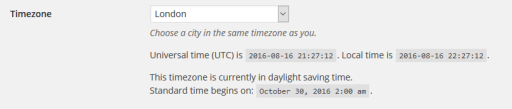
1. Please send me a screenshot of your Settings > General > Timezone, like this
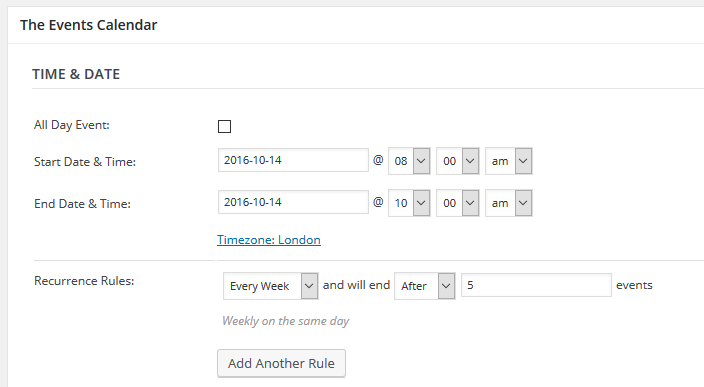
2. A screenshot of the recurring events time / date settings:
3. A screenshot of Events > Settings > General tab > Timezone settings
I’ll be waiting for these and we take it from there.
Cheers,
AndrasKeymasterHi Melanie,
Please hang in there, I’m working on this.
Cheers,
AndrasKeymasterHey Brian,
This is just to check, did you manage to get it working?
Cheers,
AndrasKeymasterHi Christine,
Thanks for getting back to me on that!
I also had a talk with our translation guy, Le Geoff, and he agreed this is a good idea, something that we should add. So it is already on his to-do list, should be coming soon.
Since this is marked resolved I am going to close this ticket, but if you need anything else related to this topic or another please post a new topic on the forum and we can help you out.
Cheers,
AndrasPS: If you like our plugin, we would be happy to receive a review in the wordpress.org repository. Thanks!
KeymasterHi BGHFC,
Thanks for reaching out to us! This is a good question, let me help you with that.
It is possible to print any of the views you like. The stylesheet for printing is set up in a way that only the calendar / list part will be printed and the sidebars and widgets will be omitted.
Does this help answer your question? Is this what you are looking for?
Cheers,
AndrasAugust 15, 2016 at 4:18 pm in reply to: Hide Categories in Submission Form – Set Default Category #1151854KeymasterHi David,
Thanks for reaching out. Let me try to give you a hand with this:
First, create the JavaScript File – demo_script.js and put it in your child theme’s folder.
Then add the following code to your functions.php file, this will call the script:
function call_my_scripts() {

wp_enqueue_script( 'script', get_template_directory_uri() . '/demo_script.js', array('jquery'));

}

add_action('init', 'call_my_scripts');
Let me know if this gets you started.
Cheers,
AndrasKeymasterHello Kate,
I’m sorry you are experiencing this issue. Let me try to help you with this.
To be able to help you, I would like to ask you for a couple of things as a start:
1. Could you please share your system information with me in a private reply?
Here’s a handy guide how you can do that:
https://theeventscalendar.com/knowledgebase/sharing-sys-info/2. What info would you like to have on the ticket?
3. Could you please send me screenshots of the a) venue setup; b) the ticket.
Once I have these I will be able to help you out.
Cheers,
Andras -
AuthorPosts