

Forum Replies Created
-
AuthorPosts
-
September 19, 2016 at 2:19 am in reply to: Email not sent when event submitted for approval #1165752
Andras
KeymasterPlease also make sure that in the settings where you set up the email addresses that should be notified, that:
- there is only one email address per line
- there is no dividing characters (comma etc.) between the email addresses.
Thanks,
AndrasSeptember 19, 2016 at 2:16 am in reply to: Email not sent when event submitted for approval #1165751KeymasterHi Lara,
So far I haven’t been able to reproduce the issue on my test site. With the theme twentyfourteen and only the 3 Modern Tribe plugins (TEC, EC Pro and Community Events).
Could you run a similar test, using a default theme like twentyfourteen or twentysixteen and deactivating all plugins, except for the 3 needed? Also please deactivate / switch off any custom code you might have in your functions.php file. This can help up eliminate any plugin / theme / custom code conflicts, which might be at play here.
Let me know the results and we’ll take it from there.
Cheers,
AndrasKeymasterHey Derek,
Thanks for using the Events Calendar.
Here on the pre-sales forum, I’m afraid we do not provide technical support. I would ask that you take any technical support questions across to our wordpress.org forum – our staff scan it periodically and other community members may also be able to help out in more detail. https://wordpress.org/plugins/the-events-calendar/
If you have purchased one of our premium plugins, then please log into your account at theeventscalendar.com and post your question in the forum for the appropriate plugin.
What you can try to do is the following:
If it is always the same 2 categories then you import all of them into one, then select all, bulk edit, and add the other category to them. If you want to list more than 20 events on one admin page, you can do that via the Screen Options in the top right corner. I wouldn’t recommend going higher than 1-200 though.
Thanks again and cheers,
AndrasKeymasterHello Benjamin,
Hey, thanks for using our plugins and welcome to the forums. I’m happy to help you with your question.
I checked your account and your license key is registered to this domain: http://213.527.m*********d.com/
I believe this article will help you to move that to your live site to get the automatic updates:
https://theeventscalendar.com/knowledgebase/moving-your-license-keys/
Let me know if this helps and if you have any more questions.
Cheers,
AndrasKeymasterHello Jen,
I’m sorry you are having this issue, let me try to help you with this.
Do you receive other emails, for example when you add a new user to your site or when you receive a comment on your site? If you are not getting these emails either, then there could be a more generic problem.
Meanwhile I’m also checking this, please try to test the above and let me know.
Thanks and have a great weekend,
AndrasKeymasterHellooooooo Andrea,
Thanks for using our plugins and for reaching out! I’ll help you with your issues, I’m really sorry you are having them.
I checked your account and indeed there is a whole bunch of localhosts there. In case you don’t know, localhost is usually a local installation let’s say on your PC / laptop, where you develop the site. And if you plug in the license key there to get automatic updates, then that also gets registered in our system. This is not a problem if you stay within the number of license keys (and linked domains) you are entitled to.
If you have a feeling your license key might be used by someone else, we can easily generate a new one for you for any or all of the plugins you have. Just give me the word. You will then need to update your license keys on all the sites you have. It will surely take some time, but then you’ll be sure nobody else is using them.
Let me know how I can help you further.
Cheers,
AndrasSeptember 16, 2016 at 2:32 pm in reply to: Email not sent when event submitted for approval #1165380KeymasterHello Lara,
I’m sorry you are having this issue, let me try to help you with this.
Do you receive other emails, for example when you add a new user to your site or when you receive a comment on your site? If you are not getting these emails either, then there could be a more generic problem.
Meanwhile I’m also checking this, please try to test the above and let me know.
Thanks and have a great weekend,
AndrasKeymasterHello Steven,
Thanks for going Pro and welcome to the forums! Wow, that’s a nice list of questions. 🙂
I checked your site and it looks like you already found some of the answers. Still, let me help you with them one at a time, it might help others as well.
How do I get the category to show on the front end of the calendar?
Where exactly would you like to show the categories? Normally they show up only on the Single Event page, but not in the month / list / week views.
It also seems like there should be a category drop down next to the other search options to display events in a particular category.
Looks like I needed more plugin for the category drop down: The Filter Bar.
Yup, you found it. And Filter Bar allows you much more… but I’m sure you already figured that.
Also, when I click on an event it doesn’t display the category.
As said above, on the single event page it shows up in the meta box. On other views it doesn’t show by default. To show them there, it would require some customization.
I would think the events should be color coded or something by category so people know what category it belongs to at a glance.
That is a valid request. And if I see correctly, you already found The Events Calendar Category Colors, a third-party plugin for doing exactly what you described.
Also, is there a way to import a group of events into a specific category? I don’t see that option on the ical plugin.
You can find it at the bottom of the list of the events that you are about to import, next to the Import Status dropdown.
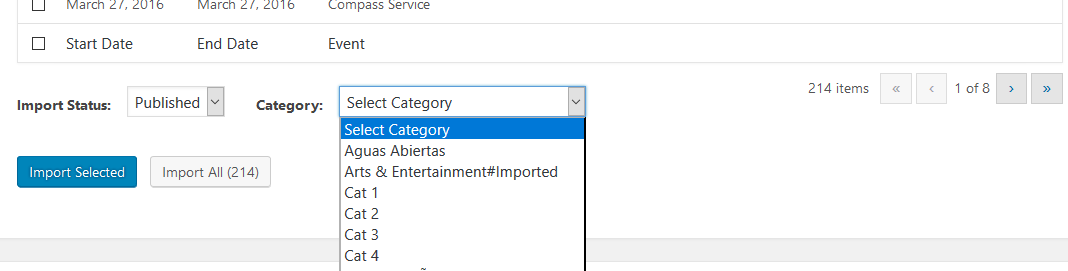
I hope this helps! Let me know if you have any other questions, I’d be happy to help!
Have a great weekend,
AndrasSeptember 16, 2016 at 2:05 pm in reply to: Recurring events still show up on date of first instance #1165360KeymasterThis reply is private.
KeymasterThis reply is private.
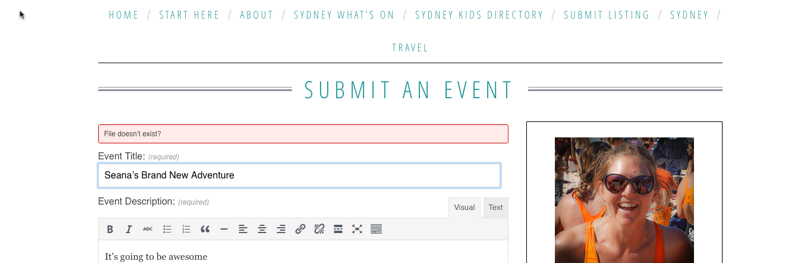
KeymasterPosting the image here so we have it in one thread:
 Keymaster
Hello Seana,
Thanks for going Pro and welcome to the forums. Let me help you with your questions.
In order to be fully able to support you, could you please share your system information with me in a private reply? Here is a guide on how you can do that:
https://theeventscalendar.com/knowledgebase/sharing-sys-info/I see you had a problem updating your community events plugin. To be able to update it from a file you will need to delete the old version of the plugin. Just go to plugins, deactivate the old Community Events plugin, then choose delete. Afterwards you will be able to upload the new version. Your data is safe, it will be preserved.
Please also make sure that all your other plugins and your WordPress installation is up to date. You can download the most recent version of our premium plugins from your account at theeventscalendar.com:
https://theeventscalendar.com/my-account/downloads/Once you are done with the updates please check if you are still getting the “file not found” issue. And we’ll take it from there.
Thanks and cheers,
AndrasPS: as for the payment option for community events, I’ll find that out for you and will let you know asap.
September 16, 2016 at 1:28 am in reply to: Issues after updates- Attendee Information Gone & default qty to 1 #1164998KeymasterHello yogadevo,
Thanks for reaching out and sorry you are having this issue. Let me try to help you with this.
I saw that you already tested with switching off all plugins, except for the Modern Tribe ones and WooCommerce. Did you also switch off / remove any other modifications you have in your functions.php?
Please get back to me on this, while I investigate the email isssue.
On the default ticket number, I recommend you do a template override rather than modifying the core files. If you modify the core files you will always lose your modifications with a plugin update. If you use file overrides, then your modifications will not be lost.
I recommend this article in our knowledge base on how to to the override for the default ticket number.
Let me know if this helps.
Cheers,
AndrasKeymasterHey netgrrl,
Super stoked to hear you managed to solve it! 🙂
I’m going to close this ticket but if you come across anything else that you need help with, grab your keyboard and open a new thread. Then we’ll also drop everything, grab our keyboards and will jump in to help you out.
I wish you a wonderful Friday and weekend!
Cheers,
AndrasSeptember 16, 2016 at 12:38 am in reply to: Recurring events still show up on date of first instance #1164992KeymasterHello stonewallcolumbus,
Thanks for reaching out and I’m really sorry about the issue with the recurring events import you are experiencing.
It seems like a bug that was reported to us not long ago. Unfortunately at the moment there is no workaround for this. I will add your thread to our bugticket, which is already on highest priority, so a fix should be coming soon. I ask for your patience.
To help our bug squashing efforts could you please send be the link to the calendar feed that you are trying to import or share the iCal / ics file with me? We would be most grateful for that.
Thanks and again apologies for this.
Cheers,
Andras -
AuthorPosts