

Forum Replies Created
-
AuthorPosts
-
Andras
KeymasterHi Riza,
So we checked the page and the location search on the map view. We have encountered similar before.
When searching for location then in some cases you need to explicitly add “UK” to the search. “Bristol” seems to work, but “Salisbury” only works with “Salisbury, UK”.
This is unfortunately due to a limitation in the Google Maps API, not our plugin. Unfortunately there is nothing we can do to fix it. I’m really sorry about this. We hope that Google will enhance their magic tricks to make this work as expected.
Is there anything else I can help you with?
Cheers,
AndrasKeymasterHi Jason,
Try this css snippet in your style.css file:
body.events-archive .header-post-title-container {
display: none;
}This should hide the whole line that contains “Archives”.
Does this solve it?
A.
KeymasterThat would be excellent! It might help us and other users in the future. Thanks in advance!
I’m happy to hear it got fixed.
A.
KeymasterHallo Hans-Gerd,
Bin froh zu hören das es geholfen hat! 🙂
Since the issue is resolved I’m going to close this thread. In case you need help in the future, just open a new topic and we’ll be happy to help you out.
Cheers,
AndrasPS: If you like our plugin, and you didn’t yet do so 🙂 we would be happy to receive a review in the wordpress.org repository. Thanks!
https://wordpress.org/support/view/plugin-reviews/the-events-calendarPS2: We’d be also grateful if you would give us feedback on your satisfaction with support. Just click on one of the classy looking emojis below. 🙂 If you can spare a few words, that’s even better. Doublethanks!
KeymasterYou are welcome. Let me know if you get stuck, I’ll try to give you a push. 😉
Cheers,
AndrasKeymasterHey Shawn,
Thanks for sharing that. I had a hunch you were using Divi. 🙂 I work with it a lot.
The thingy is squashed because there is not enough space for it in the sidebar.
Adding this snippet to your theme’s style.css file should correct the issue:
.tribe-mini-calendar-event .list-info {

    width: 75% !important;

}

.tribe-mini-calendar-event .list-date {

    width: 20% !important;

}
Note: it doesn’t add up to 100% because the list-date also has a 5% right margin, so that’s the missing five. In case you were wondering.
Check this and let me know if that solves it for you.
Cheers,
AndrasKeymasterThis reply is private.
January 23, 2017 at 4:21 am in reply to: A ‘1’ appearing below each event in Event List widget #1222269KeymasterHi Werner,
Although I cannot provide you with a snippet, I can provide you with a hack / override, which should solve it.
1. Copy this file
wp-content\themes\{your-theme}\tribe-events\pro\widgets\modules\single-event.phpto
wp-content\themes\{your-theme}\tribe-events\pro\widgets\modules\single-event.php
2. Open it for editing and add these two lines in the beginning (e.g. right after line 23, before the closing ?> tag):
$zip = tribe_get_zip();

$region = tribe_get_region();
3. Save. 🙂
I hope this will solve it for you until the fix comes. Please let me know.
Cheers,
AndrasKeymasterSzia Sanyi!
Orulok, hogy sikerult megoldani! Szuper!
Udv,
Andras
KeymasterHello again,
Thanks for sharing that!
Since the topic is resolved I’m going to close this. If you need any help in the future just open a new ticket and we’ll help you out.
Cheers,
Andras
PS: If you like our plugins we’d be happy if you would rate us in the .org repo:
PS2: We would also appreciate if you could rate your support experience below. Thanks!
KeymasterHey Marcus,
Thanks for getting back to me on this. Happy that things are more clear now.
I!m going to close this ticket, but if you have any other questions or bump into any issues, please open a new one and we’ll be happy to help out.
Cheers,
Andras
KeymasterHi Eric,
Cool, I am stoked to see you were able to figure it out! Good job dude!
The code looks absolutely fine.
I’m not sure but instead of $post->ID maybe only $post would be enough. But it’s fine nonetheless.
It should be pretty stable with updates. You would only need to revise it if we did some major change in our templates. So you might want to run a file comparison sometimes when a new release comes out if there is any difference between the old and the new template. But you should be pretty safe.
I am going to go ahead and close this ticket. If you have a similar issue or another in the future, please do not hesitate to create a new ticket.
Cheers,
AndrasKeymasterHallo nochmal Hans-Gerd,
I checked it and the issue comes from the theme / design / css you have.
Once you select your option, then the select field becomes too wide and seems to cover the icon, so it becomes unclickable. I played around a bit and what helped is making that select box less wide. Check this screenshot, I set max-width of that div to 90%.
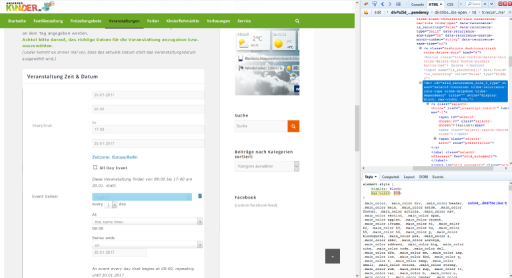
I guess you could use the ID of that div to reference it in your style.css file.
Let me know if this helps.
Cheers,
AndrasKeymasterSzia Sándor!
Kösz, hogy használod a bővítményünket!
Ha van egy érvényes licenszed az egyik prémium bővítményünkhöz, akkor kérlek, jelentkezz be a theeventscalendar.com oldalon, és posztolj úgy.
Ha nincs érvényes licenszed akkor a https://www.wordpress.org/plugins/the-events-calendar/ oldalon tudunk segítséget nyújtani. Általában. (Most az egyszer kivételt teszek. 😉 )
Ha küldesz egy linket, hogy melyik oldalon van egy a sztring, akkor megnézem, hol lehet ezt lefordítani. Lehet, hogy ez nem a mi bővítményünkből jön, hanem a theme-ből, amit használsz. Melyiket használod?
Azt is ellenőrizd le, hogy a bővítményekből a legfrissebbet használod-e.
Üdv,
AndrásKeymasterHello Riza,
Thanks for reaching out! I’m sorry about the issue you are experiencing.
I visited http://www.yourvalleynews.co.uk/events but didn’t see the search bar there. Could you provide me with a URL where you are experiencing the issue?
Also when I was trying to look at some of the events I got a 404 page and a weird URL.
E.g. Swedish Massage – 21/01/2017 09:00- 16:00
show this url: http://www.yourvalleynews.co.uk/events/swedish-massage-21012017-0900-1600/Was this event part of a series before? Was it imported? Or is it normal that it gives a “404 not found”? 🙂
Looking forward to your reply.
Cheers,
Andras -
AuthorPosts