

Forum Replies Created
-
AuthorPosts
-
Andras
Keymaster🙂
March 9, 2017 at 1:50 am in reply to: _tribe_tickets_attendee_user_id / saving wrong info among other things #1251616KeymasterSorry Illka, I forgot to tell that. That is in the wp_posts table.
A.
KeymasterThis reply is private.
KeymasterGrüss dich,
I was digging into that issue, looks like a bug / typo in one of the files.
The text domain for that string is wrong, once corrected the translation will go through. Will be fixed in the next MR.
The manual fix is also easy.
Open \events-calendar-pro\src\Tribe\Templates\Mods\List_View.php for editing.
Line 16 looks like this:
<?php printf( '« ' . esc_html__( 'All %s', 'the-events-calendar' ), tribe_get_event_label_plural() ); ?>Change the text domain so it looks like this:
<?php printf( '« ' . esc_html__( 'All %s', 'tribe-events-calendar-pro' ), tribe_get_event_label_plural() ); ?>That should fix this.
Regarding the timepicker, we are starting to scope the next MR. I’m doing everything I can to push this fix into it.
Cheers,
AndrasKeymasterAwesome!!!
Since this is marked resolved I am going to close this ticket, but if you need anything else related to this topic or another please post a new one in the forum and we will be happy to help you out.
Good luck with your project!
Cheers,
AndrasPS: If you like our plugins, and you didn’t yet do so 🙂 we would be happy to receive a review in the wordpress.org repository. Thanks!
https://wordpress.org/support/plugin/the-events-calendar/reviews/PS2: We’d be also grateful if you would give us feedback on your satisfaction with support. Just click on one of the classy looking emojis below. 🙂 If you can spare a few words, that’s even better. Doublethanks!
KeymasterVictoria, thanks for checking that!
Sally, thanks for chiming in. I’m sorry to hear about your disappointment. Would you care to elaborate what is causing this so we can do better in the future?
Also Sally, it would be really helpful if you could share your system information with me in a private reply. Here’s a guide on how to do that. Thanks!
@Victoria, @Sally, I have tried to recreate this bug with the latest version of our plugins and I didn’t manage. Please make sure you update the calendar plugins and JetPack to the latest versions and check if the issue still exists.
Meanwhile I was also investigating what could be the root cause of this.
This bug has been recently discovered and it comes up apparently when re-captcha and anonymous submissions are enabled for Community Events and Shortcode Embeds in JetPack are enabled. A workaround until the fix arrives would be disabling either re-captcha and anonymous submissions or disabling Shortcode Embeds.
But as said, first update your plugins and check as that might solve the issue.
Let me know what you find.
Thanks,
AndrasKeymasterHello Susan,
Thanks for clarifying the times for me of the imported events.
Indeed, there is no difference between the upgrade and the full version. They are exactly the same. We have provided our existing legacy importer users a free EA license as a thank you for their continuous support. I have upgraded your license which you purchased yesterday, so you are now able to run 300 scheduled imports per day. I hope that solution is to your satisfaction.
Thanks for going through that painstaking re-setup of your imports to check. It contains valuable information, which you already summarized. That is an awesome job Susan, I do wish more of our customers would do a thorough job like you did here.
1. there is still a problem with the timezones when using ics/ical.
Yes, this definitely looks like a bug. I created an internal ticket for this with high priority and will personally make sure that this gets fixed in the next maintenance release. Please hang in there. (Note, there is a MR coming out later today, unfortunately it will not be in that one yet.)
2. the venues are still importing as organizers, in most cases, using both ics/ical and Facebook
I did some test imports directly with Facebook events and so far I was unable to reproduce this issue. Would it be possible for you to share with me some Facebook event URLs where this comes up? If you could share some 5-6 that would be awesome.
4. Is there a way to use a personal profile events feed with TEC?
At the moment this is only possible with the legacy Facebook importer plugin.
5. New question: is there a way when editing events to have the screen show the event title, event date, and event start time to make editing easier?
There is a hacky way. First you need to drag-and-drop the section that deals with the date and time right below the content editor box.
Then paste this snippet into your theme’s functions.php file. You will most probably not need the opening <?php tag.
https://gist.github.com/andrasguseo/c49e5c31feb6c8738a2fd02273eb3bb2
This will hide the TinyMCE editor.
Remember to remove the code or comment out the last
add_action( 'admin_head', 'hide_tinymce' );line when you’re done, so you get the editor back.6. New question: is there any way to filter the editing screen by event category?
For this you could use our free Advanced Post Manager plugin. With that you can set up what columns you want to see on the events list admin page and it gives you a plethora of filtering options, including categories.
7. New question: is there not a way to edit an event from the site calendar itself?
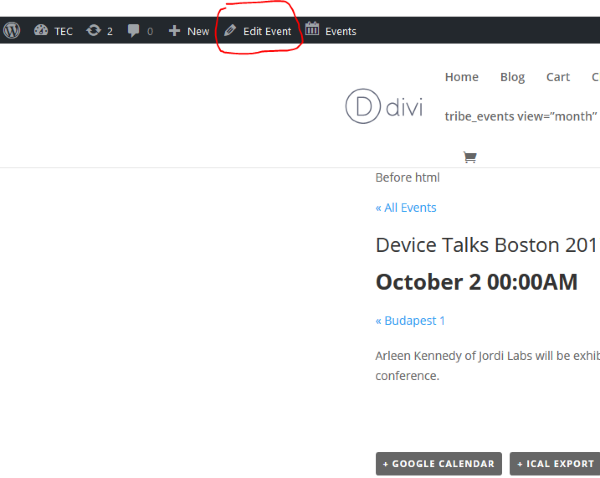
If you mean editing on the fronted, then no, unfortunately not. However if your admin bar is showing on the front-end, then you can simply click on Edit event in the admin bar (see screenshot) while viewing a single event page. If you hold down the Control / Command key while clicking, then the editing window will open up in a new tab.
8. How can I limit the number of lines shown per event on the photo view with a link to “more” since our event descriptions/details are sometimes very long.
Limiting by number of lines is not possible as the number of lines will be different with different font size and with different screen size. Limiting by number of characters would be possible with some custom development. If you need this I might be able to hammer a simple snippet together for you but I will need some time. Let me know.
9. Please transfer the payment I made last night for purchased download of EA (since I already have the free upgrade version of EA and there was no difference) to availability of more scheduled imports per day. What happens if I go over the allotment for one or two days?
Increased your license to 300 imports. You cannot really go over your allotment. If you reach your limit, then importing will pause until the next day.
I hope this clarifies your questions.
Regarding the timezone issue I’ll ask for a bit of patience, we are working on a fix.
Regarding the venues+organizers, please share with me some URLs so I can try to re-create and test.
Thanks and cheers,
AndrasKeymasterHallo,
I will give those translation files a test and will let you know what I find. Which version are you running now? 4.4.2?
The issue with the translations can be that the files you downloaded are for 4.4.3. What you can do is updating the .po files from the .pot of the install that you have.
I’ll check and will get back to you.
Regarding the timepicker, this is a frustrating issue. We are starting to scope the next maintenance release and I will try to push it into that one. Unfortunately it didn’t make it into the one which is coming later this week.
Cheers,
AndrasKeymasterHi Russel,
For displaying the ticket stock for the events on the backend you could use our free Advanced Post Manager plugin. With that you can set what columns you want to see when listing the events in the backend and “stock” is one of the columns. Note however, that this will give you a total stock for the event and not a stock for each ticket type.
Handling the stock for the tickets is best done on the event admin page when administering the tickets for an event, and not on the WooCommerce products page. (Although there are cases when you would do it there.)
Global stock can be enabled on a per event basis. There is no global stock which would include all the events. Also, if you didn’t have global stock enabled before, so if you enable global stock after some purchases have been made, then those purchases will not be taken into account. You should take those into account manually and set the global stock accordingly.
I hope this helps you get further. Let me know if you have any more questions.
Cheers,
AndrasMarch 7, 2017 at 2:02 pm in reply to: _tribe_tickets_attendee_user_id / saving wrong info among other things #1250765KeymasterHi Ilkka,
I’ve been doing some further digging in the database and testing.
What I also discovered is that if I change the _tribe_tickets_attendee_user_id in the post_meta table, nothing changes on the attendee list. So apparently that info is stored somewhere else. I was trying to find it but couldn’t so far. I asked the team if someone knows.
What I discovered is that when you set the purchase to completed, then a ticket is created, also in the database, which has the author_id which should be the same as the _tribe_tickets_attendee_user_id in a regular case, so you could try to grab the id from there. This line has the purchase id in the post_title column, which should help you find it.
Other thing you can do is to spin up a new site from scratch and test it there. This is what I would ask you to do next.
I’ll let you know if I get an answer from the team.
Cheers,
AndrasKeymasterHello,
I’m stoked to hear that got fixed as well!
About the random image, I guess you are talking about the “featured image” above the post, right? I also see there is a gallery at the bottom of the page.
I’m not quite sure, but if I remember correctly, if there is no featured image set, then Divi pulls the first image of the gallery or something. Check if this setting has any effect:
Divi > Theme options > General tab > Grab the first post image
Hope that helps.
Cheers,
AndrasKeymasterHello again Thomas,
Could you please share with us the CSS that was used to fix the issue? It might help others as well until we investigate and get a fix out.
Thanks,
AndrasKeymasterHi Eric,
I checked that other thread and the website related. Maybe it’s this piece of code:
#tribe-events-photo-events.isotope {
opacity: 1 !important;
}
But I cannot be sure of that. I will leave a question to Thomas in the other thread.
We have some bugs reported with isotope and photo view, but I’m not sure if your issue falls into any of those. In case you’d like help and for me to be able to help you out with this I would need some more details from you.
- Make sure you go through our conflict testing guide.
- Please share with me the system information of the site where the problem exists?
- Share with me please a URL where the issue can be seen.
Best is if you have a staging site set up where you can play around with the setting without disrupting traffic on the live site.
Let me know.
Cheers,
AndrasKeymasterThanks for letting me know. Will get back to you soon on the findings.
A.
KeymasterHi Susan,
Thank you for sharing your honest feedback with me. I fully understand how frustrating and nerving this issue and waiting for a fix can be. Thank you for still hanging in there.
I want to assure you that your voice was and is heard and we are not abandoning anybody who has issues, we do our best to find a solution or a fix. Sometimes developing a fix takes time though as some issues are more complex than they seem at first, and the help and cooperation of our customers is needed and of course much appreciated.
I am asking all those questions and details from you so I get the best possible picture of the issue and on how we can possibly reproduce it. This is crucial in the process as without being able to reproduce the issue, we don’t know what and how to fix.
The issue exists, yes, it is a bug. The fact that there is no fix for an issue doesn’t mean we are not working on it. As pointed out before, first we need to collect some information to know what exactly needs to be fixed. This takes time. Also we are running a tight schedule on our maintenance releases and in the middle of a release phase it is quite difficult to add in another bug to get it fixed, so if a bug is reported, likely it is not fixed in the upcoming MR, but rather the next.
I hope this gives you a picture of why things seem to be running slowly and gives you a bit of reassurance that we are here to help you and that the fix is coming.
I ran a test import with the feed you shared. (Events > Import > iCalendar) I imported three events, but I cannot find them on Facebook and the Facebook URLs included with the events give me a Facebook 404, so I cannot check if the times are correct. So here are my results for the 3 events:
Event 1:
HS Day – The Southern Museum Powerful Pistons
March 8th, 2017 @ 15:00 – 18:00
Venue: Southern Museum of Civil War & Locomotive History
Organizer: Kat** U***** B****nEvent 2:
HS Day – Champion Kids
March 7th, 2017 @ 18:00 – 21:00
Venue: Champion Kids
Organizer: Kat** U***** B****nEvent 3:
HS Day – Shakesploration Shakespeare Says
March 10th, 2017 @ 14:00 – 17:00
Venue: empty
Organizer: Kat** U***** B****nDo I understand that the times above are wrong and they should be decreased by 5 hours?
I didn’t experience the issue of venues being imported as organizers. If you could point out some events where you are having this issue, that would be most helpful.
I’m again really sorry this is taking longer than expected and your help and patience is much appreciated.
Best,
Andras -
AuthorPosts