

Forum Replies Created
-
AuthorPosts
-
March 10, 2017 at 8:32 am in reply to: WordPress database errors, Slow performance and Slow Errors #1252372
Andras
KeymasterHey Matt,
Not sure how it happened – the client manages the Events – I’m just the web dev.
🙂
I spun up a staging site and observed that deleting events from the system (actually just trashing them) had a HUGE performance benefit for the site.
Yeah, lots of events – or posts in general – can do that. I don’t know whether you saw these article before. Might give you some tips.
- Caching Basics
- Caching Month View Transients
- The Events Calendar Performance Considerations
- Some of our favorite plugins for developers
Regarding the crons, I’m not sure if there are any set up by our plugins. I’ll check and will get back to you on that.
Using a caching plugin should help, though I’m not quite sure how that handles the AJAX calls the calendar uses.
I’ll be in touch soon.
Andras
March 10, 2017 at 8:22 am in reply to: Bug:Order with 2 events, one attendee per event. No second attendee in the email #1252365KeymasterExcellent, super stoked to hear that!
Since this topic resolved I am going to close it, but if you need anything else related to this topic or another please post a new one in the forum and we will be happy to help you out.
Cheers,
AndrasPS: If you like our plugins, and you didn’t yet do so 🙂 we would be happy to receive a review in the wordpress.org repository. Thanks!
https://wordpress.org/support/plugin/event-tickets/reviews/PS2: We’d be also grateful if you would give us feedback on your satisfaction with support. Just click on one of the classy looking emojis below. 🙂 If you can spare a few words, that’s even better. Doublethanks!
March 9, 2017 at 2:54 pm in reply to: _tribe_tickets_attendee_user_id / saving wrong info among other things #1252029KeymasterHi Ilkka,
This screenshot should explain.
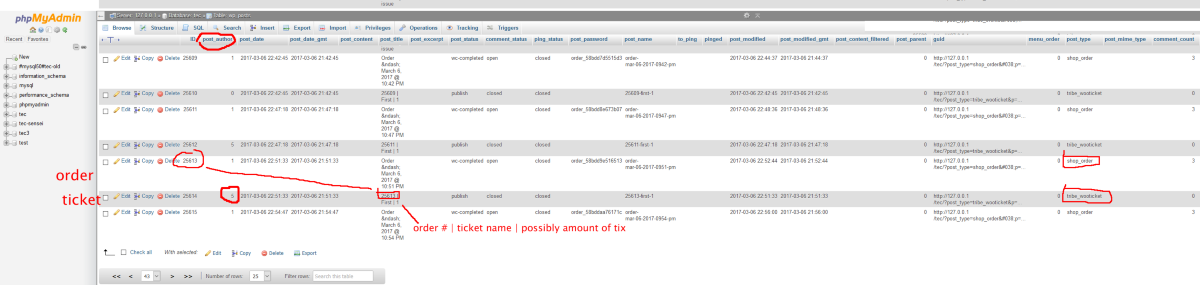
When a ticket is purchased, then first an order is created in wp_posts and the post_type will be “shop_order”.
Then when a ticket is created, a new post_type of “tribe_wooticket” will be created as well, with the post_author set as the purchaser.
Hope this explains.
A.
KeymasterHi Ben,
I’m not quite sure either. It looks like that either there was an issue while updating Event Tickets or The Events Calendar and Event Tickets needs something that is not there yet, because the update is stuck.
I see 2 options here:
#1. If you made a backup of your files and database before updating, then restore the backup.
#2. If you didn’t do a backup, then log in to your websites FTP server and remove or rename the wp-content/plugins/event-tickets directory.
Then check if your site works. Don’t need to worry, your data will not be deleted.
If it works, then log in to your website and do the following steps.
- If you didn’t do a backup before, then do a backup of your site and database now
- Go to Plugins and deactivate all plugins
- Go to Dashboard > Updates and update WordPress
- Update your theme
- Check if all works fine
- Update all your plugins, either in bulk or one-by-one
- If you renamed the directory, then name it back. If you deleted it, then re-install the plugin on the Plugins > Add new page, search for “Event Tickets”
- Activate your plugins
Let me know where this gets you.
Cheers,
AndrasKeymasterHello Ninos,
Thanks for using our plugins and welcome to the forums! Thanks for your question.
We don’t offer renewal for the bundles as per se, however you have two options:
#1: renew the products individually as you pointed out
#2: buy again the importer bundle, which gives you a saving vs if you’d buy the products separately
I hope this help. Let me know if you have any further questions.
Cheers,
AndrasKeymasterThis reply is private.
KeymasterHello Charles,
Thanks for using our plugins and for getting in touch!
I’m happy to see that you like our new shortcodes feature.
At the moment it is not possible to define a location with a shortcode.
If you think that is something you would like as a feature I encourage you to visit our User Voice Page and either upvote an existing request or make a new request there.
I hope this helps. Let me know if you have any more questions.
Cheers,
AndrasKeymasterDear Tom,
Thanks for getting in touch! Excellent questions you have posted, let me answer them for you one-by-one.
We need as much information as we can (for example: name, address, email, reading check mark for our regulations, size of t-shirt, etc.)
Is it also possible to add more fields like above?With our Event Tickets Plus plugin you can also collect custom attendee information for any and all tickets. You have the options of textbox, checkbox, radio button, and dropdown. You can also save a fieldset and reuse it for other tickets, so you don’t always need to recreate a lengthy set of fileds. Here’s a sample screenshot of the backend: https://cloudup.com/cfo12QrxXAh
Work with 2 different pricing, one for groups and one for single
You can create as many different tickets for an event as you like with different prices and different field sets. https://cloudup.com/c8unIpgqwkS
At the moment is not possible to show only this or that type of ticket based on logged in / not-logged in user or user level. You would need some custom development for that.
Note that for selling tickets you will also need and eCommerce plugin. We support WooCommerce, Easy Digital Downloads, Shopp and WPEC.
Send confirmation mail if sale was successful
This is usually handled by the eCommerce plugin of your choice. What the Event Tickets Plus plugin does as an extra, it also sends the purchased tickets to the user via email.
I hope this answers your questions. Please, let me know if you need anything else.
Thanks and cheers,
AndrasKeymasterHello Kathryn,
Thanks for reaching out to us with your question.
I’m afraid that is not possible out of the box. The feed and the resulting .ics file that you can download is dynamically generated on request.
It might be possible to develop a customization like that, but unfortunately we are limited in supporting customizations. If you would like to hire a developer to do this for you, then I can share with you this list of devs who are known in the community and are not affiliated with us. The might be able to help you out.
<span class=”paragraph”>list of freelancers</span>
I hope this helps. Let me know if you have any other questions.
Cheers,
AndrasKeymasterThis reply is private.
KeymasterThis reply is private.
KeymasterHi Ben,
Thanks for using our plugins and for reaching out to us!
I’m sorry to hear about the issues with our plugins, let me help you with this.
I see that The Events Calendar (4.2.1), Events Calendar Pro (4.0.5), Event Tickets (4.3.4) and Event Tickets Plus (4.0.5) version numbers are totally different. This can definitely cause issues.
We have just released version 4.4.4 of all of those plugins yesterday, I strongly recommend you to update all the plugins, as well as your WordPress as that seems a bit outdated as well. (Current version is 4.7.3) While you are at it, check all your other plugins as well and update them.
Let me know if that helps.
Cheers,
AndrasMarch 9, 2017 at 2:26 am in reply to: Bug:Order with 2 events, one attendee per event. No second attendee in the email #1251627KeymasterWe discovered a similar issue before, for which a fix was released in version 4.4.4 yesterday.
Please update the plugins and check if the issue is solved with that.
Thanks,
Andras
March 9, 2017 at 2:08 am in reply to: Bug:Order with 2 events, one attendee per event. No second attendee in the email #1251623KeymasterHello Aikaterini,
Hey, thanks for using our plugins and kudos for discovering that issue and finding a fix.
I will share this with the developers so they can check and test and will let you know soon, hang in there.
Thanks again!
Cheers,
AndrasKeymasterHello Javier,
Thanks for using our plugins and welcome to the forums.
I don’t speak Spanish so I used Google translate to understand your issue. If I understand correctly, you have an issue with the main events page.
I checked your URL and at first it showed up, but now I’m getting a white screen.
As a first step I would recommend you to update your plugins and WordPress to the latest version.
If the issue still exists, then please go through our testing for conflicts guide and see if that helps you find anything.
Let me know the results and we’ll go further from there.
Cheers,
Andras -
AuthorPosts