

Forum Replies Created
-
AuthorPosts
-
Andras
KeymasterHello again Andy,
Thanks for getting in touch!
If I understand correctly you would like to remove the top grey section on the page that contains the page title. (Screenshot)
Please note, that we are limited in supporting customizations. And what you want to achieve is more related to the theme you are using, than our plugins.
To get you started try pasting the following css snippet into your theme’s style.css file:
.gtc-page-title-wrapp {
display: none;
}
And remove this part:
div#tribe-events {
margin-top: -100px;
}
This will visually hide the grey banner. If you also want to remove it from your code, then I’m afraid you will need to get in touch with the theme developers.
Let me know if the above helps.
Cheers,
AndrasKeymasterHello jd,
Thanks for reaching out to us with your questions! I’d be happy to answer them for you.
Our Events Calendar PRO plugins supports the use of a multitude of shortcodes. You can insert any calendar view into any page, or even any event with selected data anywhere.
The following 3 posts will give you all the details that you can do with the different shortcodes:
Events Calendar PRO Widget Shortcodes Overview
Embedding Calendar Views with the [tribe_events] Shortcode
Embedding Single Events with the [tribe_event_inline] Shortcode
With the use of the last one you will be able to fetch only Events Title, or Featured Image, or Starting Date for example. 😉
Please note that Events Calendar Shortcode and its PRO version are not developed nor maintained by us, and thus we don’t provide support for it. (It’s a great plugin nonetheless.)
I hope this answers your questions. If you have any more, let them come, I’m happy to answer them for you.
Cheers,
AndrasKeymasterHello Trent,
Thanks for using our plugins and welcome to the forums!
I’m sorry you are having this issue. I’d be happy to help you solve this.
I need a bit more information in order to be able to help you with this topic.
1.<span class=”colour”><span class=”font”><span class=”size”>Please share with me your system information. That will allow me to check for possible conflicts and see your current calendar settings. Here is a guide on how you can share it.</span></span></span>
2. How are you collecting the extra information that is not showing up? Is it the extra attendee meta fields for the ticket, or do you use a third-party plugin?
3. Where are you looking for the collected information? If you are collecting it as described in #2, then you will find it when clicking on Attendees when hovering over an event in your event list. (Screenshot)
Let me know and we’ll tackle this.
Cheers,
AndrasKeymasterHi again,
I set up the feeds as scheduled imports.
2 I didn’t manage as one gave an error (stepbystepWCS – also not available on FB), the other was empty (Midland Swing Open).
The initial import was successful. I’m waiting for the scheduled rerun to finish. 2 of them are green already, the other 3 are pending.
Will let you know how it plays out.
Cheers,
AndrasKeymasterHello again,
I tested with an earlier version (4.3.3) of The Events Calendar and so Event Aggregator, and when I imported an event from your feed, then it gave you as organizer. Event Aggregator was launched with 4.3, so that is only 3 maintenance releases later in which we don’t make major changes like that.
So I believe this is how Event Aggregator functions at the moment, though it is definitely worth considering. I will open an internal ticket for this so our developers can take a look at it and decide how to remedy that issue.
I am going to set the status of this ticket to “pending fix” and we will update it once a fix is released, however, at this time I cannot commit to any timeframe. I’m sorry if this is not the solution you were expecting, but I’m afraid this is all I can do at the moment regarding this issue.
If you have any new questions or issues please create a new ticket and we’ll be happy to help you out.
Thanks and cheers,
AndrasMay 16, 2017 at 7:16 am in reply to: Errors after updating Event Tickets Plus and WooCommerce #1284374KeymasterHi lilblogger,
Meanwhile we have released a new version of the plugins. Are you experiencing the same issues after the update?
Please let me know.
Cheers,
AndrasMay 16, 2017 at 7:13 am in reply to: How do I add a "do not display if no events" to a shortcode? #1284373KeymasterHello Drew,
I’m sorry to keep you waiting for so long. This thread fell below my radar. Apologies.
I checked and there seems to be a conflict between our plugin and beaver builder. I will log a bugticket for this so our developers can take a look at it, however I cannot commit to any timeframe at the moment.
As for the shortcode I am checking if there’s a solution for that, but didn’t get any answers yet.
What you can for sure do is hide it with CSS. If that would be a solution, then let me know.
Cheers,
AndrasKeymasterHello Neil,
Thanks for using our plugins and welcome to the forums!
That is an excellent question!
You are right, you can use the license on 10 different sites and you can have 100 imports daily combined.
I guess you have entered your license key on both sites and it shows it’s valid.
What do you see when you go to Events > Import? Can you choose any of the import options?
Also, can you please check your Event Aggregator Status Information for both sites? It is at the bottom of the Events > Help page. It should look something like this.
We’ll get down to the bottom of this.
Cheers,
AndrasMay 16, 2017 at 6:36 am in reply to: the events calendar 4.5.1 wrong direction/place for arrow/ in "Right nawigation" #1284353KeymasterHello Remi,
Thanks for posting that!
Could you explain why you thing the original is wrong and which view it influences?
What is does is this:
- Check if it’s an upcoming event.
- If yes, then add tribe-events-nav-next
- If it’s not then add tribe-events-nav-previous
Thanks,
AndrasKeymasterYes, you are totally right in that, it doesn’t specify it in that much detail. I’ll try to get that fixed.
Let me know how it works out.
Cheers,
AndrasMay 16, 2017 at 6:17 am in reply to: Change registration form for different event categories #1284344KeymasterSure thing, let me know how it goes.
Andras
KeymasterThat’s a great adjustment, indeed it looks like that’s needed. You should be able to query for today’s date and set the comparison not to equal but to smaller than.
Will that do the trick?
Andras
KeymasterYes, indeed, sorry for not being totally clear on that. That is where that folder should be created. This way if your parent theme receives an update your child theme and the template overrides will stay untouched.
Cheers,
AndrasKeymasterThis reply is private.
KeymasterHello J,
Give me some time to look into those.
And a note, if they fail at a time, but they succeed later, that is OK. The more recent ones are at the top.
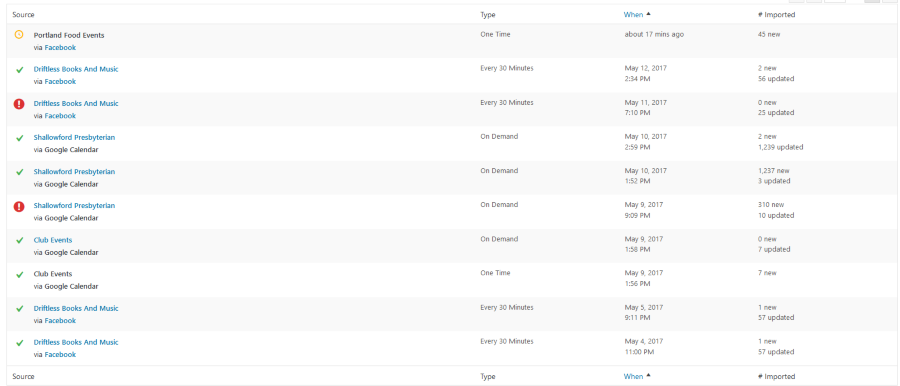
On this screenshot you can see that “Driftless Books” failed on May 11 but succeeded on May 12.
Same with “Shallowford Presbyterian”, failed on May 9 and succeeded on May 10.
I’ll be in touch soon.
Andras
-
AuthorPosts