
Home › Forums › Calendar Products › Event Aggregator › Managing facebook schedule limits
- This topic has 14 replies, 2 voices, and was last updated 9 years, 3 months ago by
Wellburn.
-
AuthorPosts
-
May 8, 2017 at 1:12 pm #1280440
Wellburn
ParticipantI have a limit of 100 Facebook imports and 375 scheduled facebook imports and rising. It took me a while to realise that my scheduled imports were failing because I was hitting my daily limit. (I assume this is the reason anyway)
Perhaps an email or warning would be a good thing and also good marketing for The Events Callander.
My issue is not just as simple as upgrading however as I am quite happy to only update 100 per day as it is likely that little information will change day to day. What I would like is for the system to update 100 per day and move on without any manual configuration. So If I had 200 facebook imports in my set up it would do 100 one day then next day it would do the next 100 and the next day it would start again.
I appreciate that I could set the update to 1 week, but iff all imports are set to run on the same day every week I also run out of my import limit.
I can’t find any documentation on this and I would love a solution or some advice on management.
Alan
May 8, 2017 at 1:27 pm #1280446ParticipantI may have made a mistake here but still require assistance.
I have 67 imports but I expect it to rise above 100 so would love info on how the above issue works.
I have 67 scheduled imports and 307 events. Can you explain why some are failing, please?
May 9, 2017 at 2:18 pm #1281291Andras
KeymasterHello Alan,
Thanks for using our plugins and for reaching out with your question! Let me try to help you with it.
The daily 100 import limit means that you can run 100 imports per day, regardless of the number of events in each import. So your 67 imports should all be fine to be imported on a day.
If you’d like we can investigate this issue.
If you rise above 100, then what you can do is set up several weekly imports on different days.
Let’s say you have 3 feeds.
Set up feed 1 for a weekly import on Monday and on Thursday.
Set up feed 2 for a weekly on Tuesday then on Friday.
Set up feed 3 for a weekly on Wednesday and on Saturday.
This way each feed will be imported twice weekly / every 3-4 days.
Depending on the number of feeds you will have you can increase or decrease the occasions.
On the failing imports, if you’d like further assistance, then please share with me the followings:
- the feed of the import, so I can run some test
- a screenshot of your Event Aggregator System Status (https://cloudup.com/c_AbQU9nKmr)
- A screenshot of how the import of the feed is set up
- A screenshot of your Events > Imports > History Page
Thanks and cheers,
AndrasMay 10, 2017 at 2:11 am #1281504ParticipantHi Andras.
Thanks for getting back to me. Good to know regarding how the imports work and how to manage going over the limit. Shame it can’t be automated by the system to maximise efficiency but I understand this is likely not a development priority.
OK,
I have checked my History today and have a mixture of pass and fail as ever. Perhaps I am missing something, would an update fail if it had no changes? of is a red exclamation mark always an error?
Heer is the feed of an import that failed: https://www.facebook.com/BavarianOpenWCS/
screenshot of your Event Aggregator System Status: perhaps this is part of the problem or I am just being stupid. Events aggrigator is not installed as a plug-in and I assume that I would get the status from this. Can you describe how exactly to navigate to the status please?
Screengrabs attached
May 10, 2017 at 7:44 am #1281644KeymasterHello again Alan,
Event Aggregator is not a separate plugin, it is part of The Events Calendar. Without a license you can use the basic CSV import feature. To enable full functionality you just need to enter your license key on the licenses page – which I believe you already did.
You are set up and done, you can aggregate away. 🙂
The EA status you can find under Events > Help and scroll to the bottom of the page.
If there are no changes in the events, then the import will still run with success.
A fail can come from a reason of things. It can be a server error on your side, on our side, on the source side (Facebook) or you simply used your quota for the day, and some other exotic cases. Or too many requests at the same time and one of the servers cannot handle that. If you hover over the red exclamation mark, then it might give you some information on it.
I just ran a test with that url and the import ran fine and imported 4 events. All seems good.
I see on your screenshot that the Bavarian Open WCS failed, but then ran with success.
And I see some which didn’t re-run. Did you try to re-run them manually, one at a time? (On the Scheduled imports page hover over the import and click on run.)
Andras
May 11, 2017 at 5:02 am #1282228ParticipantHello, and thanks for your continued support.
The tooltip only has ‘Import Failed’ on hover, unfortunately.
If I select a failed import, Preview and then save the offending source is removed from the history completely. I assume this indicates a success.
I have done this with a few failed imports and on occasion, I have it hang when it is fetching the preview but get no error. Could this indicate a server side issue?
May 11, 2017 at 8:28 am #1282302KeymasterHey J,
I believe when you edit and re-save it, then the _old version_ will be deleted and it will be saved as a new scheduled import. Likely that is why you don’t see it on the History page. You will need to follow it up and check if the import successfully happens later.
How does the preview hang? Does is just keep rolling? If the feed has lots of events that can take a while. What feed are you having a trouble with? I can test it if you can share it with me.
Cheers,
AndrasMay 12, 2017 at 12:49 am #1282812ParticipantHello again
The icon just spins indefinitely with the ‘Please wait while….’warning wehen I hit ‘Preview’
https://www.facebook.com/groups/567639986618884/
https://www.facebook.com/groups/1628750117395656/
https://www.facebook.com/groups/1510654139212102/
https://www.facebook.com/groups/104393656289660/However if I just hit save I get ‘Scheduled import was successfully updated’ and it clears from the list
May 12, 2017 at 8:33 am #1282991KeymasterHello,
I tested those 4 feeds, and indeed, they don’t give any result.
What are the privacy settings of those calendars? Could you please check and let me know? Might be they are set to private and the facebook account you use on your site is not allowed to read them.
Also, when I’m trying to import those I get an error in the console. I will open an internal bugticket for this so our developers can take a look at it. At the moment I don’t know how fast this will be, but I’ll keep you posted.
Cheers,
AndrasMay 15, 2017 at 2:37 am #1283772ParticipantInteresting. So they are all public groups, some I had joined and some I had not.
Do I need to be a member of the group in some circumstances? What exactly would they need to change in the settings to allow me to get the events?
Here are some more that have failed: (some I have joined, some not, some pages, some public groups…
Group: https://www.facebook.com/groups/763958283634455/
Group: https://www.facebook.com/groups/187954751215018/
Page: https://www.facebook.com/wcsbudafest/
Page: https://www.facebook.com/epicsthlm/
Group: https://www.facebook.com/groups/1579370328982624/
Page: https://www.facebook.com/stepbystepWCS/
Page: https://www.facebook.com/WestieFest/I have many many more sadly 🙁
May 15, 2017 at 1:00 pm #1284041KeymasterHello J,
Give me some time to look into those.
And a note, if they fail at a time, but they succeed later, that is OK. The more recent ones are at the top.
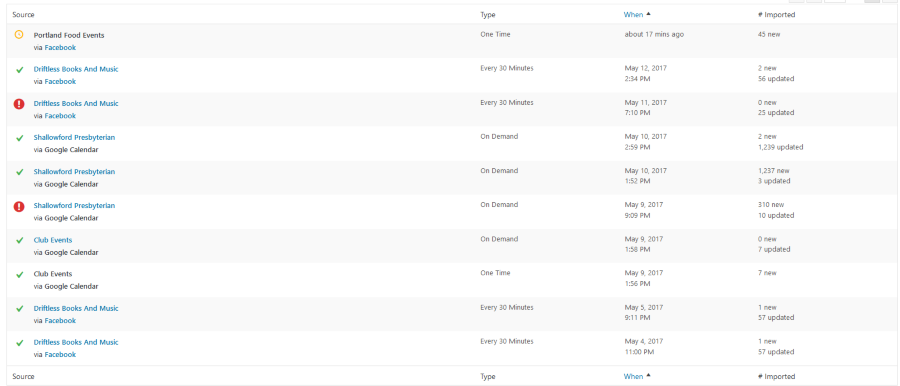
On this screenshot you can see that “Driftless Books” failed on May 11 but succeeded on May 12.
Same with “Shallowford Presbyterian”, failed on May 9 and succeeded on May 10.
I’ll be in touch soon.
Andras
May 16, 2017 at 8:59 am #1284406KeymasterHi again,
I set up the feeds as scheduled imports.
2 I didn’t manage as one gave an error (stepbystepWCS – also not available on FB), the other was empty (Midland Swing Open).
The initial import was successful. I’m waiting for the scheduled rerun to finish. 2 of them are green already, the other 3 are pending.
Will let you know how it plays out.
Cheers,
AndrasMay 29, 2017 at 1:17 pm #1290464KeymasterHello Alan,
Sorry for the radio silence, I was out most of last week. Meanwhile the scheduled imports were running though.
I set up 5 of your feeds with an hourly import. They started importing and some failed, some succeeded. The failures can mostly be accounted to me running out of the daily import limit of 100 imports. 5 feeds 24 times a day is a bit more than 100. :o) However, even the ones that failed in the past did succeed later on, usually the next day.
Here is the history of the past week: https://cloudup.com/cW_ANwsFJPT
So everything should be fine with the feeds, they are importing properly.
What is your experience of the past week? Still experiencing any issues?
Andras
June 20, 2017 at 9:35 am #1300582Support Droid
KeymasterHey there! This thread has been pretty quiet for the last three weeks, so we’re going to go ahead and close it to avoid confusion with other topics. If you’re still looking for help with this, please do open a new thread, reference this one and we’d be more than happy to continue the conversation over there.
Thanks so much!
The Events Calendar Support Team -
AuthorPosts
- The topic ‘Managing facebook schedule limits’ is closed to new replies.