

Forum Replies Created
-
AuthorPosts
-
Andras
KeymasterHey Gregg,
I’m sorry there is no improvement on this so far. Let’s dig further so we can get to the bottom of this.
the upgrade mangles my events listing pages
What do you exactly mean by this?
These upgrades might contain the fix that is needed, so it might be worth fixing that update first.
took all suggested step – still not importing
So after re-installing The Events Calendar and deactivating all other plugins, plus switching to a default theme, when you run an import you are still getting the error message?
If yes, then please check if this file exists:
wp-content\plugins\the-events-calendar\vendor\ForceUTF8\Encoding.phpand that starting on line 329 you have the following code present:
protected static function utf8_decode( $text, $option ) {
if ( $option == self::WITHOUT_ICONV || ! function_exists( 'iconv' ) ) {
$o = utf8_decode( str_replace( array_keys( self::$utf8ToWin1252 ), array_values( self::$utf8ToWin1252 ), self::toUTF8( $text ) ) );
} else {
$o = iconv( "UTF-8", "Windows-1252" . ( $option == self::ICONV_TRANSLIT ? '//TRANSLIT' : ( $option == self::ICONV_IGNORE ? '//IGNORE' : '' ) ), $text );
}

return $o;
}
Will be waiting.
Cheers,
AndrasKeymasterHi Ruth,
I’m happy to hear that the manual update went good so far. We usually push out a maintenance release every 2-3 weeks so we can test it soon if it works well.
Regarding your repeating issue, I can see that in your settings you have set that the recurrence should end on June 17th, basically the same day as it starts. That is why you don’t see any events in the future.
Change that setting to some future date or to “never” and the recurrences should show up.
Let me know how that goes.
Cheers,
AndrasKeymasterCool! Let me know if you need any more info, I will leave the topic open for now.
Note, if there is no movement here for 3-4 weeks, then it will be automatically closed.
It would be great if you could share your solution afterwards. I’m sure it could be helpful for others as well.
Cheers,
AndrasKeymasterHello Tiebo and welcome back,
I’m really sorry if you were disappointed with our support before and hope we will be able to provide you with more satisfactory help in the future.
the text entered in the description area, the main post area, does not show.
The descriptions don’t show because it is hidden with css. This is the part in question:
#tribe-events .tribe-events-content p, .tribe-events-after-html p, .tribe-events-before-html p {
display: none !important;
}
Once you remove that, or at least the first selector (#tribe-events .tribe-events-content p,), the descriptions should be visible.
Secondly: This last one isn’t showing on the calendar with upcoming events while the date is correct in 2017?
I checked your calendar and could see that event in photo view, month view and list view as well. Here’s a screenshot on that:
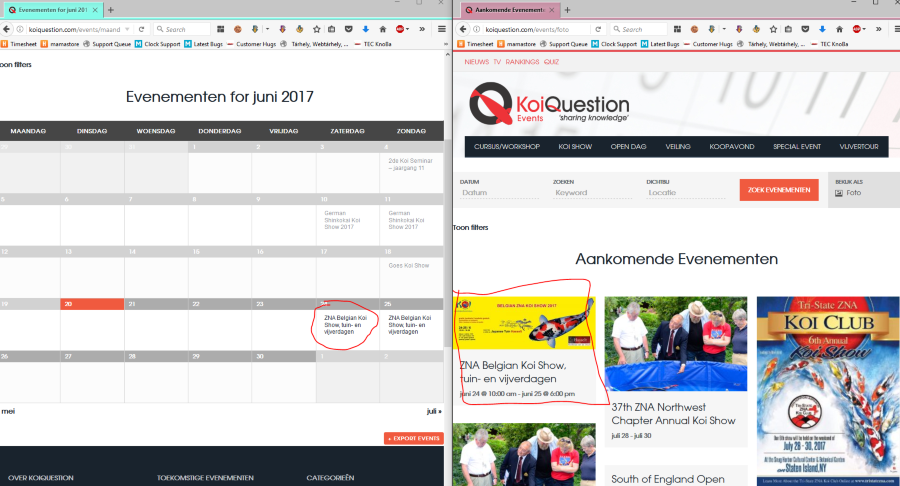
Or should I be looking somewhere else?
Cheers,
AndrasJune 20, 2017 at 2:48 am in reply to: Default state does not auto-populate in venue created with new event #1300381KeymasterHello Victor,
Thanks for using our plugins and for getting in touch!
I checked this for you and I could recreate this. All fields populate except for the state. It looks like this is a bug.
I have created a bugticket for this and it is going to be fixed at a point. At the moment I cannot give you any date when.
I am going to set the status of this ticket to “pending fix” and we will update it once the fix is released.
If you have any new questions or issues please create a new ticket and we’ll be happy to help.Thanks and cheers,
AndrasKeymasterHello marwickmarketing,
Thanks for reaching out!
Your snippet looks fine, those functions are not deprecated to the best of my knowledge.
Looks like you don’t have $postId defined. What happens if you try
$post->IDinstead or do a declaration before:$postId = $post->IDCheck this. Meanwhile I’ll also try to get someone more versed in coding to take a look at this.
Cheers,
AndrasKeymasterHello Dan,
Thanks for reaching out!
We have a function that you might be able to use: tribe_get_recurrence_start_dates()
Will this help you move forward or do you need more help?
Cheers,
AndrasJune 20, 2017 at 2:12 am in reply to: Event Aggregator: Wrong time using iCalendar-Import (Part 2) #1300371KeymasterHello Michael, grüss dich
Thanks for reaching out to us, and I’m sorry you are still experiencing this issue with the import.
As Victor said in the other thread a fix has been deployed for this issue.
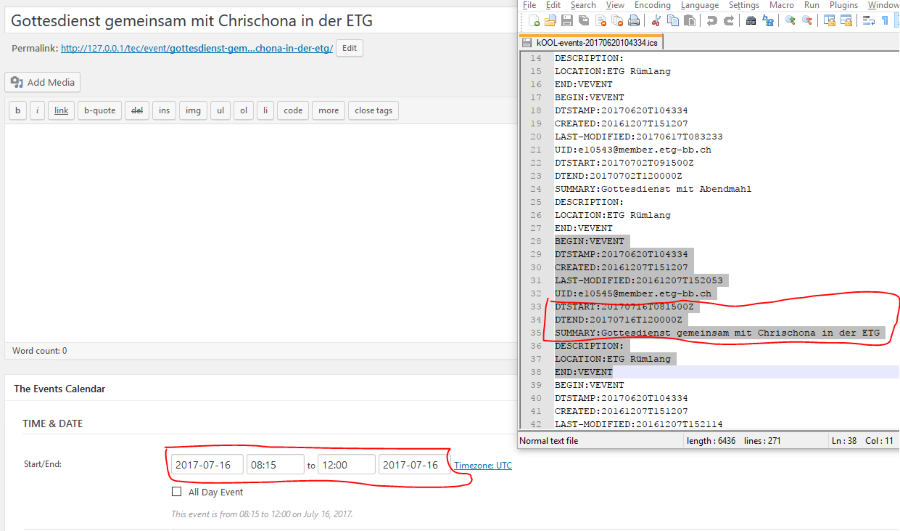
I have checked and tested the feed url you provided in the other thread. The data in the ics file seems correct, it has the “Z” indicator at the end of the date/time, which means it is a UTC time.
Since there is no timezone defined in the file, this UTC timezone will be used when creating the event in your calendar.
Here is a screenshot what I get after the import for that specific event.
There is a timezone setting for the calendar that should help you fix this. Go to Events > Settings > General tab> Timezone settings (bottom of the page) > Use the local timezones for each event.
That should show all events with the time they are set up with, regardless of the timezone. It is also recommended <span style=”text-decoration: underline;”>not to</span> check the option “Show timezone”.
Does this help? Let me know.
Cheers,
AndrasKeymasterHi Mario,
So if I understand correctly you would like to set up a home page that shows you a calendar that includes events only from a specific category.
If that is the case, then you can set up a page with a calendar shortcode (comes with Events Calendar PRO). Here is an article on the shortcodes to get you started.
Let me know if this is what you are looking for.
Cheers,
AndrasKeymasterHello Uwe,
I can understand the issue is frustrating and it is difficult to move forward.
I will check with someone from the development team what they make of the above.
As for php7, our plugin is tested and supports it. Both my local and my live test sites are running on some version of php 7.x.
I’ll be in touch soon.
Cheers,
Andras
KeymasterHi Nick,
To be on the same page, let me summarize:
- You are at the latest version of The Events Calendar (4.5.5)
- Event Aggregator license is valid. (Is everything else green on the Event Aggregator System Status page? The first 4 options.)
- WP_ALTERNATE_CRON is disabled so the default wp cron is running
- Bulk Delete and the Post Expirator have been deactivated since about June 15 <span style=”text-decoration: underline;”>all the time</span>
- The imports did run automatically daily
- No errors on the import history page
- random scheduled imports have disappeared, but they ran ok before
So far I haven’t been able to replicate the issue. For me and for my colleagues the scheduled imports never disappeared. If all the above is true, then something else must be at play here.
The next step would be a longer test phase, that includes deactivating all plugins except for the calendar ones and switching to a default theme like twentysixteen and letting that sit still for a day or two to see if the scheduled imports are still disappearing.
If they stay in place, then activate your theme and wait 1-2 days.
If they stay in place, then start reactivating the rest of the plugins one-by-one (or five-by five to make it faster) and wait 1-2 days again to see if the system still holds.
Continue activating the plugins until either 1) scheduled imports start disappearing => we can narrow down the cause to a couple of plugins; 2) all plugins are active => all works fine.
For the process I recommend the following:
- keep Bulk Delete and the Post Expirator deactivated throughout the whole process
- set the scheduled imports to more frequent than daily
- Enable error logging for The Events Calendar under Events > Help > Event log section (screenshot)
- enable WP_DEBUG
I understand if you wouldn’t want to do that on your live website. In this case making a copy of your site and setting it up under a different domain or subdomain as a staging site would be great. Once that’s done test the site first if you can reproduce the issue. If yes, then you can start with the testing.
If you decide to do it on your live site, then step 0 would be to do a full database and file backup of your site, so you can restore it in case something would go wrong.
I know this is cumbersome work and will take some time, unfortunately it is really difficult to pinpoint the issue. Also, we don’t have any code in place that would automatically delete any scheduled imports, so there is a very high chance some other plugin or code is influencing this. This is what we need to find, and the above test is the way to do it.
I’ll be here for any updates and questions you might have.
Cheers,
AndrasKeymasterDear Ruth,
Thanks for reaching out to us! I’m really sorry you are having this issue with the license key. This is a rather unusual behavior. Let me try to help you solve this.
Possibly the fastest fix would be to update the Events Calendar PRO plugin manually. Let me give you here a detailed list of steps to take. No need to worry, if you can click with a mouse and type on a keyboard, you will manage easily.
- Make a full backup of your site, both files and database. Just in case anything would go wrong. In case you don’t know how to do that, then there are couple plugins out there which can help you. A free one is UpdraftPlus.
- Make sure that The Events Calendar (our free plugin) is up to date. (Current version is 4.5.5)
- Deactivate Events Calendar PRO and then delete the plugin. No worries, your data will not be deleted, it will stay there.
- Download the newest version of Events Calendar PRO (4.4.11.1) from your account here.
- Go to your Plugins on the Dashboard and select “Add new”. Then click on the “Upload Plugin” button at the top.
- Select the file you just downloaded and click on “Install Now”
- Activate Events Calendar PRO
This should give you the newest version, which hopefully will not produce that weird license key behavior anymore.
Please let me know if this helps or if you have any further questions.
Cheers,
AndrasKeymasterThis reply is private.
June 19, 2017 at 3:59 pm in reply to: Conflict with 'Toggle wpautop' plugin makes Community Events unusable #1300235KeymasterLou, I’m stoked to hear you managed to fix it. This is awesome!
Thanks for sharing your solution!
Since the issue seems resolved I am going to close this ticket, but if you need anything else related to this topic or another please post a new one in the forum and we will be happy to help you out.
Good luck with your project!
Cheers,
AndrasPS: If you like our plugins, and you didn’t yet do so 🙂 we would be happy to receive a review in the wordpress.org repository. Thanks!
https://wordpress.org/support/plugin/the-events-calendar/reviews/PS2: We’d be also grateful if you would give us feedback on your satisfaction with support. Just click on one of the classy looking emojis below. 🙂 If you can spare a few words, that’s even better. Doublethanks!
KeymasterI have checked the current versions on my local install and all is properly translated without and language overrides in the wp-content/languages/plugins folder.
So what I can think of is that you have a language override in that folder, and the files are not up-to-date. Please check.
I see you are using Loco Translate. To update the .po / .mo language files you need open them with Loco and click on the Sync button. After couple seconds you should receive a success message that the strings are updated. Then check if the missing ones are translated or not.
Does this help?
Cheers,
Andras -
AuthorPosts