

Forum Replies Created
-
AuthorPosts
-
Andras
KeymasterHi Francisco,
Unfortunately attachments from the email replies get discarded at the moment.
Could you please log in to the forums and upload it manually to the thread? Thanks!
Andras
KeymasterThis reply is private.
KeymasterGilles, thanks a lot for checking that and sharing details. I will flag this to the developers and we’ll definitely investigate this issue.
I am going to set the status of this ticket to “pending fix” and we will update it once there is some news or the fix is released. If you have any new questions or issues please create a new ticket and we’ll be happy to help. Thanks for your patience!
Cheers,
AndrasKeymasterAwesome, thanks! Will be waiting for it.
Have a great weekend!
Andras
KeymasterHi Borge,
I took a look at your site and it works for me. Check this screencast how the search fields disappear when the resolution goes below 768px.
Might be your mobile has a wider screen, in this case you can set that px number in the css to a bigger amount, however that will also influence computers as well. It is connected to the resolution and not the type of device.
There are 2 more things you can try:
Option one:
We have a separate stylesheet for mobile, which usually kicks in on mobile devices. You can add your extra styling (the above code) to that. You will find more detailed information in our Themer’s Guide on how this can be done, specifically in the Customizing Styles section.
Option two:
You can create a snippet that uses “wp_is_mobile()” to detect if the request is from a mobile device (if the device/the browser makes that known) and turn off the bar or else enqueue CSS that hides it.
Please note that we are limited on supporting customization request. I can give you some more pointers if needed, but this is about as much help as I can give at the moment.
Let me know if any of the above helps.
Cheers,
AndrasJune 30, 2017 at 9:11 am in reply to: Venue and Organizer Drop Down Sticking when forced up #1314537KeymasterHello Jeanine,
Happy to hear it works in Safari.
I’m afraid there is no separate code for Chrome. Our plugins are coded to be browser independent as much as possible and they should work the same in all browsers. Also as I checked I couldn’t reproduce the issue you are having. A colleague of mine also checked it on her Max with Chrome and couldn’t reproduce it either.
This indicates that there is something in your chrome that results in this odd behavior. Might be you have an older version.
Please check if you have the latest version of Chrome (here’s how). If not, then update it to the latest from here.
Open an incognito window with Cmd + Shift + N and try there.
Let me know if that help.
Cheers,
AndrasKeymasterHello Malcolm,
Thanks for using our plugins and welcome to the forums!
I’m really sorry about the issue with Community Events. Let me try to help you solve this.
To be able to better support you, could you please share your system information with me? Here’s a handy guide how you can do that:
https://theeventscalendar.com/knowledgebase/sharing-sys-info/Also, please read this article and follow the instructions to run a test for conflicts and let me know what you find. This will help us determine if there is an issue with our plugin or maybe some other plugin or theme is influencing the behavior.
Thanks and looking forward to solving this with your help.
Cheers,
AndrasKeymasterHello Arnold,
Thanks for getting in touch and I’m sorry for your troubles.
When does it deactivate itself? Right after you activate it, or sometime later at a random time?
Is there maybe a specific action you are taking when this happens?
Does this also happen if you deactivate all other plugins and switch to a default theme like twentysixteen?
It would also be great if you could run a test for conflicts based on this guide. I understand this is sometimes not possible on live websites, in these cases we recommend setting up a development / staging site, possibly on the same server to have the same working environment.
Thanks,
AndrasKeymasterHallo Hans-Gerd,
Great question! I don’t know the definitive answer to this, but I’m going to check and will let you know.
An alternative would be downgrading to an earlier version, but being stuck there is not really good for several reasons.
I’ll be in touch shortly.
Cheers,
AndrasKeymasterHello Fernando,
Thanks for using our plugins and welcome to the forums!
I’m sorry about this issue with Event Aggregator! We are aware of this problem and a fix is already being worked on.
Unfortunately at the moment there is no workaround for this issue.
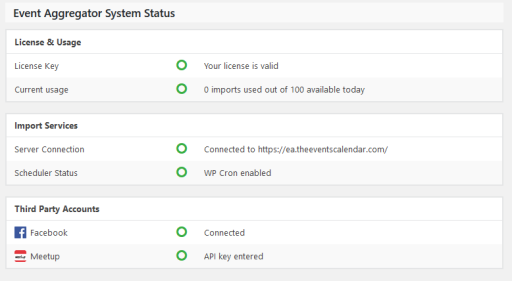
It would help us if you could share with me a screenshot of your Event Aggregator System Status section which you can find under Events > Help and looks like this:
Thanks,
AndrasKeymasterHello Phil,
Thanks for using our plugins and welcome to the forums!
I’m sorry you are having an issue there with displaying the calendar. Indeed it looks like a theme conflict.
I’m not familiar with that theme unfortunately.
What settings do you have under Events > Settings > Display tab for the “Default stylesheet used for events templates” and for “Events template”? That is something that could possibly have an influence on this, mostly the second one.
Check some other settings and let me know what you find.
Cheers,
AndrasKeymasterHello Adam,
Thanks for getting in touch and reporting this in such detail.
I have tried to reproduce this on my local install and didn’t have any issues deleting.
I tried it with a subscriber level user, with event status as ‘pending review’ and ‘published’ as well.
Would it be possible for you to test this on a clean install with only the calendar plugins?
Thanks,
AndrasKeymasterHi,
Sorry to hear that.
I now tried with my browser tools and when I added it to the style.css file of the child theme (wp-content/themes/travel-time-child/style.css) then it got applied, and the filters disappeared as soon as the window width went below 768px.
Also, if your mobile screen has a high resolution and it is wider than 768px then it will not disappear.
If you are using Firefox or Chrome then you can switch on responsive mode with Ctrl + Shift + M. Then drag the window so the width is less than 768px and check if it works there. If it does, then the code works.
Let me know what you find.
Cheers,
AndrasKeymasterI’m not sure what could be happening there. Note though, that if the tables are missing, especially the wp_options table, then your site wouldn’t open up at all, it would definitely give you an error.
Andras
June 29, 2017 at 1:12 pm in reply to: Venue and Organizer Drop Down Sticking when forced up #1312572KeymasterHello Jeanine,
Thanks for the clarification, now I understand what is happening.
So far I haven’t been able to reproduce the issue with your website in any browser (Chrome, Firefox, Edge, Internet Explorer).
Which version of Chrome are you using? Here‘s how you can find that out.
Can you try if you can reproduce the issue with a different browser?
It is also possible for the users to “start typing away”. When you open the dropdown you can immediately start typing and the list will be filtered. Here’s a screenshot of that.
Also, it would be possible to make the venue field a required field with a small piece of code. I can look it up and share that with you if you’d like, just let me know.
Andras
-
AuthorPosts