
Home › Forums › Calendar Products › Event Aggregator › Purchased and Applied License, but cant import
- This topic has 7 replies, 5 voices, and was last updated 9 years ago by
Support Droid.
-
AuthorPosts
-
June 28, 2017 at 11:58 pm #1311325
Fernando Garcia
ParticipantHello, I purchased and applied the Aggregator license, but cannot set it to import anything other than the CSV. It allows me to select the Purchase option again, but doesn’t let me continue. I went ahead and attached an image of what I am encountering.
June 29, 2017 at 3:32 pm #1312880Andras
KeymasterHello Fernando,
Thanks for using our plugins and welcome to the forums!
I’m sorry about this issue with Event Aggregator! We are aware of this problem and a fix is already being worked on.
Unfortunately at the moment there is no workaround for this issue.
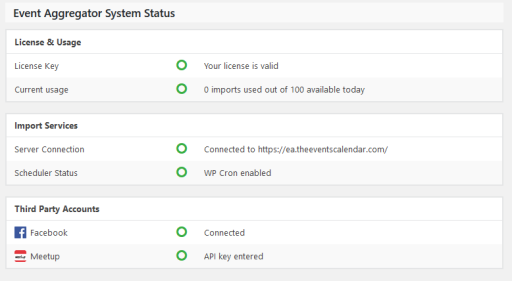
It would help us if you could share with me a screenshot of your Event Aggregator System Status section which you can find under Events > Help and looks like this:
Thanks,
AndrasJune 29, 2017 at 3:35 pm #1312889ParticipantI’ll send it to you shortly.
June 30, 2017 at 9:47 am #1314630KeymasterAwesome, thanks! Will be waiting for it.
Have a great weekend!
Andras
August 4, 2017 at 9:35 am #1330740KeymasterHey there! This thread has been pretty quiet for the last three weeks, so we’re going to go ahead and close it to avoid confusion with other topics. If you’re still looking for help with this, please do open a new thread, reference this one and we’d be more than happy to continue the conversation over there.
Thanks so much!
The Events Calendar Support TeamAugust 28, 2017 at 8:48 am #1341187Nico
MemberHey,
Just wanted to share with you that a new maintenance release is out, containing a fix for this issue ?
These are the improvements shipped for Events Aggregator this release:
- Fix – Avoid Event Aggregator previews or scheduled imports being marked as failures.
- Fix – Fixed an issue that would sometimes render Event Aggregator options invalid even with a valid license.
- Fix – Fixed an issues where Event Aggregator scheduled imports could not run other than manually.
- Tweak – Improve Event Aggregator message regarding Facebook token expiration.
- Tweak – Support importing from URLs (Event Aggregator) where the protocol hasn’t been specified by defaulting to HTTP.
- Tweak – Added filter: tribe_aggregator_meta_source to filter the Event Aggregator import source.
- Tweak – Added filter: tribe_events_linked_post_meta_values_{$current_linked_post_meta_key} for filtering the array of values retrieved for a specific linked post meta field.
Find out more about this release → https://theeventscalendar.com/maintenance-release-week-21-august-2017/
Please update the plugins and let us know if the fix works for you,
Cheers,
NicoSeptember 19, 2017 at 9:39 am #1351216KeymasterHey there! This thread has been pretty quiet for the last three weeks, so we’re going to go ahead and close it to avoid confusion with other topics. If you’re still looking for help with this, please do open a new thread, reference this one and we’d be more than happy to continue the conversation over there.
Thanks so much!
The Events Calendar Support Team -
AuthorPosts
- The topic ‘Purchased and Applied License, but cant import’ is closed to new replies.