

Forum Replies Created
-
AuthorPosts
-
Sky
KeymasterHi there,
I’m sorry to hear that you’re having problems with this. I will try to help get this sorted.
This problem happens due to our plugins using a different version of the Select2 library than what other plugins are using.
To solve this problem, please try adding the following code snippet to your child theme’s functions.php file, or a functionality plugin.
// Disable tribe select2 function when not in tribe admin screens

function tribe_select2_conflict_fix() {

  $admin_helpers = Tribe__Admin__Helpers::instance();

  if ( ! $admin_helpers->is_screen() ) {

    wp_deregister_script( 'tribe-select2' );

  }

}

add_action( 'admin_enqueue_scripts', 'tribe_select2_conflict_fix', 11);
You should remove any other customizations you did to the core plugin files.
Let me know if that works for you!
Thanks,
SkyJuly 12, 2018 at 10:40 am in reply to: next week – previous week link shows all calendar categories #1573890KeymasterHi there,
I’m sorry to hear that you’re having issues with the calendar display. I will try to help you get this sorted.
Can you please share your system information with me?
Thanks,
SkyKeymasterHi there,
I’m sorry to hear that you’re having issues with the map display. I will try to help you get this sorted.
For this particular venue, can you try checking the “Use latitude + longitude” checkbox and saving the venue? Does that make it show up on the page?
If not, does it show if you temporarily switch to the Twenty Seventeen theme, disable all other plugins, and remove any modifications you may have made?
Thanks,
SkyKeymasterHi Karen,
I checked, and the bug ticket for this is still open. When this has been addressed, someone will follow back up with you in your original thread. If you have any questions about this, can you ask in your original thread? This will help us keep track of everything related to the issue.
I’m going to close this thread since you already have one going for this issue.
Thanks,
SkyKeymasterHi there,
I’m sorry that you’re having issues with the calendar display. I will try to help you get this sorted.
Is the calendar with display issues being generated with a shortcode?
Can you provide links to these two pages so I can take a look at them?
Thanks,
SkyKeymasterHi Chris!
I’m sorry to hear that you’re having issues with your site. I will try to help you get this sorted.
It sounds like the scheduled imports are still trying to run even though you no longer have an Aggregator license. Aggregator is actually a cloud based service, and there is no plugin to delete. Some features of the Events Calendar import functionality just don’t show if you do not have a valid license entered.
When you go to the settings in Events > Settings > Licenses, is your old Aggregator license still entered? If so, try deleting this field and saving.
Let me know if that was not the case.
Thanks,
SkyKeymasterGreat! I’m glad that worked for you.
You will need to keep that fix in place for the time being. All of our plugins are built with the older syntax, and changing everything is going to be quite a project. I’m not sure when it will be able to be updated on our end.
Please let us know if you have any issues or questions in the future.
Thanks,
SkyKeymasterCezar,
Great! I’m glad the updates took care of your issues!
Please let us know if you have any issues or questions in the future.
Thanks,
SkyKeymasterHi there,
Thanks for reaching out. I’d be happy to help with your question.
There is not a built in way to change the automatic sku, but it is possible with some custom development. We are limited in the amount of support we can provide for customizations like this, but I may be able to get you pointed in the right direction.
The SKU is automatically generated by the Event Tickets Plus plugin. Unfortunately, there is not a filter or other way to change the pattern it uses. However, there is a filter that can enable/disable automatically generating a sku. The filter is ‘event_tickets_woo_should_default_ticket_sku’ and if you passed this “false” it would not generate the sku. You could then apply your own logic to create the sku on your own. Check out the source code to see how this is done. wp-content/plugins/event-tickets-plus/src/Tribe/Commerce/WooCommerce/Main.php starting on line 909.
It is just saving it to a post meta field. You might be able to hook into ‘event_tickets_after_woo_ticket’ (see line 1128 from the file above) and save your own custom sku there.
I hope this helps! Let me know if you have additional questions about this.
Thanks,
SkyJuly 11, 2018 at 8:30 am in reply to: Receiving error, Your %plugin name% license key is out of activations. #1572688KeymasterAnthony,
Ok, just let us know. We may come up with an expanded set of licensing options by next year, so check back in to see if our offerings meet your needs then.
Thanks,
SkyKeymasterHi again,
I have tracked down some updated code for this.
function tribe_select2_conflict_fix() {

  $admin_helpers = Tribe__Admin__Helpers::instance();

  if ( ! $admin_helpers->is_screen() ) {

    wp_deregister_script( 'tribe-select2' );

  }

}

add_action( 'admin_enqueue_scripts', 'tribe_select2_conflict_fix', 11);
This should disable our select2 function when not in event admin screens.
Let me know if that works for you.
Thanks,
SkyKeymasterHi again,
I don’t yet have enough information to tell what the problem is. Can you tell me what steps your developer went through to determine that the issue is due to Events Calendar Pro? Were you able to collect any debug information as I described earlier? Have you gone through the steps in the Testing for Conflicts Guide?
In addition to providing that information, can you show me a screenshot of the Event Series pattern you are using on one of the events that you are having issues with when creating the recurring events?
Thanks,
SkyJuly 10, 2018 at 10:19 am in reply to: Receiving error, Your %plugin name% license key is out of activations. #1571837KeymasterHi again,
Here’s what our current options are. There in an unadvertised Aggregator plan for 300 imports per day, that can be used on up to 100 sites. The price is $199/ per year.
I can upgrade you to that tier at no extra charge, for the misunderstanding caused by our product information page. When it comes time to renew next year, it will automatically charge the $199 fee. If you change your mind, you can let us know before it renews and we can cancel the auto renew subscription, and you can choose a different plan if you’d like.
Does that sound ok to you?
Thanks,
SkyJuly 10, 2018 at 10:08 am in reply to: Receiving error, Your %plugin name% license key is out of activations. #1571819KeymasterHi Anthony,
I’m apologize for the confusion. It does state this on the product page, but I agree this should be stated in a more obvious manner.
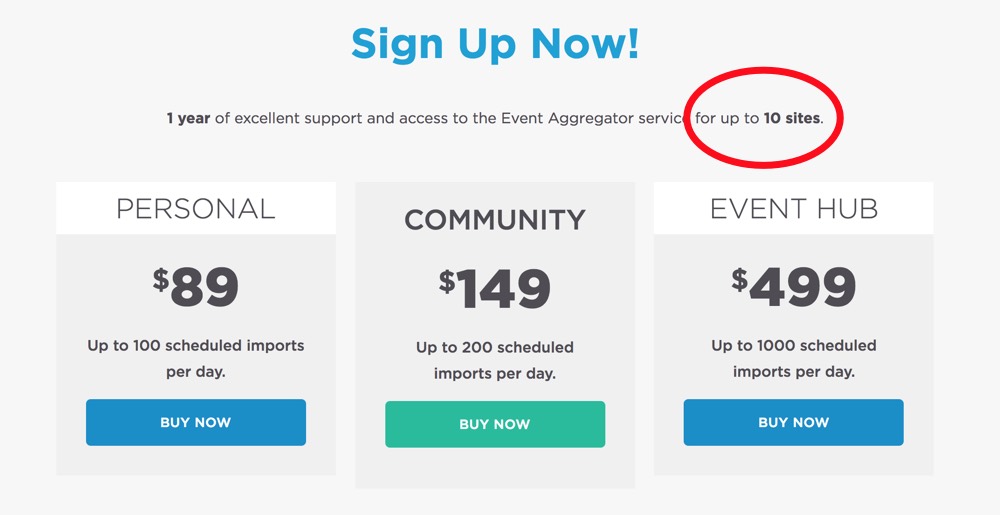
It is not documented anywhere, but some of the higher tiers of “imports per day” also have a higher limit of sites that the license can be installed on. We are discussing how we can outline the different plans better. I will follow back up here with more complete information about this as soon as I hear back.
To see how many imports have been used each day, visit the Events > Help page and look in the “Event Aggregator System Status” section.
Hope that helps! Thanks for your patience, and I’ll let you know what your options are for adding more sites as soon as I can.
Sky
KeymasterHi again,
I’m sorry to hear that you are still having issues with this.
There is a setting in Events > Settings > General > “Permanently delete events older than” that will delete older events. However, the earliest option is 3 months. It also doesn’t remove tickets or attendees or other data.
You may also give this plugin a try: https://wordpress.org/plugins/bulk-delete/ It will allow you to delete all post types created by our plugin, and use a more specific timeframe.
I took a look at your attempted imports. I tried doing an import from the same url on my local test install, and it is not able to even connect to generate a preview. All of your attempted imports from this URL are showing “No data sent to the client.” There seems to be something wrong with the data in the file being served from there.
Are you able to import from any other URLs? You can try an example calendar like this one to test: https://p15-calendars.icloud.com/holidays/us_en.ics
Let me know if that helps.
Thanks,
Sky -
AuthorPosts