Forum Replies Created
-
AuthorPosts
-
Patricia
MemberHi Matt,
My apologies for the delay in response. We’re doing our best to adhere to our Scope of Support / Terms for you and everyone else.
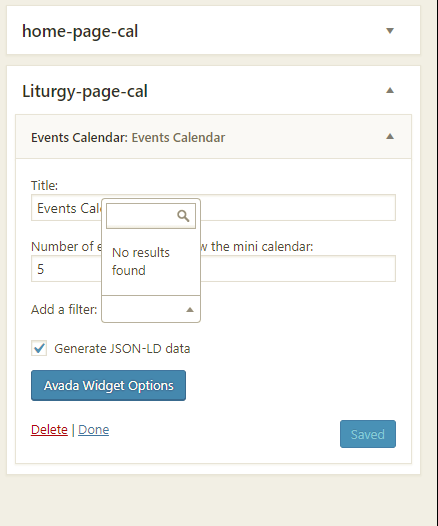
Regarding this screenshot: https://theeventscalendar.com/content/uploads/2018/03/5f3d0d3bcf29419a.png
The “Add a Filter” option in the calendar widget is not a feature provided by Filter Bar: this feature is part of the widget functionality provided by Events Calendar PRO.
I ran a test locally and wasn’t able to reproduce the issue from here (screenshot). To get started, I would recommend you to open up your browser’s console and verify if there are any relevant javaScript errors in there.
If you find an error, I would recommend you to run a Conflicts Test. You can start the test by temporarily changing your theme to another one like Twenty Seventeen and let us know if the problem is solved after that (don’t forget to backup your database before changing anything).
To make sure that Filter Bar is working as expected, please access your calendar page, click on “Colapse Filters” and check if the filters are listed there (screenshot here). With your current settings, you should be able to see the Event Category filter available.
Regarding the shortcodes, since the venue filter is available only for the Event List Shortcode and not for the Mini Calendar Shortcode, you can use a conjuction of these two shortcodes to achieve exactly what you want. If you add something like (don’t forget to replace the category names):
[tribe_mini_calendar category=”wp-meetups” count=”0″]
[tribe_events_list venue=”yes” category=”wp-meetups”]The output will be: https://ibb.co/jFQzUc
I hope this helps!
Thanks,
Patricia
MemberHi Jérôme,
Thanks for sending us your system info and screenshots!
You have 457 scheduled imports as I can see from here: could you please let me know what is the frequency of these scheduled imports? Are all of them running weekly? Do you have any imports running daily?
Please note that your Event Aggregator license provides up to 100 scheduled imports per day. Each successful scheduled import is counted as a single import task and will deduct from your daily import count by one, regardless of how many events are imported in a given task. You will find more info about this in the following article:
https://theeventscalendar.com/knowledgebase/event-aggregators-import-limits-work/
Cheers,
Patricia
March 20, 2018 at 5:06 am in reply to: Removing venue and organizer fields from back office #1483785MemberHi Arnaud,
You are welcome! If you need an assistance again or have other concerns, please feel free to open up a new thread, we’ll be more than happy to help you!
Cheers,
Patricia
MemberHi AK,
You are welcome! If you just want to allow your users to create new events without free tickets (RSVP’s), then Community Events is your best option. Now, if you do want to create RSVP’s, Community Tickets is the plugin that will give you this functionality.
Answering your question: you can control if users will be able to create new venues and organizers in your Community Events Submission form. The Event Categories and Event Tags fields will only be displayed if you have existing values for these fields in your database.
If you want to see the plugins in action, you can buy the Community Manager Bundle and ask for a refund within 30 days of payment if for some reason you verify that our plugins don’t not fit your project as you expected.
If you have any other questions at all please let me know and I’d be happy to help as best I can!
Cheers,
Patricia
MemberHi Kadi,
Could you please send us the Facebook links so we can run some tests from here and verify if this is a bug?
If you have any other questions in the mean time please feel free to let me know and I’d be happy to help as best I can!
Thanks!
March 19, 2018 at 4:53 am in reply to: Removing venue and organizer fields from back office #1482794MemberHi Arnaud,
Please add the following snippet in your theme’s functions.php file. With this snippet you’ll be able to achieve what you want without having to re-add the code after each update:
add_action('admin_head', 'hide_mt_venue_and_organizer');function hide_mt_venue_and_organizer() {
echo '<style>
table#event_tribe_venue {

    display: none !important;

}
table#event_tribe_organizer {
display: none !important;
}
</style>';
}Cheers!
Patricia
MemberHi Erik,
I’m glad to hear that you have found a solution and everything is working as expected now! If you need an assistance again or have other concerns, please feel free to open up a new thread, we’ll be more than happy to help you!
Cheers,
Patricia
MemberHey Richard,
Thank you for reaching out to us!
To get started, could you please let us know if these duplicated events are being imported from an external source like Facebook? Are these recurring events? Also, please send us the link from where you are importing them.
Thanks,
Patricia
MemberHey Kadi,
Thank you for reaching out to us!
To get started, could you please send us some of the links from where you are trying to import your events?
Also, could you please access your Dashboard, head over to Events > Help and share a screenshot of the Event Aggregator System Status? Do you see any errors in there?
Thanks!
Patricia
MemberHey Matt,
Thank you for reaching out to us!
Regarding your question about Filter Bar, to get started, could you please access your Dashboard and head over to Events > Settings > Filters and make sure that the Event Category option is enabled as an available filter? You will find more information about how to configure Filter Bar in the following article:
Regarding the shortcodes, as you already noticed, the venue filter is available only for the Event List Shortcode. You will find more information about our shortcodes in the following article:
https://theeventscalendar.com/knowledgebase/pro-widget-shortcodes/#event-list-shortcode
As an alternative, you can also use the category-filtered calendar view to achieve what you want.
For example: if you access [your-site]/events/category/liturgy-events/ , you will see a calendar with all events in the “liturgy-events” category.
You will find more information about how to setup category-filtered calendars in the following article:
Is it Possible to Create Multiple Calendars With One Plugin?
I hope this helps! If you have any other questions at all please feel free to let me know and I’d be happy to help as best I can!
Cheers,
Patricia
MemberHey Douglas
Thank you for reaching out to us!
I believe that this snippet is what you are looking for:
https://gist.github.com/cliffordp/4f06f95dbff364242cf54a3b5271b182
With this code, the site admin email will receive a copy of all Event Tickets’ RSVP emails.
Please add this code to your theme’s functions.php file or in a custom plugin (without the <?php opening tag) and let me know if it helps!
Thanks,
Patricia
March 16, 2018 at 3:10 pm in reply to: Removing venue and organizer fields from back office #1481712MemberHey Arnaud,
Thank you for reaching out to us!
It’s not possible to remove these fields from the “Add New Event” page out-of-the-box, but you can hide both by adding the following rules in your style.css file:
table#event_tribe_venue {
display: none !important;
}table#event_tribe_organizer {
display: none !important;
}I hope this helps! If you have any other questions at all please feel free to let me know and I’d be happy to help as best I can!
Cheers,
Patricia
March 16, 2018 at 3:00 pm in reply to: Need advice for conducting after-sales CVS export and QR Code scanning. #1481699MemberHi Liam,
Thank you for reaching out to us!
We are unfortunately unable to provide support through our Pre-Sales forum channel, but you can head over to Event Tickets WordPress.org support forums for assistance and answers.
If you have a PRO license, you can log into your account and get assistance through the PRO forums. If you need to reset your password, you can do so here. This will send an email to the account used when you initially registered for the support forums.
Thanks for understanding and good luck resolving your issue. Have a good day!
Best regards,
Patricia
MemberHey Jérôme,
Thank you for reaching out to us!
To get started, could you please access your Dashboard, head over to Events > Help and share a screenshot of the Event Aggregator System Status? Do you see any errors in there?
Also, could you please head over to Events > Import > Scheduled Imports and let us know how many scheduled imports do you have and what are their frequency (hourly, daily, weekly, etc.)? Answering your question, you can remove scheduled imports in this area as well.
I hope this helps! Let me know if you have any other questions in the meantime.
Cheers,
Patricia
MemberHi there,
Thank you for reaching out to us!
Answering to your questions: WooCommerce is required for Community Tickets to work properly.
It’s not possible to allow your users to create RSVPs and at the same time prevent them to create new Tickets out-of-the-box, but you could use a simple workaround to achieve this by removing/hiding the “+ New Ticket” button from your Community Event submission Form. You can do this via CSS by adding the following rule in your theme’s style.css file:
button#ticket_form_toggle {
    display: none !important;
}
The question regarding the possibility to export the attendee list was already answered in this thread.
Regarding your question about email notifications, it’s certainly possible, but remains something that we do not support “out of the box”: some amount of custom dev work would be required to make this happen.
I hope this helps! If you have any other questions at all please feel free to let me know and I’d be happy to help as best I can!
Cheers,
Patricia
-
AuthorPosts