
Home › Forums › Calendar Products › Events Calendar PRO › Shortcode or Widget – Venue and Filters
- This topic has 0 replies, 2 voices, and was last updated 8 years, 6 months ago by
Matt Collins.
-
AuthorPosts
-
March 16, 2018 at 7:24 am #1481157
Matt Collins
ParticipantI purchased both the pro and filter bar.
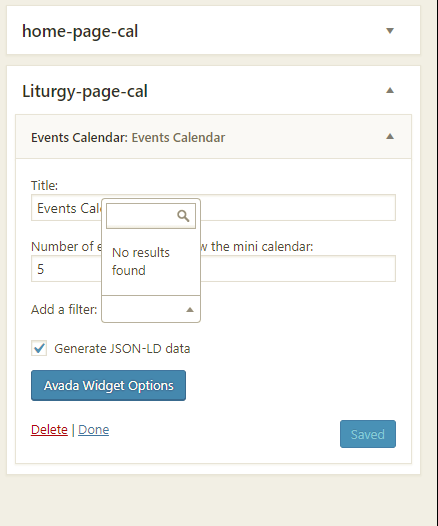
I want to show the mini cal. along with the title, time and venue of each event. The widget can do this, but I want to limit the display to a certain category. I purchased the filter add on, however I cannot figure out how to “add a filter” The drop down says “no results found”. How do I filter for a specific category
Or, I would like to use the shortcode
[tribe_mini_calendar category=”liturgy-events”]
when I try [tribe_mini_calendar category=”liturgy-events” venue=”yes”] it does not show the venues.
When I use list view the tag works but I loose my mini calendar.
[tribe_events_list venue=”yes” category=”liturgy-events”]March 16, 2018 at 3:49 pm #1481742Patricia
MemberHey Matt,
Thank you for reaching out to us!
Regarding your question about Filter Bar, to get started, could you please access your Dashboard and head over to Events > Settings > Filters and make sure that the Event Category option is enabled as an available filter? You will find more information about how to configure Filter Bar in the following article:
Regarding the shortcodes, as you already noticed, the venue filter is available only for the Event List Shortcode. You will find more information about our shortcodes in the following article:
https://theeventscalendar.com/knowledgebase/pro-widget-shortcodes/#event-list-shortcode
As an alternative, you can also use the category-filtered calendar view to achieve what you want.
For example: if you access [your-site]/events/category/liturgy-events/ , you will see a calendar with all events in the “liturgy-events” category.
You will find more information about how to setup category-filtered calendars in the following article:
Is it Possible to Create Multiple Calendars With One Plugin?
I hope this helps! If you have any other questions at all please feel free to let me know and I’d be happy to help as best I can!
Cheers,
Patricia
March 17, 2018 at 3:59 am #1481927ParticipantYes, the settings for filter are enabled. Screen shot attached. I even removed all, and only enable category on the filter.
I need the mini calendar, not a full calendar, more specifically a mini calendar with Event title, date/time, and venue, which the widget can do, but then I need that filtered for a specific category.
March 20, 2018 at 4:57 am #1483783ParticipantHi, is this something I can still get assistance with? If not then how should I go about getting a refund for the Filter Add On since it does not work.
March 20, 2018 at 6:54 am #1483840MemberHi Matt,
My apologies for the delay in response. We’re doing our best to adhere to our Scope of Support / Terms for you and everyone else.
Regarding this screenshot: https://theeventscalendar.com/content/uploads/2018/03/5f3d0d3bcf29419a.png
The “Add a Filter” option in the calendar widget is not a feature provided by Filter Bar: this feature is part of the widget functionality provided by Events Calendar PRO.
I ran a test locally and wasn’t able to reproduce the issue from here (screenshot). To get started, I would recommend you to open up your browser’s console and verify if there are any relevant javaScript errors in there.
If you find an error, I would recommend you to run a Conflicts Test. You can start the test by temporarily changing your theme to another one like Twenty Seventeen and let us know if the problem is solved after that (don’t forget to backup your database before changing anything).
To make sure that Filter Bar is working as expected, please access your calendar page, click on “Colapse Filters” and check if the filters are listed there (screenshot here). With your current settings, you should be able to see the Event Category filter available.
Regarding the shortcodes, since the venue filter is available only for the Event List Shortcode and not for the Mini Calendar Shortcode, you can use a conjuction of these two shortcodes to achieve exactly what you want. If you add something like (don’t forget to replace the category names):
[tribe_mini_calendar category=”wp-meetups” count=”0″]
[tribe_events_list venue=”yes” category=”wp-meetups”]The output will be: https://ibb.co/jFQzUc
I hope this helps!
Thanks,
Patricia
March 20, 2018 at 7:58 am #1483911ParticipantThanks Patricia for the followup.
The issue is between the theme, AVADA and the widget. When avada them is active that filter drop down does not work.
I did figure out a work around, in case another Avada user has this issue. You to the widgets section and then click “manage with live preview” this will give you the 4 footer widgets to work with. Add the Events Calendar widget through this screen and then add the filter (they work here). Save.
Then go back to the normal widgets view, and you can drag that widget to any other side bar you want to use it on. you cannot edit it, but at least it will work.
Yes, this code shows what I want
[tribe_mini_calendar category=”wp-meetups” count=”0″]
[tribe_events_list venue=”yes” category=”wp-meetups”]but when you advance the calendar the events do not advance with it 🙁
March 21, 2018 at 12:25 pm #1485273MemberHi Matt,
Thanks for sharing your findings about the conflict with Avada.
Regarding the shortcodes, you are right, advancing your calendar won’t update the list bellow it. As a workaround, you can use a template override to force all widgets and shortcodes to show the venue. Please copy all content from:
events-calendar-pro/src/views/pro/widgets/modules/single-event.php
Paste it on:
[your-theme]/tribe-events/pro/widgets/modules/single-event.php
Open the single-event.php file you just created in your theme and modify line 134. Replace:
<?php if ( isset( $venue ) && $venue && tribe_get_venue() != '' ) : ?>
with:
<?php if ( tribe_get_venue() != '' ) : ?>
I hope this helps!
Cheers,
Patricia
April 12, 2018 at 9:35 am #1505697Support Droid
KeymasterHey there! This thread has been pretty quiet for the last three weeks, so we’re going to go ahead and close it to avoid confusion with other topics. If you’re still looking for help with this, please do open a new thread, reference this one and we’d be more than happy to continue the conversation over there.
Thanks so much!
The Events Calendar Support Team -
AuthorPosts
- The topic ‘Shortcode or Widget – Venue and Filters’ is closed to new replies.