

Forum Replies Created
-
AuthorPosts
-
Caroline
MemberHi Gregg,
Thanks so much for getting in touch–I’m so sorry to hear that you’re having issues with event exports from your calendar! I’m afraid that we’re not equipped to provide technical support for current plugin users here in our pre-sales forum. We’d be more than happy to assist you at one of the following locations:
- If you’re using one or more of our free plugins such as The Events Calendar and Event Tickets, you can request assistance on the WordPress.org support forum for the affected product.
- If you’re a current license holder for one of our premium offerings, please log in to your account and submit a post to the appropriate forum for the affected product.
If you can, please take the time to confirm in your post that you’ve run through our conflict testing steps prior to contacting us–this will save us a step and help us to get your issue resolved that much quicker! 🙂
Thanks again, and we’ll see you in the forums!
MemberThis reply is private.
MemberHi Chelsea,
Thanks for taking the time to follow up once more–so sorry to hear that you’ve been unable to reach your theme’s developer for more information on this issue. Without having access to the complete code for the affected theme, I’m afraid that we would be unable to provide much more than suggestions even if the scope of our support services covered such in-depth debugging. 🙁 That said, since we do know that reverting to a standard WordPress theme resolves the issue, I’d guess that your theme likely employs some type of custom loop that, when combined with one or more of your activated plugins, interferes with the normal display and functionality of The Events Calendar on your site. If you’re comfortable with PHP and don’t mind delving into the core files for your plugin, you might consider reviewing the code that’s used for the loop and seeing if there are any issues with custom post types that might be triggering a conflict with your plugins.
Failing that, and assuming that you’re still unable to get in touch with your theme’s developer, you might consider looking into some development assistance to get things back up and running quickly with your preferred theme. We maintain a list of third-party developers here who work with our plugins, and any one of them would surely be more than happy to work with you on this project!
https://theeventscalendar.com/knowledgebase/find-a-customizer/
Of course, switching themes is also an option, if you’re open to it–most popular theme directories offer a wide selection of themes that guarantee compatibility with our plugins.
I hope one of these options will help to get you moving in the right direction again! Thanks so much for your patience here, and best of luck getting things working again on your site! 🙂
MemberHi Conrad,
Thanks for following up–so sorry to have kept you waiting here! I’ve just run your CSV through my local install for a quick test import, and I was able to import these three venues without any issues. As such, I’m not sure why you might still be experiencing problems on your end! Can you confirm that these settings and column mappings are the same as the ones that you’re using for your import?
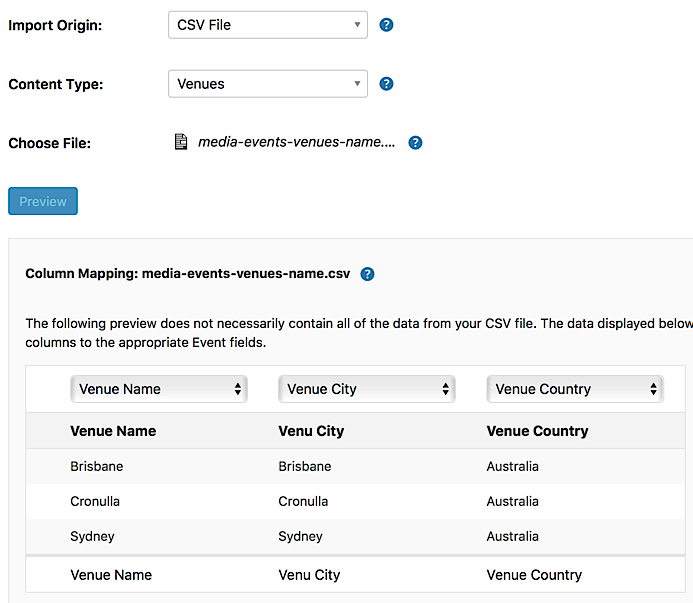
If you’re still having problems after confirming that your settings and column mappings match what’s seen here, let me know, and we’ll see where we can go from there!
May 12, 2017 at 2:50 pm in reply to: What is the difference between the Unlimited and the Multisite license #1283303MemberHi Elza,
Thanks for stopping by–happy to provide a little more clarification here! A WordPress multisite network is a special type of WordPress installation, which consists of a single WordPress install that houses a larger network of sub-sites. You might use a multisite network to create a social site, for example, where the main site houses content provided by the site administrator, and individual users can create their own smaller blog sites within that network. You can read more about WordPress multisite networks on WordPress’s documentation here.
For most users who wish to install our plugins on multiple sites, you’ll want to stick with our standard license types (Personal, Business, Agency, and Unlimited). A Multisite license cannot be used on multiple sites outside of a single multisite network.
I hope that helps! Thanks again, and let me know if you should have any other questions!
MemberHi Conrad,
Sorry to hear that making that change didn’t work for you with this CSV file! Are you able to share a link to the CSV file you used on your most recent attempt? I’ll be glad to take a look and see if I can reproduce the problem on my end. 🙂
Thank you!
MemberHi Conrad,
Thanks so much for reaching out! It looks as though your venue import may have failed due to the listed venues not having names (which are required for the custom post type by WordPress). Can you try adding a name for your listed venues and attempting your import again? If you’d like a template to guide you as you’re setting up your CSVs for import, you’ll find example CSV files for our various import types on our Knowledgebase here:
https://theeventscalendar.com/knowledgebase/csv-files-options-and-examples/
Give it a try, and let us know if this helps to resolve your issue! 🙂 Thanks again!
MemberHi Rion,
Thanks for reaching out, and I’m so sorry for the trouble here! It sounds like your license key may just be experiencing a little glitch with our servers–have you tried disconnecting the key from your site on TheEventsCalendar.com, then attempting to activate the key again on your site’s backend? This Knowledgebase article will walk you through the steps:
https://theeventscalendar.com/knowledgebase/moving-your-license-keys/
Give it a try, and let me know if these steps help to resolve your issue here! 🙂
MemberHi Amanda,
Thanks so much for reaching out–great question! An upgrade to an existing license will effectively “reset” the renewal date of your licensing; your upgraded license will be automatically extended out for one year following the date of your upgrade. For example, if you have a Personal license that is due to expire on June 1, 2017, and you purchase an upgrade on May 15th, 2017, your new expiration date will be May 15th, 2018, and you won’t need to renew prior to that date.
I hope that helps to clarify things a bit here! Thanks again, and let us know if you should have any other questions!
May 11, 2017 at 8:07 pm in reply to: Need refund–I accidentally just bought Events Ticket Plus twice #1282748MemberHi David,
Thanks for taking the time to reach out–so sorry for the trouble here! I’ve gone ahead and refunded your duplicate order as requested, and you should see those funds returning to your account in no more than 5-10 business days. 🙂
Cheers, and let us know if there’s anything else that we can do for you!
MemberHi Juan,
Thanks for taking the time to reach out! While we don’t offer a way to check tickets against the current date for multi-day events at this time, you can achieve this type of setup by simply creating three different tickets for your event (day 1, day 2, and both days) and checking the ticket type manually when scanning tickets at the door. Check-ins with Event Tickets Plus are one-time-only, so if a day 1 ticket is checked in once, the same ticket will return an error if it is scanned again on day 2.
You can learn more about check-ins and how they work with Event Tickets Plus (including information on what happens if a checked-in ticket is scanned a second time) on our Knowledgebase here:
https://theeventscalendar.com/knowledgebase/managing-your-orders-and-attendees/#navigating-attendees
Does that help to answer your question here? Let me know if you should have any other concerns or if I can clarify anything for you! 🙂 Thanks again!
MemberHi Craig,
Thanks for taking the time to reach out! Glad to see that you were able to find what you needed here! 🙂 It looks like you’re all sorted by now, so I’m going to go ahead and close this thread out. Cheers, and please don’t hesitate to follow up with a new thread if there’s anything else that we can do to assist!
MemberHi Jenn,
You’re so very welcome! Since you’ve gone ahead and marked your question as resolved here, I’m going to go ahead and close this thread out. Please don’t hesitate to follow up with a new thread if there’s anything else that we can do to assist! 🙂 Thank you!
MemberHi Part,
Thanks for following up! I’m afraid that we don’t offer any demo or trial versions of our products at this time–rather than rely on restrictive methods such as feature-limited trial downloads, we’ve chosen to instead provide a full 30-day refund policy for all of our plugins. Feel free to deploy the full versions of our products on your site and test the complete range of features at your disposal! Should you encounter any issues with your imports, you’ll have ready access to our premium support services, and we’ll be glad to process a refund for any reason within your 30-day trial should you decide that Event Aggregator isn’t right for you.
Thanks again, and please don’t hesitate to let us know if you should have any other questions or concerns here! 🙂
MemberHi there,
Thanks for following up! Absolutely–our Attendee Information feature lets you add as many additional fields as you’d like to your ticket forms as you’d like, and you can even save field groups to be applied to future, as well. We’ve got all the details in our Knowledgebase here:
https://theeventscalendar.com/knowledgebase/collecting-attendee-information/
Give it a look over, and let us know if you should have any other questions about this feature! 🙂 Thanks so much!
-
AuthorPosts