

Forum Replies Created
-
AuthorPosts
-
January 7, 2016 at 7:25 pm in reply to: Possibility to let users pay for placement of their events #1052258
Hunter
ModeratorHey Dennis,
We do not have an out-of-the-box feature to allow payment for event submissions at this time, but we are always taking new ideas on our UserVoice Feature Ideas page.
Also, I noticed you posted this under Pre-Sales Questions – if you have a valid license, please open a thread on the official Community Events forum and we’d be happy to assist you with more information.
I hope this information helps and have a great weekend!
January 7, 2016 at 7:07 pm in reply to: Google Structured Data Testing reports a warning about Knowledge Grap Events #1052250ModeratorHey Tim,
Welcome back to the forums! The error you’re seeing is because you haven’t entered a value in your cost field when adding/editing an event.
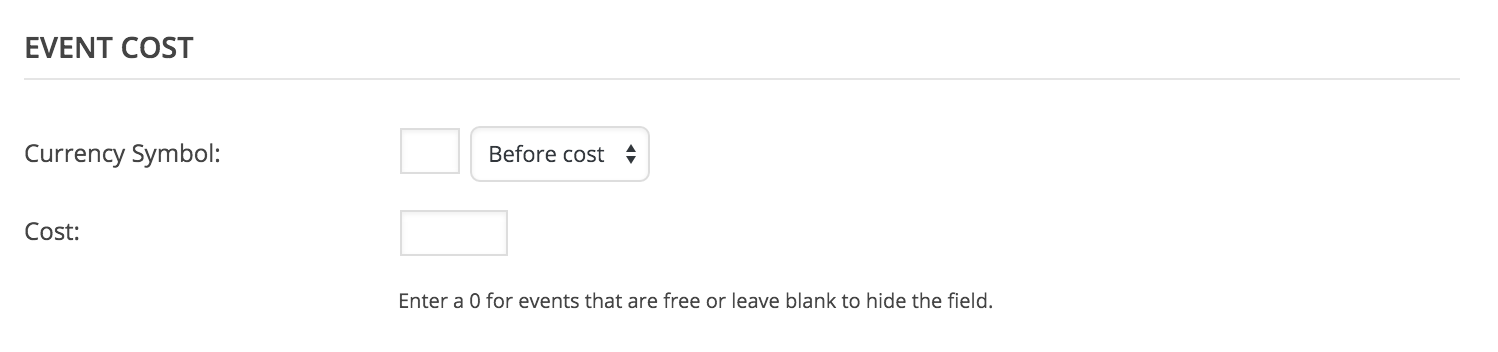
If you were to enter a value into the cost field and retest it through the Stuctured Data Tool, you should see that warning disappear.
Thanks again for visiting us on the forums and let me know if you have any more questions or comments!
ModeratorDaniel,
Thanks for your patience while I’ve done some more testing and research. Everything looks good on your system information, however I do want to point out that with as many plugins as you’re using, the likeliness of a conflict is fairly high.
I would recommend running through our “Testing for conflicts” article one more time just to make sure you’ve exhausted the possibility of an error on your side.
With that being said, I’ve logged your issue into our system as a “bug” – though we’re unable to recreate the issue at this time. Our lead developers work through bugs and do more extensive testing than the support team, so keep your eye on this thread and if/when we discover your issue to be an official bug, we’ll be sure and leave an update here.
Thanks again for working so patiently through this issue! If you experience any new issues, please feel free to open a new thread. Have a great weekend!
January 7, 2016 at 6:32 pm in reply to: Search in Month View not showing future month events #1052246ModeratorHello again and thank you for the response!
Again, I completely understand where you’re coming from and I see the value in your point. We are always adding new features and functionality into our suite of plugins and invite our users to voice their opinion on what they’d like to see in future releases. You can do so here.
Thanks for understanding both sides and again, thank you for choosing PRO and if you have any more questions, feel free to start a new thread.
ModeratorThanks for reaching out!
I noticed when viewing your events page source code that you have WP Super Cache activated. Have you tried deactivating it to see if the problem still occurs? Let me know if it does and we’ll continue troubleshooting.
Thanks again for contacting our support forums!
Moderatorcharrame,
Gwyneth is correct when she says, “Tribe have recognised it as a bug now and will be on the case” – we have logged the issue as a bug and will be addressed as soon as possible.
Thanks again for the patience on your end while we resolve the issue! Stay tuned to this thread for more detailed information for an update in the very near future.
ModeratorHey Margaret,
Hope all is well and we’re sorry to hear about the troubles!
To get things started, would you mind sharing your system information? Directions on how to do that can be found right here. Please reply back with the information as a private reply.
Next, have you gone through the detailed instructions on how to configure Eventbrite properly? This link in our Knowledgebase takes you to more information about the Eventbrite plugin. Try troubleshooting some and see if you can get the import to work properly.
Additionally, I noticed an error in the screenshot provided – “The page “Events” uses the “/events” slug: the Events Calendar plugin will show its calendar in place of the page.” which leads me to a few questions:
1. Does your site have a page whose title is “Events” and whose URL slug is /events? If so, remove this page – The Events Calendar will auto-generate its own /events “page”.
2. If you visit Events > Settings in your wp-admin, what is your setting for the “Events URL Slug” option? If you change this, then save your changes and then re-set it to the original, does that help with things at all?
Thanks for contacting our support forums and we look forward to getting this resolved!
January 6, 2016 at 6:56 pm in reply to: Search in Month View not showing future month events #1051551ModeratorHello 🙂
From a user-experience standpoint, I can definitely understand what you mean when you posed the question, “Shouldn’t it display the month of the first occurrence of the event?”
But the direction we chose for the month view made more sense when we dissected it a little further. I checked and when searching “Mardi Gras” in list view and the event displayed as designed.
To accomplish what you’re describing would take customization outside of our support, but if you’d like to attempt it, I can help point you in the right direction.
Thank you for being a great customer and have a wonderful rest of your week!
ModeratorHey Jamie,
Thanks for contacting us!
I checked your website and am indeed experiencing the issue you described. Would you mind sharing your system information as a private reply? Refer to this article on how to share your system information and we’ll go from there.
Thanks for choosing PRO!
January 6, 2016 at 4:54 pm in reply to: Filter Bar layout in list view versus month/grid view #1051495ModeratorHey Karen!
Thanks for posting to our support forums!
We don’t have a readily available solution on how to go about achieving what you describe other than reading through the Themer’s Guide, particularly the first section “Customizing Template Files”. I took a quick look and it looks like the folders/files you’ll need to explore are in plugins/the-events-calendar/src/views and plugins/events-filterbar/src/views.
Next you’ll need to browse the Technical Docs. A more specific page in regards to tribe_events_get_filters can be found here.
I hope this helps and please let me know if you have any follow-up questions or comments!
Moderator@Gwyneth,
Thanks for your patience while we’ve looked further into the matter. We’ve done more testing and have seen similar issues from other users, so we’ve logged a bug in regards to this issue.
I can’t promise we’ll have a fix in the next update, but it’s a pretty serious topic so we’ll treat it as such.
Again, thanks for letting us know about the problem and we truly appreciate your patience while exploring for the conflict and finding possible resolutions.
ModeratorApologies for the delayed response. After extensive testing and a few similar issues, we’ve logged a bug in regards to this issue. Look out for our next upcoming release and hopefully we’ll have this addressed. I can’t assure it will be in it the next release, but we are taking it as a serious matter and will prioritize accordingly.
Thanks again for your patience while we’ve worked through the troubleshooting process. Hold tight for a fix and we thank you for choosing PRO!
January 6, 2016 at 3:07 pm in reply to: Accidentally set the timezone to match incorrect WP timezone #1051465ModeratorVentrice,
Unfortunately we don’t have a way to get the events back to your desired time settings, but one method I can think of is doing an SQL query. You can find the related meta_key in your post_meta table. Look for _EventTimezone – with this info you could do an SQL query to update the events to the correct timezone. As always, I recommend backing up your site before making any changes in case anything goes wrong.
Apologies for not having an out-of-the-box solution, but we’re always adding new features from our UserVoice Features Idea page. Thanks again for your patience while we work through your issue!
ModeratorI had a wonderful holiday, thanks for the wishes!
So I’m still unable to recreate the problem you’re experiencing. I apologize for not asking for this sooner, but would you mind sharing your system information as a private reply? This will give us much more information to work with and help narrow down the issue faster (hopefully!)
To share your system information, please read this this quick article on how to do so. Let me know if you have any questions about the process. Thanks again and I look forward to hearing back!
January 5, 2016 at 6:42 pm in reply to: Accidentally set the timezone to match incorrect WP timezone #1050836ModeratorThanks for getting back to me!
Timezones can get confusing quick, but if an event shows 9AM UTC, that is technically correct because New York is -5 hours behind UTC, which would display as 4AM.
To get your event times displaying correctly, you’ll need to change your general site timezone setting to “New York”. Once you’ve done that, you’ll need to edit the time for the events displaying incorrectly. You will not need to delete the events, simply adjust the existing events to the correct time.
Let me know if this helps and thanks again for being so patient while we get caught up from the holidays!
-
AuthorPosts