

Forum Replies Created
-
AuthorPosts
-
Hunter
ModeratorThanks for getting back to me 🙂
The top bar you’re describing is not associated with The Events Calendar – it most likely has to do with another plugin you have installed and activated. You can try our Testing for conflicts article to try and help narrow down the culprit. We have added the “Events” to the WordPress admin bar for convenience, but again, the top bar is associated with WordPress itself rather than our plugin.
Good luck in resolving the issue and please open a new thread if you have a question or concern with any of our plugins!
ModeratorHey, Wellington 🙂
The top bar displayed in the screenshot provided is the WordPress admin bar that is typically displayed to logged-in users. There are a few different ways to approach hiding/removing it – here is a good article on some potential options.
We try and keep our forums relative to our own plugins, so please keep that in mind when creating new threads in the future 🙂
Thanks for choosing PRO and have a great rest of your week!
ModeratorExcellent!
Thanks for working with us to resolve the issue 🙂
I’ll go ahead and close this thread out, but please open a new one if you have any more questions. Enjoy the rest of your week!
ModeratorHello again 🙂
The events-page.php file is not generated by The Events Calendar. Our single event template file name is single-event.php. As previously stated, I think your best bet would be to read through our Themer’s Guide, particularly the first section, Customizing Template Files. It seems you’re experiencing a theme conflict, so the template overrides should solve your problem.
As for the styling, locate your style.css file in your active theme folder and add your styling changes there.
I wish I could be of more help, but unfortunately theme conflicts are out of the scope of support we’re able to provide in our support forums. Have a wonderful rest of the week and thanks for choosing PRO!
ModeratorHey, Dan!
I would be happy to answer your question 🙂
The functionality you describe is not a built-in feature, but with the right programming… anything is possible!
We are always adding new features and functionalities to our plugins, often times directly influenced by our users! Head on over to our UserVoice Feature ideas request form and let us know what you’d like to see in upcoming versions!
Thanks for stopping by and I hope to see you around on our premium plugin forums!
ModeratorHello, and good to see you back on the forums 🙂
After some quick research, I think the your best bet is to contact the theme author. I believe they have included their own templates/styles for the Incarnation theme and our plugins, which would be outside the scope of support we are able to provide.
It looks like your theme authors have had similar questions asked in their own forums, so they should be able to help get the issue addressed in no time.
Thanks for choosing PRO and if you have any more questions, please feel free to open up a new thread!
ModeratorHello, and welcome back to the forums!
I do indeed see the issue you described. It appears the problem could be coming from a template issue or theme/plugin conflict, which are unfortunately outside the scope of support we are able to provide. However, I would be happy to point you in the right direction.
Have you tried running through our Testing for conflicts article in our Knowledgebase? Another place I’d recommend reading through is our Themer’s Guide, particularly the first section, Customizing Template Files.
In regards to the size of the date/time font, try adding the code below to your CSS file.
.tribe-events-schedule h2 {
    font-style: normal;
    font-weight: 700;
    font-size: insert_font_size_here;
}
Let me know if either link provided helps address the issue you’re experiencing and thanks for being a wonderful customer!
ModeratorHello Birgit,
It’s hard for me to guarantee that is indeed where the code belongs. The most likely place you’ll need to insert it is at the bottom of your theme’s functions.php file. And before saving any changes, be sure to backup your database!
I would advise against working on a live server unless you have direct FTP access, preferably through a text editor so you can simply undo the saved changes.
I apologize I’m unable to provide more detailed assistance as these types of customizations are outside our scope of support. You may want to try and contact the author of your theme. Good luck and enjoy the remainder of your weekend!
ModeratorHey Birgit,
Welcome back to the forums! I believe the thread you refer to in your original post is found here, correct?
I did some quick testing on my local environment and found this gist on GitHub to produce the desired titles in combination with WordPress SEO (Yoast) rather than the snippet you originally shared. Try inserting the code the from the gist provided into the bottom of your theme’s functions.php file.
Please note that titles are affected by many factors, so your best bet is trial and error. Let me know if this helps!
January 8, 2016 at 7:48 pm in reply to: Change the position of Additional Fields in Submit Event page #1052915ModeratorWelcome back to the forums, Fernando!
Anything is possible with the Events Calendar PRO 🙂
To achieve what you’re describing does take customization outside of our support, but I’d be happy to point you in the right direction. The templates you’ll need to override are located in plugins/the-events-calendar-community-events/src/views/community.
Next, I’d check out the Themer’s Guide. We provide detailed information on how to go about creating custom template overrides.
Let me know if this gets you pointed in the right direction. Thanks again for choosing PRO and have a wonderful rest of your weekend!
ModeratorHey britta 🙂
Good to see you back on the support forums! There are a few different ways to achieve the layout you described. I recommend starting by trying different options found under Events > Settings > Display.
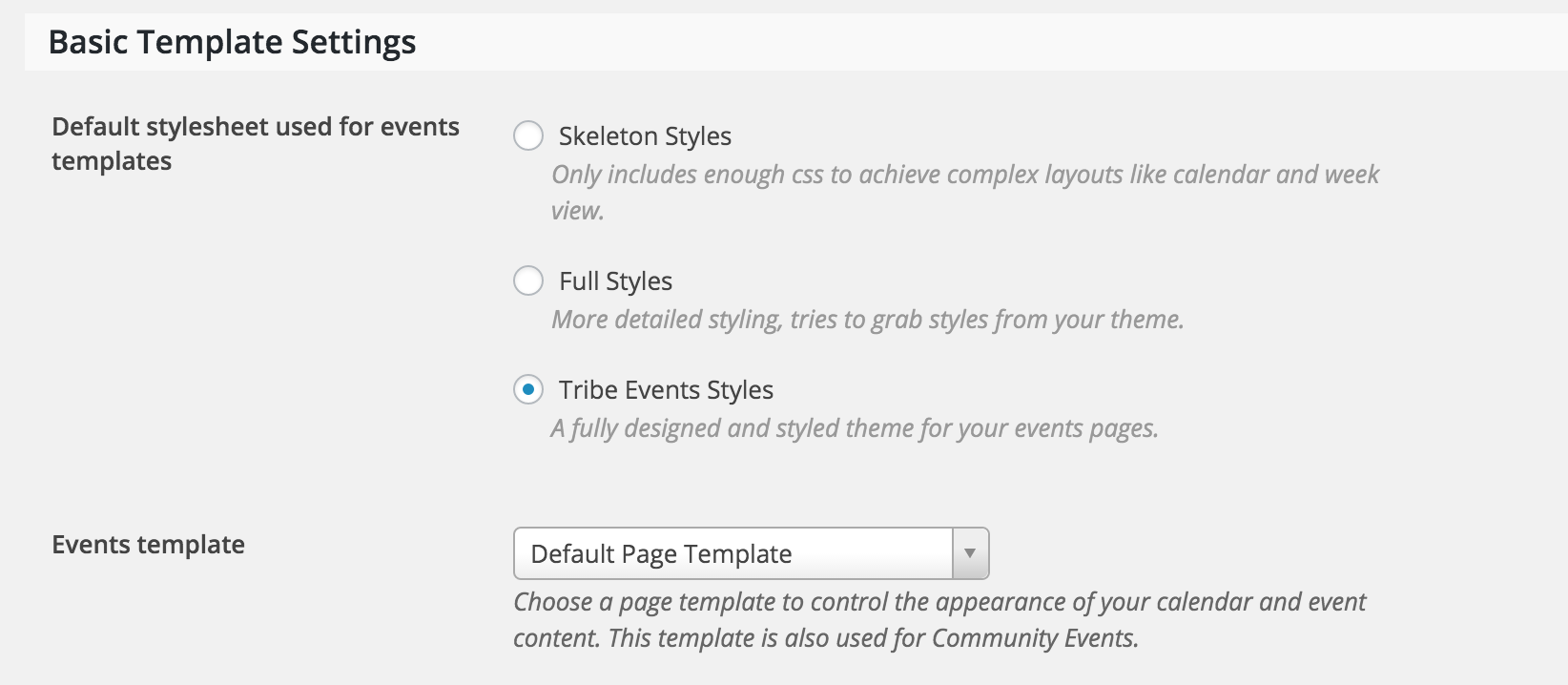
If troubleshooting there doesn’t work, the next step would be reading through our Themer’s Guide. Information regarding template overrides can be found at the top under Customizing Template Files.
Let me know if either of these accomplish the desired layout you described in your original post. Thanks again for reaching out to our support forums!
ModeratorHey Chris,
Good to see you back on the forums!
To achieve your desired layout for the Submit an Event form, take a look at the detailed instructions in the Themer’s Guide and Community Events Knowledgebase.
The Submit an Event form is located in the plugins/the-events-calendar-community-events/src/views/community folder.
I hope this information helps! Thank you for choosing PRO and let us know if you’ve got any more questions.
January 8, 2016 at 10:23 am in reply to: Search in Month View not showing future month events #1052723ModeratorHello Graphic,
Thank you for posting in the UserVoice, we truly appreciate it! To address the issue in reference, we do have a default notice appear when no results are found for that particular month (see screenshot below).

From a technical standpoint, the search results are correct, but people don’t think like computers.
You definitely nailed it here. Keep your eyes peeled for future releases and thanks again for your patience and understanding. I’ll go ahead and close this thread but please feel free to open a new thread if you have any more questions or concerns.
ModeratorHey Neelam,
Welcome to the forums! Sorry to hear about the problems you’re experiencing. I notice in your purchase history that you have 1 license for our PRO plugin, but I don’t see anything in regards to a Community Events license.
Is it possible you purchased it under another email address? The conflict you’re experiencing is most likely due to the different plugin versions you are running. The first step in resolving this problem would be to locate the necessary login information so you can access your Community Events latest plugin version and your license key.
If you need more assistance, please email [email protected] with the email receipt of your Community Events purchase. Please include a link back to this form thread in the email for reference.
Thanks again for choosing PRO and I hope this information helps!
ModeratorMargaret,
Glad to hear that solved the import issue and thank you for running through the instructions provided! And to answer your question, there are always benefits to upgrading to PRO, but the month view is a feature included in our free plugin. If you need to look over the features included in PRO, here’s a link to check them out!
With that said, I would like to point out that we try and keep issues focused on the original thread topic, so if you wouldn’t mind, go ahead and open a new topic in regards to the new issue you are experiencing and we’d be happy to assist you with that.
Thank you again for running through those steps to troubleshoot the problem! Have a great weekend and thank you for being a wonderful customer!
-
AuthorPosts