

Forum Replies Created
-
AuthorPosts
-
Hunter
ModeratorWelcome back to the forums, Justin!
My first hunch would be to check the “End of day cutoff” setting found in Events > Settings > General. Try adjusting it to a different time and see if the events display properly.

If you are still experiencing the issue, go ahead and respond back with your system information as a private reply. You can learn where to get that here.
Thanks for choosing PRO and have a great weekend 🙂
ModeratorHey John,
Good to hear and thank you for letting me know you’ve got it worked out! I’m going to close this thread out, but please feel free to open a new one should you have any more questions. Have a great weekend!
January 15, 2016 at 8:56 am in reply to: Only Display a User's Organizers and Venues (Redux) #1056682ModeratorMD,
I’d be happy to point you in the right direction. Check out plugins/the-events-calendar-community-events/src/views/community/modules/venue.php. It looks like you’ll need to explore the Technical Docs, more specifically tribe_community_events_venue_select_menu.
Good luck with it and thanks again for adding it to the UserVoice! Have a great weekend, Mad Dog 🙂
ModeratorHey Vincent,
Thanks for sharing the system information with us – it is much appreciated. I didn’t see anything obvious or out of the ordinary with the information shared.
Would you mind reactivating the Filterbar plugin? Once you’ve done that, visit your main Events page, right click on your mouse, select “Inspect” – let me know if you see any JavaScript errors displaying in the developer tools dashboard.
It appears their is a conflict of some sort, possibly between your theme, plugin(s), CDN, etc. The errors shown in your developer tools dashboard should help point you in the right direction.
Thanks for running through the steps as we work to address the Filterbar issue you’re experiencing and have a great weekend 🙂
ModeratorDennis,
You will need to create a template override for the plugins/the-events-calendar/src/views/list/single-event.php file. To achieve the desired line break, you will need to replace:
<!--?php echo implode( ', ', $venue_details ); ?-->
with:
<!--?php echo implode( '<br> ', $venue_details ); ?-->Let me know if this does the trick. Thanks for choosing PRO and good luck with the template override 🙂
ModeratorShannon,
Thanks for letting me know you’ve got your problem solved! Let’s hope John is as lucky 🙂
January 13, 2016 at 12:09 pm in reply to: Display Single Event Sidebar is broken & remove second H1-Tag #1055513ModeratorHey Andreas 🙂
In regards to problem #1 – can you please be a little more specific? Ideally you can share a direct link to the page(s) you’re referring to.
The second issue mentioned sounds like a template setting. Try selecting different options found under Events > Settings > Display.
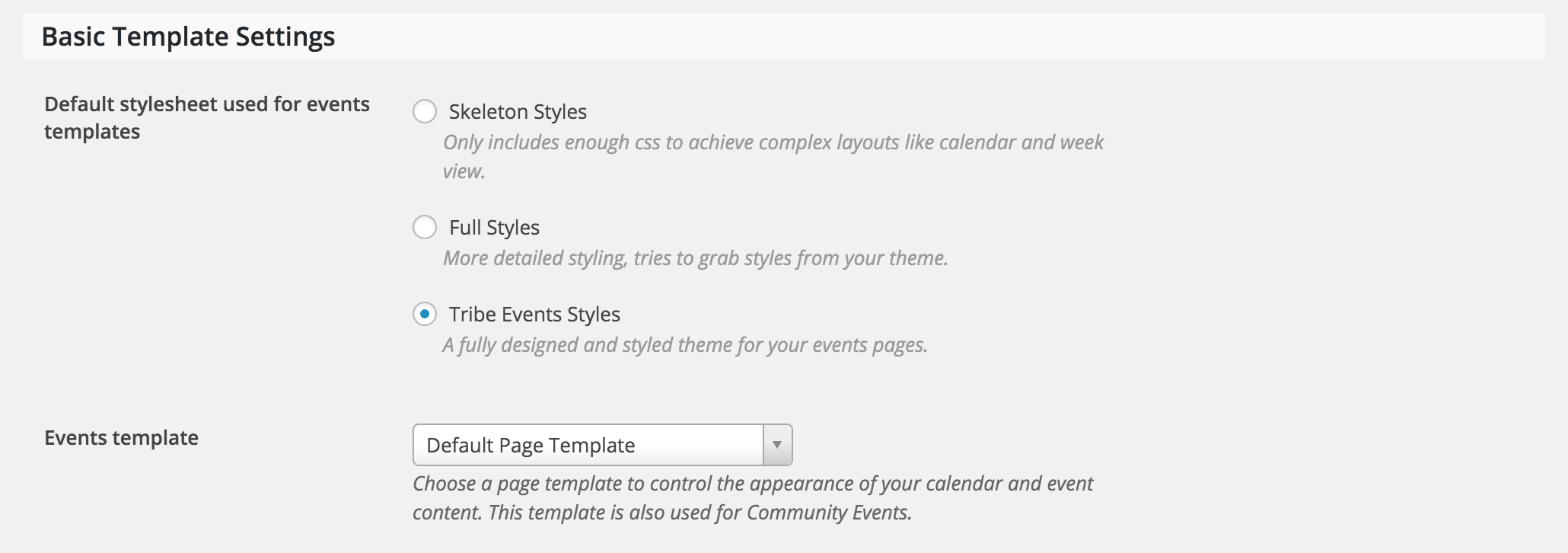
If that doesn’t work, the next option would be to create a template override. Instructions for doing overrides can be found in our Themer’s Guide, starting right at the top.
Let me know if either solution addresses the display issue! Thanks for choosing PRO 🙂
ModeratorHey Shannon 🙂
Would you mind opening a new thread in relation to the problem you’re experiencing? We try and keep topics separate as it helps expedite the process of addressing issues and avoids confusion.
Thank you and I’ll keep an eye out for an incoming thread. Have a great week!
ModeratorVincent,
Thank you for going through the Testing for conflicts article – it’s always a good place to start. I understand your frustration, but the good news is… I’m here to help 🙂
Let’s focus on the original topic as each issue you’re experiencing will require separate threads. With that said, would you mind sharing your system information with me as a private reply? You can learn how to do that here.
Again, thanks for your patience and willingness to troubleshoot while we work to resolve the issue!
ModeratorDaniel,
Thanks again for troubleshooting those steps one more time 🙂
Hold tight as I’ve submitted a bug. Our lead developers will be taking a look and doing a little more digging – if they haven’t started already.
Thanks again for your cooperation and patience while we work to resolve the issue! Stay tuned to this thread for more information.
January 12, 2016 at 3:15 pm in reply to: Only Display a User's Organizers and Venues (Redux) #1054889ModeratorHey Mad Dog,
Welcome back 🙂
I completely understand where you’re coming from. Unfortunately, not much has changed in the dropdown capabilities on the Submit an event page. Admittedly, the Venue dropdown is not as in-depth as it probably could be because it isn’t able to be filtered with a function. This means it comes down to building a replacement dropdown which would be a fairly advanced level of customization.
I apologize I can’t give you an easier solution to going about accomplishing what you describe! Thanks for understanding and if you have any more questions or concerns, feel free to open a new thread.
ModeratorWelcome to the forums, Dennis!
Thanks for the compliments – we also think it’s GREAT! To get started on accomplishing your desired results, head on over to our Themer’s Guide. Start right at the top under Customizing Template Files. I believe the template you’ll need to overwrite is plugins/the-events-calendar/src/views/list/single-event.php.
Thanks for choosing PRO and welcome again to the forums!
ModeratorHey John,
Welcome to the forums! I’ve checked the links provided and I do see the issue described. First things first… have you ran through the Knowledgbase in regards to the Eventbrite tickets plugin, more specifically Configuring Eventbrite Tickets – and based on your location, Configuring Eventbrite Tickets to use eventbrite.co.uk?
It sounds like you’re having some kind of breakdown in the plugin configuration, so hopefully one of these tutorials helps address the lack of communication between Eventbrite and your WordPress site. Let me know if this answer helps – if not, we’ll continue troubleshooting.
Thanks again for contacting our support forums and enjoy the remainder of your week!
ModeratorHey Vincent,
Welcome to the support forums! My first recommendation to solving the issue you’re experiencing would be to run through our Testing for conflicts Knowledgebase article. You are more than likely experiencing a theme and/or plugin conflict – so start there and let me know if you’re able to get the Filterbar to display results appropriately.
Thanks for choosing PRO and enjoy your Tuesday!
ModeratorHello again,
Thanks for letting me know the final verdict! I’ll go ahead and close this thread out, but please feel free to open a new thread if you have any questions related to The Events Calendar 🙂
Have a great week!
-
AuthorPosts