

Forum Replies Created
-
AuthorPosts
-
Hunter
ModeratorHey Danielle,
Sorry to hear about the troubles. When attempting to access your Past Events page, it appears there is some kind of conflict going on. I recommend reading through our Testing for conflicts article on how to address that. This will be the first thing you need to do in order to get the events to display properly.
And we need to include pages that list past events for each category.
Can you provide a little more detail on what you’re trying to accomplish? If you’re trying to add a link to past events for a category, simply visit the category page, select “Previous Events”, then copy and paste that URL into a menu item custom link and name it whatever you’d like.
I hope this information helps and thanks for choosing PRO!
ModeratorHey Tom,
Welcome to the forums 🙂
Based on the customizations you’re looking to do, I recommend reading through our Themer’s Guide. With that information, you should be able to accomplish exactly what you described in your post.
Thanks for choosing PRO and again, welcome to the forums. Have a great week!
ModeratorWelcome back Rick,
I removed the admin credentials provided in your private reply. I appreciate the offer for login details, but please refrain from sharing those with us as logging into customer sites extends beyond the scope of support we are able to provide.
Would you mind sharing a screenshot of the “Tickets” section of an event you’re having trouble with in the add/edit event screen in your WP-admin dashboard?
Also, I recommend checking out our Testing for conflicts article. This will help narrow down a potential theme and/or plugin conflict.
Thanks for keeping me updated and have a good day 🙂
ModeratorHey Bart,
Try selecting “Editor” role. Once you’ve done that, enable the role with “import” capabilities then save the settings. Let me know how it works out for you 🙂
February 4, 2016 at 1:56 pm in reply to: Event Calendar Pro problems after WordPress update #1067873ModeratorMichal,
I’m able to see the events page, but I am not seeing any obvious issues. Can you describe the problems you’re having since the update? Also, please check our Testing for conflicts article. This may help narrow down where the problem is coming from.
Thanks and have a good day.
ModeratorHey Ruud,
Apologies for the delay on our end. Ron has been out for the past couple days. When you visit Events > Settings > Display in your WP admin dashboard, you should see an option to enter the number of events you’d like to display (see screenshot below).
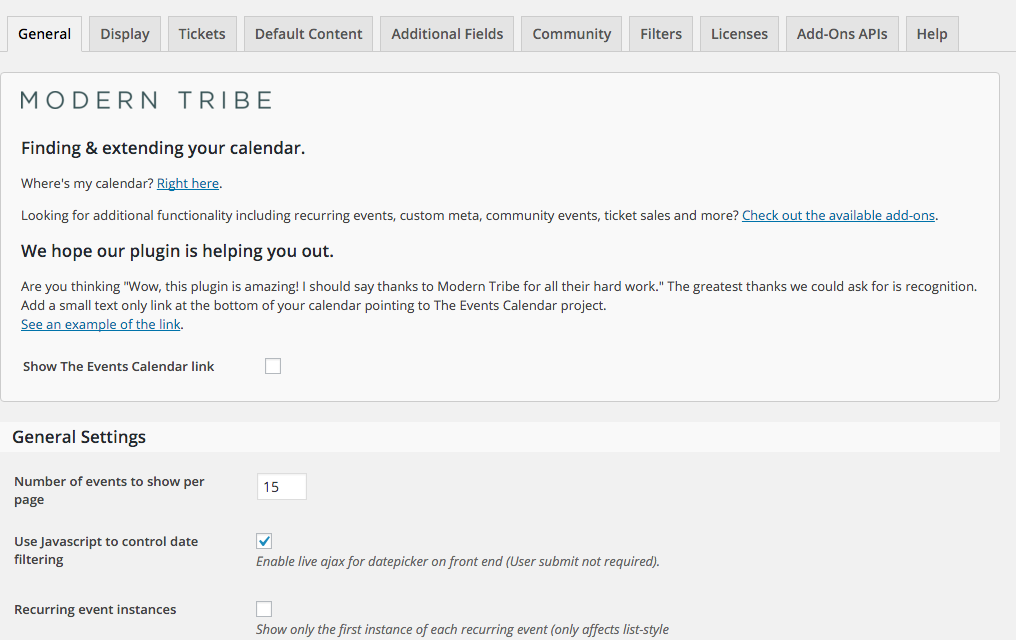
If you’re unable to get that working properly, please share your System Information with me as a private reply.
Thanks for choosing PRO and I look forward to hearing back 🙂
ModeratorHey Jon,
Unfortunately, the ability to create custom fields relating to tickets is not a built-in feature at this time. The tickets are a WordPress post type, so by using get_post_meta, it shouldn’t be too difficult for the right developer.
I don’t mean to lead you on, but I believe this is a feature already on our radar. I recommend visiting the UserVoice Feature Ideas page and seeing if it’s been added there (most likely has). If not, feel free to add it. We’re always exploring the UserVoice for the latest features and functionalities to add into upcoming releases.
Good luck with the customizations and thanks for choosing PRO. Have a great week 🙂
February 3, 2016 at 10:11 am in reply to: Adding navigation links above the calendar in Month View NOT WORKING #1067155ModeratorHey Konrad,
Sorry to hear about your troubles. Can you provide a link to the article you refer to in your post? If you can provide any screenshots for reference, that would be helpful too.
Thanks for choosing PRO and have a great day 🙂
February 3, 2016 at 10:07 am in reply to: Show full date range rather than first date and time. #1067153ModeratorHey Abby,
Thanks for posting to the forums 🙂
To better help me understand your question, would you mind linking to the thread where Josh provided that information?
Have a good day and thanks for choosing PRO!
February 3, 2016 at 8:33 am in reply to: Recurring events repeating multiple times in the same day #1067070ModeratorHey Sean,
Would you mind linking to the other thread you referenced? Additionally, I’m still having troubles recreating the issue. Would you mind providing me the step-by-step process you’re using when adding the event(s) you’re experiencing troubles with?
Thanks for the patience and I look forward to getting this solved. Have a good day 🙂
ModeratorHey Rick,
Sorry to hear about the troubles. Would you mind sharing a link to an event with the errors described in your post? Also, would you mind sharing your System Information with me as a private reply?
Thanks for reaching out and welcome to the forums!
ModeratorHey jussibr,
Unfortunately, the level of functionality isn’t available out-of-the-box (yet) – but head on over to our UserVoice Feature Ideas page. There may already be a similar idea submitted – if not, please feel free to add it! We are always looking into the newest and most popular requests to include in upcoming releases.
Thanks for understanding and best of luck accomplishing the submit event/login customizations. Have a good week and thanks for choosing PRO 🙂
ModeratorHey Bart,
You are correct – authors do not have permissions to access the Facebook Importer. Check out the User Role Editor plugin in the WordPress repository for adding/editing permissions for your WordPress users.
Hope this helps and thanks for choosing PRO! Have a great week 🙂
February 3, 2016 at 7:28 am in reply to: Event Calendar Pro problems after WordPress update #1067004ModeratorMichal,
I’m having troubles locating your events page on your website. Would you mind sharing a link with me?
And just to double check, you do have The Events Calendar installed and activated on your website, correct? In your System Information, it appears you don’t have that installed or activated. You need to be running The Events Calendar (free plugin) in addition to Events Calendar Pro (paid plugin).
Let me know if this information is helpful and I look forward to hearing a response. Have a great day!
ModeratorThanks for sharing the screenshot.
Unfortunately I’m unable to recreate the issue you’re experiencing. From the looks of everything you’ve sent over (links and screenshots) – it appears to be a theme and/or plugin conflict. I also noticed a Google Adsense script when viewing your source code – so there may be some conflict there as well.
I wish there was more I could do but as previously mentioned, I’m unable to recreate the issue and there are not bugs logged relevant to the issues you’re experiencing, both with the event search and map not displaying properly. I recommend checking our Testing for conflicts article one more time just to make sure you’ve completely eliminated the possibility of a theme and/or plugin conflict.
Thanks for understanding and best of luck narrowing down the contributing factor(s). Keep me updated on your progress and have a good week!
-
AuthorPosts