

Forum Replies Created
-
AuthorPosts
-
Hunter
ModeratorPeter,
Thanks for keeping me up-to-date with the status of your issue and I’m glad to hear you’ve got it resolved for the time being. I’m going to close this thread out, but please open a new one if you have any more questions.
Thanks for choosing PRO and have a great week 🙂
February 1, 2016 at 6:57 pm in reply to: Event Calendar Pro problems after WordPress update #1066060ModeratorHey Michal,
Thanks for sharing the System Information with me. It appears in your list of plugins that The Events Calendar or Events Calendar PRO are not installed and activated. Can you confirm this for me?
Thanks for the patience and I look forward to hearing back from you.
ModeratorHey Rhonda,
I’m sorry to hear you’re still having troubles, however the issue you’re experiencing is not directly associated with our plugins. Unfortunately, these types of issues extend beyond the support we’re able to provide through the forums.
I recommend trying a search in the WordPress repository for a plugin that can help improve your social media snippets.
Thanks for understanding and best of luck solving your Facebook preview issue 🙂
ModeratorAngela,
Sorry to hear you’re still having troubles. Would you mind sharing your System Information with me as a private reply?
Now the events are showing up in the importer
Where exactly are the events showing up? If possible, please share a screenshot of this step.
but when I go to import them all it does nothing.
Can you give more detail about this as well? Does the screen go white? The more detail you can provide, the better.
Thanks for your patience while we work to resolve your issue and have a good week!
February 1, 2016 at 6:36 pm in reply to: Recurring events repeating multiple times in the same day #1066048ModeratorThanks for getting back to me, Sean 🙂
I believe Francisco is correct. Additionally, check out our PRO Recurrence Events article; it goes into detail about how the recurrence rules work.
I recently helped another customer in regards to recurrence rules which provides a pretty solid answer about recurrence rules. You can see that thread here.
If you have any troubles, please send me the recurrence rules you need for “Group Active” and I can help provide more assistance. Have a good week and thanks for choosing PRO 🙂
ModeratorWelcome back, Olivia 🙂
When new versions of any of our products are available, you should see an update notice under “Plugins” in your WP dashboard. I’m not sure why the update notices aren’t showing up for you. One thing I can think is to make sure your license key is entered correctly under Events > Settings > Licenses. You can retrieve your license key under your Downloads page on theeventscalendar.com.
If installing a new plugin with this latest version, what will happen to all my already entered events for the currently installed version of the plugin?
I recommend updating your database prior to updating your plugins, but you shouldn’t lose any event data when doing the update.
Please keep me updated on the status of your progress. Have a good week 🙂
ModeratorHey Edwin,
Glad to hear one of the solutions worked for you 🙂
I’ll go ahead and close this thread out, but please feel free to open a new one should you have any more questions. Have a great week and thanks for choosing PRO!
ModeratorHey Maximiliano,
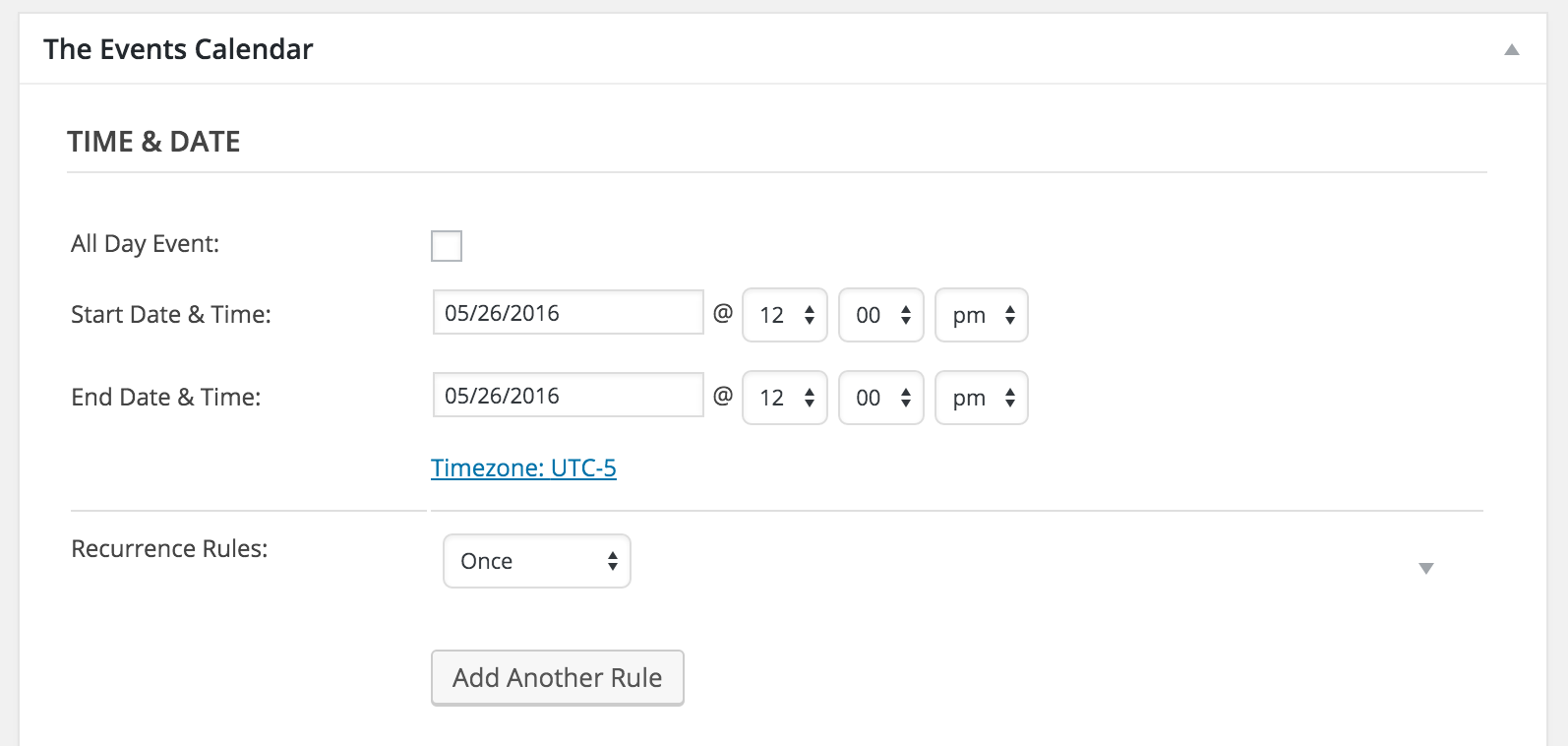
Sorry to hear you’re still having troubles. Would you mind sharing a screenshot of your “Time & Date” settings when viewing the “Edit Event” screen of an event you’re experiencing the issue with? (see screenshot below)
 January 29, 2016 at 8:30 pm in reply to: Only Display a User's Organizers and Venues (Redux) #1064756Moderator
Hello Mad Dog,
Thanks for sharing the solution. Don’t forget to back the customized files up before updating. I’ll close this thread out for now, but go ahead and open a new one should you have any more questions.
Have a good weekend 🙂
January 29, 2016 at 8:21 pm in reply to: Event Calendar Pro problems after WordPress update #1064754ModeratorWelcome back Michal,
Visit this link to learn how to share your System Information with me. Once you’ve located the necessary information, reply back privately.
Let me know if you have any more questions.
January 29, 2016 at 11:23 am in reply to: Today's Events widget : Hide hours on "all day" events #1064621ModeratorThanks for posting to the forums, Hervé!
I checked the screenshot provided and it appears the widget you’re referring to isn’t one of the widgets provided by our plugins. After taking a closer look at the source code, it looks as if it’s a theme feature rather than something included in our plugins.
Try contacting your theme author and see if they can provide any detail on hiding the “all day” time. Thanks for choosing PRO and have a good weekend 🙂
ModeratorOlivia,
Thanks for getting back to me,
It appears you need to update to the latest versions. You can find the latest version of The Events Calendar here and Events Calendar Pro by visiting your downloads page when logged into your theventscalendar.com account.
If for any reason you need a version you’re unable to download under the “Version” dropdown option, let me know and I can backdate your license accordingly.
Thanks for all the information and patience and let me know how the update goes. Have good weekend 🙂
ModeratorHey Olivia,
Sorry to hear you’re having troubles with the search functionality. Would you mind opening a separate thread in regards to your issue? I know it seems counter-intuitive, but it’ll help resolve both of your issues much quicker.
Thanks and I’ll keep an eye out for your new thread.
ModeratorHey Mikhail,
I’m not sure what’s going on with the link I’m trying to share, but I’ll just leave this here. Let me know if it helps!
ModeratorHello and thanks for the response.
I removed the admin login credentials provided by you in your private reply above. We are unfortunately unable to log into customer sites for any reason, so please refrain from sending over credentials in the future.
I also checked the link provided but it appears you are currently in maintenance mode. I notice in your system information that you are running versions 4.0 for both The Events Calendar and Events Calendar PRO. Would you try updating to the latest versions and see if the problem still occurs?
You should see update notices in your WP-admin dashboard. If not, you can download the latest version The Events Calendar here and Events Calendar Pro by visiting your downloads page when logged into theeventscalendar.com.
Thanks again for keeping me updated on the status of your issue and I look forward to getting this resolved with you. Have a good weekend 🙂
-
AuthorPosts