

Forum Replies Created
-
AuthorPosts
-
Hunter
ModeratorHello and welcome back 🙂
Sorry to hear about the license key troubles. If you haven’t already, please run through our Testing for conflicts article to see if you have a potential theme and/or plugin conflict in play.
One other recommendation I have would be to try entering the license key, click out of the license key box, hit save and wait a few seconds before navigating to a new page. Return to the license key page and see if it sticks. If either option doesn’t work, let me know and we’ll continue troubleshooting.
Thanks for posting to the forums and I look forward to resolving this issue. Have a good week!
ModeratorHey Jan,
Welcome to the forums!
Can you please provide a link to your main events page? Also, I noticed you deactivated all other plugins, but have you tried reverting back to the default WP theme?
Please read through our Testing for conflicts article. More than likely, you’re experiencing a theme and/or plugin conflict. This article will help track down the culprit and hopefully get you started in the right direction.
Please keep me informed on the status of your issue. Thank you for choosing PRO and again, welcome to the forums!
ModeratorHey Bill 🙂
Thanks for reaching out! We’d be more than happy to have you using Events Calendar PRO for your Non-Profit site!
With that said, your best route would be to submit a request through our contact form. We check the email daily and typically respond within 24 hours.
Also I would like to utilize it in the development stage before cut over to the final URL.
You are able to change the url your license is being used on at any time, whether it be a staging environment or your live site.
I hope this information helps and thanks again for contacting us. Best of luck with the site and NPO approval – have a good weekend!
ModeratorWelcome back,
To answer your question, the post types are tribe_events, tribe_venue, and tribe_organizer. You might also want to contact your hosting company to see if they can increase your limits. Before trying an SQL query, take a look at these plugins. You should be able to export events from your old site and import them into the new site:
Best of luck with the data transfer and have a good weekend!
ModeratorLee,
Thanks for the update on the progress of your issue. Others are experiencing similar issues, so I’ve added this forum thread to our logged bug ticket. If a fix for this bug is included in an update, it will be mentioned on theeventscalendar.com/blog and in your WP-admin dashboard.
Thanks for submitting your inquiry via our forum threads as they help us build more efficient products! Have a good rest of your weekend 🙂
ModeratorNick,
Thanks for keeping me informed on the status of your issue and I’m glad to hear it’s been resolved. Please open a new thread should you have any more questions. Have a good weekend and thank you for choosing PRO 🙂
ModeratorAwesome!
Glad to hear you’ve got it going 🙂
I’ll close this thread out but please open a new one should you have any more questions. Have a good weekend!
ModeratorGood day, Dutchess 🙂
We do have a built-in setting for cleaning up recurring events, but there is no built-in setting that allows you to delete single events based on date (see bottom field of screenshot below).
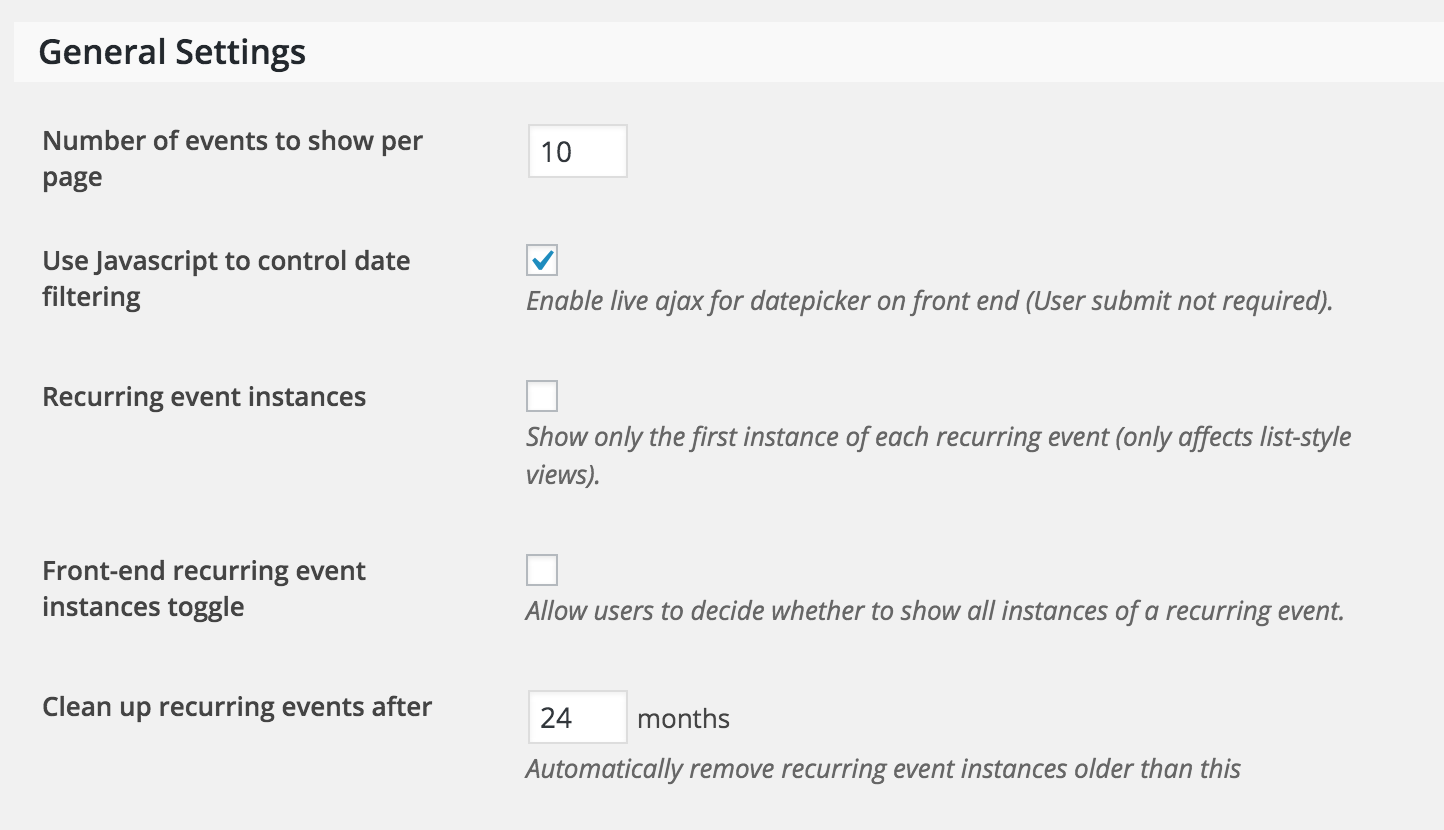
One way you could delete events based on date would be to do an SQL query. As always, we recommend backing up your database prior to running any SQL queries.
I hope this information helps and best of luck cleaning up your old events!
ModeratorHello, Danielle!
Unfortunately that kind of customization is not available right out-of-the-box. Depending on the extent of capabilities you’re looking for, I don’t see it as too difficult a project to accomplish. Our Technical Docs support section will come in handy should you choose to add in that feature.
Also, as this is a support-related question, please post these types of inquiries to their appropriate forums rather than the Pre-Sales channel. Thank you reaching out and best of luck with the new functionality 🙂
February 11, 2016 at 9:51 am in reply to: Week customization not working after event calendar update #1071614ModeratorHello and welcome back,
Our Themer’s Guide goes into great detail on how to achieve template overrides. Read through that if you haven’t already and let me know if it helps get you started in the right direction.
Additionally, LevelUp Tuts on YouTube is one of my personal favorites on learning how to do template overrides (and pretty much everything else!) Good luck on the customizations and thanks for choosing PRO 🙂
ModeratorHey Nick,
Welcome back to the forums 🙂
We’ve got a KB article geared towards fixing the issue you describe right here. Take a look and see if it helps solve your problem. Please let me know how it goes!
Have a good day and thanks for choosing PRO!
ModeratorWelcome back,
I truly do apologize you’re experiencing issues. One option you can explore is found under Events > Settings > Display in your WP-admin dashboard. Try different settings and see if you’re able to get the look you want.
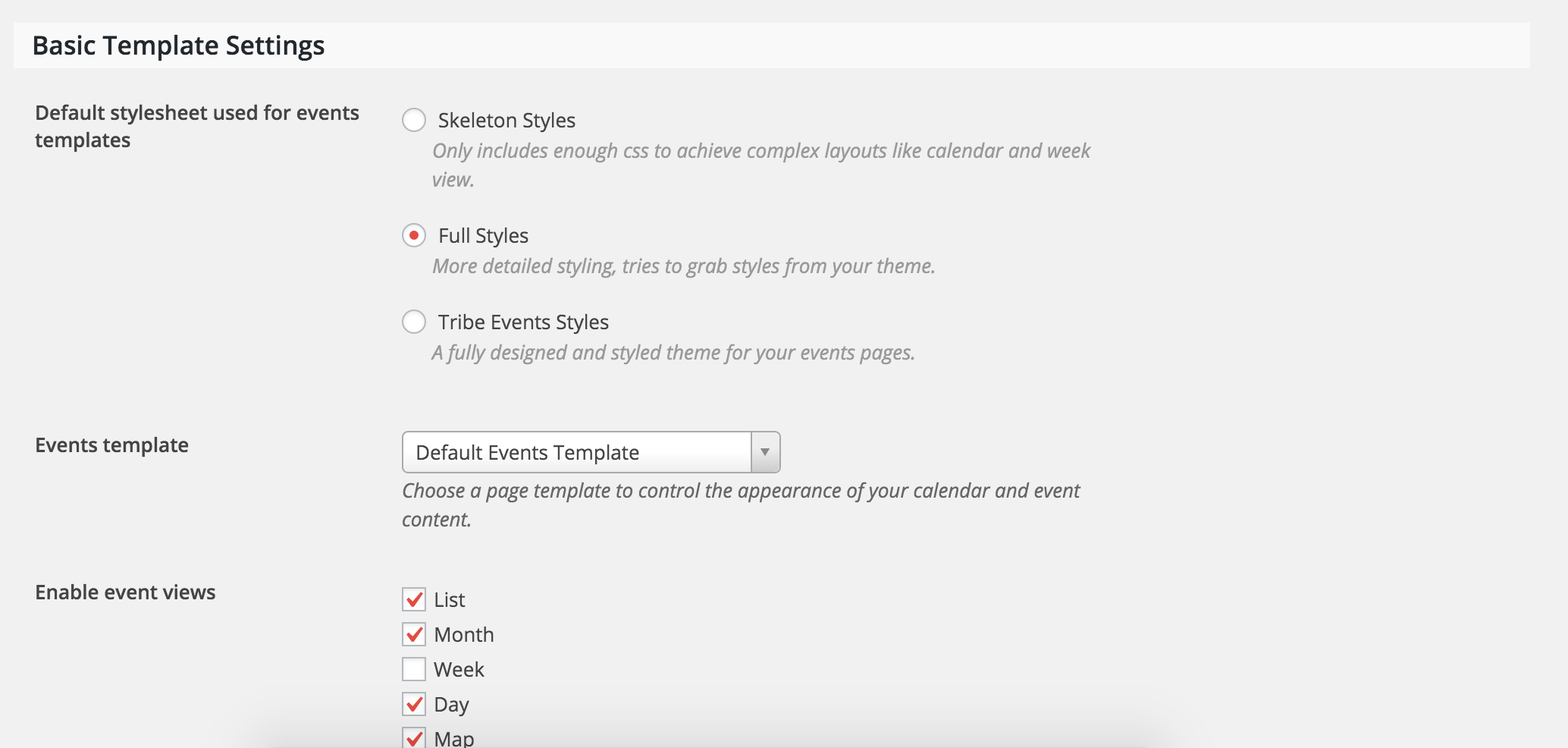
I feel confident therefore that the conflict is between The Events Calendar Pro and the Cherry Framework 4.0.5.1 theme.
I believe there is a theme conflict going on as well. As previously stated, theme conflicts and customizations extend beyond the support we’re able to provide. You can learn more about template overrides by doing YouTube searches for relative keywords. Between that and the documentation provided in the Themer’s Guide, you should be able to get started.
Again, sorry I can’t be of more assistance and best of luck with the customizations 🙂
ModeratorHey Lee,
Thanks for the update. Have you tried running through the steps I recommended in my first response? If not, please go ahead and try that just for good measure. There is a good possibility you are experiencing 404s due to the – in your events slug; but try all that out and if you still get the error, I’ll try reproducing it. If I’m able to, I’ll add this thread to the already logged ticket.
Thanks for the patience and I look forward to your response. Have a good one 🙂
February 10, 2016 at 10:47 am in reply to: Upgraded Events Calendar Pro – Events Were Deleted #1070970ModeratorHello and sorry to hear about the troubles,
The upgrade in no way should have altered/deleted the existing events. If you can remember – what version were you updating from? Additionally, can you confirm the information is no longer in the database?
One way I can think of to possibly go about recovering the lost data would be to contact your hosting company. They usually have weekly backups available for free or a small fee.
Again, sorry to hear about the potential loss of data. I don’t mean to point out the obvious, but we always recommend making backups prior to updating themes/plugins.
Let me know if any of this information helps and best of luck getting it all addressed. Have a good day 🙂
ModeratorWelcome back, dellydooley!
Theme customizations and support are unfortunately a little out of our hands, but we have created a few helpful tutorials on how to narrow down potential theme and/or plugin conflict issues. First, check out the Themer’s Guide. Next, read through our Testing for conflicts article.
Best of luck narrowing down the issue and keep me posted on whether or not either article helped.
Cheers!
-
AuthorPosts