

Forum Replies Created
-
AuthorPosts
-
September 13, 2016 at 9:49 pm in reply to: In List view, text no longer right of photo in WP 4.6.1 #1163786
Hunter
ModeratorHey Craig,
Thank you for reaching out and being so thorough. Can you confirm if the issue occurs after reviewing our Testing for conflicts guide? Also, do you see different results after trying different options found under Events > Settings > Display? If you want, send over a link and I can provide some CSS that can help with the content width issue.
Thanks again and have a great Wednesday. Cheers!
ModeratorHello JC,
We are unfortunately unable to provide support through our Pre-Sales forum channel, but you can head over to The Events Calendar WordPress.org support forums for assistance and answers.
If you have a PRO license, you can log into your account and get assistance through the PRO forums.
Thanks for understanding and good luck resolving your issue. Have a good day!
ModeratorHey Matt,
Welcome to the forums. The best way to confirm it is indeed a theme issue is to review our Testing for conflicts guide. Reply back with your findings and we’ll go from there. We are limited on the amount of support we can provide for theme conflicts, so another good article worth reading is our New User Primer.
I look forward to your response and have a great evening. Cheers!
ModeratorHey Atul,
Welcome back! Our Themer’s Guide is the best way to go about editing the emails. You’ll need to check out the files in /event-tickets/src/views/ and make changes to necessary files.
I hope this helps and please let me know if you have any more questions. Cheers!
ModeratorWelcome back,
Can you send over your System Information as a private reply? Also, I checked on a site running ECP and am not experiencing the same behavior. Can you confirm the issue occurs with the default WP theme and only our plugins active?
Thank you and have a good evening. Cheers 🙂
ModeratorSimon,
Thank you for your patience. I did some testing and can confirm I experienced similar behaviors, but I’m going to need a little more time to try and narrow down the exact source of conflict. I’ll report back to this thread with more information once I’ve finished up my testing.
Thanks again you for your patience and detailed responses as they’ve been extremely helpful. Stay tuned and have a great Wednesday. Cheers!
September 13, 2016 at 9:15 pm in reply to: Filtering events by date does not work on category specific events pages #1163768ModeratorHey Russel,
Thank you for reaching out and following up with a viable solution. I’m going to do some research on the matter and check our bug reports to see if we have anything resembling what you’ve described logged. If not, I’ll create a new bug including the details provided. Either way, I’ll link this forum thread to the bug report for the developers to reference while making improvements.
Thanks again and stay tuned for an update. Cheers 🙂
ModeratorHi Ch,
Welcome back! You can hide or remove the export button by reading over our Removing “Export” Links from Event Views KB article.
Let me know how it goes and have a great evening. Cheers!
ModeratorThis reply is private.
ModeratorSounds like a plan, please keep me updated on the status of your issue. Cheers!
ModeratorTed,
Thank you for the response. As much as I loathe asking users to run through the Testing for conflicts guide, it is required to ensure the conflict isn’t coming from your theme and/or another plugin, which we don’t support. (see What support is provided for license holders)
Reply back with the results of your testing, your System Information as a private reply, and please include the 8 iCal links as well and I’d be happy to test the issue myself. Thanks again and take care.
ModeratorHey Jackson,
Thank you for the in-depth response. I took a look at everything provided and am really not sure where the problem is coming from – whether it be a WP timezone issue, Events Calendar timezone issue, sitemap issue, or coming from Google. Have you done any research on the matter outside searching our forums? In other words, have you found any documentation from Google on how to “debug” the incorrect times it’s displaying to see where the issue is specifically coming from?
I’ve never worked with a business that displays the events in Google as you’re seeing, so I don’t have any expertise on this and I’m not seeing any logged bugs or an influx of users reporting similar behaviors. Let me know what else you’re able to find and I’d contact Google as they’re pretty helpful on these matters.
Keep me posted and thanks again. Cheers 🙂
ModeratorHi Denise,
Glad to hear you’re on the right track! If you visit Events > Settings > Display, make sure the ‘Photo‘ checkbox is checked (see screenshot below). You’ll then visit your-site.com/events/photo to see the grid style you shared in the 2nd screenshot.
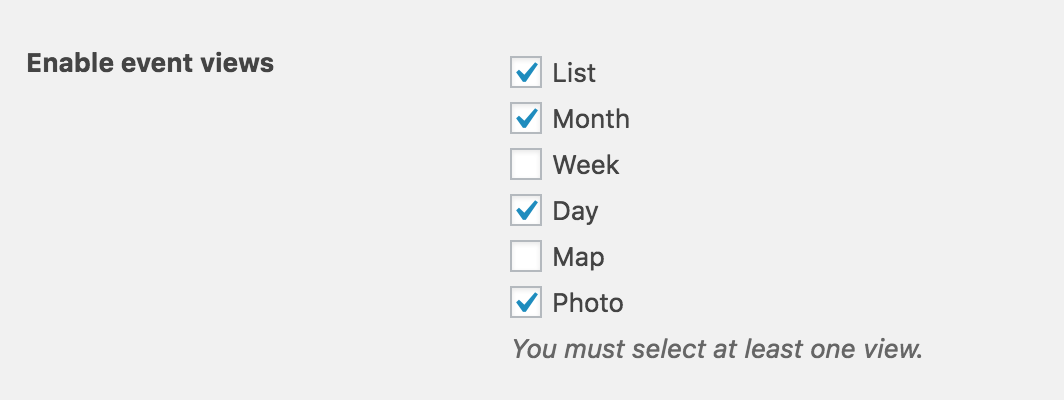
Let me know if that answers your question. Have a great afternoon 🙂
ModeratorHey Becky,
My sincerest apologies for the delayed response! The best way to go about this would be to create custom templates as explained in our Themer’s Guide. Simply locate the file you’d like to overwrite and be sure to save in [your-theme]/tribe-events to avoid losing customizations. Let me know if you need any more instruction and I’ll do my best to accommodate.
Have a great afternoon. Cheers!
ModeratorHey Justin,
Thank you for reaching out via our Pre-Sales Channel! I’d be happy to help answer your questions to the best of my knowledge. It sounds like a membership plugin will be beneficial based on what you’ve described.
Our plugins allow for displaying events, selling tickets to your events, importing events from Facebook and Eventbrite and many more awesome features, so with the right combination of plugins I don’t see any reason why you can’t accomplish the site you’ve laid out for me.
I hope this helps answer your questions and please let me know if anything needs more clarification. Have a great evening and thanks again for contacting us. Cheers!
-
AuthorPosts