
Home › Forums › Calendar Products › Events Calendar PRO › venue and organizer admin page missing
- This topic has 10 replies, 3 voices, and was last updated 10 years ago by
Hunter.
-
AuthorPosts
-
September 8, 2016 at 9:39 am #1161591
Denise
ParticipantHello
I just installed PRO. Doumentation states
The top two options allow you to set a Default Venue or Default Organizer, using a dropdown. The dropdown lists all of your published organizers or venues, which are editable from the Venue and Organizer admin pages. If you don’t want to use a Default Venue or Organizer, leave the dropdown blank or select No default.
I do not see the Venue and Organizer admin Pages. I cannot edit/add/delete.
plugin is loaded in a dev folder @ believegitm.com/2016
Please advise
Thank youSeptember 8, 2016 at 2:48 pm #1161770ModeratorHi Denise,
Welcome to the support forums! Can you try adding a new venue/organizer under Events > Venues and Events > Organizers and revisit Events > Settings > Default Content and see if you’re new venues and organizers display in the dropdowns?
Let me know how it goes and thanks for choosing us for your events calendar needs. Cheers!
September 8, 2016 at 2:59 pm #1161776ParticipantHello
Thank you for the quick response. The issue is that I do not seeEvents > Venues and Events > Organizers
anywhere within the plug in
Please advise
Thank you!
September 9, 2016 at 10:53 am #1162165ModeratorDenise,
Do you see the options for Venues and Organizers after reviewing our Testing for conflicts guide? Reply back with your findings and we’ll take the next step. Thank you for the update and have a great rest of the day. Cheers!
September 9, 2016 at 6:34 pm #1162338ParticipantYes, I can now see the
Events > Venues and Events > Organizers, and able to add/edit/delete organizers and venuesThank you
second question – how do i add the calendar to a location on the webpage? I have purchased the Envato Social Activism template which uses Calendar Pro in their demo. I cannot figure out if i need to embed something?
September 12, 2016 at 11:00 am #1162908ModeratorHi Denise,
Forgive me if I’m confused, but I believe you’re asking where to find your events once you’ve created and published them? If so, visit Events > Settings > General and look for the ‘Events URL slug’ setting (see screenshot below).

Our plugin doesn’t actually create a page, but more of an archive, so you’ll visit your-site.com/events (or whatever you have for the aforementioned setting). Let me know if this helps answer your question and if you haven’t already, I recommend reviewing our New User Primer as it contains a plethora of useful information.
Have a great afternoon and thank you for keeping me posted. Cheers!
September 12, 2016 at 5:54 pm #1163139ParticipantThank you for checking in. I appreciate the direction to the Primer as well. I would like to duplicate what appears on the demo site for the template I purchased. I’ve attached a screenshot of what I hope to accomplish and it includes the URL to the template demo site.
So far, I can only get a list view to appear – see second screenshot
September 13, 2016 at 1:02 pm #1163580ModeratorHi Denise,
Glad to hear you’re on the right track! If you visit Events > Settings > Display, make sure the ‘Photo‘ checkbox is checked (see screenshot below). You’ll then visit your-site.com/events/photo to see the grid style you shared in the 2nd screenshot.
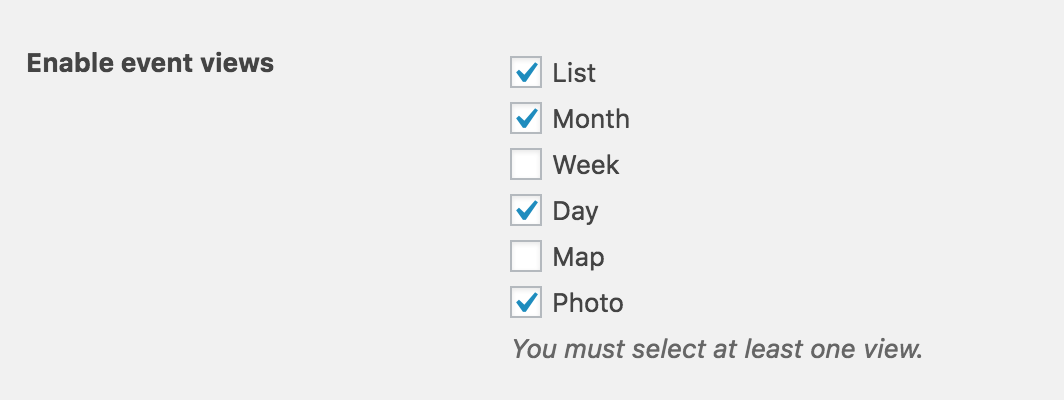
Let me know if that answers your question. Have a great afternoon 🙂
September 14, 2016 at 7:56 am #1163897ParticipantHello
Thank you so very much for your assistance. I have the page looking how I want! Great plug in and I highly recommend it.
Denise
September 14, 2016 at 12:29 pm #1164152ModeratorDenise,
Thank you for the kind words and I’m glad to hear you’ve got everything worked out for the time being! If you run into any more questions or concerns, please feel free to open a new thread. Have a great afternoon. Cheers 🙂
-
AuthorPosts
- The topic ‘venue and organizer admin page missing’ is closed to new replies.