

Forum Replies Created
-
AuthorPosts
-
George
ParticipantHey folks!
You can indeed disable the iCal link on your site – there are actually several ways to go about doing this, but the most simple way is just to add CSS like the following to the very bottom of your theme’s style.css file:
a.tribe-events-ical.tribe-events-button {
    display: none !important;
}
Let us know if this helps!
— George
ParticipantHi Carl,
All of your questions here are unfortunately customization-related questions outside the scope of support we can provide here. I’ll try to offer as much insight as I can here, but the main point for all of your questions is the custom styling / coding / queries / etc. are all things you will have to take the reins on entirely. Sorry to disappoint!
I’ll try to address some of your concerns here:
i would like to display related events on my single-event.php how can i achieve this ?
This is quite complex to do with custom code, but the PRO add-on does already include a “related events” module that you can activate in Events > settings in your site admin.
also i would like to display a different side bar to default-template how can i solely constomise my single event which will not effect my event listing and vice versa.
This question and some of your others related around separating styles or PHP code from default-template.php and from the single-event templates – you can get more granular with this sort of separating than I think you’re doing at the moment, by simply breaking up your customizations across all of the various versions of single-event.php in the Plugin views.
If you haven’t already, you can study this whole system here → https://theeventscalendar.com/knowledgebase/themers-guide/
I’m sorry to disappoint about the limitations with our support for customizations Carl, let us know if anything I provided here is helpful or if you have further questions or concerns we might be able to shed some light on.
Thank you!
GeorgeParticipantHey Surrealer,
I’m sorry to hear you’ve run into trouble here. However, can you clarify exactly what you mean about “filtering” the ID from the URL?
Do you mean that you just want to be able to paste any Facebook URL into the importer page, and have it automatically grab that event without issue?
If so, then this is a neat idea, and we appreciate you sharing your feedback related to it. However, it would unfortunately not be just 1 or 2 lines of code, as far as I can think. If the only type of Facebook URL was the one you posted, it would be, but there’s an enormous range of possibilities for what a URL from Facebook could look like – a wide set of possible locations for the event ID to be located, in other words.
So I agree it would be more convenient in some ways, but for now I don’t think our method of ID entry would change substantially any time soon. I’m sorry if this is a disappointment! I just want to help set expectations reasonably and not promise you something we won’t deliver 🙂
Despite all of what I said here, I’m not lying about your idea fundamentally being a good one – it’s harder to implement than you might expect, but a good idea, and other folks might want the same improvements that you do. If you have the time, you should definitely post your idea in our “User Voice” page here → http://tribe.uservoice.com/forums/195723-feature-ideas
People can vote-up your idea if they like it – we pay attention to this page more than you might expect, and often integrate ideas from it into product updates.
Make your voice heard there, and let us know if you have any other questions/concerns/etc.
Thank you!
GeorgeParticipantHi Martin!
Unfortunately, no, you cannot enable users to submit their own events with Events Calendar PRO. We do have a separate add-on called “Community Events” that enables these features though – check that out here if you’re interested: https://theeventscalendar.com/product/wordpress-community-events/
I hope this information helps. Cheers!
George
ParticipantHi Eric!
Thanks for your interest in the add-on – there’s fortunately good news here, in both cases. Yes, the Facebook Importer will import an event’s “featured image”, and No, you do not need the PRO [or any other] add-on for The Events Calendar to use the Facebook Importer. You can just use the core/free version, and then add Facebook Importer, and be good to go! 🙂
Let us know if this helps and if any other questions arise.
Thanks!
GeorgeParticipantHi Charlotte,
Thank you for the screenshot! It turns out that this thread was marked “Solved” because you accidentally clicked the “Correct Answer” button on one of your own posts there.
However, the thread is still open and you’re able to post here, so I’ve closed your other threads that are duplicates of this one to keep things organized, and keep our conversation in one place here.
Now, unfortunately, there may not be much left to this conversation since your site’s styling issues are things you’d have to handle separately from The Events Calendar. I’d recommend contacting your theme developer for help here…
…However, before just outright closing the thread, I can recommend some things that will hopefully help a little bit 🙂
First on the list is to download a [free!] tool like Firebug if you use FireFox, or the Developer Tools for either Safari or Chrome, and learn the basics of using them. They all have “Inspector” tools that let you zoom right into an element on your page and see what CSS you’d have to write to fix its appearance.
If you’re not familiar with CSS, then no worries – you can get quite far by simply googling specific issues you run into, e.g. “How to change text alignment with CSS”, “how to change text color with CSS”, etc.
As I’ve mentioned probably too many times already, we only provide very limited support for customizations, but I know how frustrating it can be to have layout issues like you have right now, so I’d love to offer some specific examples for you that you can use on your site. For each example, copy and paste the code into the very bottom of your theme’s style.css file.
First, try the following CSS to add some “breathing room” to the elements on your page:
#tribe-events dt {
    font-weight: 700;
    margin-top: 1.25em;
}
Here’s how that looks for me on your site → https://cloudup.com/cqe90nz6K7D
Next, some styling to move the calendar links into a better spot:
.tribe-events-cal-links {
    clear: both;
    float: left;
    overflow: hidden;
    width: 100%;
}

.tribe-events-cal-links a {
    clear: none !important:
}
Finally, you can add some spacing around the whole meta sections like this:
.tribe-events-meta-group {
    border-top: 1px dashed #000;
    margin-bottom: 4em !important;
    margin-top: 2em !important;
}
Here’s how all this looks on your page when I tried it out: https://cloudup.com/c0Kv_xWw_C5
Not bad for a quick example! 🙂
Play around with things a bit, save all changes you make, Google anything you’re not familiar with, and hopefully you can put something workable together here. Let us know if this helps Charlotte!
Thanks,
GeorgeParticipantHi Charlotte,
It turns out that the thread you posted in is marked “Solved” because you accidentally clicked the “Correct Answer” button on one of your own posts there.
However, the thread is still open and you’re able to post there, so I’ll close this thread and keep the conversation there. Any further questions have about this topic should remain in that thread.
Here’s a link to it:
Sorry for any confusion around this “Correct Answer” button, I’ve removed your selection of this item so hopefully it shouldn’t say “Solved” at this point any more.
Thank you!
GeorgeMay 22, 2015 at 7:29 am in reply to: Events Showing Up in SummerStage Category Listing that Shouldn't Be #964458ParticipantHey Stephanie!
Thanks for the kind words, hopefully you’re having a nice Spring as well 🙂
I’m sorry for some of the frustration you’ve undoubtedly had related to this issue, but it seems like it might be a fairly simple one to solve.
I could be wrong, but it appears that your “Summerstage Kids” category is working correctly, but is actually also a sub-category of the main “Summerstage” category.
Is this intentional? If you’re not even 100% certain about what I’m referring to here, what I mean is that in WordPress, categories (and Event Categories, too) can have “child” categories. For example, if you had a category called “Music”, you could have “Child” categories related to it like “Classical”, “Blues”, “Rock”, etc.
If you know all this and have Summerstage Kids intentionally configured as a child category of “Summerstage”, then unfortunately, the way WordPress works it will keep showing up in the parent “Summerstage” category pages. To remove that you’d have to make “Summerstage” and “Summerstage Kids” both separate parent categories, and not have the latter be a child of the former.
You can see if a category is a child of another by going to Events > Event Categories in your admin area. Look for Summerstage Kids – if it’s a child of Summerstage, it will be indented with a dash in front of it, like the music genres underneath “Music” in my screenshot here → https://cloudup.com/cR2nHZQbHYM
If you click “Edit” for the category, you’ll be able to separate it from the parent category and save your changes. Then, go to Settings > Permalinks in your admin, click “Save Changes” without actually changing anything (this just refreshes the permalinks across your site), and check out your category pages again.
I hope this helps! Let us know what you think.
Thanks,
GeorgeParticipantHi Charlotte,
Thanks for reaching out to us here – to address your questions in reverse order, I’m curious, what makes you say that this ticket was showing as “solved”? When I came to this ticket, I found that its status was “New”, and then after I assigned it to myself, “Assigned” – both expected statuses for a new ticket. Here are screenshots showing what I saw:
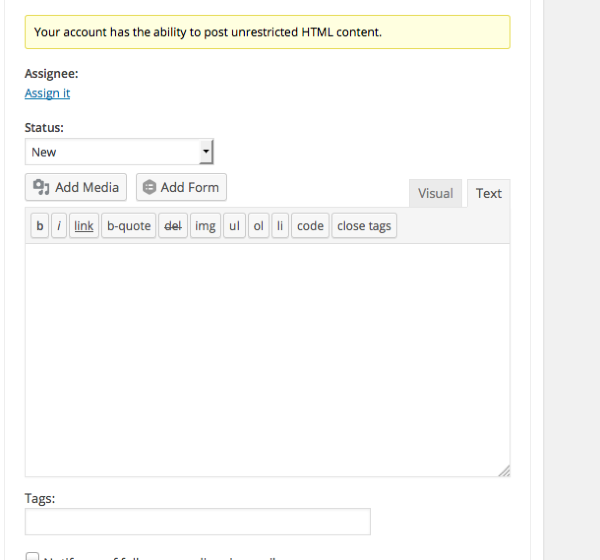
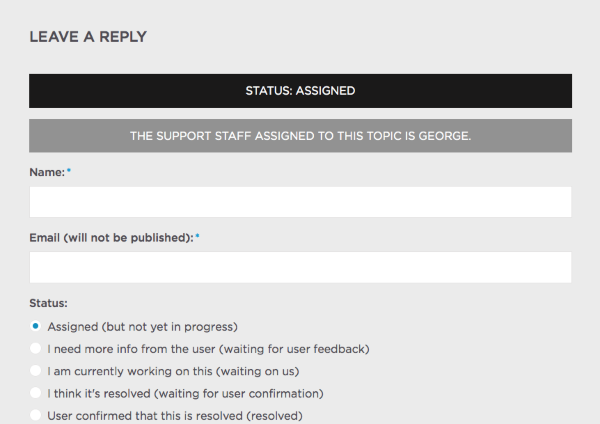
Can you describe what you found when you saw your ticket marked as “Solved”? We’re making a series of fixes to this web site and it’s possible this is some sort of bug – if so, we’ll patch it up promptly! 🙂
Now, as for your main questions – unfortunately, upgrading to the Filter Bar plugin won’t change any of your single-event concerns here much. This is because the layout of your single events page is dictated by your theme, not The Events Calendar…
…for the most part. There are some CSS styles from The Events Calendar itself that affect the layout of these calendar-related things like the single-event pages, and you should experiment with changing these styles on your site.
To do this, head to Events > Settings > Display in your admin area, and then choose different options for the “Stylesheet” option (e.g. “Full”, “Skeleton”, etc.).
Different stylesheets here might get you a different appearance on your single events page, but beyond this, the layout and styling is entirely coming from your theme.
Let us know if this information is helpful!
Thanks,
GeorgeParticipantHi Chris,
Sorry about the issues you’ve encountered here – they’re indeed odd, and ones that I can’t create on my local testing site, so could you run through our full set of troubleshooting steps here? → https://theeventscalendar.com/knowledgebase/testing-for-conflicts/
Check on your week view after each step in that process, and see if the behavior changes at all.
Let us know what you find – thank you!
ParticipantHi Chui,
We unfortunately do not offer support for customizations here, but hopefully we can at least help you figure out what’s going wrong here and point you in the right direction for how to fix things.
The first thing to note is that default-template.php is not an Events Calendar template file. If this is file within your theme, then your best course of action here is to contact your theme developer for insight on how to make this customization.
Next, if you’re curious about how the Events Calendar templating system works itself, which might be helpful here, I’d recommend reading through our “Themer’s Guide” here → https://theeventscalendar.com/knowledgebase/themers-guide/
That should at least help clarify the difference between template files included within The Events Calendar, and template files that are outside of it and in your theme itself.
Let us know if this information helps, and any further questions you might have related to it 🙂
Thank you!
GeorgeParticipantHey Merijn,
If you have a ticketing extension, you can add multiple ticket prices for sure, but if you just mean the default “Event Cost” meta field, then at this time you unfortunately cannot add multiple prices there without some mildly-extensive code customization.
If you’re interested in doing that, let us know, and we can at least point you in the right direction and share resources for how to make such customizations.
If not, then one solution some folks use in similar predicaments is to add a price range to this field. So, for example, if you have three tiers of pricing for an event like $10, $25, and $65, folks often enter something like “$10-65” for the “Event Cost” value…
Let us know what you think about this information – I’m sorry to disappoint about some of the limitations with this feature, but hopefully we can help you get something useful in place! 🙂
Thanks,
GeorgeMay 21, 2015 at 10:34 am in reply to: re-occurring events calendar with mailchimp + paypal. Does your product do this? #964223ParticipantHey @yume,
Thanks for reaching out to use here – I’m a bit uncertain of the purpose of your ticket though. In the first half you seem to be asking for some features, but then said this:
I am actually surprised this tool would not offer this.
So, to be clear, have you already evaluated our product lineup and determined that our plugins don’t do what you need?
I only ask because if this is not the case, and you do indeed still have questions, let us know in some more detail.
Our plugins don’t have specific integration with email apps like MailChimp, Constant Contact, etc., especially not “out of the box”, but our plugins are highly customizable and these sort of customizations are technically possible. And you may be able to find other plugins online that, in conjunction with our own plugins would meet your mailing-list needs well. We don’t have any specific ones to recommend, as there are many out there, but such integration is possible for sure.
Let us know if the information I provided here is helpful at all.
Thank you!
George
ParticipantThanks for both pieces of information Michael – I’m curious about those restriction settings, it’s possible that your admin account is either at one of those User Roles, or is being mistaken for belonging to one of them…
If you disable all “restriction” options there, so that it looks basically like my version of those settings, how do things behave? I’m just curious, and if so then we can at least narrow down the source of the problem to some weirdness with the configuration of these settings.
Let me know what you find!
Thank you for your patience with this issue, too 🙂
ParticipantHey Nicola,
Thank you for posting that, I see your issue clearly and it’s basically because the mobile.php file is a JavaScript template, and you’re trying to customize it by simply echoing PHP into it.
That will not work – while the whole process is a little outside the scope of the support forums, the Gist of customizing the mobile.php file is that you need to make content available to the file itself, and then reference it from the file.
This can be seen with template variables in that file that look like this:
[[=date]]Notice how that isn’t actually defined anywhere in the file with PHP? It’s defined in a JSON array that is passed to mobile.php, and the [[=date]] variable in mobile.php tells the file to look for this variable within that array.
If that doesn’t make much sense, then the best step at this point would be to check out a few resources to learn how this all works.
First, follow the instructions at the top of the mobile.php file itself:
/**
 *
 * Please see single-event.php in this directory for detailed instructions on how to use and modify these templates.
 *
 */
Check out that file and read through the entire documentation notes there.
Another great resource is an example customization of the tooltip.php template from one of our developers, Gustavo. The file and data are different – instead of passing an excerpt to the mobile.php template, this customization passes Venue information to tooltip.php – but in both cases, a JavaScript template is being customized. Hopefully if you read through the code you should get a good idea of how the whole system works. You can even activate the code directly on your site and make modifications to it, just to see what connects to what.
Check out Gustavo’s example modifications here → https://github.com/bordoni/tec-forum-support/tree/plugin-939516
I hope this all helps Nicola!
Cheers,
George -
AuthorPosts