

Forum Replies Created
-
AuthorPosts
-
George
ParticipantThanks for elaborating here, @Diego. I now understand why CSS may not be the best fit.
To implement the features you describe, it’s unfortunately not something we can help with here. You would have to write that custom code or hire a professional developer to do it for you. We have a list of great developers here → http://m.tri.be/18k1 (and have no affiliation with any of these folks—they’re simply some well-respected names in the community that we’ve compiled to share in situations like this one).
Please let me know if there are any other issues or questions I can try to help with!
— George
February 6, 2017 at 6:28 am in reply to: Major displaying issues with The Community Events 4.3.2 #1229934ParticipantHey Karl,
Sorry about this, I just realized that your Community Events license is expired.
It expired January 4, 2017.
As per our license guidelines, premium support of the kind offered here is only a feature of active licenses: https://theeventscalendar.com/knowledgebase/what-support-is-provided-for-license-holders/
So I would recommend renewing your Community Events license so that we can continue to help you, which would also make the most recent version of the plugin available to you on the Downloads page in your account here.
And so once you renew the license, please download the latest version and try again to update it.
Events Calendar Pro and Event Tickets Plus are also expired, so if you are using those on your site and they are not the most recent version, please renew your licenses and update them if you need to use these plugins on your site (and/or want support for them).
Sorry that I didn’t see these expirations in your account until now!
Sincerely,
GeorgeParticipantHey William,
I’m sorry to hear that odd behavior is persisting.
What you describe above is insightful:
If I replace “%post_id%” with an actual post ID, it works beautifully.
↑ This confirms that the shortcode itself—and the retrieval of the specified event’s start date meta values—is working as expected. But there isn’t a global $post specified otherwise, which is why my recommendation in my reply above isn’t helping.
I do not know the Essential Grid theme well, nor do I have a copy of it. Do you enter the shortcode for each post? If so, specifying the ID for each one may be the best solution here, even though it’s not ideal.
If you don’t enter this shortcode post-by-post, and instead only enter it once in a template sort of thing, then I would recommend reaching out to the Essential Grid team for possible insights into how you can grab the global $post of the event item for use in shortcodes or some other way to programmatically do this.
The shortcode itself, if there’s not an id="" attribute specified, uses the handy WordPress function get_the_ID(), so that may be helpful to share with the Essential Grid folks…
…I’m sorry that I don’t have any other ideas here, but hope that working with the Essential Grid folks from here leads to a successful outcome.
Please let me know if there are any other issues or questions I can try to help with.
Sincerely,
GeorgeParticipantThanks for your feedback Steve, elaborating on some of the methods behind what makes a showcase template “showcase-worthy” might indeed be pretty helpful!
Jennifer, I will close up this thread for now, but please feel free to open a new thread any time if other issues or questions arise!
Sincerely,
GeorgeParticipantHey Matt,
Thanks for your clarification there. Based on your description of a picklist, I don’t think our plugins offer anything quite with that specific functionality.
One thing that might help is to check out our demo site’s events page here → http://wpshindig.com/events/
↑ On this page, play around with the “Narrow your results” options there. These are “filters” for events provided by our Filter Bar add-on, and all of the available field types our plugins support are demonstrated there in those filters. If there’s anything here close to a picklist how you envision it, let me know—if not, then unfortunately our plugins don’t provide any other type of field for choosing/selecting/entering values.
As for the integration with salesforce, the best thing I can share here is this overview of what support comes with a premium license → https://theeventscalendar.com/knowledgebase/what-support-is-provided-for-license-holders/
Locating code and providing that information is not something we’re really able to do, as all of the code is available right in the files of the plugin which you download. And so if you or a developer you hire is working on integrating the forms with your own custom code, you’ll have the form code itself to look at and refer to, plus the following documentation resources:
• Themer’s Guide → https://theeventscalendar.com/knowledgebase/themers-guide/
• The Knowledgebase in general → http://theeventscalendar.com/knowledgebase
• Function reference → https://theeventscalendar.com/functionsI hope this helps!
— George
ParticipantThanks for the kind words, and for your patience while we worked on a snippet—it was a bit harder to pull off than I originally thought, so I do apologize for the time we took to get it right.
Glad it’s working though!
Be sure to keep backups of that custom code and of your site and database in general ? https://codex.wordpress.org/WordPress_Backups
Cheers!
GeorgeParticipantHey @Joe,
Thanks for the background information. Please share the compiled production files if possible.
Cheers!
GeorgeParticipantHi Cody,
Thanks for adding your voice to this thread—this thread will be updated with news about the bug fix, so it’s one of the best ways to stay up-to-date with the bug fix news.
At this time, all imports should be working fine except for the featured image.
Is this not the case for you? Do your imports fail outright?
— George
February 2, 2017 at 10:26 pm in reply to: Very Big Issue buying different tickets simultaneously from one event #1228724ParticipantHi Gergana,
At long last, I wanted to share an updated version of this snippet with you. You can download it here now, finally: https://theeventscalendar.com/content/uploads/2017/01/tribe-ext-woo-order-templates.zip
Try deleting the snippet of mine that you mentioned using above (this one) and then installing this extension.
☝️ This Extension adds several features to Event Tickets Plus. These ones to be specific:
- Showing the full order details in the Woo cart, including event date and venue
- Hide QR code from all ticket emails
- Adding a new ticket notification email
- CC the event organizer with the ticket notified
You can just enable the first option and it will replace the functionality of the snippet I originally shared before.
I hope that using this new Extension instead of my old snippet helps to resolve your issues! 😀
— George
February 2, 2017 at 9:18 pm in reply to: Purchased Events Calendar Pro, but I need Event Aggragator instead #1228705ParticipantSure thing Bodie! I’ve refunded your Events Calendar Pro license in full—you should see those funds back in your account in no more than a few business days.
Feel free to purchase Event Aggregator any time, and to open a new thread any time if other issues or questions arise.
— George
ParticipantHey @darrienw93,
Thanks for your patience here!
A developer on our team, Brook, has written a snippet that should totally remove that Customizer’s generated CSS.
Try adding the code from this Gist to your theme’s functions.php file ?https://git.io/vDGZI
Let us know if it helps!
Cheers,
GeorgeParticipantThanks James.
I am sorry about the pace of this investigation but I am utterly stumped because I can’t recreate this, so I am working with other members on our team and will keep you posted on this!
Stay tuned!
George
ParticipantHi William,
Do you have any progress if you just omit the ID parameter altogether? So that instead of something like this:
[tribe_formatted_event_date id=”%post_id%” timezone=”New York” format=”F jS, Y @ g:i a” ]You just remove the id="" bit, so it looks more like this:
[tribe_formatted_event_date timezone=”New York” format=”F jS, Y @ g:i a” ]This will get the shortcode to query for an event ID on its own, which may be helpful.
Thanks so much for chiming in here, @Mathew! Great to see both of you chatting here.
Cheers,
GeorgeFebruary 2, 2017 at 8:04 pm in reply to: Tooltips Not Showing with all Plugins Deactivated and Clean Template File #1228684ParticipantThanks for this extra information!
The tooltips are seeming to show up fine for me now (click for a larger-sized image):
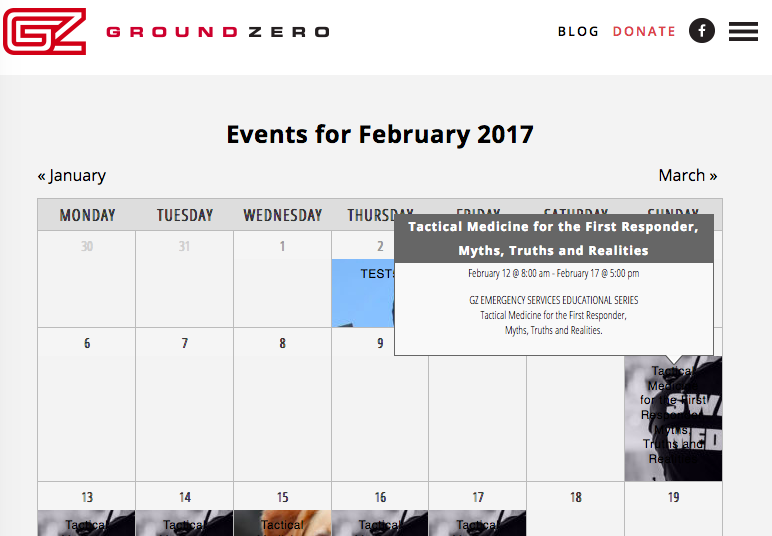
☝️ Are things working fine now?
If not, then can you please do the following things?
1. Share a screenshot of how the failing toolitps look to you in your browser (perhaps a “timed” screenshot that shows what you see when you mouse over an event title, which is when a tooltip is supposed to show up). You can do so by uploading the screenshots to this thread. If you have issues with that, you can upload to Imgur.com, Flickr.com, CloudUp.com, or any similar image-hosting site; then just share the links to those images here and I’ll take a look.
2. Next, can you upload a .zip of your theme to a place like drive.google.com, DropBox, cloudup.com, etc., and then share a download link to that theme? I will download it and see if I can spot the problem within the theme code directly.
Thanks,
GeorgeParticipantExcellent! 😀
Open a new thread any time if other issues or questions arise.
Cheers,
George -
AuthorPosts