
Home › Forums › Calendar Products › Events Calendar PRO › Tooltips Not Showing with all Plugins Deactivated and Clean Template File
- This topic has 5 replies, 4 voices, and was last updated 9 years, 7 months ago by
Jason.
-
AuthorPosts
-
February 2, 2017 at 1:31 pm #1228522
Jason
ParticipantHi,
I am working with another developer, and we are stumped. We can not figure out why the tooltips are not showing in month view. We have stripped everything down within our theme. All plugins are deactivated, created a super clean template file for the events that has a simple header/footer, and the loop for the calendar, and still the same results. I created the stripped down version of the template file because the disabled plugins are necessary for the rest of the site to function, and we wanted to isolate the issue as much as possible.
When viewing in Firebug, I can see that the tooltips DIV container is not being written to the HTML. Usually, if it’s working, you can see the proper HTML is written and set to display:none (which is correct).
I purchased a pro license in an effort to receive support. Could you take a look and let me know if you see anything that could be causing this problem? I really don’t need the PRO plugin, just the license for support.
http://redfivellc.com/gzk9/events/
This is a staging server WP installation as I do not want to touch the live server. I can give you any credentials you need, WP, FTP, etc. I also have my PRO license for your reference as well.
We have read through everything we could find online, and still have no resolution 🙁
Thanks for your time.
February 2, 2017 at 1:49 pm #1228539George
ParticipantHey Jason,
You mention the process you’ve done so far to make your own theme “as simple as possible” — can you try, however, to activate a default theme like Twenty Seventeen?
In a theme like this, how do things behave?
If issues persist without improvement in a default theme like Twenty Seventeen, please leave Twenty Seventeen active and let me know — I will take a look at your main calendar page in this state and see what I can learn about the absence of the tooltips.
Thanks!
GeorgeFebruary 2, 2017 at 2:19 pm #1228560ParticipantI apologize, I meant to say it works when switching themes. I switched to Twenty Fifteen and it was good. I’ve reviewed the documentation and everything points to a JQuery conflict, but we aren’t loading any JQuery libraries within the test template. All plugins are disabled, the test template nor functions.php is loading JS … is there anything you recommend we try under these circumstances? The plugin is great, we just need some guidance if possible.
February 2, 2017 at 8:04 pm #1228684ParticipantThanks for this extra information!
The tooltips are seeming to show up fine for me now (click for a larger-sized image):
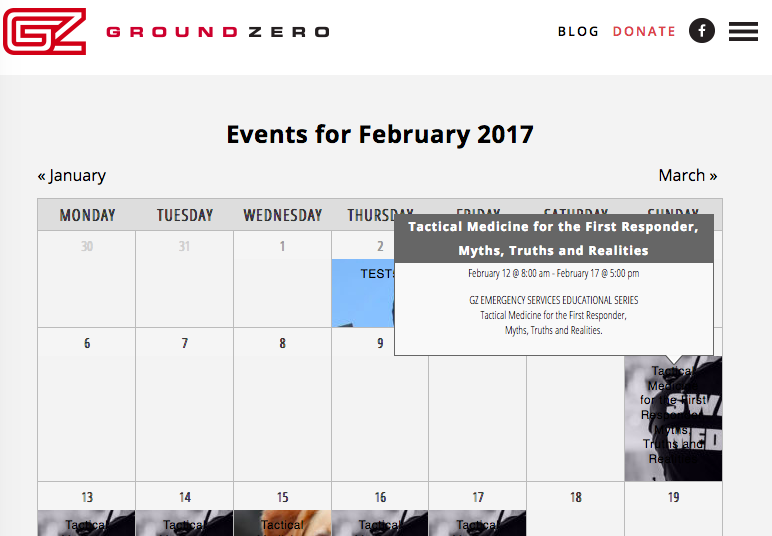
☝️ Are things working fine now?
If not, then can you please do the following things?
1. Share a screenshot of how the failing toolitps look to you in your browser (perhaps a “timed” screenshot that shows what you see when you mouse over an event title, which is when a tooltip is supposed to show up). You can do so by uploading the screenshots to this thread. If you have issues with that, you can upload to Imgur.com, Flickr.com, CloudUp.com, or any similar image-hosting site; then just share the links to those images here and I’ll take a look.
2. Next, can you upload a .zip of your theme to a place like drive.google.com, DropBox, cloudup.com, etc., and then share a download link to that theme? I will download it and see if I can spot the problem within the theme code directly.
Thanks,
GeorgeFebruary 24, 2017 at 8:35 am #1245308Support Droid
KeymasterHey there! This thread has been pretty quiet for the last three weeks, so we’re going to go ahead and close it to avoid confusion with other topics. If you’re still looking for help with this, please do open a new thread, reference this one and we’d be more than happy to continue the conversation over there.
Thanks so much!
The Events Calendar Support Team -
AuthorPosts
- The topic ‘Tooltips Not Showing with all Plugins Deactivated and Clean Template File’ is closed to new replies.