

Forum Replies Created
-
AuthorPosts
-
George
ParticipantHey Cynthia,
Hm, that’s odd behavior indeed – I live on the East Coast and my local test site is literally also the “New York” timezone, and my Month View’s been accurate with dates thus far with no issue….
I’m wondering if you could set your site timezone setting to the numeric version of this timezone, “UTC -4” – we had a recent bug uncovered where the “named” timezones like “New York” produce issues with the Facebook Importer specifically, but switching to UTC worked fine. Perhaps there’s a similar bug like that happening here – let us know if you do this and, if so, what you find (though it might take a day or two, of course, to notice if it jumps ahead later in the evening).
In the meantime, can you clarify if you’ve made any customizations to your theme or to The Events Calendar templates at all? It seems you have a child theme active, so I’m wondering if that’s at play somehow, too (though it shouldn’t be).
Odd issue Cynthia – sorry you’ve encountered it. Let us know what you think about some of the points I rose and we can go from there!
Thanks,
GeorgeParticipantHey Judi!
By default, Subscriber will not be able to post or edit events in the admin. They’ll be able to edit their own user profile and…that’s about it 🙂
Contributors, by default, will be able to post new events, but not update ones that exist in the admin already.
So perhaps adding “edit” capabilities to the “Contributor” role is your best option here – if so, then there are two ways to do this. One is with code, which is a pretty granular change to make, but you can also just use the famous “Members” plugin from Justin Tadlock to manually edit the “Contributor” role and allow them to edit events as well: https://wordpress.org/plugins/members/
Just some ideas here – let me know what you think and if there’s anything more I can help with!
George
ParticipantHey Mirko,
Sorry to disappoint, but there is unfortunately no function or feature like this “out-of-the-box”. You might be able to custom code it, or to hire someone who can custom code it for you, but it’s included by default and is too complex for us to code here on the support forums.
Once more: sorry to disappoint! 🙂 Please let me know if there’s anything else I can help with.
Cheers,
GeorgeParticipantHey Barry,
I’m sorry you find our templating system confusing. For this customization, it should actually be fairly simple to do – just make a file in your theme at /tribe-events/list/single-event.php which is an exact duplicate of the file in the plugin code itself at /src/views/list/single-event.php.
Then, where you want the extra information to display, add it. This can be the_content() instead of the_excerpt() – you can add custom get_post_meta() calls and anything else like that. Basically, all the fun WordPress templating stuff that you were presumably hired for your knowledge and experience with 🙂 Play around with the run-of-the-mill WordPress templating functions, and if you have specific Calendar data you want to get, just look through the functions listed in the various template tag files in the plugin’s /src/functions/template-tags directory.
The only “weird” or tricky thing to display is data from the “Additional Fields” content if you have Events Calendar Pro – if you want to display those fields, just add this where you want them to display:
tribe_get_template_part( 'pro/modules/meta/additional-fields', null, array(

    'fields' => tribe_get_custom_fields(),

) );
I hope this all helps! Best of luck with your templating 🙂
ParticipantHey Barry,
There unfortunately is not a way to do this without extensive code customization beyond the scope of the support we can provide 🙁
You’d have to write custom code within and/or based on the metabox views in the src/admin-views directory of the plugin files.
Sorry to disappoint – it’s a complex customization and one in the site admin, which is harder to work with and something we typically advise against doing. Let me know if you have any other questions, comments, etc.
Thank you,
GeorgeParticipantHey @littleshiva,
To get things looking “just right”, or to truly get a really robust fix in place here, you may indeed need to reach out to the theme developer, or use a tool like Firebug (if you use FireFox, or the Developer Tools for either Safari or Chrome) to find and fix these CSS conflicts yourself.
However, for now, the bulk of that layout problem comes from Divi’s too-generic style rules related to tables and the padding on them. You can override these simply by adding the following code at the very bottom of your theme or child theme’s style.css file:
.entry-content .tribe_mini_calendar_widget th {

    padding: 5px 6px !important;

}
.entry-content .tribe_mini_calendar_widget tr td {
padding: 5px 6px !important;
}
Change the numbers to your liking, but keep them the same between these two rules. These specific values here already make the calendar look a lot better, check out this screenshot to see how it looks: https://cloudup.com/cWtsL5BfZkK
So, it’s a great place to start. Play around with this code and if you need to get more fancy with things, definitely ping your theme developer and see if they can help! 🙂
Cheers,
GeorgeParticipantHey @littleshiva,
Unfortunately, I believe the hyphen-related issue is exactly to blame for your lack of update notices again here.
The process I’d recommend is to go through the following steps:
- Back up your site.
- Remove your license key from the Events Settings page in your lcr-lagauche.org wp-admin
- Head to http://theeventscalendar.com/my-account/license-keys and use the “Disconnect” links to Disconnect the license to your site at lcr-lagauche.org
- Go to http://theeventscalendar.com/my-account/downloads and manually download the latest version of Events Calendar Pro.
Now you’ll be ready to update The Events Calendar and Events Calendar Pro on your site, and then re-enter your license keys. So, do just that:
- Update The Events Calendar to version 3.11.2, from inside your admin or from download it manually from wordpress.org/plugins/the-events-calendar
- Update Events Calendar Pro to version 3.11.1 with the file you download earlier in step 3 above
- Once both things are up-to-date, try adding your license key again.
This process may sound tedious, but it’s simpler and faster to work through than it might seem. And it should kill two birds with one stone: first, it’ll bring your versions of The Events Calendar and Events Calendar Pro up-to-date, which means we can then offer support for them and that your site will be using better, safer code. Then, it should also help with the hyphen-related issues with domain names and allow your site to actually “activate” with its license.
Let us know how it goes!
Thank you,
GeorgeParticipantHey Anna,
Thanks for reaching out!
Custom Field Beneath Maps Link
You can indeed add code to your site and force it to come after that “+ Google Map” link. There are two basic approaches: first is to find any template file within The Events Calendar and Events Calendar Pro that call the function tribe_get_map_link_html() – this is the function that generates that map. Then, using the principles outlined in our Themer’s Guide, add your custom-field code beneath this function call.
The second approach, and maybe simpler, is to just add a filter to the tribe_get_map_link_html filter so that your custom-field code is automatically added after each instance of “+ Google Map”. You can do this by adding a function like this to your theme’s functions.php file:
add_filter( 'tribe_get_map_link_html', 'tribe_997723_append_custom_fields_to_map' );function tribe_997723_append_custom_fields_to_map( $link ) {
ob_start();
tribe_get_template_part( 'pro/modules/meta/additional-fields', null, array(
'fields' => tribe_get_custom_fields(),
) );
$fields = ob_get_clean();return $link . '<br>' . $fields;
}
If this function doesn’t provide enough flexibility for your needs, unfortunately the previously-mentioned method using our Themer’s Guide is the only other reliable option 🙁
Change the Date Display
Also, is it possible to have the date display as “Tuesday, October 6″ instead of “October 6″?
This is indeed possible – can you specify exactly what location of the date display you’re referring to? Just curious, but 99 times out of 100 the default Date Format Settings within The Events Calendar’s settings panel will address these needs for you.
Basically, head to Events > Settings > Display in your sites wp-admin. Scroll down to find the Date Format Settings, which look like this: https://cloudup.com/cBatDxYorvN
Now, notice the link in the top-right of this section? It tells you to make your own date format which you can learn here: http://codex.wordpress.org/Formatting_Date_and_Time
If that looks confusing, don’t worry – it’s actually really easy (and a bit fun 🙂 ) to play around with.
For example, to go from “October 6” to “Tuesday, October 6”, find date format patterns that are like this: “F j”. And just add the lowercase-“L” which symbolizes the day name in PHP date formatting. So replace all cases of “F j” with this: “l, F j”. The comma will be used there, so this pattern will become {Weekday Name}, {Month Name} {Day Number}.
I hope that all makes sense! Definitely check out the materials I’ve linked to in this thread, as they’re full of great info.
Let me know if this helps and/or if you have any further questions, thoughts, etc.
Cheers,
GeorgeParticipantHey Christina,
Thanks for reaching out here. You have a few different questions so I’ll break them out and address them in order:
I am using the Bridge Theme and am new to using Event Calendar Pro. When I pull up my calendar, the word “archive” appears at the top left of the page.
If you’re not using the Bridge Theme, does this issue persist? Also, do you have a screenshot of this text or something for example? When I went to http://www.mixcpe.com/, I was met with a “coming soon” page. Do not post any site login information here, as we cannot log into customer sites – but if you have a screenshot of that text for example, or can “un-lock” your site temporarily, that should help a lot.
I am also unable to export.
I’m sorry to hear this – what specific exporting do you mean? Do you mean the default WordPress exporter tool? If so, then what is your specific point of failure with this: does the Export page not even load? Does it load but are the exported files you generate invalid or something? Does it just not export more than a few events even though you have many? Describe your specific issue in detail and hopefully we can go from there.
Was wondering if the words “venue” and “organizer” can be edited to be more specific to my application.
Yes! 🙂 Absolutely – this is a feature I’m really glad to share with you. It can be achieved by heading to your theme’s functions.php file and adding code like this there:
add_filter('tribe_venue_label_singular', 'change_single_venue_label' );function change_single_venue_label() {
return 'Company';
}add_filter('tribe_venue_label_plural', 'change_plural_venue_label' );
function change_plural_venue_label() {
return 'Companies';
}add_filter('tribe_organizer_label_singular', 'change_single_organizer_label' );
function change_single_organizer_label() {
return 'Speaker';
}add_filter('tribe_organizer_label_plural', 'change_plural_organizer_label' );
function change_plural_organizer_label() {
return 'Speakers';
}
This code changes “Organizer/s” to “Speaker/s” and “Venue/s” to “Company/ies”.
Where you see the code like this:
return 'Speakers';Just change ‘Speakers’ to what you want in place of “Organizers”, and then save the code and it should well on your site.
Cheers!
GeorgeAugust 21, 2015 at 5:17 am in reply to: Map View – Show Date in Popup / Featured Image as Map Marker #997861ParticipantThanks for the kind words about the plugin, Davis 🙂
Just to be clear, when you describe the “map marker”, do you mean the fairly narrow marker that appears above an event “inside” (or, on top of) the Google Map itself? Here’s a screenshot of one of these markers, for reference:
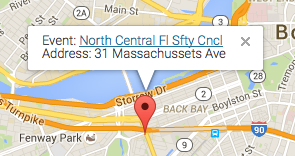
I just want to be 100% certain about what you’re talking about, because if this marker is what you’re talking about, then I hate to bear the bad news but it’s unfortunately a tricky thing to customize 🙁 That’s because it’s mostly generated by the Google Maps API itself – in other words, unlike almost everything else on our views, there’s not a Tribe template file that defines how that looks.
Let me know if this is the marker you mean and we can go from there – we’re very limited with options here for those Google Maps API markers, but I can recommend some things for sure.
Thanks,
GeorgeParticipantHey Gerry,
No, there is not a basic set of functions that is required in the theme for The Events Calendar or its add-ons to work properly. The basic requirements of a theme are required, however: proper placement and pervasive use of the wp_head() and wp_footer() functions; valid HTML markup for the templates; and bug-free JavaScript.
If you verify each of these three things as a starting point, the calendar should work. There could indeed be remaining issues, but these first three “core” things I listed are by and large the most common causes of theme problems that I’ve seen over the years.
I hope this is somewhat helpful, or at least gives you a place to start!
Cheers,
GeorgeParticipantThanks for noting that William, and for your patience and politeness throughout this issue. I’ve still got this flagged for a developer so improvements for this may indeed still arrive in forthcoming releases, so stay tuned! 🙂
Best of luck with your project,
GeorgeAugust 21, 2015 at 5:03 am in reply to: Nav menu not working on calendar/single event/organizer/venue pages #997855ParticipantThanks for the update Bud – this is great to know and, though conflicts can be frustrating, a great step in the direction of getting things fixed on your site.
Your best course of action from here is to contact the developer and/or support team of that plugin and see if they can help out with this issue. At the very least, they should be able to take the bug report and get a fix out in the near future hopefully.
I’m sorry that there’s been a code conflict on your site – glad we found the source of it though. Let me know if there’s anything else I can help with!
— George
ParticipantThanks for the update! Best of luck with your site 😀
Cheers,
GeorgeParticipantOh! And one last note – almost forgot to mention it…
It is not very likely, in my opinion, but one possible cause of all your issues here could be your site’s .htaccess file. This article explains what this is and how it should look for various configurations of WordPress, just in case you’re not familiar with this → https://codex.wordpress.org/htaccess
It may be worthwhile for you to send a support request your Web Hosting provider and see if they can look at your site’s .htaccess file, and see if there’s anything at play there that could lead to the sorts of issues we’ve been addressing in this thread…
Just a possibility – cheers William!
-
AuthorPosts