

Forum Replies Created
-
AuthorPosts
-
September 11, 2015 at 8:30 am in reply to: New event: add name/mail of creator to "new event" notice mail #1004274
George
ParticipantHey Lucion,
I’m not 100% certain about what you’re looking for, to be honest, but if you want to customize things in the edit screen related to either the Author or to custom Meta fields, these are general WordPress things and not things generated specifically by our plugin. So you might find it helpful to look for general WordPress resources on this matter.
For example, here’s a list of admin-facing actions → https://codex.wordpress.org/Plugin_API/Action_Reference#Administrative_Actions
Cheers,
GeorgeParticipantHey Douglas,
Thanks so much for your feedback here, I’m sorry that I didn’t realize the venues were age/country-restricted sooner!
Unfortunately, if a venue has these restrictions we simply cannot access it via the API, Facebook does not allow it. I think your point about there being better feedback, e.g. an alert or error of some kind for this if a venue is restricted, is very helpful and I will make a development ticket to get this into the plugin.
We can definitely improve feedback regarding age restriction stuff for events, venues, etc. from Facebook – it’s admittedly something tough to work with because their API doesn’t provide much context for restricted items, but we can improve regardless.
I’m sorry that this thread took so long to arrive at a somewhat disappointing conclusion, Douglas. Please let me know if there’s anything else here I can help with!
— George
September 11, 2015 at 8:16 am in reply to: The page "Events Calendar" uses the "/events" slug: #1004262ParticipantHey @Jason,
Any update on things in regards to your instance of this notice? Did you, in fact, have a separate “Page” in your wp-admin that is called Events and whose URL slug is /events?
September 11, 2015 at 8:14 am in reply to: The page "Events Calendar" uses the "/events" slug: #1004260ParticipantHey @lblnra
Thanks for posting your system information here – however, I’m not quite sure what you mean about some of the things you wrote in your reply. If your “event slug” is /calendar, that should work fine, and it does seem to be working fine on your site when I went to that calendar.
If you have this set up and then also have another separate page called “Calendar”, whose slug is also /calendar/, then this separate page would need to be removed for the error to go away.
Otherwise, you can forcefully hide the admin notice by using the code snippet I wrote in my reply to @clangille right above this reply to you – add it to your theme’s functions.php file:
if ( class_exists( 'Tribe__Events__Admin__Notice__Archive_Slug_Conflict' ) ) {

    remove_action( 'admin_init', array( Tribe__Events__Admin__Notice__Archive_Slug_Conflict::instance(), 'maybe_add_admin_notice' ) );

}
I hope this information helps!
Cheers,
GeorgeSeptember 11, 2015 at 8:09 am in reply to: The page "Events Calendar" uses the "/events" slug: #1004256ParticipantHey @clangille,
I’m sorry about the impact this has on your business, and share in your hopes of resolving this soon – thanks so much for your patience with things thus far!
I unfortunately cannot recreate this notice unless I have a page with an /events/ slug, so the only step I can think of from here would be for you to try deactivating non-Tribe plugins on your site one at a time, and then after each plugin deactivation, go to Settings > Permalinks in your admin area, and just click “Save Changes” without actually making any changes. This may seem like an odd thing to do but is a little “trick” within WordPress to get the permalinks across your site to refresh, which might help here.
Once the permalinks are refreshed, head back to your site where you originally saw this error, and see if it persists.
If the issue persists no matter what you try here, then unfortunately the best solution I can think of for the sake of your site would just be to outright remove that notice. You can do so by adding the following code to your theme’s functions.php file:
if ( class_exists( 'Tribe__Events__Admin__Notice__Archive_Slug_Conflict' ) ) {

remove_action( 'admin_init', array( Tribe__Events__Admin__Notice__Archive_Slug_Conflict::instance(), 'maybe_add_admin_notice' ) );

}
I have that helps!
— George
ParticipantDamn, I’m really sorry about this continuing to not work for you @Jako!
Your notes here are exactly what my code snippet achieves for me:
When a user lands on the site and scrolls all the way down to the bottom of the page, I’d like for only that specific days’ events to appear in the Events Calendar widget.
Your functions.php file looks fine to me, so my suspicion is that the Date parameters I’m adding via the filter aren’t working correctly based on your server configuration or something. This was why I recommended new DateTime() instead of strtotime( ‘now’ ) originally, but if that is not helping, the only other alternative worth trying that I can think of is this one:
strtotime( current_time( 'Y-m-d' ) )So, in other words:
add_filter( 'tribe_events_list_widget_query_args', 'tribe_support_1001539' );function tribe_support_1001539( $args ) {
$args['eventDisplay'] = 'custom';
$args['start_date'] = strtotime( current_time( 'Y-m-d' ) );
$args['end_date'] = strtotime( current_time( 'Y-m-d' ) );return $args;
}
If making this simple change alone does not help, then I’m curious – what is your site’s “Timezone” setting in Settings > General in your wp-admin? If it’s a “named” timezone, like “New York”, can you try setting it to a “numerical” equivalent, e.g. “UTC-4” instead? This may make a difference – if not, then you can set it back to the named timezone without issue.
Thank you so much for your patience here! I’m sorry about how long this has dragged out but cannot figure out the cause – this code snippet worked on my original testing site and I just added it to another testing site and it works well there, too.
Sincerely,
GeorgeParticipantHey Tal,
I unfortunately cannot read your site well, so it’s hard for me to find the events page. Can you link directly to your events page, with the tooltips?
Next, can you put your site back in a state where the RTL template is disabled, and your theme is a default WordPress theme like Twenty Twelve or Twenty Fourteen?
I will look more closely at your site in this state and see how things behave, which will be very helpful.
September 11, 2015 at 7:35 am in reply to: Event List Widget does not show today's remaining events #1004223ParticipantThat sounds good to me Jennifer, and I appreciate your patience and willingness to update the thread here with those screenshots if issues arise again.
If possible, I’m curious if you can also spot on patterns among the events that do specifically cause problems – e.g. are the problematic events recurring events, or events that have specific start times or end times or something, etc. Anything at all that stands out about them, if any such patterns exist…
Keep me posted! If this thread auto-closes before you’re able to post again, really sorry about that – it’s just our Support Droid, who closes threads after 15 days of inactivity. If this happens, open a new thread any time and just link it back to this original thread here for context. We can pick up right where we left off.
Cheers!
GeorgeParticipantHey Anthony,
I agree that this should be much easier to change and will vocalize support for this with our development team.
And Andy, if you’re willing to do that, that is awesome! I can leave this thread open for a bit of time if you would like, but our Support Droid might auto-close it after 15 days of inactivity.
I’m sorry that the results of this thread are somewhat disappoint, Anthony – please stay tuned to plugin updates because this is an area we can definitely improve, and if we add more features to adjust all this, it will be noted in the “Changelog” of the plugin update readme files.
Cheers!
GeorgeSeptember 11, 2015 at 7:24 am in reply to: Menu Category Calendar view shows events in the wrong order #1004215ParticipantHey Jennifer,
I’m really sorry to hear that the problems persist even in a “blank slate” state of your site…
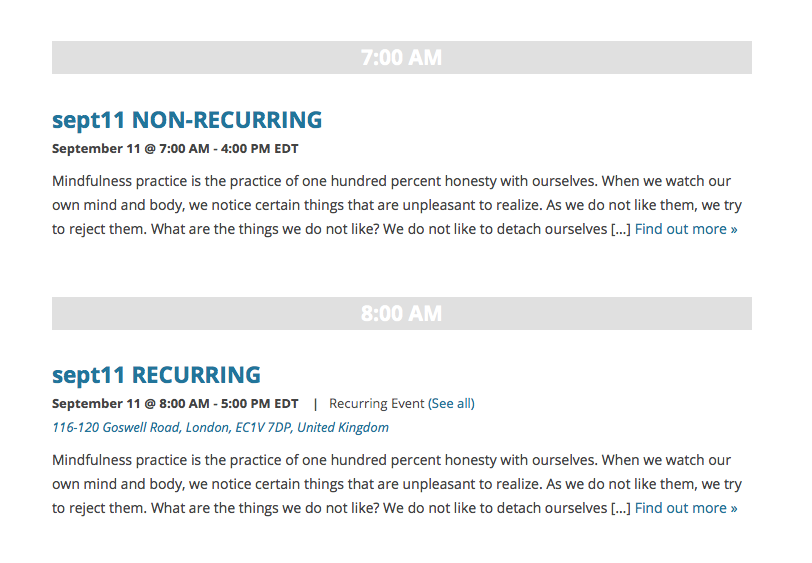
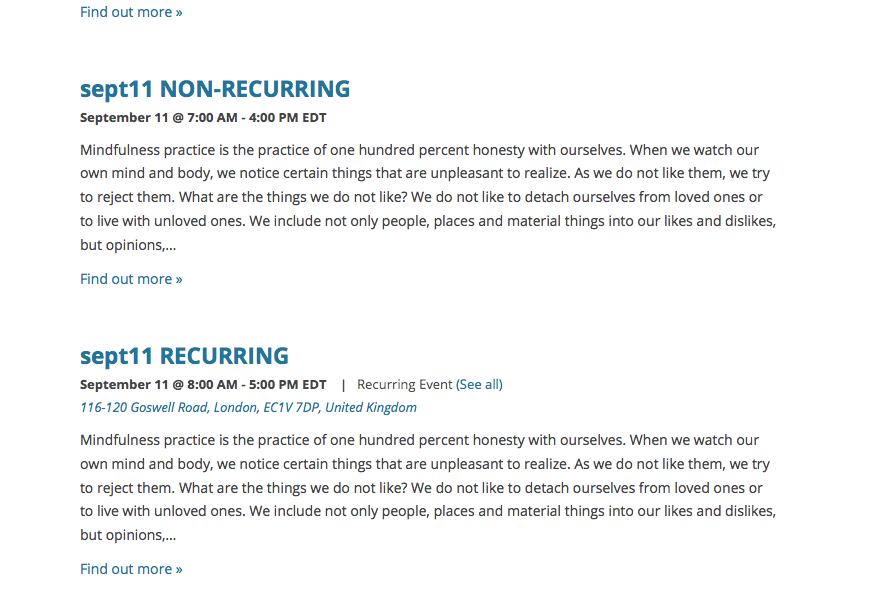
This is odd, because for me there are never problems with chronological ordering here. To exemplify this, I made two test events: one a non-recurring event, one a recurring event.
I made the non-recurring event happen one hour before the recurring event, and it worked fine for me in all views. Here are screenshots of Day View and List View, respectively:
I’d recommend two things from here:
First, update your Tribe plugins to version 3.12, which was released on Tuesday. The Events Calendar itself is at 3.12.1 already.
Once you’re up-to-date with the most recent version of the plugins, see if these issues change at all on your site.
If not, then I’m curious: can you create two test events exactly like I did? Create one that is non-recurring, and whose “event title” says so (e.g. “Test Event Non-Recur”) and make it happen on a given day and time. Then, create a recurring event titled something like “Test Event RECURRING” and set it up so that it has one of its recurrence instances happening just one or two hours after the non-recurring event.
See my screenshots above for an example of dates and times to use.
Once these test events are created, can you share links to both of these events and also to the specific calendar views on your site where their ordering is not chronologically accurate?
Thank you for your patience Jennifer!
ParticipantHey Gretel,
I’m sorry to hear that about your theme developer! I checked out this page and indeed see that your theme is preventing the calendar from displaying: http://b72.3eb.myftpupload.com/events/
I hate to sound like your theme developer, but we unfortunately do not support themes here. The problem is stemming from the theme, so hopefully the theme developer can provide some more insight on this matter as the problem isn’t the third-party software itself (our plugin), but rather the theme itself. I’m really sorry that your support experience hasn’t been satisfactory so far!
Regardless of all of that, for the time being, I have a few suggestions we can try that might improve things:
First, do you happen to have a “page” in your admin called Events? Whose URL slug is /events/? If so, delete this page and then go to the Trash for pages and “Permanently Delete” it there.
Next, try heading to Events > Settings > Display in your admin – once there, find the “Event template” option and try changing it from “Default events template” to the other options. Try out each option here, save the changes, and then check out your /events/ page again – see if any templates behave better with your theme than the current one.
Let us know what you find!
And by the way, it seems like you purchased your Events Calendar Pro license just a few days ago – I want you to know that if these pieces of software end up being just insurmountably useless together, then we can happily refund Events Calendar Pro in full immediately 🙂
Thank you,
GeorgeParticipantHey Susie,
Sorry you’re having trouble here! I checked out one of the “See All” links and indeed was met with a 404 error. However, I didn’t see what you described as ” a bunch of code above the page” – can you clarify what you mean by that?
In the meantime, one thing worth trying here is to go to Settings > Permalinks in your admin area, and just click “Save Changes” without actually making any changes. This may seem like an odd thing to do but is a little “trick” within WordPress to get the permalinks across your site to refresh, which might help here.
If that doesn’t help, then I notice that you’re using /classes/ and /singleclass/ for your Events and Single Event URL slugs, respectively, instead of the “default” /events/ and /event/ – now, this is an option and it’s supposed to be customizable, so no worries at all about your using these /class/-based URLs instead of the defaults. However, I’m wondering if that’s a factor in all of this, so it might be worth setting these options back to /events/ and /event/ in your Events Settings and then saving your changes.
Once you save those changes, do the odd “Save Permalinks” trick one more time and see if these “See All” links for recurring events work any better…
If even after all this, the links still fail, I’d recommend then trying to run through our complete set of troubleshooting steps here → https://theeventscalendar.com/knowledgebase/testing-for-conflicts/. After each step in the process, repeat the “Save Permalinks” trick and have a look at your “see all” URLs again, and see if the behavior with them improves at all.
I hope this all helps, Susie. Let us know what you find!
Thanks,
GeorgeParticipantHey @Nikolaus,
Sorry you’re having trouble with getting these things to work together at the moment. It’s possible that you may need to customize template files from The Events Calendar to fully integrate things, but before jumping to that conclusion, I’m curious if you can first try heading to Events > Settings > Display in your site’s wp-admin.
Once here, look for the “Event template” option.
Once you find this option, try out each of the various template options there – after every time you choose a new template, save the changes and have a look at the calendar on your site. Does the slider behave any better with the template?
What this process will do is reveal if any of your theme’s own templates work better with the Slider and thus will add the calendar to that theme template, so that both slider and calendar are in the same template together.
If this fails to improve things, then unfortunately it sounds like you’d have to set this template back to the “Default events template” option and proceed with customizing various calendar templates as described in our Themer’s Guide → https://theeventscalendar.com/knowledgebase/themers-guide/
Let us know what you find!
Thanks,
GeorgeParticipantHey David,
There is indeed not a simple option, or even a filter at this point, that would let you do this 🙁
Making an AJAX call to change the amount of events pulled in is a bit tricky too, and quite a lot of extra work – the simplest method I can think of for upping the amount of events queried for is to head into core plugin code itself. This is not recommended, and would require re-updating after every time you update the plugin until we add a filter for this, but for now you can do this by heading to your Events Calendar Pro plugin files and navigating to this file:
src/Tribe/Mini_Calendar_Widget.php
Once there, scroll to around line 35 or so until you see code like this:
$defaults = array(

	'title'   => __( 'Events Calendar', 'tribe-events-calendar-pro' ),

	'count'   => 5,

	'filters' => null,

	'operand' => 'OR',

);
Simply change the ‘count’ argument from 5 to whatever you’d like, save the changes, and that should work well here.
I’m really sorry that all this is required just to change that number! I agree that this is too complex, and will make a development ticket to make a filter for this that you can change it much more easily (and only have to do so once, and not update the code after every plugin update!).
— George
September 10, 2015 at 6:12 pm in reply to: Venue name and City are required after update….when they're in the Saved Venue #1004044ParticipantHey @Mad Dog,
Really sorry to hear about these issues! For starters, can you share your system information with us? Here’s how to do so → https://theeventscalendar.com/knowledgebase/sharing-sys-info/
From there, though this may sound like an odd thing to test, I’m curious: does anything improve if you go to Settings > Permalinks in your admin area, and just click “Save Changes” without actually making any changes? This may seem like an odd thing to do but is a little “trick” within WordPress to get the permalinks across your site to refresh, which might help here.
Let us know what you find!
Thanks,
George -
AuthorPosts