

Forum Replies Created
-
AuthorPosts
-
George
ParticipantHey Diana,
Sorry you’re having trouble with this! I’m honestly not sure why this problem would arise, so to get started, I’d recommend doing two simple steps that will help provide a lot more information about this issue:
First, can you share your system information with us? Here’s how to do so → https://theeventscalendar.com/knowledgebase/sharing-sys-info/
Next, can you run through our troubleshooting steps here? → https://theeventscalendar.com/knowledgebase/testing-for-conflicts/
Be sure to check on this issue after each step in that above process, to see if the behavior of the problem changes at all.
Let us know what you find! Both the system information and the results of that conflict test will be very helpful to have for further troubleshooting.
Thanks!
GeorgeParticipantHey Susie,
When you say “I’ll try your suggestions and see if that helps.”, do you mean the “Save Permalinks” changes I recommended? Because if so, then good call! These are the exact step I’d recommend trying, once you deactivate the Custom Post Type Archive plugin again.
Let us know if those steps make a difference! 🙂
— George
September 11, 2015 at 10:28 am in reply to: New Event Calendar PRO v3.12 Recurring events generates on random #1004361ParticipantHey @Michal,
Sorry you’re having issues here! When you mention your “second language”, does that mean you have WPML activated on your site, or a similar translation plugin?
If so:
1. First, can you deactivate this plugin, and then set your site Language to “English” and share another version of your screenshots above in English? I’m sorry to request all this! But it’s hard to know the exact details of your recurrence configuration without seeing it in English – if we can recreate your exact recurrence pattern for testing, that will be immensely helpful here! 🙂
2. Next, can you also share your system information with us? Here’s how to do that → https://theeventscalendar.com/knowledgebase/sharing-sys-info/
Thank you Michal!
GeorgeSeptember 11, 2015 at 9:42 am in reply to: WPML & tribe_events query = trouble! What's wrong here? #1004340ParticipantHey Sean,
I’m sorry to report this, but I think the extent of this problem is simply the incompatibility between The Events Calendar and WPML 🙁
WPML does many odd things that are prone to breaking queries, URL rewrites, all sorts of stuff. It’s a great plugin, just a complicated one with its code affecting many disparate things.
We have many known compatibility issues with WPML and this unfortunately seems to just be another one. I’m sorry that we don’t have a fix for this yet – starting with the 3.12 release that came out just this week, we’re making a commitment to compatibility fixes with WPML in our development budget. I’m sorry but unfortunately this means that my best news for this issue is to hope that the next updates for The Events Calendar and Events Calendar Pro fix this – I can’t promise that they will, as other compatibility issues with WPML might be taking precedence, but I will make sure this issue stays on our radar.
I’m really sorry about this, Sean, and wish I had something more substantive to share with you here!
September 11, 2015 at 9:36 am in reply to: Hide Recurring Events on Add Event page CONDITIONALLY? #1004336ParticipantHey @Mad Dag,
There was indeed a different UI for the recurrence features in the past, which might suit your needs a bit more nicely – I would not recommend rolling back to old versions of the plugin just for this, but it is possible if you would like. You can access older versions for which your license was active for by heading to http://theeventscalendar.com/my-account/downloads
Just note that if you downgrade Events Calendar Pro to, say, version 3.10, then you should downgrade The Events Calendar to 3.10 too, or any version where the first two digits match the first two digits of Events Calendar Pro. e.g. you could run Events Calendar Pro 3.10.0 and The Events Calendar 3.10.2 together fine, but not Events Calendar Pro 3.10.0 and The Events Calendar 3.9.8
You can find older versions of The Events Calendar in the “Developer” tab at http://wordpress.org/plugins/the-events-calendar
If you do not have older versions of Events Calendar Pro before version 3.11, that means that you did not buy your license until version 3.11 was the “current” release, so you do not have access to older versions of the plugin before your license was activated.
We cannot offer more help with your customizations so I will close up this thread for now. Best of luck with your site!
— George
ParticipantI’m sorry that things aren’t working more smoothly and automatically! Thank you for your patience while we roll out improvements for compatibility with WPML, which we’ve started doing with the very 3.12 releases that came out this week.
WPML is a non-standard way of translating sites – it’s its own plugin and has its own way of doing things, which unfortunately is made up of a lot of complex custom solutions. Our plugins are all fully translatable with standard methods, and we’re working hard to catch up with WPML and integrate with it safely without adding an immense amount of extra code to our plugins.
Stay tuned to plugin updates, improvements are rolling out over the next many releases to come! 🙂
Cheers,
GeorgeParticipantHey @oniregoc,
Thank you for the update, I’m glad you found a way to achieve what you wanted here! If other questions, comments, or concerns arise, open a new thread here any time 🙂
Cheers!
GeorgeParticipantSorry for the disappointment Courtney, I really am 🙁 If it’s any consolation, we’re working hard on a quick followup release full of bug fixes and “smaller” tweaks of the nature of this date-filtering behavior for example. I don’t have an ETA but stay tuned to release news, and if any other questions, comments, or concerns arise, please open a new thread any time!
Thank you,
GeorgeParticipantHey @Nikolaus,
Deleting a page will not delete any existing events content you have added.
In fact, deleting a page called “Events” or something like that is necessary, and you should only rely on the auto-generated /events Page from The Events Calendar.
If you would like to link to this /events URL in a custom navigation menu, that is definitely possible. Use the “Custom link” feature of the Menu builder in WordPress, and just enter the URL there and add it to your menu.
If you’re not familiar with doing this, you can learn all about making Menus in WordPress here → https://codex.wordpress.org/Appearance_Menus_Screen#Appearance_.E2.86.92_Menus
You’d add a “custom link” like in this screenshot:
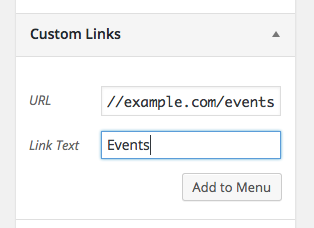
Cheers!
GeorgeSeptember 11, 2015 at 8:58 am in reply to: Hide Recurring Events on Add Event page CONDITIONALLY? #1004301ParticipantHey @Mad Dog,
Thank you for posting code that you’ve come up with so far – we unfortunately cannot help out with custom code projects like this, but to answer your question if there’s a more “built-in” way to do what you’re trying to do, there is unfortunately not at this time 🙁
Cheers,
GeorgeSeptember 11, 2015 at 8:55 am in reply to: Venue name and City are required after update….when they're in the Saved Venue #1004297ParticipantThank you for the system information! And for looking into this a bit…
I’m sorry that the Save Permalinks trick didn’t help, as this means that the next best thing to try is to run through a full set of troubleshooting steps to look for code conflicts, which might be rather likely to exist here since you have many plugins (which isn’t a problem! 🙂 just noting that more plugins = more of a chance of conflict).
We have a whole set of steps outlined here → https://theeventscalendar.com/knowledgebase/testing-for-conflicts/
I’d recommend running through those steps and seeing what you find if after each plugin deactivation you try to submit a community event. Do the same venue issues persist?
These steps may seem tedious but are actually pretty quick to work through, especially if you harness the power of multiple browser tabs 😉
Thank you for your patience here – let us know what you find!
— George
ParticipantThanks for posting @websource! That might be helpful, @katy – definitely check it out.
Cheers,
GeorgeSeptember 11, 2015 at 8:37 am in reply to: Events Calendar Pro causing conflict with theme featured slider #1004282ParticipantHey Nikolaus – we’re handling your problems in this thread → https://theeventscalendar.com/support/forums/topic/using-avada-theme-and-revolution-slider/
To keep things organized, I’ll keep our conversation of your issues there and only deal with Brad’s issues here.
See you over in that thread! 🙂
— George
ParticipantHey Ben,
To be clear, have you updated all of your Tribe plugins – Eventbrite Tickets, The Events Calendar, Events Calendar Pro, etc. – to 3.12? The Events Calendar is not 3.12.1, for that matter.
This may help.
Just want to be certain about whether or not you’ve done this yet, since it isn’t clear if you have. We did roll out some bug fixes and it may make a difference.
ParticipantHey Allan,
It is definitely not normal for the white page of death to show! That suggests code conflicts on your site for sure – you might want to run through these troubleshooting steps to help locate the source of this problem: https://theeventscalendar.com/knowledgebase/testing-for-conflicts/
Cheers,
George -
AuthorPosts