
Home › Forums › Calendar Products › Events Calendar PRO › Menu Category Calendar view shows events in the wrong order
- This topic has 6 replies, 2 voices, and was last updated 11 years ago by
George.
-
AuthorPosts
-
September 1, 2015 at 2:34 pm #1001029
Jennifer
ParticipantWhen both re-occuring and non-reoccuring events exist on the same day, the events do not list/view in the correct chronological time order within the calendar view.
September 2, 2015 at 6:55 am #1001210ParticipantHey Jennifer,
Sorry to hear about this happening on your site – there is generally some separation of the type of events on a calendar view, namely with “All Day” events at the top of a list, “Ongoing Events” (ones that span multiple days) below those, and then the rest. But recurring or not, it should display chronologically and it does for me on my testing site, and on our demo site too.
I’m curious – in your support submission, it says that you have tested activating a default theme and have also tested deactivating other plugins. What did you find by doing these steps? If you have not done these steps, can</yem> you do them and share what you find?
Thank you!
GeorgeSeptember 9, 2015 at 4:34 pm #1003541ParticipantThere was no change when changing theme and deactivating plugins.
September 11, 2015 at 7:24 am #1004215ParticipantHey Jennifer,
I’m really sorry to hear that the problems persist even in a “blank slate” state of your site…
This is odd, because for me there are never problems with chronological ordering here. To exemplify this, I made two test events: one a non-recurring event, one a recurring event.
I made the non-recurring event happen one hour before the recurring event, and it worked fine for me in all views. Here are screenshots of Day View and List View, respectively:
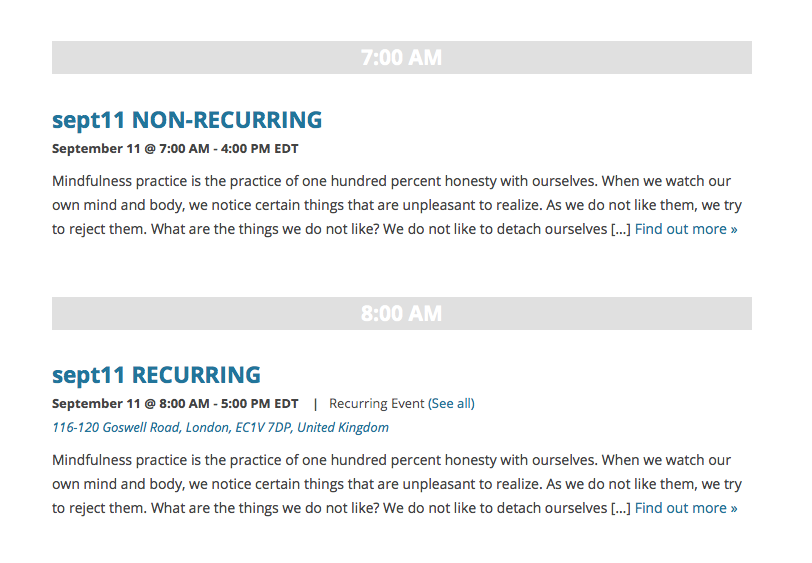
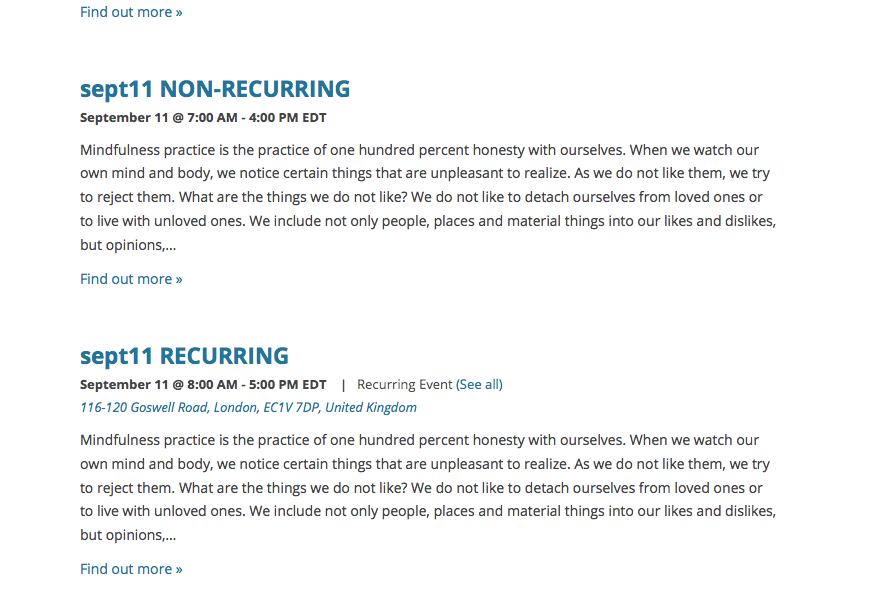
I’d recommend two things from here:
First, update your Tribe plugins to version 3.12, which was released on Tuesday. The Events Calendar itself is at 3.12.1 already.
Once you’re up-to-date with the most recent version of the plugins, see if these issues change at all on your site.
If not, then I’m curious: can you create two test events exactly like I did? Create one that is non-recurring, and whose “event title” says so (e.g. “Test Event Non-Recur”) and make it happen on a given day and time. Then, create a recurring event titled something like “Test Event RECURRING” and set it up so that it has one of its recurrence instances happening just one or two hours after the non-recurring event.
See my screenshots above for an example of dates and times to use.
Once these test events are created, can you share links to both of these events and also to the specific calendar views on your site where their ordering is not chronologically accurate?
Thank you for your patience Jennifer!
September 15, 2015 at 10:33 am #1005341ParticipantThank you for your reply,
I did create a staging server and turned all plugins off except yours and defaulted to the Twenty Fourteen theme.
The problem persists on Tuesday, September 1st, 2015. However, after creating future non-recurring and recurring events, starting on Sept 19, 2015, all was well and worked. See here, http://f8c.9eb.myftpupload.com/events/category/jenn-duran-yoga-classes-events/classes/

I recreated the test on our production server and the tests yielded the same use case answers, the problem persisted on Tuesday, September 1st, 2015. However, future non-recurring and recurring events, starting on Sept 19, 2015, worked well.
Perhaps the plugin update addressed the problem?
I cannot recreate the issue that persists on Tuesday, September 1st, 2015, http://jennduranyoga.com/events/category/jenn-duran-yoga-classes-events/.

PS
It might be nice in the future if you could allow users to use their single license key on a production and staging server.Thanks,
-
This reply was modified 11 years ago by
September 15, 2015 at 10:45 am #1005346ParticipantUse Case 1 – Vanilla
Only Event Calendar and Event Calendar Pro activated with the default Twenty Fourteen Theme
http://f8c.9eb.myftpupload.com/events/category/jenn-duran-yoga-classes-events/classes/
Use Case 2 – Fancy
All plugins and ENFOLD theme
http://jennduranyoga.com/events/category/jenn-duran-yoga-classes-events/
Both tests yield the same result after updating the plugins.
The order problem persists on September 1, 2015, However, the newly created use case tests on September 19th, showing Non-recurring and recurring events, are in the correct chronological time order.
I believe the plugin update fixed the issue or the way in which September 1, 2015 was entered, caused a problem.
I also tested using the exact titles on the September 19 test events and it still listed them in the correct order.
PS
It would be great if a single license could be used on both a staging and production server.Thanks,
September 16, 2015 at 12:24 pm #1005734ParticipantThanks for the updates here Jennifer – I’m honestly not quite sure what caused this problem originally, or what fixed it, but it does appear that the update helped…
With that in mind, then, I will close up this thread – but if any other issues arise, don’t hesitate to open a new thread here any time!
Best of luck with your site,
George -
This reply was modified 11 years ago by
-
AuthorPosts
- The topic ‘Menu Category Calendar view shows events in the wrong order’ is closed to new replies.