

Forum Replies Created
-
AuthorPosts
-
George
ParticipantHey @Scott,
I’m really sorry to hear about this – to be clear, do you mean the “Attendees” link specifically that I highlight in the following screenshot?
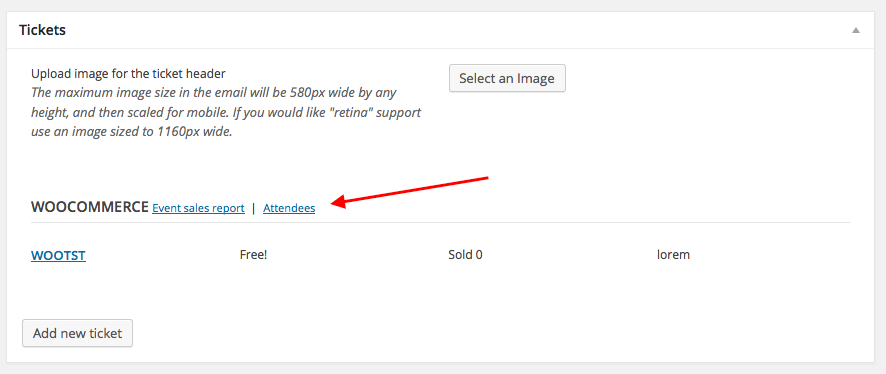
If so, then when I click this link I am brought to the Attendees list admin view without issue.
To get started, can you share the “System information” for one of your sites? Here’s how to share system information with us → https://theeventscalendar.com/knowledgebase/sharing-sys-info/
You mention having ten sites with both plugins, but just for the sake of efficiency can you choose one website to focus on for now? We will focus on getting things working there then turn to each other website afterwards and apply the fixes. If issues persist on those other sites, we can handle those in turn from there.
Thank you!
GeorgeParticipantHey @Debbie!
Can you share a link to a specific post or page on your site where we can see the column of events from your shortcode? I’m just curious about exactly how it’s showing up in a column, to see whether it’s e.g. your theme or The Events Calendar’s own CSS that is causing the layout.
Can you also specify the exact shortcode you are using on the page whose link you provide?
We don’t technically offer any support for design customization questions which this will likely be, but I’m happy to take a quick look for you regardless and will recommend any helpful CSS I can 🙂
Thanks!
GeorgeParticipantHey @Karrie,
It’s cool to see funthisweekend.com taking shape compared to how it looked in your earlier posts here on the forums – it’s looking great!
In regards to your issues, just to be 100% clear on what the issue is, let’s take this specific event for example: http://funthisweekend.com/event/music-to-cure-ms-2015/
That event takes place in my now-freezing home state of Massachusetts – but if you go to the bottom of the event page, where the “previous event” and “next event” links reside, the “Next event” takes place in New York. The “previous event” takes place in Connecticut.
Is your main goal just to ensure that the “next” and “previous” event links are essentially “next in category” and “previous in category” links in stead? So that e.g. when viewing a Massachusetts event, only other Mass. events will be show up in the “previous” and “next” event navigation?
If so, this will unfortunately take a bit of code customization, but let me know if I’ve summarized things accurately just to be sure – we can go from there!
— George
ParticipantOh no! I’m sorry to hear about this Keith – just to be 100% clear, by “demo” do you mean our official demo site at http://wpshindig.com/events?
Thanks for reporting this, if that’s the case – we’ve been working on some secret things with the demo and might’ve accidentally broken something along the way 😉
Cheers,
GeorgeOctober 19, 2015 at 5:13 am in reply to: consolidating events on multiple sites using Cal Pro #1015756ParticipantHey @Jp Stephen,
If each website is independent of each other, and not all belonging to one centrally-hosted WordPress Multisite Network installation, then unfortunately the Agency License is the appropriate license.
Is this the extent of your question here? Let me know! Happy to answer anything else on your mind 🙂
Thanks,
GeorgeOctober 19, 2015 at 5:09 am in reply to: Simple recurrence, where you choose your dates and times, or Duplicate the event #1015755ParticipantHey Henrik,
Thanks for reaching out!
Before we even get into event recurrence, one thing I wanted to make clear is that WooCommerce Tickets does not support recurrence. You cannot create tickets on an event, save that event as a recurring event, and then just have the tickets be auto-generated for each of the recurring events. An event has to be a standalone event, i.e. not part of a recurring series, to work with our ticketing add-ons like WooCommerce Tickets.
Does this alone make or break things for you?
If not, and you’re still interested in recurrence, then let’s take the example you gave:
She runs a workshop Monday, then Friday, then Sunday, then Wednesday then 2 weeks later one thursday night.
Does this pattern repeat every 4 weeks, or every 2 weeks for example?
Let’s say for example it happens every 4 weeks. Well, then you can create one event for the first Monday of every month, and have it recur every month. Then you can do this for the first Friday of every month, first Sunday and first Wednesday of every month, and then the third Thursday of every month. So five events that happen the same time every month, five events that will recur infinitely.
If that pattern (Monday, Friday, Sunday, Wednesday, 2 weeks later Thursday) repeats, then the solution above would work to have them all generated automatically. As a given event approaches, you can use the “Break from series” link to break the given event from its recurrence series, thus making it a standalone event while preserving all the other upcoming events in its series; and so this lets you add tickets to this event 🙂 Here’s a screenshot of this “break from series” link for reference.
If that pattern (Monday, Friday, Sunday, Wednesday, 2 weeks later Thursday) does not repeat, then the closest you can get with our recurrence rules is what is shown in this screenshot:

I used arrows and text overlay on the screenshot to help explain things, so please view the screenshot in its full size here → https://cldup.com/EoENUzixJm-1200×1200.png
I really hope this all helps! 😀
Let me know what you think @Henrik,
George
ParticipantHey Kevin,
The Events Calendar has an option called “Events template” that might help here, based on what you wrote, quoted as such:
My theme (Kleo) has a ton of customizability but doesn’t affect the pages that EC uses
If theme customizations don’t seem to “reach” various Events Calendar pages, this could be because of the use of The Events Calendar’s page template itself.
If you head to Settings > Display > Events Template in your site’s wp-admin, try out every different template option there to change the template.
After each template change, make some simple test custmoizattions and then check out various Events Calendar pages – do the changes get applied in any templates?
Let us know what you find! If things don’t improve regardless of template, then in your reply can you include your “System Information” as described here: https://theeventscalendar.com/knowledgebase/sharing-sys-info/
Thank you!
GeorgeParticipantHey Keith,
Thanks for reaching out. Do you mean that you’re wondering if, by following those steps, you’re brought to another admin page? Or do you mean that you’re not sure if you should be led to a page on the front-end of your site?
Just trying to get a sense of what you’re expecting to happen here. It’s worth noting that these are generic WPML features, so if you’re uncertain about them it might be extremely helpful to check WPML’s own documentation and support as well.
Cheers!
GeorgeParticipantThanks Matthew!
While that is a sizable number of events, it’s not “extreme” or an amount that The Events Calendar shouldn’t be able to handle. If there were all, for example, in literally one month, then that would by pretty intensive…
But regardless, the only way things would have taken nearly a minute to load, with your relatively-normal number of events, is something specific to your server environment. I know that you mention your web host saying that “everything looked good” on their end, but The Events Calendar itself can handle a few thousand events without issue.
How are you hosting your event, specifically? Is it with a shared webhost like GoDaddy, for example? Are you hosting on your own private server or something?
Also, it appears like you’ve been using The Events Calendar on your site for quite some time now, for several versions. Is this correct? And if so, have there ever been any similar performance issues to this, or was this literally a case of simply updating the plugin and then immediately you had performance issues?
Thank you!
GeorgeOctober 17, 2015 at 5:49 am in reply to: Recurring Events – Exclusion not working (2nd round) #1015546ParticipantHey Andreas,
I removed your login information since we cannot log into user sites for any reason, but I appreciate you sharing that and being so cooperative as to want to let us in at all!
Your site’s behavior is odd – weekly exclusions and such do work for me, but there is still a bug here with the type of exclusions you originally reported.
I am sorry that our last release did not fix this! We’re working hard on the next release and this bug is one of the main things we’re hoping to fix.
Sincerely,
GeorgeParticipantI’m sorry about this @terrizsolo – based on your feedback here and the input of some other users we are fairly certain we have a bug on our hands 🙁
I’m really sorry about that! I don’t have many details regarding this bug at the moment but we are actively looking into it and could publish a maintenance release soon to address this and a few other smaller bugs.
Please let me know what you think or if I can do anything to help keep your site somewhat functional in the meantime while we await the bug fix.
Sincerely,
GeorgeParticipantHey Bill,
If you remove the “webcal://” from that URL inside the “iCal Importer” plugin page, do things behave any better? That URL works well for me if I do so.
— George
ParticipantHey Mike,
Making the image mandatory at this time is not possible, unfortunately – our “defaults” and “requirements” system for Community Events changed a bit in recent releases and we are working hard on improving these details 🙁
I’m really sorry to disappoint!
— George
October 17, 2015 at 5:39 am in reply to: End of Day Cutoff is extending all-day events an extra day #1015540ParticipantHey @Graphic,
We just discovered this as a bug, and are working on a fix for our next release. If you set the End of Day Cutoff option to its default 12am, do things work correctly? If so, is it a workable solution to use that as the end-of-day cutoff for the time being until our bug fix is released?
I’m so sorry about this! The bug is an odd one related to timezones and such but we’re working on a solution.
Sincerely,
GeorgeParticipantThank you for sharing all of this!
We just discovered this as a bug, and are working on a fix for our next release. If you set the End of Day Cutoff option to its default 12am, do things work correctly? If so, is it a workable solution to use that as the end-of-day cutoff for the time being until our bug fix is released?
I’m so sorry about this, @onelittlemoose – the bug is an odd one related to timezones and such but we’re working on a solution!
-
AuthorPosts
