

Forum Replies Created
-
AuthorPosts
-
George
ParticipantNow, while what wrote above is true, I’d still love to at least try and help here. 😀
I took a look at your events page and did not see the gray bar — I just saw the “date” box sitting there. Here’s a screenshot of exactly what I see, for reference (click for a larger-sized image):
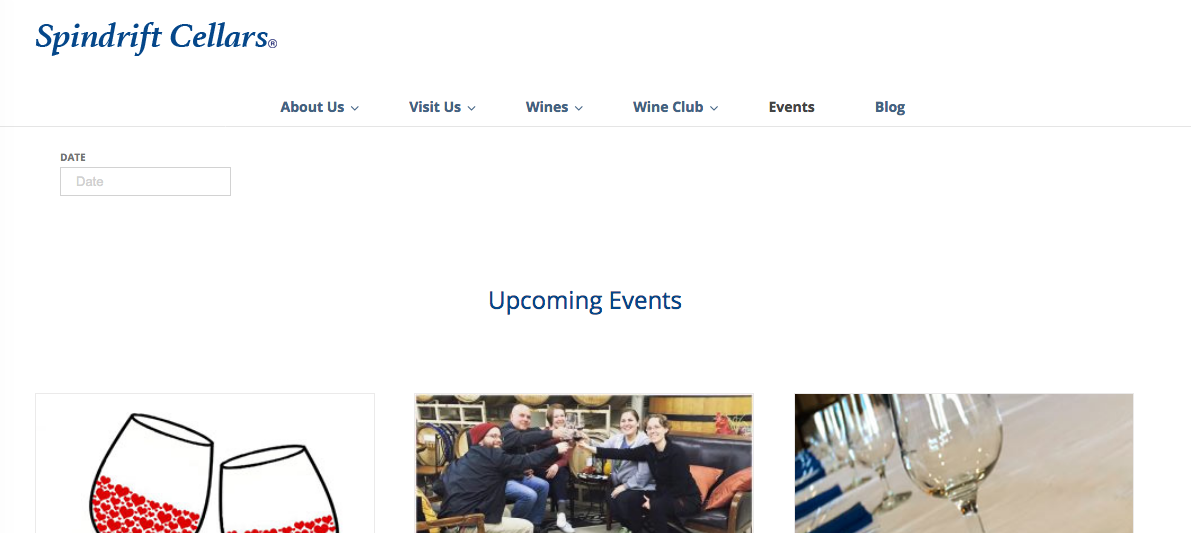
1. Can you help clarify exactly where the gray bar shows up for you? Share a link directly to the pages on your site on which it is visible.
2. Can you clarify exactly what you’re trying to leave showing there? You said in your post here, “Here’s what I used to remove all of the search bar except the date:”, then pasted some CSS. So are you trying to keep the “date” box then, but just not any gray behind it? Or should there be nothing there—no date box, no other search box, no gray bar, nothing…?
Thanks! 😀
GeorgeParticipantHi Tabitha,
I’m sorry, but we unfortunately cannot provide any assistance with custom coding.
⚠️ Please read this page to learn more about the support that comes with a license: https://theeventscalendar.com/knowledgebase/what-support-is-provided-for-license-holders/
— George
ParticipantHi Mark,
Sorry to hear this!
To be clear, are you saying that when you head to http://theeventscalendar.com/license-keys, you do not see the Events Calendar Pro license key there that you bought?
— George
ParticipantSorry to hear this Chris! I don’t find your same issues, so before getting questions #2 and #3 here, can you first help me learn more about #1?
Specifically, you say this:
1. When on any Event Page – it’s not displaying the List of Events, it displays the Calendar view? When on another page with a sidebar – it does display the List View correctly.
1. Can you please share a link to a page on your site where the List is supposed to show, but the “Calendar view” shows instead?
2. Can you please share a link to a page on your site where the List is being displayed correctly?
3. Can you please share your site’s complete, un-edited system information using the “Sharing information manually” steps outlined in this article: https://theeventscalendar.com/knowledgebase/sharing-sys-info/
Thanks!
GeorgeParticipantHey Stanley,
Thanks for reaching out.
Importing manually from a file does not count towards the 100-import-per-day limit.
For some clarification about what “counts” as an import and what does not, please check out this Knowledgebase article: https://theeventscalendar.com/knowledgebase/event-aggregators-import-limits-work/
Cheers!
GeorgeParticipantThank you all for your continued patience with this.
— George
ParticipantHey Rob,
Sorry for the trouble here, but the screenshot did not get posted. 🙁
Can you try sharing screenshots of the issue again? You can do so by uploading the screenshots to this thread (do not try to do it via email, though!).
If you have issues with that, you can upload to Imgur.com, Flickr.com, CloudUp.com, or any similar image-hosting site; then just share the links to those images here and I’ll take a look.
Thanks for your patience here!
GeorgeParticipantIndeed I have, Robert! 😀 The attachments you added did not get posted, but the text of your reply did.
Did you see my response to that very reply? I submitted my reply yesterday, 2/9.
Cheers!
GeorgeParticipantGood questions, Valerio!
Are events records also stored in the woocommerce tables?
Event records are NOT stored in WooCommerce’s own custom tables. They are stored in the default wp_posts tables.
How exactly tickets “become” products in woocommerce?
For the moment I have developed an app whose products’ records are populated using WC APIs.
So, if a ticket become a standard WC product (a record in the WC products’ table) I should see ’em all together with all the other products.Tickets are just “Products”. In other words, they are literally the “products” post type! 😀 Their product catalog visibility is set to “hidden” by default, so if you want tickets to show up along with other “normal” WooCommerce products, you just adjust their catalog visibility. You can learn more about catalog visibility here: https://docs.woocommerce.com/document/catalog-visibility-options/
Please let me know if this information helps and if there are any other issues or questions I can try to help with!
Cheers,
GeorgeParticipantHey Chris!
Sure thing, check out this page for more information on finding examples: https://theeventscalendar.com/knowledgebase/do-you-have-a-demo-examples-i-can-see-or-trial-licenses/
Please let me know if that is helpful and if there are any other issues or questions I can try to help with.
— George
ParticipantThanks for this update, Will! I’m glad to hear things are working for now.
I will close this thread for now, but feel free to open a new thread any time if other issues or questions arise. 🙂
Cheers!
GeorgeParticipantThis reply is private.
ParticipantHey there,
You mention attached images, but unfortunately none are showing up on the thread. This may be because you attached the images to an email and responded via email.
Can you trying sharing screenshots of the issue again? You can do so by uploading the screenshots to this thread. If you have issues with that, you can upload to Imgur.com, Flickr.com, CloudUp.com, or any similar image-hosting site; then just share the links to those images here and I’ll take a look.
Thank you!
GeorgeParticipantFolks, I’m sorry for not being clear: The issue with the images not importing is still being worked on.
What this Maintenance Release addresses for now is the issue other folks in this thread were reporting with failed scheduled imports.
I will post again—more clearly—when the images-related issue is fixed.
Sincerely,
GeorgeFebruary 9, 2017 at 6:43 pm in reply to: Events RSVP facility creating customer complaints – please help \O/ #1232579ParticipantThis reply is private.
-
AuthorPosts