

Forum Replies Created
-
AuthorPosts
-
George
ParticipantHi Stanley,
Thanks for your patience here over the weekend.
I did some manual testing of your ICS files and here’s what I am finding:
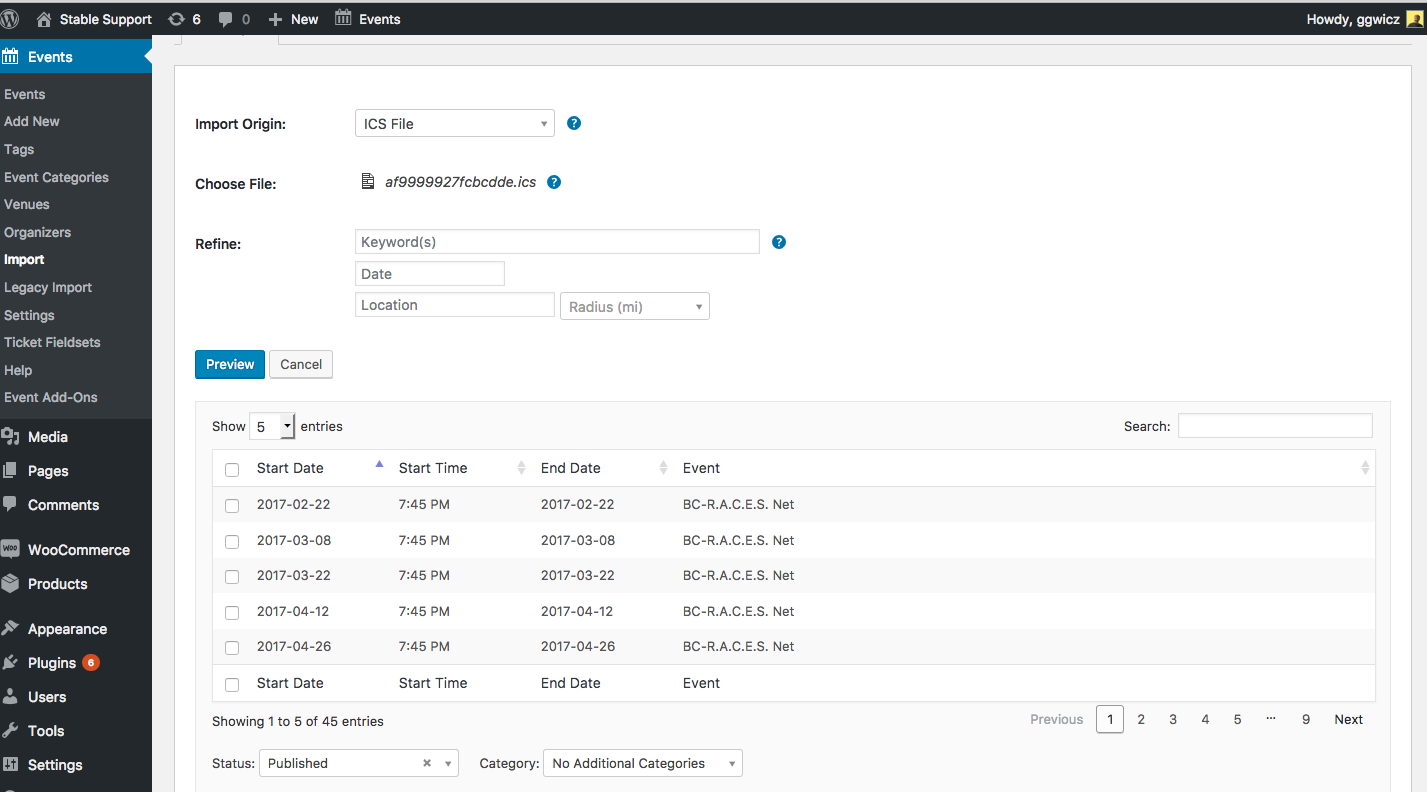
For the BC-RACES Nets 2017-2021-1.ics file, there are 113 events inside of it. When I import it into my site, only 45 are listed, as shown in this screenshot (click for a larger-sized image):
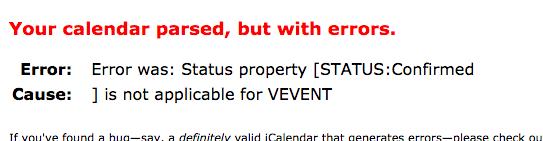
I ran the file through an ICS file validator and am encountering this odd error (click for a larger-sized image):
I have reached out to some developers on our team and will report back soon with more information here. Just wanted to confirm we are actively investigating this issue.
One thing that may be helpful for us is to post your site’s complete, un-edited system information using the “Sharing information manually” steps outlined in this article: https://theeventscalendar.com/knowledgebase/sharing-sys-info/
Thanks — stay tuned!
— George
ParticipantSure thing @websource, cheers.
— George
ParticipantExcellent Mark, glad to hear it! 😀
February 13, 2017 at 11:23 am in reply to: Recommendation to sell tickets grouped with others products #1233971ParticipantSure thing! 😀
ParticipantThanks for reaching out and for the kind words here, Michael. I’m glad that our plugins are serving you well—for the most part! 😉
One of the major feedbacks we have received from several clients is that their customers are stating they are not receiving an email with their tickets. Granted I know that some email providers block it for some reason or it may go to spam, but we would like to see an option to click on a purchaser and have an option to resend their tickets to them.
It’s true that email providers’ own rules and configurations can factor into the failed deliver of ticket emails for some users. 🙁 This is a fact that there is unfortunately not much our plugins can do to address.
As for having an option where users can manually re-send the tickets, this is a great idea and one that we do have interest in; there is no support for this at this time, however, nor is there a specific plan to implement this soon (“soon” meaning in the next couple of weeks or months).
I would encourage you to please post ideas like this to our UserVoice page here: tribe.uservoice.com — other users can vote ideas like this up or down, which we pay close attention to!
2nd: Another is that clients have requested us to remove the “tickets left count” on the front end. There is no options for us to do that on the back end and would like to see that option as well. The option could be to have ticket left count visible or to hide it from the front end.
Another great idea. This is currently only possible with custom CSS. As a tip that might help with writing such custom CSS for the time being, definitely check out a [free!] tool like Firebug if you use FireFox, or the Developer Tools for either Safari or Chrome. They have “Inspector” tools that let you zoom right over the element you want to hide or modify, and this makes writing custom CSS much, much easier.
lastly, If we create an event as a post, we would like to see an option to give us the ability to sync or automatically create and event in the modern tribe community events calendar.
Can you clarify what you mean by “modern tribe community events calendar”? And then can you also clarify what you mean about “syncing” with it?
Thanks!
GeorgeParticipantHey Preston,
Thanks for reaching out!
Event Aggregator imports images from Facebook.com events, and uses the Facebook.com event image as the “featured image” of the WordPress version of the event.
You can also specify a featured image in the CSV import.
There is no other image support for other imports at this time, though.
Does this help address your question? Please let me know if so and if there are any other issues or questions I can try to help with.
Thanks!
GeorgeParticipantHey Daniel,
It sounds like you have not yet downloaded and installed Events Calendar Pro on your site.
Please check out this guide on getting started with Events Calendar Pro to do those steps: https://theeventscalendar.com/knowledgebase/new-user-primer-the-events-calendar-and-events-calendar-pro/
Please let me know if that guide helps and if there are any other issues or questions I can try to help with! 😀
— George
February 10, 2017 at 10:19 am in reply to: Latest update: Still no images importing from FB!!! #1232982ParticipantHi Cody,
This bug was not listed as “fixed” in the Release Notes for this most recent release, because this most release indeed did not fix that bug: https://theeventscalendar.com/maintenance-release-events-calendar-4-4-2-event-tickets-4-4-2-premium-add-ons/
The fix is still being worked on, and should be arriving soon.
I will mark this thread Pending Fix and will update this thread when the fix is available.
I am truly sorry for the trouble here and appreciate your patience.
Please let me know if there are any other issues or questions I can try to help with in the meantime.
Sincerely,
GeorgeFebruary 10, 2017 at 10:16 am in reply to: PHP Error – explode() expects parameter 2 to be string, array given #1232978ParticipantThanks for reporting this, Jeremy!
I have reported this to our development team and, while it is Friday right now and so a reply may be a bit slow, I will keep you posted about what they say about this and what our plans are for addressing it.
Stay tuned to this thread for those updates, and please let me know if there are any other issues or questions I can try to help with in the meantime.
Sincerely,
GeorgeParticipantHey Iain,
Thanks for reaching out.
When you say that you can see “which Organizer submitted the event”, “but not which user”, can you please clarify what you mean?
Only one person can submit an event, so if an Organizer “submits an event”, then this is the only person who submitted the event. And so the “organizer who submitted and event” IS the user who submitted an event, because only one person can submit an event and so it’s the same person.
Apologies if I’m misunderstanding you in some way!
Thanks,
GergeParticipantHi Marianne,
Thanks for reaching out.
I will look into this issue for you and hope to help resolve this.
To help me do that, can you your site’s complete, un-edited system information using the “Sharing information manually” steps outlined in this article: https://theeventscalendar.com/knowledgebase/sharing-sys-info/
Thanks!
GeorgeParticipantHey Pauline,
Thanks for reaching out.
I am sorry to hear about this issue!
What I would recommend doing is the following things:
1. Deactivate the “unsafe mimetypes” plugin for now.
2. Update your site’s version of The Events Calendar. Head to this page to see what the latest version should be: http://theeventscalendar.com/my-account/downloads
3. Update your site’s version of Events Calendar Pro. Head to this page to see what the latest version should be: http://theeventscalendar.com/my-account/downloads
Once you’re up-to-date with those plugins, try an import again and let us know if anything improves.
What do you find when you do these steps?
— George
ParticipantHey Brian,
Thanks for reaching out about this again. Just to help me verify this bug, can you please your site’s complete, un-edited system information using the “Sharing information manually” steps outlined in this article: https://theeventscalendar.com/knowledgebase/sharing-sys-info/
Thank you!
GeorgeParticipantHey Juan,
Thanks for reaching out.
This is unfortunately a known bug that we are working on fixing. A fix should hopefully be arriving some time in the next few weeks, but there is no current workaround for now. 🙁
I’m sorry to bear this news! But I will mark this thread “pending fix” and can assure you I will post an update here when the bug fix is available and the meta templates thus starting working with our templating system as expected.
Please let me know if there are any other issues or questions I can try to help with in the meantime.
Sincerely,
GeorgeFebruary 10, 2017 at 10:01 am in reply to: Recommendation to sell tickets grouped with others products #1232962ParticipantHey Gabriel,
Thanks for reaching out.
We unfortunately do not have any specific list of WooCommerce Extensions that work with our plugins well or don’t.
However, what you should be able to do is to contact WooCommerce support and ask if the “Force Sells” extension works well with the “Simple Product” type of WooCommerce product. “Tickets” in our plugins are this “Simple Product” product type, and so if an Extension works well with the “Simple Product” product type, it should work well with our ticketing plugins.
In regards to the “delivery option” issue, I would recommend also asking the WooCommerce support for recommendations about adding delivery options to “simple product” types of products.
We are unfortunately not able to help with any customized implementations or features of our plugins, including “delivery options” or other add-ons to the default functionality. But I hope this information has helped! 😀
Cheers,
George -
AuthorPosts