
Home › Forums › Calendar Products › Events Calendar PRO › Limit on events being imported?
- This topic has 34 replies, 2 voices, and was last updated 9 years, 6 months ago by
Stanley.
-
AuthorPosts
-
February 10, 2017 at 9:25 am #1232941
Stanley
ParticipantIt appears that there is a minimum for Aggregator when it states that there are 100 Imports in 24 hours for the Personal version. To most people an import is a FILE, but apparently to the Aggregator, it is a record or event. VERY misleading as I found out after I purchased the product and tried to import more than 100 .ics records into calendar events.
Am I doing something wrong or is it misleading advertisement or a bug?
Thanks.February 10, 2017 at 9:45 am #1232950George
ParticipantHey Stanley,
Thanks for reaching out.
Importing manually from a file does not count towards the 100-import-per-day limit.
For some clarification about what “counts” as an import and what does not, please check out this Knowledgebase article: https://theeventscalendar.com/knowledgebase/event-aggregators-import-limits-work/
Cheers!
GeorgeFebruary 10, 2017 at 10:16 am #1232977ParticipantThanks George! I still don’t see what is limiting my input then. Any ideas?
February 10, 2017 at 12:01 pm #1233035ParticipantStill don’t understand why my event import is being limited when I check Preview. The attached file 2019 shows only 4 records in Preview and the next file 2020 has zero records in Preview. When I look at the files the data is all there.
February 10, 2017 at 4:11 pm #1233143ParticipantDon’t know why this is under Pre-Sales Questions when I thought it was entered under Post Sales since I have already purchased AGGREGATOR and cannot get it to function properly.
February 12, 2017 at 1:46 pm #1233585ParticipantI uploaded a previous .ics file with a different file name but the same 114 entries with added start and end times, but when I went into preview, only 44 showed up again. This happened before as well. Other files show zero records and 4 records still as mentioned in the prior e-mail a couple of days ago on this thread. This is VERY frustrating.
-
This reply was modified 9 years, 8 months ago by
February 13, 2017 at 11:51 am #1233994ParticipantHi Stanley,
Thanks for your patience here over the weekend.
I did some manual testing of your ICS files and here’s what I am finding:
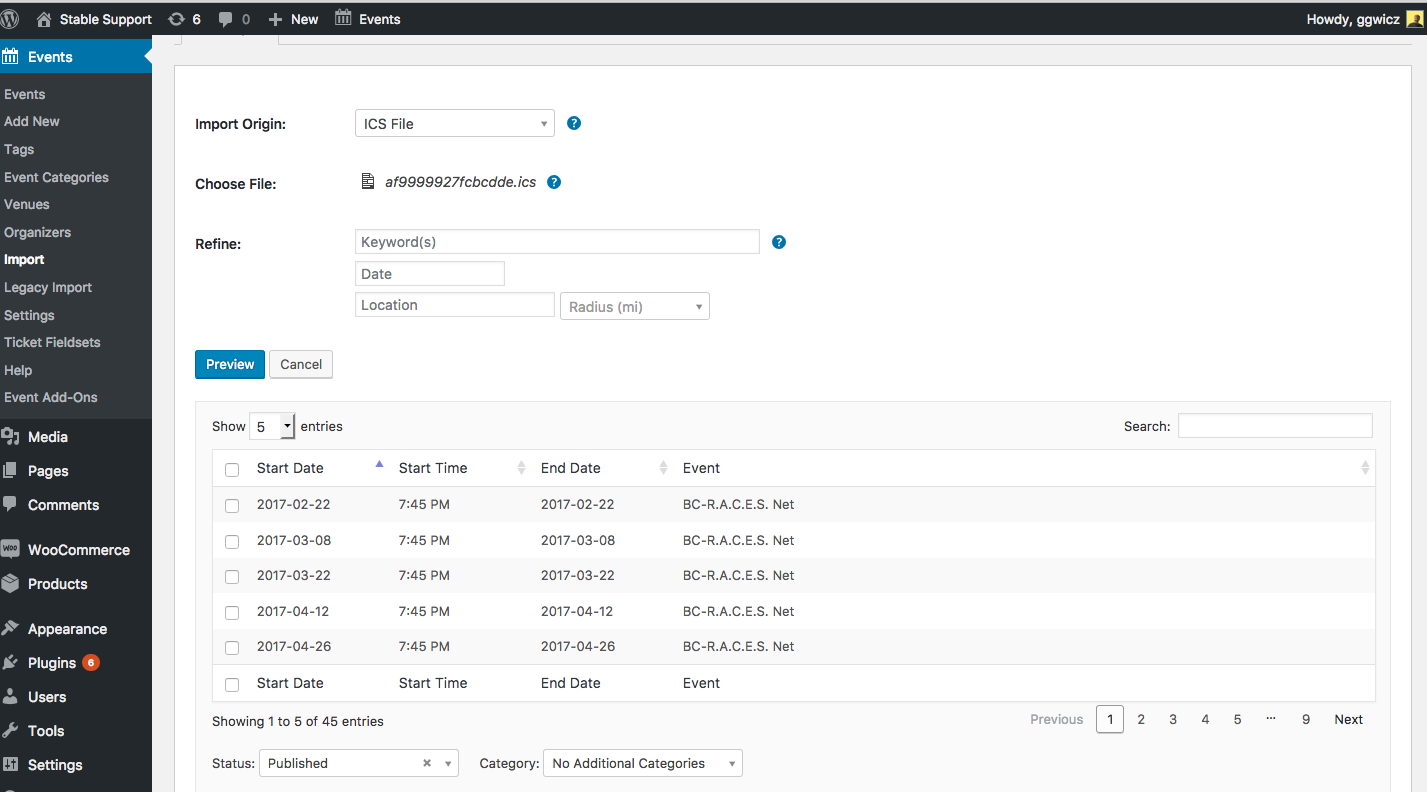
For the BC-RACES Nets 2017-2021-1.ics file, there are 113 events inside of it. When I import it into my site, only 45 are listed, as shown in this screenshot (click for a larger-sized image):
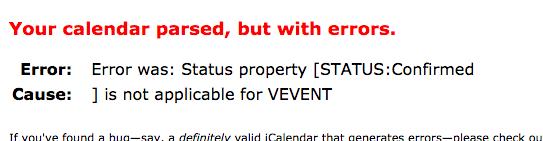
I ran the file through an ICS file validator and am encountering this odd error (click for a larger-sized image):
I have reached out to some developers on our team and will report back soon with more information here. Just wanted to confirm we are actively investigating this issue.
One thing that may be helpful for us is to post your site’s complete, un-edited system information using the “Sharing information manually” steps outlined in this article: https://theeventscalendar.com/knowledgebase/sharing-sys-info/
Thanks — stay tuned!
— George
February 13, 2017 at 12:41 pm #1234025ParticipantThanks George. I tried each time to upload the system stats, but got a failure error. I will go into the Events>Help and try there for a copy.
I got the copy from the Help but sadly, this response does not allow a private e-mail response below.February 13, 2017 at 12:51 pm #1234030ParticipantGeorge:
Just clicked on “Yes, automatically share my system information with the Modern Tribe support team” so I’ll see what, if anything, that changes below.Well, sadly again, nothing changes in this thread.
February 14, 2017 at 5:43 am #1234419ParticipantThanks for doing that Stanley, I can confirm that I am seeing your system information and have read through it — nothing stands out as outright problematic or concerning, and it looks like your software is up-to-date which is great.
When it comes to your issues importing those files, I want to be clear that I am working with a developer on our team to investigate your ICS file and potential reasons why it might be behaving like you find.
One thing that will be very helpful for us in this investigation is to see what you find if you do the following steps:
1. Download the test ICS file I have uploaded here (there’s a “Download” link in the top-right corner of the window when you open this link, just click that 🙂 ) ? https://cloudup.com/cWqqssYwIXO
2. Do a test import of this file on your site. Be sure to use the ICS File import type, and to set the Date parameter in the import screen’s “Refine” section to February 1, 2017. Here is a screenshot of the exact configuration you should use for this test import (click for a larger-sized image):
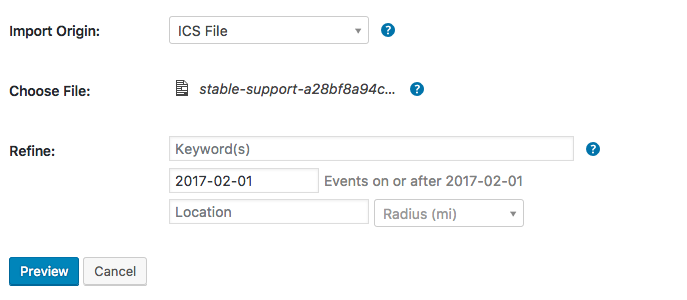
☝️ Note the “Events on or after 2017-02-01” text in gray in the screenshot above; make sure your import screen shows this text which will confirm you’ve set it up right!
3. You do not have to actually import these events, but please confirm how many events come up in the “Preview” screen. Does it say “Showing 1 to 5 of 10 entries”, for example? Or different numbers? Let me know exactly what you find.
This step should be very helpful.
Let us know what you find!
GeorgeFebruary 14, 2017 at 6:46 am #1234470Stanley
GuestExactly like yours. Showing 1 to 5 of 10 entries.
February 15, 2017 at 8:58 am #1235574ParticipantExcellent, Stanley.
You result confirms that there is something wrong with the ICS file you originally shared, then. The one named BC-RACES Nets 2017-2021-1.ics
1. Where are you generating these ICS files from specifically? Are they coming from a specific app or web site, for example?
2. Not a question here, but just wanted to say that I am sorry about the pace of this support exchange, and greatly appreciate your patience. The issues with our ICS files not importing all the entries are ones that we cannot recreate and are unique to these files, and so the investigation is taking a bit of time and tinkering. Thank you!
Sincerely,
GeorgeFebruary 15, 2017 at 9:28 am #1235731GuestThanks George. The app software is . I first went to him as i\I mentioned in an earlier post, and he said he thoroughly checked the files out and there was not a problem in the conversion. I imported this same file into Outlook and it worked fine with no errors and all records imported.
Please send me in a Private e-mail the character code or whatever was found so that I may pass it on to him since as I understand from Andras that you cannot work with other app developers.
Thanks.
February 15, 2017 at 9:37 am #1235745ParticipantGeorge, for some reason the link to the app site did not work.
Here it is again: https://csv-to-ics.com/
February 16, 2017 at 7:40 am #1238584ParticipantThanks for confirming that Stanley — just curious, would you be willing to share the CSV file with us?
I’m curious if this CSV file has a column called “Status:”, which is why that might be showing up in the CSV files and generating the above-mentioned error regarding it.
— George
-
This reply was modified 9 years, 8 months ago by
-
AuthorPosts
- The topic ‘Limit on events being imported?’ is closed to new replies.