

Forum Replies Created
-
AuthorPosts
-
December 1, 2015 at 11:06 am in reply to: Want to use other login process for the community event #1033362
George
ParticipantHey @Friedrich,
Thanks for reaching out! To be clear is the problem just that when the user logs in via the User Pro plugin, they are not redirected to the “Community Events” submission form as hoped?
If that is not the problem, then can you please specify what exactly is going wrong?
Cheers,
GeorgeParticipantHey @Alex!
This sort of event structure is indeed possible – it just takes going through each rule one-by-one. Here’s an example of how to build this:
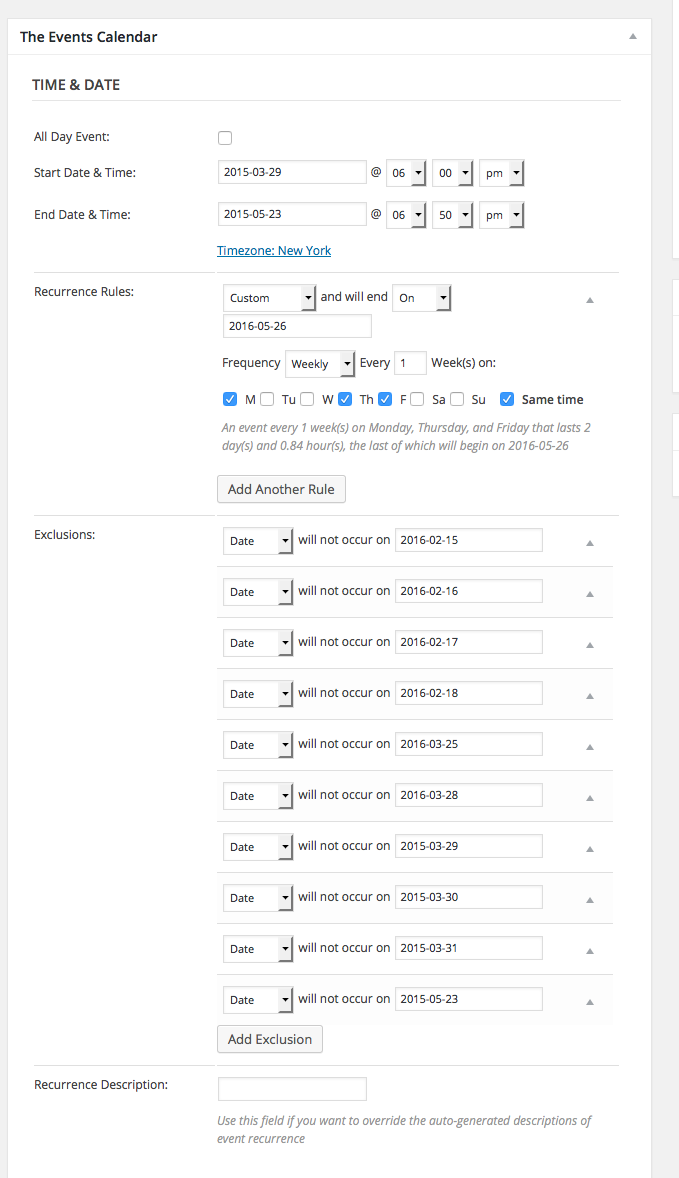
You can learn more about each parameter on the knowledgebase here → https://theeventscalendar.com/knowledgebase/pro-recurring-events/
Cheers!
GeorgeParticipantNo worries @Kishore – try out the code I recommended and let me know if it helps! 😀
December 1, 2015 at 9:59 am in reply to: Warning: strtotime() expects parameter 1 to be string, object given in #1033317ParticipantHey Matt,
Thank you for testing that. I’m still trying to reproduce this error, without luck, and so at this point unfortunately the best steps I can recommend are to do further testing with the full set of steps listed here → https://theeventscalendar.com/knowledgebase/testing-for-conflicts/
I really appreciate your patience with this!
Thank you,
GeorgeParticipantThank you so much for this, @amazing!
It may not seem like an important detail at all, but one thing that stands out to me as inconsistent is that on your DEV site, every plugin is single-site activated, whereas on your LIVE site, some plugins are network activated.
The Events Calendar and Events Calendar Pro are two such plugins. So, on your LIVE site, try network-deactivating these plugins, and instead just active them on an individual site-by-site basis.
Once you do this, does the behavior of these issues change at all?
In addition to this, the version numbers are a bit behind, so the next step you can try is to update The Events Calendar to 3.12.6, and update Events Calendar Pro to 3.12.6 as well.
Cheers!
GeorgeParticipantHey Vendulka,
Your summaries are indeed quite accurate. I’m sorry to see this:
Unfortunately I can not pay for every year of the PRO version, it is too expensive for me. So I know what will not be possible without the PRO version.
However, I totally understand your perspective and wish you the best of luck with your project regardless!
Sincerely,
GeorgeDecember 1, 2015 at 9:49 am in reply to: Events missing from backend, picture view not working #1033310ParticipantThank you for this information @mariannafridjonsdottir!
Just to double-check, can you deactivate the “W3 Total Cache” plugin and see if anything is improved with regards to this issue?
Thank you for your patience here,
GeorgeParticipantThanks for your feedback K.D.! I totally relate to the frustration of making and maintaining custom code 🙁 It’s tricky to find the right balance of what to include as features and what to leave out.
A good example is your suggestion of adding reps to the Map View. Something that specific to reps and shows is not something we’re likely to implement, however it might be a really nice feature to have our “Organizers” taxonomy be easily included on that map view, and so then it would be really easy to just use this for reps instead…
Either way, thank you for the feedback! I will close up this thread for now, but please open a new thread any time if any questions, comments, or concerns arise 🙂
Cheers,
GeorgeDecember 1, 2015 at 9:42 am in reply to: The following plugins are out of date: The Events Calendar: Filter Bar 3.12.1 #1033308ParticipantHey @Dave,
Thanks for sharing this! I didn’t realize you were using the 4.0 Release Candidates of the core plugin and of Events Calendar Pro.
To prevent this error, please use the Release Candidates of all your other Tribe plugins, too – so, head to https://theeventscalendar.com/my-account/downloads/ and get [then install] the 4.0 Release Candidates for Filter Bar.
—
If you would like, you can also get rid of WooCommerce Tickets and install the 4.0 Release Candidates for both “Event Tickets” and “Event Tickets Plus” – these are two new plugins that are replacing the old per-platform add-ons we made. So instead of having WooCommerce Tickets, then “EDD Tickets”, then “Shopp Tickets”, et cetera, starting with The Events Calendar 4.0 we’re just going to have Event Tickets and Event Tickets Plus.
—
But doing the tickets-related changes are up to you! Regardless of what you do regarding tickets: to suppress this notice about Filter Bar, download and install the 4.0 Release Candidate of Filter Bar.
Cheers!
GeorgeParticipantHey @edevita,
Thanks for clarifying things – I would recommend trying the code snippet I wrote for the user in this other forum thread here → https://theeventscalendar.com/support/forums/topic/make-the-event-popup-clickable-on-month-view/
That should make the tooltip titles clickable, and make them “look” and function more like links and stuff – let me know if this helps!
Cheers,
GeorgeParticipantThanks for elaborating on that @Rocio, and for testing the Twenty Fourteen theme!
I’m sorry about how long this issue is taking – I admit that I’m a bit confused about what’s going on, because it seems like category links work totally fine just until you switch views. Meanwhile, on my local testing site even if I switch views I cannot reproduce this error.
However, I did some digging and it turns out that this is a bug we are working on fixing. It happens because of translations, which I didn’t find on my site because I am not using a translation.
I’m really sorry about the existence of this bug! We are working on it and are hoping to have it fixed for the official 4.0 release coming soon – if not, then by a maintenance release soon after.
Thank you for your patience with this!
Sincerely,
GeorgeDecember 1, 2015 at 9:23 am in reply to: Google import added hundreds of past events to current month #1033301ParticipantHey Joel,
The Events Calendar does not create any of its own tables. For example, Events, Organizers, and Venues are all just stored in the default wp_posts table, with the post_type parameter set to tribe_events, tribe_organizer, and tribe_venue, respectively.
Other metadata on events like venue/organizer relationships, recurrence data, et cetera are all stored in wp_postmeta.
I hope this information helps and conveys how The Events Calendar’s data is not in any custom tables, but sticks to the standard WordPress database structures.
Cheers,
GeorgeParticipantThanks for this information – does using the existing filter not work at all? I.e., something like this:
add_action( 'tribe_is_community_edit_event_page', '__return_true' );
Cheers,
GeorgeDecember 1, 2015 at 9:12 am in reply to: Warning: strtotime() expects parameter 1 to be string, object given in #1033295ParticipantThanks for your patience with this! One last question: when you say that you’re not displaying it on the front-end, do you mean that you have some sort of custom CSS or other customization to actively hide the start date/time on the front-end?
If so, does temporarily removing or disabling this customization affect the presence of that error on your site at all?
Thank you!
GeorgeParticipantOh cool, are you just going to manually enter the time into the titles Christina? If you’d rather have it happen automatically and are comfortable adding custom code to your theme’s functions.php file I can share some custom code to do it.
Cheers!
George -
AuthorPosts