

Forum Replies Created
-
AuthorPosts
-
George
ParticipantHey Hugh,
Thanks for confirming this!
In this case, I would recommend contacting the support team of that exstension specifically; “Tickets” in WooCommerce are actually just normal “Products” inside of WooCommerce, so as long as this extension converts currency accurately for other instances of the WooCommerce “products” post type, it should work with Tickets from WooCommerce Tickets.
Thank you,
GeorgeDecember 2, 2015 at 12:20 pm in reply to: Warning: strtotime() expects parameter 1 to be string, object given in #1034070ParticipantHey Matt,
I’m sorry that this issue is persisting! It’s really got my head scratching; we can indeed table this issue for now, and see if the forthcoming 4.0 updates fix it.
If not, we can perhaps resume troubleshooting from there on that issue.
—
Now, as for the WooCommerce Tickets issue you reported, I personally do not see this behavior. One possibly-contributing factor is the “Order status” of the order as part of which the tickets are purchased.
Are these orders marked as “Complete” while the stock is not updated? If not, then does marking them as “Complete” get the stock to adjust accurately?
Thank you!
GeorgeDecember 2, 2015 at 12:16 pm in reply to: No slash / being added to events slug – so links don't work #1034066ParticipantWoot! 😀
Best of luck with your site,
GeorgeParticipantThanks for the kind words Matt. Best of luck with your site and a smooth upgrading process!
Be sure to make a backup of your site and database before upgrading things!
And we’ll be manning the forums attentively if you need help with anything as you upgrade 🙂
Cheers!
GeorgeDecember 2, 2015 at 10:16 am in reply to: Google import added hundreds of past events to current month #1033951ParticipantHey @Joel,
Thanks for these updates! I’m sorry to admit that I’m not quite sure what you mean by “the google calendar import”.
Are you asking if the “Export to Google Calendar” link on some event views, which sends event date from the WordPress site to Google will then create some sort of connection, so that if the event date is change on Google, the changes will be sent back from Google back to the WordPress site? And then updated on the WP site accordingly?
If so, then unfortunately no, this will not happen.
If this is not what you’re asking, I’m really sorry about that – though, in which case, can you elaborate a bit more on what you mean?
Thank you!
GeorgeParticipantHey @Corey,
Thank you so much for your patience with this and for doing those steps – I’m wondering, can you let me know what the “Events slug:” option is set to on theapopkavoice.com? For some reason this is not showing up in the “System Information”.
1. If it’s not set to events, set it to that, save changes, and see if anything improves.
—
2. What are this site’s Permalinks Settings in Settings > Permalinks in your wp-admin? Are they set to /%postname%/, for example? If not, does setting them to /%postname%/ (or any option OTHER THAN “Default”) and saving changes improve anything?
—3. If neither #1 nor #2 lead to any improvement, I would recommend seeing if any errors pop up on your site if you head to your site’s wp-config.php file and change this line of code:
define('WP_DEBUG', false);to this:
define('WP_DEBUG', true);That will display PHP errors if any exist, which might be quite useful here.
—
Let me know what you find! I’m sorry this is issue is still persisting, I can’t reproduce it so this investigation is unfortunately necessary to identify the source of the problem 🙁 Thank you for your patience!
– George
December 2, 2015 at 8:52 am in reply to: Events missing from backend, picture view not working #1033904ParticipantHey Marianna,
Thank you for your patience! In your reply you wrote “I get this when deactivating W3 Total Cache” – were you referring to a screenshot or something that you tried to add to the reply?
If so, there is unfortunately not a screenshot in your post. Our forum could’ve stripped the code or something – sorry about that!
Can you try sharing a screenshot of the issue again, if that’s what you were trying to do originally? You can do so by uploading the screenshot to Imgur.com, Flickr.com, CloudUp.com, or any similar image-hosting site; then just share the links to those images here and I’ll take a look.
—
If you are not referring to a screenshot, then what was the “this” you got when deactivating W3TC?
Thank you!
GeorgeParticipantHey @Kishore,
I’m sorry that that did not help 🙁
I’m also sorry to admit that I don’t quite understand what you mean about “change some priority order”. If you mean changing the priority of a given hook or filter, simply pass the priority as an integer after the name of the hook’s callback function. So instead of this, for example:
add_action( 'the_hook', 'the_callback' );
You can just add the desired priority like this, will make the priority 5:
add_action( 'the_hook', 'the_callback', 5 );
I appreciate your feedback regarding hooks for the plugin – we are adding hooks and filters all the time, and so while I cannot promise the inclusion of this one immediately, like in our next release, it may well end up in another release down the road.
Please stay tuned to updates and read the changelogs for the inclusion of such filters.
Thank you!
Sincerely,
GeorgeParticipantThank you so much for your patience and for confirming the nature of the issue here. Unfortunately I am not 100% certain about when the fix will be released; it should be coming in the 4.0 release, which is coming very, very soon.
There is one option that might help, but you should only consider if you have good backups of your site and can create more backups before doing these steps.
This option is to head to http://theeventscalendar.com/my-account/downloads and scroll down to the “Early Access” section of the page. You should be able to download the 4.0 Release Candidates for all of the plugins for which you have a license, and for The Events Calendar itself.
Once you download these plugins, back up your site and database. Then, delete all existing versions of The Events Calendar and its add-ons like Events Calendar Pro on your site. This will not delete event data but you should have a backup just in case – do not try this without a backup.
Once those are deleted, install the 4.0 Release Candidate versions of all plugins; re-enter License Keys if needed; and then go to Settings > Permalinks in your admin area, and just click “Save Changes” without actually making any changes. This may seem like an odd thing to do but is a little “trick” within WordPress to get the permalinks across your site to refresh, which might help here.
Then check things out again – are the issues exactly the same, or improved at all?
Thank you!
GeorgeParticipantHey Hugh,
There are unfortunately not features within our own “WooCommerce Tickets” add-on that would enable multi-currency support like you describe. 🙁 I’m sorry to bear that news!
Does that WooCommerce extension you have handle converting the base ticket price into different currencies based on locale?
— George
ParticipantHey @Corey!
Thanks for reaching out. I’m sorry that these notices and the 404 have arisen on your sites.
For the /events slug to work, there cannot be a page that has the same slug. So any either site, if you head to the “Pages” tab in your wp-admin sidebar and find a Page titled “Events”, whose slug is /events, send this page to the trash, then empty the Pages trash, and then go to Settings > Permalinks in your admin area and just click “Save Changes” without actually making any changes. This last step may seem like an odd thing to do but is a little “trick” within WordPress to get the permalinks across your site to refresh, which is good to do for these issues.
You can do this on both sites; when you do this, what do you find? The error should go away at least.
If it does not, or if issues persist on either site, then can you share the “System Information” for BOTH sites separately? Here’s how to share system information for a web site → https://theeventscalendar.com/knowledgebase/sharing-sys-info/
Thank you!
GeorgeParticipantHey @Matt,
Making such changes to the internal workings of The Events Calendar is possible, but would require editing core plugin code which is not something we are able to help with as part of customer support. Editing the code would be complex and is something you’d have to take the reins on personally, or hire a professional to do it for you (here’s a list of some, if you’re interested! → http://m.tri.be/18k1).
so we would really prefer to pull in those venues into the venues (and their location) within The Events Calendar, rather than create another venue in The Events Calendar.
This approach that I’ve quoted right above is particularly interesting, and might be the most efficient and long-term-stable, since you wouldn’t have to edit any core code of The Events Calendar. Instead, you could write a simple importer/exporter style plugin that imports the data from the original post types into The Events Calendar’s built-in post types.
Heck, you MIGHT even be able to already do this by using the WordPress Importer and Exporter tool [not The Events Calendar’s own CSV import tool].
This is the importer plugin I am referring to:
• https://wordpress.org/plugins/wordpress-importer/What might work is going to Tools > Export in your wp-admin and exporting the original post type, as shown here:
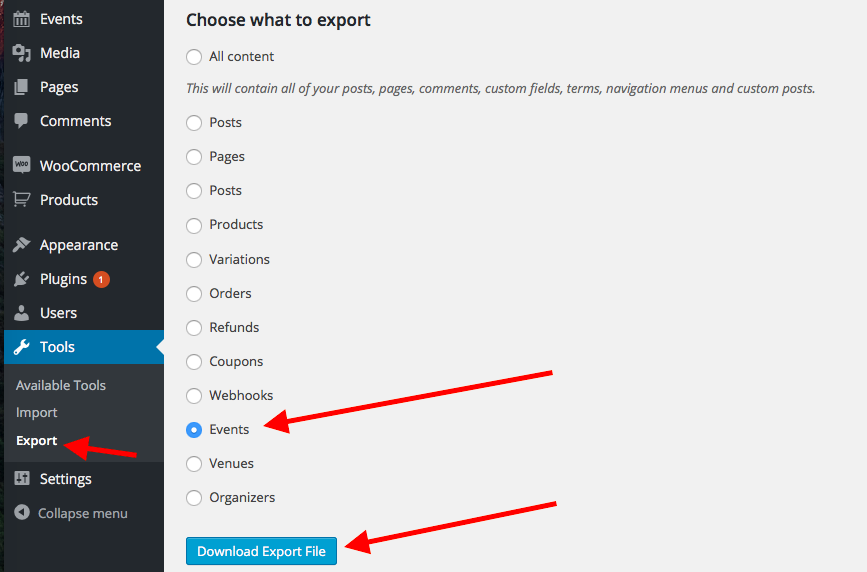
Then, open the generated XML file from this in a text editor, and look for the <wp:post_type> tag. Here’s a screenshot:
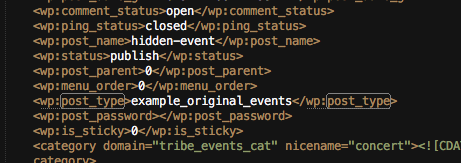
Change that to <wp:post_type>tribe_events</wp:post_type>, and then re-import this file and see if the data gets duplicated into the proper post type.
These steps may work, but may not, so please test this on a development site before testing on a live site!
I hope this information helps! If the importer method I suggested works for events, you can use it for Venues and Organizers too. If it does not work, you may have luck doing a similar sort of process with another plugin out there. I do not have a specific recommendation for that, but it’s possible, and if not then you would unfortunately have to custom code a solution.
Sincerely,
GeorgeParticipantHey @Ryan,
You refer to “this add-on” in your post, but can you clarify which add-on you are referring to?
I’m almost certain you are referring to Community Tickets; in which case, unfortunately we’ve left support for EDD Tickets minimal, as well as support Shopp Tickets and WPEC Tickets, because going forward with The Events Calendar 4.0 we are merging ALL tickets add-ons into a simpler pair of add-ons: Event Tickets [free], and Event Tickets Plus.
These two add-ons will replace all platform-specific add-ons like WooCommerce Tickets, et cetera. (And don’t worry – since you have paid for EDD Tickets already, you will have a premium license automatically for Event Tickets Plus when it launches).
I know that this is information is not that helpful, since you’re still left with the same problem of possibly losing your EDD-specific customizations; but I just wanted to explain our decision and such.
Unfortunately your EDD customizations may need to be re-done with the new Event Tickets Plus plugin when it is available 🙁 I am very sorry about this, @Ryan.
Sincerely,
GeorgeDecember 1, 2015 at 11:33 am in reply to: Month View Not Updating WordPress Template – H1 & Breadcrumbs #1033378ParticipantHey there!
We unfortunately do not field technical support questions for the free version of The Events Calendar here in our Pre-Sales questions forum, and so your best bet is to post in the official free support forums for the The Events Calendar → https://wordpress.org/plugins/the-events-calendar/
One thing that may help here is to head to Events > Settings > Display in your wp-admin, and then find the “Events Template” option here. Try out every single option and see if any of them work better then the Default events template.
Thanks,
GeorgeDecember 1, 2015 at 11:12 am in reply to: No slash / being added to events slug – so links don't work #1033365ParticipantI’m sorry to hear about this issue! I cannot reproduce this – it might be something specific to WP Engine’s platform.
To help determine if that’s the case, can you share your System Information with us? Here’s how → https://theeventscalendar.com/knowledgebase/sharing-sys-info/
Thank you!
George -
AuthorPosts