

Forum Replies Created
-
AuthorPosts
-
George
ParticipantThanks Jacob,
I’m unfortunately not able to identify a specific culprit there 🙁 I’m sorry! There aren’t JavaScript errors outright, but a code conflict is still the most likely candidate. To dig deeper and find out the source of the problem, I would recommend going through the troubleshooting steps outlined here → https://theeventscalendar.com/knowledgebase/testing-for-conflicts/
Check on the issue after each step in that process and let us know what you find!
Thank you for your patience with this 🙂
George
ParticipantThank you for all of this!
If you deactivate that Multilingual plugin temporarily, does anything improve with regards to this issue?
If not, then what about if you proceed with the rest of the steps in this guide → https://theeventscalendar.com/knowledgebase/testing-for-conflicts/?
I’m sorry to recommend these steps! 🙁 Unfortunately, I cannot produce this specific behavior and I notice many, many plugins on your site, so it’s possible there’s a code conflict here – a code conflict could be happening in numerous places on the site.
Let me know if you can do those steps, and if so what you find.
Thank you!
GeorgeParticipantNo worries! 😀 Thanks for the update.
Best of luck with your site,
GeorgeParticipantThank you for explaining @Jacob!
Can you link to where this source code displays on your site? I will take a closer look.
This normally happens because of a code conflict that comes from your theme or a plugin on your site. I will take a look and try to identify the source of the conflict 😀
Cheers!
GeorgeParticipantHey @Emilie!
The time format used across The Events Calendar is inherited from the time format in your general WordPress settings.
So, I would recommend first heading to Settings > General in your wp-admin. Look for the “Time Format” settings as shown in this screenshot:
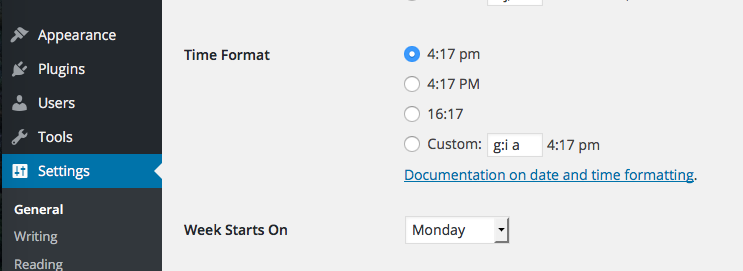
1. What are these time format options set to, currently?
2. Does changing them affect the display of times on the front-end of your events?
—
Let me know what you find for items #1 and #2 here – if the answer to #2 is NO, then can you then proceed to number #3, as follows:
3. Share your system information with us, which you can do by following the steps here: https://theeventscalendar.com/knowledgebase/sharing-sys-info/.
Thank you!
GeorgeParticipantHey Brandon!
Thanks for reaching out. If you’re curious about Events Calendar Pro specifically, there are a few admin screenshot on its official product page here → https://theeventscalendar.com/product/wordpress-events-calendar-pro/
There are four more admin screenshots for The Events Calendar’s page here → https://theeventscalendar.com/product/wordpress-events-calendar/
Are these screenshots helpful?
If not, can you specify any details you’re particularly interested in? Or the features of a specific add-on, for example?
Thank you! 😀
GeorgeParticipantHey @kevman4christ,
Sorry to hear about this! You posted this question in the Facebook Events forum – is the duplicate event in question an event that you imported from Facebook?
—
Regardless of that, can you link to this event on your site specifically?
If it is an import from Facebook, can you also link to the original event on facebook.com?
—
Finally, for now, can you share your “System Information” with us? Here’s how → https://theeventscalendar.com/knowledgebase/sharing-sys-info/
Cheers!
GeorgeDecember 2, 2015 at 1:11 pm in reply to: Google import added hundreds of past events to current month #1034109ParticipantI’m sorry about that Joel, I didn’t read your fourth item correctly!
That’s odd behavior and I’m wondering – can you share an export file that you are attempting to import? Then, change some events on Google and re-generate the export files as per the exact steps you tried in the process above.
Share this secondary export as well.
I will manually test with both export files and see if I get the same results as you.
—
Also, can you share your system information? Here’s how → https://theeventscalendar.com/knowledgebase/sharing-sys-info/
—
If you share your system information here, and share the export files (which you can do via CloudUp.com for example, or http://ge.tt or a similar service), that will provide a lot of information we can use to figure out why this is happening here.
Thanks a ton for your patience and persistence with this thread, @Joel!
Sincerely,
GeorgeParticipantThank you for your feedback James!
There’s no disagreement here that this feature would be extremely useful 🙂 We’re working on it.
Stay tuned to plugin updates for progress on this issue over time!
Cheers,
GeorgeParticipantHey James, this is unfortunately not an option at this time 🙁 There are no ways to simply duplicate an existing event, you have to manually create each event.
Sorry to disappoint!
— George
ParticipantHey @Martin!
Can I put these tribe css files in custom or is it essential that they stay in a particular location? And if so, I am not sure where that should be!
You will want to put the custom CSS file in a specific location; find your active theme’s directory and make a new folder there called /tribe-events. Inside this folder, add your custom tribe stylesheets.
Read this guide for more information about this system → https://theeventscalendar.com/knowledgebase/themers-guide/
—
Now, as for finding your theme directory itself, this should be in /wp-content/themes/. If you need more help from there, contact your theme developer specifically for some assistance here – every theme is different and when there are frameworks like Genesis Framework at play, you might need to use a specific theme folder or child theme folder.
I hope this helps!
Cheers,
GeorgeDecember 2, 2015 at 12:44 pm in reply to: Many Features w/ Hard Dependency on HTML localStorage #1034087ParticipantHey @Josh,
I’m sorry that for now you’ve had to outright disable these features; improving the handling of storing the state of Filter Bar is indeed a priority, but it’s a challenging thing to fix. There are not great alternatives 🙁
Posts like these definitely do help keep this on our radar, though, so thank you for reaching out at all.
I’m really sorry about this state of things; do you have any further thoughts or any more specific questions I could address here?
Sincerely,
GeorgeDecember 2, 2015 at 12:39 pm in reply to: Google import added hundreds of past events to current month #1034083ParticipantThank you for clarifying @Joel! Unfortunately, no, the changes on Google in your example are not automatically reflected on WordPress; another import would be needed for that, unless you also update the individual event on WordPress.
— George
December 2, 2015 at 12:38 pm in reply to: Events missing from backend, picture view not working #1034080ParticipantThank you Marianna!
That error reveals an issue on the server level with your site. I would recommend sharing that screenshot with your web host via their customer support, and they should be help to increase the “server sort buffer size” as indicated by that error.
Thank you for your patience with this!
P.S.
Roughly how many events do you have on your site? Dozens? Hundreds? Thousands? Dozens of thousands? Just curious! 😀 It’s hard for me to tell from the front-end of your site.
Thank you!
George -
AuthorPosts