
Home › Forums › Welcome! › Pre-Sales Questions › Use venue locations from elsewhere in wordpress
- This topic has 2 replies, 3 voices, and was last updated 10 years, 8 months ago by
Support Droid.
-
AuthorPosts
-
December 1, 2015 at 8:59 am #1033285
Matt
ParticipantIs it possible to use venue locations from elsewhere in wordpress? Let me explain, we are using a separate custom post type already for our venues, so we would really prefer to pull in those venues into the venues (and their location) within The Events Calendar, rather than create another venue in The Events Calendar.
Is it possible to change how The Events Calendar uses the venue, custom taxonomies (tribe_venues), to pull in that data from another post type instead?
December 1, 2015 at 12:16 pm #1033391George
ParticipantHey @Matt,
Making such changes to the internal workings of The Events Calendar is possible, but would require editing core plugin code which is not something we are able to help with as part of customer support. Editing the code would be complex and is something you’d have to take the reins on personally, or hire a professional to do it for you (here’s a list of some, if you’re interested! → http://m.tri.be/18k1).
so we would really prefer to pull in those venues into the venues (and their location) within The Events Calendar, rather than create another venue in The Events Calendar.
This approach that I’ve quoted right above is particularly interesting, and might be the most efficient and long-term-stable, since you wouldn’t have to edit any core code of The Events Calendar. Instead, you could write a simple importer/exporter style plugin that imports the data from the original post types into The Events Calendar’s built-in post types.
Heck, you MIGHT even be able to already do this by using the WordPress Importer and Exporter tool [not The Events Calendar’s own CSV import tool].
This is the importer plugin I am referring to:
• https://wordpress.org/plugins/wordpress-importer/What might work is going to Tools > Export in your wp-admin and exporting the original post type, as shown here:
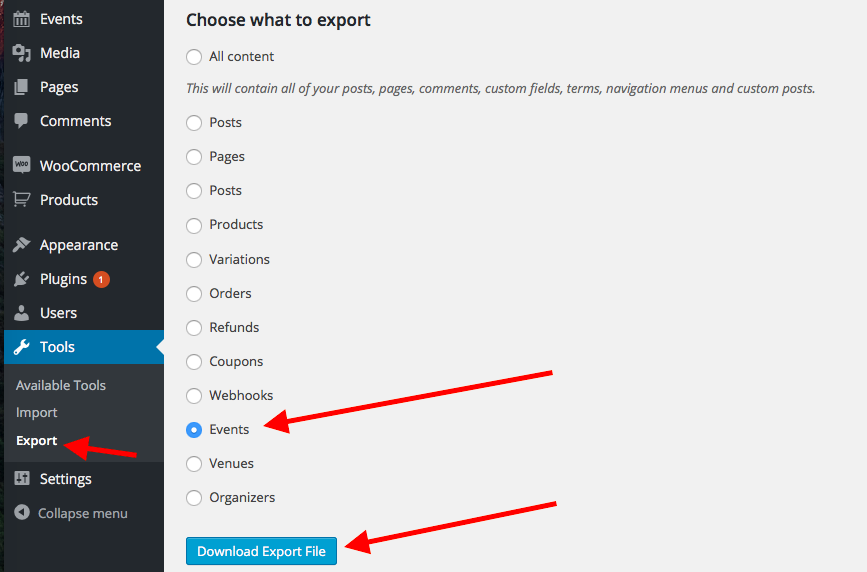
Then, open the generated XML file from this in a text editor, and look for the <wp:post_type> tag. Here’s a screenshot:
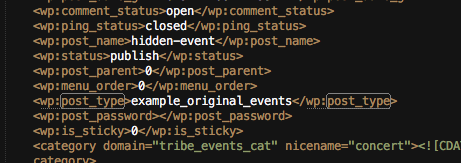
Change that to <wp:post_type>tribe_events</wp:post_type>, and then re-import this file and see if the data gets duplicated into the proper post type.
These steps may work, but may not, so please test this on a development site before testing on a live site!
I hope this information helps! If the importer method I suggested works for events, you can use it for Venues and Organizers too. If it does not work, you may have luck doing a similar sort of process with another plugin out there. I do not have a specific recommendation for that, but it’s possible, and if not then you would unfortunately have to custom code a solution.
Sincerely,
GeorgeFebruary 18, 2016 at 8:32 am #1075866KeymasterThis topic has not been active for quite some time and will now be closed.
If you still need assistance please simply open a new topic (linking to this one if necessary)
and one of the team will be only too happy to help. -
AuthorPosts
- The topic ‘Use venue locations from elsewhere in wordpress’ is closed to new replies.