

Forum Replies Created
-
AuthorPosts
-
George
ParticipantHey Katherine,
Is the example I gave what you are looking for, exactly? So that instead of this:
All Out Bootcamp
All Out Strength ClassThere is this instead:
6pm – All Out Bootcamp
7:30pm – All Out Strength Class— George
ParticipantHey Gina,
I’m sorry about the frustrations arising from this – are you sure about the refund? I’ll close up this thread for now; but if you ever change in the mind, then as long as you request a refund within 30 days of purchase we can issue a 100% refund immediately 🙂 Head here to learn how, if you’d like a refund → https://theeventscalendar.com/knowledgebase/refund-policy/
Cheers!
GeorgeDecember 1, 2015 at 8:57 am in reply to: Erroneous Characters Showing up in Event Date Listing… "ETC+O" #1033284ParticipantGreat! Thanks for the update Terry 🙂
Best of luck with your site,
GeorgeParticipantHey @Joanny!
I’m sorry, but unfortunately we are not able to help with the level of customization required for these things to exist on your site:
Now, i just want to include the Events Pages, in List format, on my homepage (behind a slider).
The short code display only a small calendar. I want the full format, in List.Recreating the complete list view as it stands on the main events page is unfortunately a very complex customization 🙁 We’re hoping to make it easier over time, and I’m sorry about this news, but we do have one thing that might help, which is a list of highly-rated customizers. You can see the list here → http://m.tri.be/18k1
I’m sorry to disappoint @Joanny! 🙁
Best of luck with your customizations.
— George
November 30, 2015 at 4:29 pm in reply to: Events calendar triggering false positives with Config Server security in cpanel #1032888ParticipantHey @ironandsteel,
This is bizarre behavior and I have not seen this behavior at all before. I would recommend the following steps:
1. Share your “system information”.
To help us investigate possible reasons for this, can you start by sharing your “System Information” with us? Here’s how to do that → https://theeventscalendar.com/knowledgebase/sharing-sys-info/
2. Confirm permalinks settings.
Once you share that, can you then specify what your site’s “Permalinks” settings are? These settings are visible on a page in your wp-admin that literally resides at Settings > Permalinks in the wp-admin sidebar menu – e.g., are your site’s permalinks settings /%postname%/
3. Issue history
Finally, for now, can you share when this issue started happening? Have you just installed The Events Calendar for the first time and fount this problem? Have you had The Events Calendar installed for a long time and then this suddenly started happening out of nowhere? Any information you can provide on the history of how this used to not happen up to now when it is happening can be helpful!
Thank you!
GeorgeParticipantThis reply is private.
ParticipantHey Hanni!
Good question – the reporting is basically exactly the same 🙂
If you’re skeptical and just want to try things out firsthand, please do! We’ve got a 30-day no-questions-asked refund policy, so you can try out the plugins and let us know what you think. If it’s not the right plugin for the job, we can issue a refund in full within 30 days of purchase.
Let me know if this helps!
George
ParticipantHey K.D.!
what is available to show a list of organizers?
At this time there is not much within the admin panels of the plugin or anything “out of the box” that will display all of the organizers; in other words, at this time your best bet for displaying a list of organizers is to write some custom code.
You can use a helper function we have to do this easily – just be sure to put null as the first function parameter! So, you’d do this somewhere on your site:
$organizers = tribe_get_organizers( null );foreach ( $organizers as $organizer ) {
// echo organizer information...
}
I hope this helps! 🙂
George
ParticipantHey there!
YES, we offer non-profit discounts as long as the non-profit in question is not a religious or political one in nature.
You can learn about our program here → https://theeventscalendar.com/knowledgebase/do-you-offer-discounts-for-non-profit-organizations/
And you can apply for it here → https://theeventscalendar.com/apply-for-nppp/
Cheers!
GeorgeParticipantHey @edevita,
Apologies for my lack of understanding here, but are you saying that you would prefer no tooltips in the Month View on devices the size of an iPad or smaller? (so, i.e., tablets and phones…)
OR are you asking to make the tooltip titles clickable?
OR are you saying that on laptops and desktops, keep the tooltips and make their titles clickable; but then also make it so that these tooltips do not show up regardless on tablets and phones.
Just want to be 100% clear about what you’re looking for so I can best help out! 😀
Cheers,
GeorgeNovember 30, 2015 at 9:43 am in reply to: Erroneous Characters Showing up in Event Date Listing… "ETC+O" #1032712ParticipantHi Terry,
The “UTC+0” style text is the timezone of the event – if you head to Events > Settings in your wp-admin, scroll all the down until you see the “Timezone Settings” options right above the “Save Changes” button.
What are your settings here? Can you share a screenshot of these settings and share it with us? You can do so by uploading the screenshot to Imgur.com, Flickr.com, CloudUp.com, or any similar image-hosting site; then just share the links to those images here and I’ll take a look.
—
If you just want to hide that text regardless, then you can add the following CSS to the bottom of your theme’s style.css file:
div.tribe-events-schedule span.timezone {

    display: none !important;

}
Cheers,
GeorgeParticipantHey @Jacob,
Sorry to hear about these issues!
1. First, how specifically have you enabled the German translation on your site? Are you using WPML, for example?
2. Can you share your system information with us? Here’s how → https://theeventscalendar.com/knowledgebase/sharing-sys-info/
3. When did this issue arise? Has it been this way since Day One, or has it only recently appeared on your site?
Thank you!
GeorgeNovember 30, 2015 at 9:33 am in reply to: Google import added hundreds of past events to current month #1032704Participantreally all I need are instructions on how to completely remove TEC from my wordpress install-including the database info that have been created.
Sorry for not picking up on this as the main question! If you “Deactivate” The Events Calendar in your wp-admin, and then “Delete” it, there will be some cleanup processes triggered by the plugin by default. If you are interested in totally wiping tables from your database or something, though, some SQL commands on your server or a plugin like this one would likely be necessary → https://wordpress.org/plugins/wordpress-database-reset/
I hope this addresses your questions! Let me know.
— George
November 30, 2015 at 9:30 am in reply to: Warning: strtotime() expects parameter 1 to be string, object given in #1032701ParticipantI totally agree about how an error can effect things elsewhere on the site – it’s definitely something worth investigating for sure and I’m doing so, and appreciate your patience with this! One thing I noted though is your last comment there, which is this:
It is weird, especially as I’m not really using the start of end date!
What exactly do you mean by that? Can you elaborate on what you mean?
Thank you!
GeorgeNovember 30, 2015 at 9:25 am in reply to: Events missing from backend, picture view not working #1032699ParticipantHey Marianna,
Thanks for sharing this system information! I unfortunately did not find anything here that hints at what the cause of this problem is…
With that being said, please DO NOT post any login information for your site. We cannot log into customer sites for any reason.
—
As for how things are in your site’s wp-admin, could you share a screenshot of exactly what you find when you go to Events > Events in your wp-admin? Here’s my wp-admin, for example:
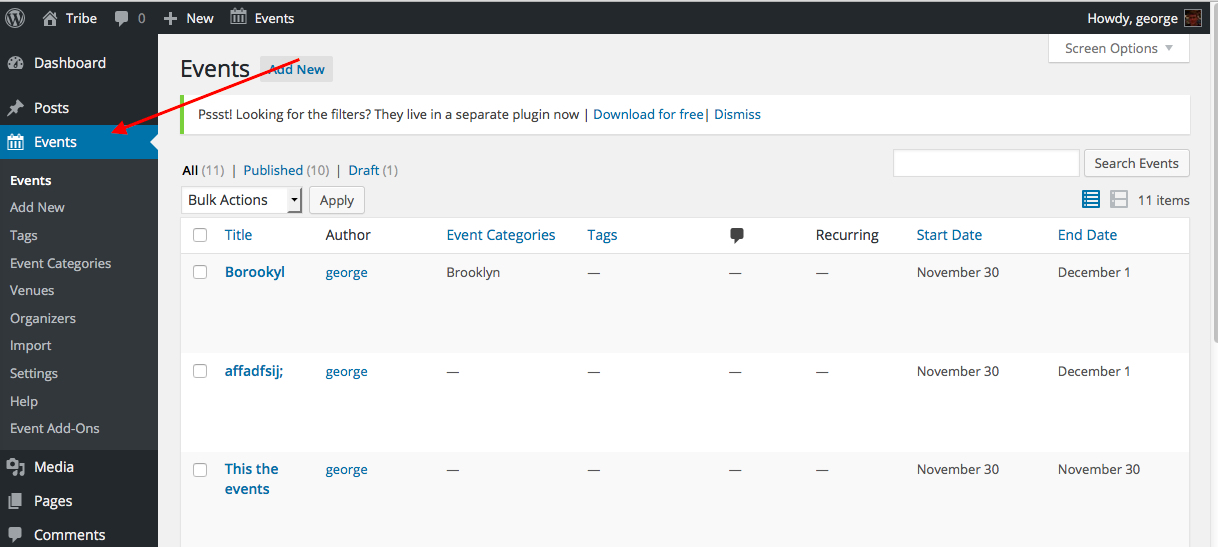
—
Finally, for now, do any errors pop up on your site if you head to your site’s wp-config.php file and change this line of code:
define('WP_DEBUG', false);to this:
define('WP_DEBUG', true);That will display PHP errors if any exist, which might be quite useful here. Once you make this change, see if there are any PHP errors in either the front-end OR the wp-admin.
Thank you for your patience with this!
George -
AuthorPosts