

Forum Replies Created
-
AuthorPosts
-
George
ParticipantHey @Bluewaterparent,
Thank you so much for your patience here. Glad to hear that some things are a bit better by now.
2.But…I noticed that when I enter 0 in the cost field, it doesn’t show up as anything. I do want “free” to show up on the event listing if possible.
There is unfortunately a bug at this time with the Cost field that makes it difficult for “Free” to show up fine on the front-end. You MIGHT have some success, for now, by adding the following snippet to your theme’s functions.php file – then just enter the word “Free” into your cost fields and see if it helps:
add_filter( 'tribe_get_cost', 'cost_show_full_meta_field', 10, 2 );function cost_show_full_meta_field( $cost, $post_id ) {
$full_cost = tribe_get_event_meta( $post_id, '_EventCost', false );if ( isset( $full_cost[0] ) ) {
return sanitize_text_field( $full_cost[0] );
}return $cost;
}
3. And, there seems to be a time lag between the time I enter or change a listing and the time the change shows up. Newly added events included. I just did this one as a test and went back to edit it and the edit never “took”. http://www.bluewaterparent.com/event/merry-christmas/2015-12-15/
It seems like there is a problem with not having an end time. Many of the events on my calendar do not have an end time. Leaving that field blank seems to cause trouble.
There are a few things to touch on here.
First, if there are “lags” every time you edit an event or change site options or something like that, then this is likely a result of hosting or server-side issues, not something within The Events Calendar or another plugin on your site…I’d recommend raising any performance concerns like this with your web-hosting support team and seeing if they notice any specific things on your server that would indicate a source for the slowness and/or lags.
Next, in regards to events having an end time, at this time there is unfortunately a very important requirement for start times and end times for events. This can only be altered if you set the event as an “All Day” event – otherwise, start- and end- dates and times are required.
No worries at all about questions and concerns here, thank you for your patience with our replies and with our software on the heels of this massive 4.0 release 🙂 Please let me know if I can help with anything else!
Cheers,
GeorgeParticipantHey Ben,
These features are not included in the latest 4.0 update – I’m sorry to bear that news. I also unfortunately do not have a specific release date for those features at this time. It will be early 2016 at the earliest.
Sorry to disappoint Ben!
— George
December 8, 2015 at 10:42 am in reply to: shortcodes for embedding events list in wordpress page #1037754ParticipantYes, the shortcodes in that article are only available within Events Calendar Pro :]
— George
December 8, 2015 at 10:40 am in reply to: Many Features w/ Hard Dependency on HTML localStorage #1037753ParticipantI appreciate the tips and recommendations here; there’s much to pass along to our devs and we are seriously interested in improving Filter Bar’s ability to save and store a set of filters…
Thank you for your patience here in this thread specifically, and just in general with us while we work on improving Filter Bar period.
Stay tuned to plugin updates!
Sincerely,
GeorgeParticipantHey @mediaversa,
I’m sorry to hear about these problems 🙁
Can you share a link directly to the Community Events submission page on your site? I tried finding it but was not able to – sorry about that!
I’ll take a closer look and see what I can find.
Thanks,
GeorgeParticipantHey @bigbyrd65,
I’m sorry to hear about this!
• First, can you clarify and elaborate on exactly what you mean when you write that “you can not see text being typed into a new event”?
• Next, can you share a screenshot of the above issue? You can do so by uploading the screenshot to Imgur.com, Flickr.com, CloudUp.com, or any similar image-hosting site; then just share the links to those images here and I’ll take a look.
• Thirdly, how did the spam-entering of 75,000 events happen? Is your site compromised security-wise? Or was it a matter of recurring events being posted via the Community Events form or something? Just curious if you know anything about the origin of this.
—
Finally, we unfortunately cannot respond over email and only provide technical support here on the forums. I’m sorry if this is inconvenient – let me know what you think!
Sincerely,
GeorgeParticipantHey Insan!
Thanks for your interest in our plugins 🙂 I’m happy to address your questions and will do so as follows:
(1) Can events be shown on the home page?
YES via widgets or custom code; however, if you mean the full-on events calendar views, then unfortunately these cannot be rendered on the home page of a website at this time. They have to reside at the /events/ URL, or some other slug which you can customize like /calendar/, /agenda/ etc.
(2) I want to be able to charge event organisers for promoting their events and tickets.
This is something that our plugins do not handle, but it’s still totally possible. For example, if you have advertising space on your site that you want to use for this, you can use that and charge money for highlighting events there or anything like that. But The Events Calendar itself does not handle all of that, and the collection of payments or anything. Neither do any of our add-ons.
(3) I want to have ‘classified event listings’ which are completely free-of-charge.
If you mean that people on the internet will be able to post events for free, then you can use The Events Calendar with our “Community Events” add-on. (The Events Calendar Pro add-on would not be required). You can just let people make accounts on your site for free and let them submit events for free; or you can even let anyone on the internet post events anonymously without even having an account on your site.
(4) Event organisers to be able to add their events via the front-end.
See my answer for (3) above – you can use Community Events for this, as long as the organizers are people who have accounts on your site.
(5) Where an event organiser doesn’t wish to use the ticketing service, I want to be able to direct the delegates to an alternative third-party page, i.e., the event organiser provides a URL and the delegate is directed to this when clicking the ‘buy ticket’ button. I know this does mean the delegate has to fill in their details again!
This is not something that our plugins would handle out-of-the-box – it would require some custom coding which we are unfortunately not able to help with. 🙁
(6) Does the plugin include a database where details of event organiser and venues are stored and selected by drop-downs when creating events?
Yes
(7) Does the plugin include multi-language support?
Not by itself, no, as it’s just a WordPress plugin. But it is a fully translatable WordPress plugin and meets all translation standards for WordPress software.
(8) Do the plugins come with any demo data?
No
I hope this information helps!
Cheers,
GeorgeParticipantHey @Paul,
I’m sorry to hear this! If things display differently across browsers, then there could be a simple theme-related issue here.
I checked your Community Events submit page and this is how the Venues and Organizers section looked for me in Firefox on a Mac:
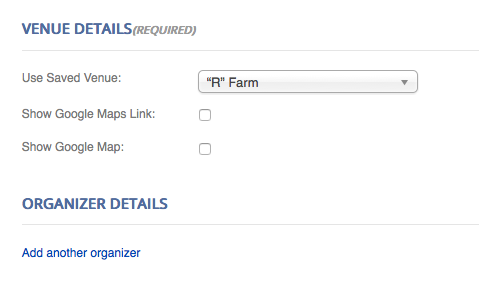
Here’s how things look when in Chrome:
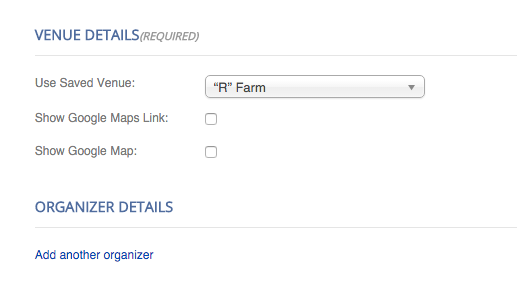
Very similar, aside from some differences in font smoothness between the browsers…
Is that what you’re seeing? Share screenshots if you see otherwise – you can do so by uploading the screenshots to Imgur.com, Flickr.com, CloudUp.com, or any similar image-hosting site; then just share the links to those images here and I’ll take a look.
One thing I noticed in either browser is that, upon refreshing the page, sometimes I see this as the design on the page:
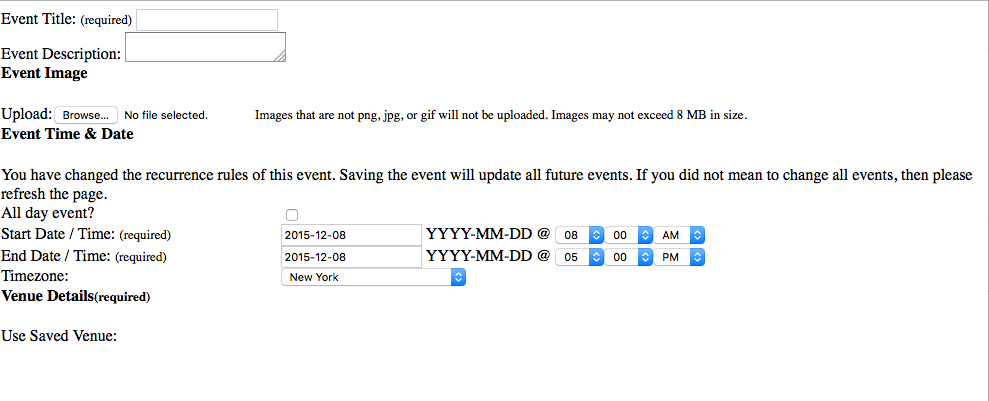
So, it seems like part of the issue may be a caching plugin on your site. It looks like WP Super Cache is active on your site; if you temporarily deactivate this plugin and fully disable caching temporarily, do your issues persist? Or does the display of the fields improve at all?
Thank you!
GeorgeParticipantHey @xrossglobalgroup,
Changing the name fields to something other than the default one-input field would unfortunately require custom coding beyond the scope of the support we can provide 🙁
It is possible, just a bit of a complex change to make.
One important thing to keep in mind regarding the current name field is that the simple “First name” / “Last name” naming convention does not fit for many, many people on this planet, and so for us as the developers of this globally-used plugin we opt for a more accommodating, single-field approach. You can read more about the complexities and varieties of name structures here, for example → http://www.kalzumeus.com/2010/06/17/falsehoods-programmers-believe-about-names/
You yourself seem to acknowledge this:
many people have several first or last names, such as people from latin countries
So if you think that one-field for names is limiting, then two fields for names is even more limiting.
If you want this first-and-last-name approach just for your CRM software, then maybe a simpler solution would be to have that CRM software itself use the better one-field approach, or at least reach out to them via their support channels. They may have an option for setting the name fields to just be one input.
Let me know what you think about all of this!
If you really need two fields instead of one, and are interested in hiring a professional to help with those customizations, there is a list of highly-rated customizers that we maintain here that might be helpful → http://m.tri.be/18k1
Sincerely,
GeorgeParticipantHey @Francesco,
Sorry to hear about this!
I went to http://bristol2night.co.uk/events/ but unfortunately could not spot the problem you described…
Can you elaborate a bit more on the issue, and link specifically to a place on your site where it can be seen on the front-end of your site?
It might also help to share a screenshot of the issue – you can do so by uploading the screenshot to Imgur.com, Flickr.com, CloudUp.com, or any similar image-hosting site; then just share the links to those images here and I’ll take a look.
Thank you!
GeorgeParticipantHey @jaapstronks,
Having an unlimited license indeed gives you full access to using the license on mu sites, non-mu sites, and so on.
In other words, the information previously shared is totally fine, and your license-holding is fine too (and greatly appreciated) – the error itself and its display is the problem.
I’m sorry for the trouble here! Can you clarify where this error appears? Is it literally in your wp-admin, or is it in your account management page here on http://theeventscalendar.com?
ParticipantHey @reshetramah,
This is indeed possible, but would require some custom coding. We unfortunately do not support custom coding so this isn’t something we can totally help with, but I’m happy to share some general ideas to [hopefully] get you started on the path towards customization.
First and foremost is how to store the Redirect URL for each event – assuming each one will have a different URL that it will redirect to.
For this, I think a great solution would be using Events Calendar Pro’s built-in “Additional Fields” feature. You can learn how to use this feature here: https://theeventscalendar.com/knowledgebase/pro-additional-fields/
Next, in the view templates for events, you can edit the current title-generation code so that instead of the single-event permalink being the title link, your custom URL is.
This is where the custom coding comes into play, but to get started on this I’d recommend first reading our Themer’s Guide to learn how to make custom events templates → https://theeventscalendar.com/knowledgebase/themers-guide/
If you use those principles and play around with this a bit, I’m sure you’ll be able to make something useful.
I hope this helps!
GeorgeParticipantHey @Lars!
can we create a WP user for each of those organizers and control on login that they only see the events in admin that they are organizer for? So that they can only retrieve attendee information for they own events?
YES – you can create users within WordPress, and as long as you grant these users full administrator access, they can do check-ins for events and such.
Now, if you want really, really specific controls over all of this so that they can only see their own events, that would unfortunately take work outside of the Event Tickets Plus plugin itself. You’d have to use custom code or perhaps another plugin out there that lets you get very granular with “permissions” and admin privileges.
What if we are not using any of these providers? Will we then need to also install and configure these in order to sell tickers? Does it work with Stripe?
YES – if you only need the free RSVP features, you do not need any eCommerce platform installed alongside the Ticketing plugins. However, yes, if you want to charge and collect payments you will need a plugin like the ones listed there in your post. As for working with Stripe, each of the ones listed there (EDD, WooCommerce, etc.) do work with Stripe but unfortunately the Stripe integration is an add-on for those platforms.
WooCommerce is the most popular of these plugins, so for example, you’d need to add an extension like this to fully use Stripe → http://www.woothemes.com/products/stripe/
I hope this information helps!
— George
ParticipantHey @Danielroe,
Unfortunately, the only to do this would be via custom coding.
I say “unfortunately” for two reasons: first is that obviously a simple option or setting would be easier, so I’m sorry that one does not exist for this. The other reason is that we cannot help with custom coding, so if you’re not familiar with customizing theme or plugin code then you should hire a professional to help out.
The gist of making template changes can be learned rather easily, though, especially by getting started with this knowledgebase article → https://theeventscalendar.com/knowledgebase/themers-guide/
If you use those principles you can customize pretty much anything you’d like, in the Map View or otherwise, so definitely give that a read.
I hope this information helps!
Sincerely,
GeorgeDecember 8, 2015 at 7:21 am in reply to: License test site & question about event page templates #1037627ParticipantHey Sean!
Do I need to validate my license on the test site before receiving support?
No, you do not 🙂
I’m surprised to see this issue because it was one that we have recently fixed, and for me it works fine when I test on my local site:

Can you share your “system information” with us for the site where these issues exist? Here’s how to do that → https://theeventscalendar.com/knowledgebase/sharing-sys-info/
Thank you!
George -
AuthorPosts