

Forum Replies Created
-
AuthorPosts
-
George
ParticipantHey Heath,
It looks like you don’t have a premium plugin license – if you do, can you post this question in the appropriate premium plugin’s forum here on http://theeventscalendar.com>
If you indeed do not have a premium plugin license, please post this question on our free support forums on WordPress.org → https://wordpress.org/plugins/the-events-calendar/
We cannot field technical support questions here in our Pre-Sales Questions forum.
Thank you,
GeorgeParticipantHey @Christoffer,
The “Cost” field is intentionally replaced by the Tickets field when you have Event Tickets active on a site alongside The Events Calendar. This is by design, so that the “cost” that displays in the front-end views is just whatever ticket price can be pulled from the tickets you’ve created for the event.
I’m sorry if this limitation is disappointing – it’s something we’ve gotten mixed feedback about and so this current configuration may change in the future, but for now this is unfortunately the nature of the plugins 🙁
Thanks,
GeorgeParticipantHey Mike,
You can change these labels quite easily:
- Event
- Events
- Venue
- Venues
- Organizer
- Organizers
There are two knowledgebase articles that cover the simple process for changing these labels:
- https://theeventscalendar.com/knowledgebase/changing-the-word-events-to-something-else/
- https://theeventscalendar.com/knowledgebase/relabeling-the-venue-organizer-sections-in-event-meta/
Other than these labels, you’d have to customize the code further or come up some other method like gettext filtering to modify the labels in an extensible way. We are not able to help with this, but it’s fortunately a pretty simple thing to do and there are articles like this one that should help you with this if need be → speakinginbytes.com/2013/10/gettext-filter-wordpress/
Cheers!
GeorgeParticipantHey Cristina,
The “Cost” field is intentionally replaced by the Tickets field when you have Event Tickets active on a site alongside The Events Calendar. This is by design, so that the “cost” that displays in the front-end views is just whatever ticket price can be pulled from the tickets you’ve created for the event.
I’m sorry if this limitation is disappointing – it’s something we’ve gotten mixed feedback about and so this current configuration may change in the future, but for now this is unfortunately the nature of the plugins 🙁
Thanks,
GeorgeDecember 21, 2015 at 5:28 pm in reply to: Events Calendar PRO Map View: sorting by distance #1044946ParticipantHey @Sarah,
There’s unfortunately not a filter in Events Calendar Pro like this at this time 🙁
The only date-related filter in our plugins is the “Distance” filter included in our premium Filter Bar add-on as shown in the following screenshot:
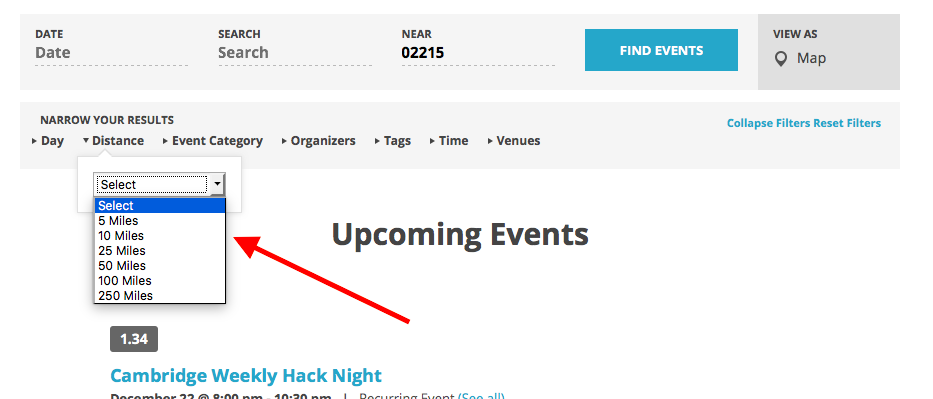
Even that is not quite you’re asking for though, unfortunately, but just wanted to share the limited range of date filters we do have.
Let me know if this information is helpful!
George
ParticipantHey Dominik,
Thanks for the kind words about our software – at this time, there are unfortunately no default views exactly like the ones you shared here. The closest equivalents we have are the “Map View” and “Photo View” in our most popular add-on, Events Calendar Pro → https://theeventscalendar.com/product/wordpress-events-calendar-pro/
You can read more about that plugin and about these views in particular (and other features of the plugin) at that link above.
If you would like to see examples of the Map and Photo Views in person, you can see them at http://wpshindig.com/events.
I hope this all helps! If you are looking anything much different than what you can see at http://wpshindig.com/events, you’d unfortunately have to custom build the views yourself or hire a professional developer to do that for you.
Cheers,
GeorgeParticipantHey @Piotr,
I’m sorry to hear about these issues – if there are threads on this forum that are about this same issue, can you share links to these threads? I’m just curious about the specifics of this issue.
Apologies for misunderstanding the explanation you’ve provided! But to clear, do you mean that when you scan the QR code for a ticket, it doesn’t let you check-in the ticket because it says “Already Checked In”? If this is not what you mean, can you elaborate on what you do mean?
Thank you!
GeorgeParticipantNice – thank you for reporting on the status of this issue. If any other issues arise, don’t hesitate to open a new thread! 😀
— George
ParticipantHey Vikas,
Thank you reporting for this conflict. I’m sorry to hear about it, and am also sorry to admit that at this time the best course of action would be to reach out to the WP-Member folks directly. Report this conflict in detail there, and hopefully they can investigate the WP-Member codebase and see if there’s a specific bug causing this.
Thank you,
GeorgeParticipantHey Phil,
There is no functionality like this at this time, unfortunately, leaving only a few options for this as follows:
• writing the custom code yourself
• hiring a developer to write the good just for you
• find a plugin to do this for youOne such plugin I found after a quick search was this one → https://postpromoterpro.com/ This is a premium plugin but seems to be freely downloadable here → https://github.com/postpromoterpro/post-promoter-pro
I have no affiliation with this plugin and haven’t used it myself, but it’s just an example of the sort of thing out there…
I hope this information helps! Let me know 🙂
— George
ParticipantI’m sorry to hear this @Michelle 🙁
I’m curious, how many events do you have? Do you have a few dozen, a few hundred, a few thousand, a few thousand per month? Etc.
Also, how are you hosting your website specifically? Who is your webhost and what hosting plan are you currently using?
Thanks!
GeorgeParticipant1. is there anyway to text your plugins?
the following theme i’m not sure if is going to work
https://www.ait-themes.club/wordpress-themes/event-guide/
if you don’t allow texting to see if is going to work, do you give refunds? is there in anyway for you to know/tell me if this theme is going to work with your plugin/s?
(Community Events, Community Tickets, Event Ticket Plus)We do not have a test program but indeed have a 100%, no-questions-asked refund policy so long as you request your refund within 30 days of your purchase. To get a refund, simple follow the steps here → https://theeventscalendar.com/knowledgebase/refund-policy/
2. Is there a minimum number for tickets to be able to start event?
Minimum attendance # in order to start event?There is not a minimum imposed by our plugins, if that’s what you mean. If you mean some sort of option where an event won’t happen unless X amount of tickets are purchased, unfortunately this feature is not a part of our plugins either.
3. Calendar – Can I choose when I am available/unavailable, and can I choose holidays so it will show automatically ‘unable to book on those days?
You can manually enter events into your calendar that say “Unavailable” or something like that, but there is unfortunately no configuration for automatic inclusion of holidays and such.
4. If someone buys something for a length of time, example 6 weeks of services, Do they get an automated email to remind them to register again if they want to continue with the services?
No, this is not a default feature of any of our plugins.
Cheers!
GeorgeParticipantHey Justin,
One thing that might help is to add this snippet to your theme’s functions.php file → https://gist.github.com/ggwicz/ba85b0f9aa4dadbda538
Cheers,
GeorgeParticipantHey @Francesco,
I went to the events page and the bottom-spacing between events did, indeed, seem fixed when I checked it out.
If you mean that the space between the left or right edges of events are too close together, then this is because of your theme’s grid spacing, namely classname style rules like this one:
.col-sm-6 {

    width: 50%;

}
That is coming from your theme and so unfortunately you will have to reach out to your theme developer for further styling assistance. Some CSS like this might help, for example:
.type-tribe_events.col-sm-6 {

    max-width: 49% !important;

    width: 49% !important;

    margin-right: 1% !important;

}
I wish you the best of luck with your styling!
Cheers,
GeorgeParticipantHey Annette,
I would recommend what Nico recommended, and then would also recommend adding another bit of CSS that I’ve written for you here:
.tribe-events-schedule .recurringinfo {

    display: none !important;

}
To be clear, add both blocks of CSS I’ve recommended here into the bottom of your theme’s style.css file, or via the Simple Custom CSS Plugin for example.
Cheers!
George -
AuthorPosts