

Forum Replies Created
-
AuthorPosts
-
George
ParticipantHey James,
Sorry to hear about these issues. To address things in reverse order, most of the map-specific features on that eightlane.org site are indeed default features.
But the difference might come down to the presence of latitude and longitude for events – do your UK events and their venues have latitudes and longitudes in their address fields?
For example, if you head to a single venue in your wp-admin, make sure its “Use Latitude + Longitude” option is checked, which is shown in this screenshot for reference:
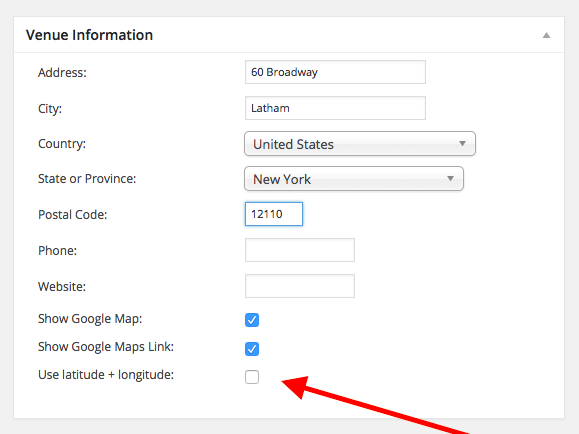
For any given venue that currently doesn’t show up, I would recommend the following steps:
1. View this venue in your wp-admin.
2. If the Latitude + Longitude option is not checked, check it.
3. Save the Venue.
4. Try searching again.
—
If the option is checked, then try un-checking it and save the venue. Then do steps 1-4 above on it again. This may get things to “refresh” correctly and may make a difference.
If issues persist despite all of this, then in your reply can you include your system information? Here’s how to do so → https://theeventscalendar.com/knowledgebase/sharing-sys-info/
Thanks!
GeorgeJanuary 9, 2016 at 9:41 am in reply to: Find out more link on Events Calendar Pro is not working #1053202ParticipantHey @Saffron,
I’m really sorry to hear about this. For starters, I just want to make sure your expectations are set correctly here so as not to get your hopes up – you mention needing urgent help, but the pace of our forums is a reply within 24 hours. That can be slower over the weekends. I’m posting this on a Saturday, so I will definitely try my best to tend to your issue quickly, but just wanted to clarify the speed of things here so you can operate with realistic expectations and plan accordingly!
—
Now, to actually get to your issues, this is not an issue I can recreate. So I would recommend addressing the following things:
1. What is your site’s “System Information”? Please share the complete block of system information with us. Here is how to do that → https://theeventscalendar.com/knowledgebase/sharing-sys-info/
2. What are your site’s permalinks settings, in “Settings > Permalinks” in your wp-admin? Are they /%postname%/, for example?
3. For me, the pages actually loaded fine when I clicked “Find out more” – they just took a very long time to load. Do you find this behavior? As in, do you too sometimes get the pages to load? Or does every single page fail for you?
4. How are you hosting your website, specifically? Who is the webhost you are hosting with – and, is this a good quality host? Is it a cheap host? Etc. Their could be inherent limitations from poor server performance at play here.
Thank you!
GeorgeJanuary 9, 2016 at 9:33 am in reply to: How formal do you want to address your users (Dutch translations) #1053198ParticipantHey Hans,
Thanks for reaching out – this is an interesting question.
I don’t know the best option myself, so I’ve reached out to some of our lead developers and managers for some insight on this. I will post another update as soon as we’ve arrived at a conclusion.
In the meantime, in your experience do you find that most software in Dutch goes with one form or another? I could see the “formal” tone being more common in software, but am not sure if this is accurate – is it? Or do most products go informal?
Thank you for your insight on this, and for your continued contributions with translating and validating – it means to a lot to us and to our other Dutch-speaking users! 🙂
Sincerely,
GeorgeParticipantHey Amanda,
Thanks for reaching out. We love non-profits (and dogs) so I’m sure we could help out in some way.
You should submit your group to our Non Profit Partnership Program – learn more about this, and find the application link, on this page → https://theeventscalendar.com/knowledgebase/do-you-offer-discounts-for-non-profit-organizations/
If you don’t fully qualify for an outright-free license we might be able to help out in other ways, and will if we can.
We look forward to your application.
Thank you!
GeorgeParticipantHey @Greg,
You should be able to pull this off by adding the following code snippet to your theme’s functions.php file:
if ( function_exists( 'Tribe_ECP_Load' ) ) {

	/**

	 * Change the list widget icons' day names to month names.

	 *

	 * @link http://theeventscalendar.com/?p=1052743

	 */

	function tribe_support_1052743( $text, $postDate, $class ) {

		return date_i18n( 'M', $postDate );

	}

	add_filter( 'tribe-mini_helper_tribe_events_ajax_list_dayname', 'tribe_support_1052743', 10, 3 );

}
This works well for me on my own testing site and I hope it works well for you, too.
Let me know!
— George
January 9, 2016 at 9:11 am in reply to: All recurrences URL shows events earlier than current month by default #1053189ParticipantHey @Sitecrafting,
Sorry to hear about this issue – it’s an odd one that I cannot recreate on my own testing site, so I’m curious about a few things to help further the investigation:
1. What are your site’s permalinks settings? (The seeting that is literally in “Settings > Permalinks” in your wp-admin, just to be clear). Are they /%postname%, for example?
2. Does anything improve if you go to Settings > Permalinks in your admin area, and just click “Save Changes” without actually making any changes? This may seem like an odd thing to do but is a little “trick” within WordPress to get the permalinks across your site to refresh, which might help here.
3. Does this affect every single recurring event on your site? Do you notice any recurring events that do not behave this way?
4. Similar to question #3, but just to make it clear as a separate step: if you make an all-new recurring event right now just for testing purposes, does this test-event have the same issue with its “View All” link?
—
The information from the above 4 questions will be very helpful here – let us know what you find for each item!
Thank you,
GeorgeParticipantHey @Derrill,
Sorry to hear about these errors. I cannot recreate them and so to get started with some deeper investigating here, can you share your System Information with us? Here’s how to do that → https://theeventscalendar.com/knowledgebase/sharing-sys-info/
Thank you!
GeorgeParticipantHey @Laura,
Thanks for reaching out.
I checked out the link you shared – which is not only fine to share, by the way, but very helpful! You can post any link to the front-end of your site and should, just no links to the admin.
The RSVP section is accurate in terms of being built – you choose how many RSVPs you would like to make, enter your name and email address, and then click “Confirm RSVP”.
1. If you mean that the appearance of this RSVP section is not what you envisioned, then unfortunately the appearance of everything on your site is dictated by your theme. The RSVP section is no exception – so, to tweak the design of it you can reach out to your theme developer or hire a professional developer to tweak the design appearance.
2. If you do NOT mean the literal appearance, but rather the functionality itself, can you clarify specifically what is not intuitive about this? And then how you envision this working instead, specifically?
Thank you!
GeorgeParticipantHey Matthew,
Making such a change would indeed require custom coding and thus it’s a customization that we can only marginally help with – check out the “Product Support” section on this page for more information → http://theeventscalendar.com/terms
However, the good news is that we do have a general guide for moving the tickets forms around – it should help a bit and is a bit more specific than the generic Themer’s Guide: https://theeventscalendar.com/knowledgebase/moving-the-ticket-form/
I hope that article helps!
Thanks,
GeorgeParticipantHey Aris,
Sorry to hear about these issues!
1. Can you share your system information with us? Here’s how → https://theeventscalendar.com/knowledgebase/sharing-sys-info/
2. If you activate a default theme like Twenty Sixteen, and then try to recreate these issues, does anything change?
Thank you!
GeorgeParticipantHey @John,
At this time this is the default functionality of the search utility, and getting the Month-View search to look outside the currently-viewed month is a tricky customization to make.
We cannot help with customizations, though I did go into a bit more detail about how you could, theoretically get started with the code changes to make this happen in this other thread from October → https://theeventscalendar.com/support/forums/topic/search-all-events-not-just-the-events-that-month/
That unfortunately requires modifying core plugin code; so proceed at your own risk and only if you’re very comfortable with modifying – and maintaining! – code. If you’re interested in hiring some professional developers to help with this, we have a list of some highly-rated ones here that I will share just in case it’s helpful → http://m.tri.be/18k1
Sorry to disappoint, @John, but I hope this information is at least clear and helps you proceed with your project.
Let me know if I can help with anything else!
– George
January 8, 2016 at 7:56 pm in reply to: Error message on our site regarding the Events Calendar #1052922ParticipantI’m sorry to see these errors, Debora. They seem related to some out-of-date code – can you share your “System Information” with us so we can investigate?
Here’s how to do that → https://theeventscalendar.com/knowledgebase/sharing-sys-info/
Thanks!
GeorgeParticipantHi @Jodi,
Events Calendar Pro does not enable any ticket-selling features whatsoever.
To be able to sell tickets to events on your site, you would instead need to install these plugins:
• Event Tickets [free] – http://wordpress.org/plugins/event-tickets
• Event Tickets Plus [starts at $89/year like Events Calendar Pro] – https://theeventscalendar.com/product/wordpress-event-tickets-plus/—
Now, you DO NOT need Events Calendar Pro to use Event Tickets Plus. So, if you only need the ticket features and do not need the Events Calendar Pro features [like Map View, recurring events, etc.], then I can refund your license for Events Calendar Pro.
I hope this information is clear and helps you proceed.
Sincerely,
GeorgeParticipantHey @Rosa Maria,
Doing either thing here would unfortunately require custom coding. I say “unfortunately” because we cannot help with this sort of thing – please read the “Product Support” section of this page for more information → http://theeventscalendar.com/terms.
—
Despite all of that, I’d still love to help here if I can.
1. Can you share a link to the page on your site where the Map View tooltips are visible?
2. What are the specific things you want to change about these tooltips? By this I mean what do you want to change other than the change of “Event” to “Address” text. Or is this change of text the only change you want to make?
Thanks!
GeorgeParticipantHey @Rosa Maria,
By default our Events List widget does not add images to events – so, if there are images on your site, these might be coming from your theme or from custom code or something. We cannot help with either of these things – but before jumping to conclusions, can you share a link to where the Events List widget is visible on your site? I will look at it and some of the images within it to learn more.
Next, can you share your “System Information” with us? Here’s how → https://theeventscalendar.com/knowledgebase/sharing-sys-info/
Thanks!
George -
AuthorPosts