

Forum Replies Created
-
AuthorPosts
-
George
ParticipantI’m really sorry for that inconvenience! This is a hard issue to pin down but we are actively working on it. Stay tuned to plugin updates and to http://theeventscalendar.com/blog – when there’s a new release, release notes are posted there and if there is something that addresses this specific problem it will be noted there.
I will close up this thread for now just to keep things organized, and because I do not have an ETA on when the bugfix will arise, so leaving this open for potentially several weeks is not a good thing. Stay tuned to the outlets mentioned above – thanks a ton for your patience with this!
Sincerely,
GeorgeParticipantHey Scott,
We unfortunately cannot help out with customizations, so you’ll have to take the reins on this. Please see the “Product Support” section of this page for more information → http://theeventscalendar.com/terms
—
With that being said, I hope I can help at least a bit here – a simple method for doing what you ask is to implement a JavaScript solution by using the code below. You can do this by copying the code below and pasting it into your theme’s functions.php file:
add_action( 'wp_footer', 'wp_make_all_links_open_in_new_window' );function wp_make_all_links_open_in_new_window() {
?>
<script>
(function () {
var links = document.getElementsByTagName( 'a' );
for ( var i = 0; i < links.length; ++i ) links[i].target = '_blank';
})();
</script>
<?php
}
Ensure that any other customizations you have tried thus far are removed – get rid of any previously-attempted code solutions for this functionality. Then, add in the code above to your theme’s functions.php and see how things behave.
Best of luck with your customization,
GeorgeParticipantHey Helgi,
The QR Code is included right in the ticket email itself, and nowhere else by default. Here’s an example of how the email tickets look:
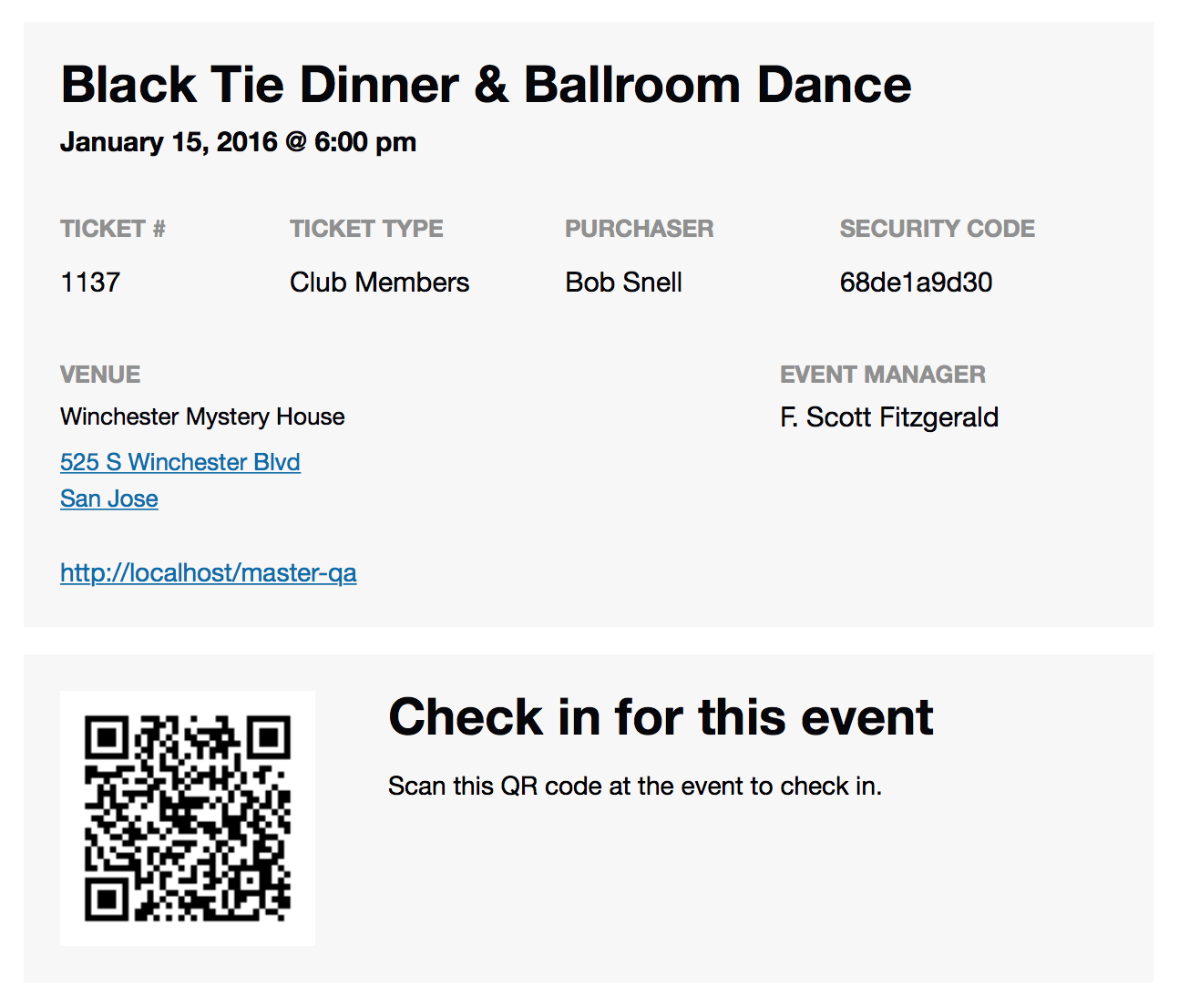
I hope this is helpful!
— George
January 9, 2016 at 3:21 pm in reply to: Event Calender Pro causes error in theme customiser #1053270ParticipantHey @Will,
I don’t encounter this error, so I’m wondering if there’s some other sort of code conflict on your site. To help us investigate this, can you share your “System Information” with us? Here’s how to do that → https://theeventscalendar.com/knowledgebase/sharing-sys-info/
Thank you!
GeorgeParticipantHey @Kate,
If your main goal is just to remove the date, time, and separator from Event List widget events, then I would actually recommend that you remove all PHP customizations and instead just hide this information with some custom CSS.
So, for example, here’s the schedule information appearing in the Event List widget by default:
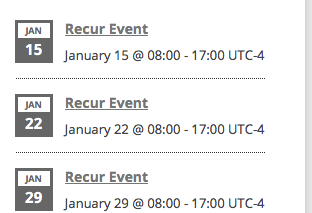
Now, add the following CSS to the bottom of your theme’s style.css file:
.tribe-mini-calendar-event .tribe-events-duration {

    display: none !important;

}
Here’s how the Event List events look now:
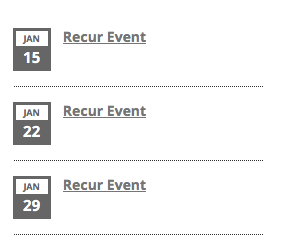
I hope this helps!
Sincerely,
GeorgeJanuary 9, 2016 at 3:13 pm in reply to: Conditionally display tribe_get_venue if venue exists #1053267ParticipantHey @Sean,
tribe_get_venue() will return NULL if there is no venue – you can just check if its return value is NULL in a variable and display different things based on that. A basic example would be something like this:
$venue = tribe_get_venue( get_the_ID() );if ( is_null( $venue ) ) {
// There's no venue...do relevant stuff.
echo '';
} else {
// There is a venue! Echo $venue or whatever you want like normal.
echo '| ' . $venue;
}
I hope this helps – tinker around with this and see if it does.
Thanks,
GeorgeJanuary 9, 2016 at 3:01 pm in reply to: integration of events calendar pro with gravity forms #1053265ParticipantSounds good Wolfgang – sorry to disappoint. Best of luck with your site!
— George
ParticipantI appreciate this information, @Barback, and your patience with this – I am still unable to produce this problem! 🙁
1. I have removed the login and password you posted here – we cannot log into customer sites for any reason whatsoever, and so having that information is just a security risk and I removed it the instant I saw it.
2. What are your site’s permalinks settings in both cases? This is literally the option in “Settings > Permalinks” in your wp-admin. Is it /%postname%/, for example?
3. Does anything improve if you go to Settings > Permalinks in your admin area, and just click “Save Changes” without actually making any changes? This may seem like an odd thing to do but is a little “trick” within WordPress to get the permalinks across your site to refresh, which might help here.
4. When did this issue start happening on your site? Has it been existent since you first installed Event Tickets and such, or were things working fine and then you made some changes on your site and then noticed the issue all of a sudden?
Thank you!
GeorgeJanuary 9, 2016 at 2:52 pm in reply to: Organizer unable to email attendee list in EC Pro 4.03 #1053263ParticipantHey Ameet,
The email functionality still works for me without issue – the modal just fills up the whole screen.
our Promoters can’t email themselves the li
What is the specific WordPress user role that our “Promoter” users are?
In the meantime, I have reached out to folks like Zach and Matt specifically to get some more eyes and insight on this – we are investigating the problems closely and I will keep this thread updated.
Thank you,
GeorgeParticipantThanks for sharing your specific solution, @Graeme! I’m glad this code is working well.
Best of luck with your project,
GeorgeParticipantThanks for the kind words, Rhonda!
I’ll close up this thread for now – but don’t hesitate to come back and open a new thread any time if other issues/questions arise.
Sincerely,
GeorgeParticipantHey @Graeme,
This is unfortunately a tricky thing to do 🙁 I’m sorry to bear that news, but just want to be clear and honest about this. It’s a tricky customization, and one we cannot help with implementing, but there is a method to change text universally that we go over in this knowledgebase article: https://theeventscalendar.com/knowledgebase/change-the-wording-of-any-bit-of-text-or-string/
I would recommend taking those principles and tinkering with this – this is the best option, and is in fact the only option I can think of other than manually changing all of the text inside the plugin code itself.
I hope this helps!
Best of luck with your customization,
GeorgeParticipantHey Cole,
We unfortunately cannot help with custom coding, which the search tweaks you describe here would unfortunately require. A plugin like SearchWP may indeed be helpful, but I don’t know if it would be specifically because we do not use that plugin nor have we tested for it specifically.
I will go ahead and close up this thread for the reasons listed above, and also because this is the Pre-Sales Questions forum; to ask any further technical support questions, please post them in our free support forums here → http://wordpress.org/plugins/the-events-calendar
Best of luck with your project,
GeorgeParticipantHey @Rod,
Sorry to hear about these issues on your site. However, when I went to your site I couldn’t actually see a widget that displayed events “by venue” – I just found a normal “Upcoming Events” list widget, which displays events. The only links clickable here, then, are directly to single events, like these links:
• http://parayoga.launchbrigade.com/event/toronto-yoga-conference/
• http://parayoga.launchbrigade.com/event/the-four-desires/All of these single-event links worked fine. I saw nowhere on your site where venue links are clickable inside of a widget – can you clarify where exactly these venue links are appearing on your site?
—
Next, can you share your “System information” with us? Here’s how: https://theeventscalendar.com/knowledgebase/sharing-sys-info/
Thank you,
GeorgeParticipantHey Rachel,
I’m sorry to hear this, because it unfortunately sounds like there would be deeper issues on your site causing this to happen.
1. Can you share your “System Information” with us now that things are working with 3.9.3? Here’s how to share system information → https://theeventscalendar.com/knowledgebase/sharing-sys-info/
2. After sharing the information, try updating again to the most recent version of everything; if the admin events are still inaccessible, can you clarify what you mean here? Do you mean that you cannot even access /wp-admin on your site? Or just the the “events” menu item does not appear in the admin?
Thank you,
George -
AuthorPosts