
Home › Forums › Calendar Products › Events Calendar PRO › Searching via postcode in the UK
- This topic has 6 replies, 3 voices, and was last updated 10 years, 8 months ago by
Support Droid.
-
AuthorPosts
-
January 9, 2016 at 6:56 am #1053160
James
ParticipantHi! 🙂
I am currently using Events Calendar Pro (loving it) however I am experiencing problems running the filter bar which should allow users to search via Geolocation. The website I run aims to connect car and motorcycle enthusiasts in the UK with shows of interest to them.
The issue I am having is allowing users to find events with a certain distance of their location. Ideally I would like them to be able to enter their postcode and filter events within a chosen distance. There are several difficulties I am encountering:
1 – The filter bar’s location search field does not seem to be working when I enter a UK city. For instance when I enter ‘London, UK’ or ‘Birmingham, UK’ the relevant shows do not appear in the calendar.
2 – I would prefer users to be able to search via their own postcode. I found this website http://events.eightlane.org/latest/ on your showcase page which manages to achieve postcodes searches in the UK and wondered how I could replicate that functionality – is it built in to the plugin or can you advise what I would need to change?
Your help would be greatly appreciated as I am new to website creation!
With thanks,
James
January 9, 2016 at 9:48 am #1053206George
ParticipantHey James,
Sorry to hear about these issues. To address things in reverse order, most of the map-specific features on that eightlane.org site are indeed default features.
But the difference might come down to the presence of latitude and longitude for events – do your UK events and their venues have latitudes and longitudes in their address fields?
For example, if you head to a single venue in your wp-admin, make sure its “Use Latitude + Longitude” option is checked, which is shown in this screenshot for reference:
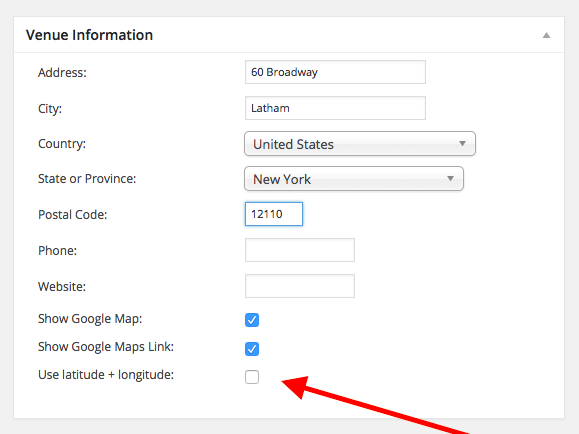
For any given venue that currently doesn’t show up, I would recommend the following steps:
1. View this venue in your wp-admin.
2. If the Latitude + Longitude option is not checked, check it.
3. Save the Venue.
4. Try searching again.
—
If the option is checked, then try un-checking it and save the venue. Then do steps 1-4 above on it again. This may get things to “refresh” correctly and may make a difference.
If issues persist despite all of this, then in your reply can you include your system information? Here’s how to do so → https://theeventscalendar.com/knowledgebase/sharing-sys-info/
Thanks!
GeorgeJanuary 9, 2016 at 5:33 pm #1053300ParticipantThanks for your help with this George, adding the Latitudes + Longitudes solved my issue! Seems obvious with hindsight..
One more thing which would really benefit my site is to be able to change the text in the filter bar e.g. from ‘Near’ to ‘Enter Your Postcode’. Could you advise what I would need to do to change this text?
Your help is much appreciated.
James
January 11, 2016 at 10:34 am #1054013ParticipantNo worries James! You say it “seems obvious”, but in my opinion we could be doing more inside our plugin to make this a bit clearer. We have some development tickets geared specifically towards that end, so stay tuned to plugin updates over time – hopefully this aspect of our plugin is made a bit more clear and visible!
—
Now, in regards to your question about changing the word “Near”, this is unfortunately not as simple as it is to change other wording throughout our plugins. You would unfortunately have to use the method outlined in this article to do this → https://theeventscalendar.com/knowledgebase/change-the-wording-of-any-bit-of-text-or-string/
Check out that article above and tinker a bit – you should be able to pull of this tweak without issue.
Cheers,
GeorgeJanuary 11, 2016 at 3:20 pm #1054196ParticipantHi George
Thanks again for pointing me in the right direction. I had a few attempts at changing the labels using the technique described in that article but to no avail. Luckily on another support thread I found someone who had a similar problem and solved my issue using a version of the code they were given which I edited and inputted into functions.php as follows:
function modify_bar_label( $translated_text, $text, $domain ) {
switch ( $translated_text ) {
case ‘Near’ :
$translated_text = __( ‘Search By Postcode’, ‘tribe-events-calendar-pro’ );
break;
}
return $translated_text;
}
add_filter( ‘gettext’, ‘modify_bar_label’, 20, 3 );This worked perfectly for me for the postcode label. Is there an easy way to edit this code so that I can change the other two labels? (‘Events In’ & ‘Search’)
Cheers for your continued support.
James
January 11, 2016 at 3:57 pm #1054227ParticipantThanks for sharing this James. To apply this solution to other text, you should just be able to add more “case” checks for the text. So, code like this:
case 'Events In' :

    $translated_text = __( ‘Events in alt example’, ‘tribe-events-calendar-pro’ );

    break;
case 'Search' :
$translated_text = __( ‘Search alternative example’, ‘tribe-events-calendar-pro’ );
break;
If you add this code to the above snippet that you posted, then it will change text “Events In” to be “Events in alt example”, and would change “Search” to “Search alternative example”.
You can of course use whatever “replacement” text you would like 🙂
Since this venturing into the world of customizations, I will have to leave you with the reins on implementing this and other code customizations – I hope this information helps though!
Thanks,
GeorgeFebruary 18, 2016 at 8:34 am #1076688KeymasterThis topic has not been active for quite some time and will now be closed.
If you still need assistance please simply open a new topic (linking to this one if necessary)
and one of the team will be only too happy to help. -
AuthorPosts
- The topic ‘Searching via postcode in the UK’ is closed to new replies.