

Forum Replies Created
-
AuthorPosts
-
February 15, 2017 at 7:07 pm in reply to: Add Time & Date – Missing Quarter Hour in Dropdown #1237691
George
ParticipantNice! 😀
Best of luck with your site. Be sure to back up that code and/or bookmark this thread so that if you lose that custom snippet in a theme update or something down the line, you can always reinstate the customization without much hassle.
Cheers,
GeorgeParticipant😀
February 15, 2017 at 11:38 am in reply to: Invite friends after publishing a community event (Buddypress site) #1236043ParticipantParticipantThis reply is private.
ParticipantThanks a ton for this data, Cliffy, and for your continued patience and persistence of course 🙂 Hope you had a good weekend.
In regards to your questions here:
• I am not sure why you didn’t get an email notice about my reply. ? It indeed may have something to do with the reply-by-email features invoked here. Those are recently-launched features we custom built ourselves, so there could be a bug there and I will mention this to the lead developer of that project.
• As for the issues you describe with DeskTopServer and your web host’s unique configurations regarding the media directory and /var/r/ and such, I am admittedly not sure how much this will affect our investigation and recommendations here, either.
I was able to download your files successfully and it seems like this is plenty for us to do some digging. I will be working with other members of our team on this.
Stay tuned for more insight here — thank you in advance for your patience while we investigate and tinker!
— George
ParticipantI’m glad to hear about the venues importing well for now, Charles! The images issue is still being worked on, but a fix is being tested and is in the QA process.
So, while this is of course subject to change, it should hopefully be arriving next week.
Stay tuned! 😀
— George
ParticipantThanks for confirming that, Diane.
With Event Aggregator, you can specify exactly how changes on the external/”origin” calendars (like Google Calendar, in your case) are handled by the WordPress site itself in the “Update Authority” settings found in Events → Settings → Imports.
However, regardless of the Update Authority settings, deleting an event on Google Calendar will not delete its WordPress version once it has been imported in WordPress.
Please let me know if this helps and there are any other issues or questions I can try to help with!
— George
ParticipantHey Uwe,
I am sorry for the limitation there, and do understand your frustration.
When it comes to the code necessary to customize this for now, though, it is unfortunately a complex enough customization that I don’t have any example code for how to get started. 🙁
Please let me know if there are any other issues or questions I can try to help with.
Sincerely,
GeorgeParticipantHey Kristen,
Sure thing.
To modify the output of the shortcode, you’ll want to use the methods described here: https://theeventscalendar.com/knowledgebase/themers-guide/
The [tribe_events] shortcode just loads/renders the “official” calendar views, so to modify the Month View as displayed by the [tribe_events] shortcode, you would use the methods in the above-linked Themer’s Guide to modify the Month View template files, which you can find within The Events Calendar at this file path:
the-events-calendar/src/views/month/When it comes to limiting the number of events output by the shortcode, there is unfortunately not a way to do this within the shortcode; the shortcode just uses the generic settings defined in the plugin and in the Events → Settings sections in your wp-admin.
So whatever “posts per page” setting you define which applies for the List View general will apply to instances of the list view in the [tribe_events] shortcode like [tribe_events view=”list”]
Please let me know if this information is helpful and if there are any other issues or questions I can try to help with!
— George
ParticipantSure thing Joe!
If they are logged in could they delete any event on the calendar or just the ones they have created?
☝️ They would only be able to delete their own events that they created.
Now, if they are “administrator”-level users, they will be able to do anything on the site that you could: add plugins, change site settings, delete any event from any other, create pages and new users and on and on…but if they’re just “Subscriber” or “Author”-level users, which is the default and also what is recommend, then they would only be able to delete their own events that they created.
I hope this helps!
GeorgeFebruary 15, 2017 at 10:00 am in reply to: Adding Sidebar to Calendar & Single Events Pages #1235803ParticipantCool, thanks for confirming you’ve checked that out Jon. Keep us posted here on further follow-ups and questions you might have. 🙂
— George
ParticipantThis reply is private.
ParticipantThis reply is private.
ParticipantThanks for confirming Noelle.
Well, at bottom this ultimately comes down to your personal taste and preference.
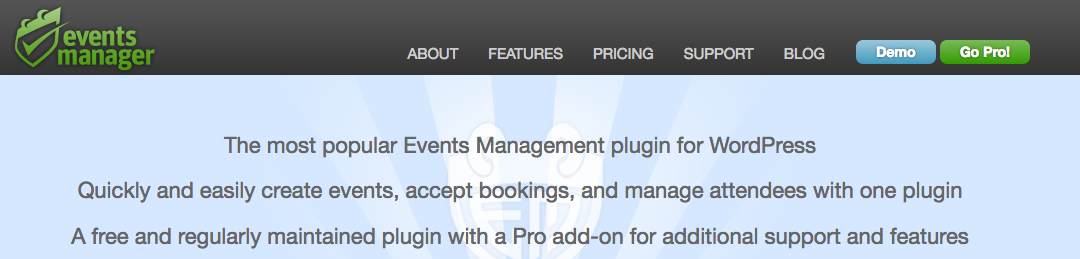
Both plugins look like good options, and the Events Manager plugin looks solid in its own right! One thing that is curious to me is that on the Events Manager homepage, they refer to themselves as “he most popular Events Management plugin for WordPress” (click for a larger-sized image):
If you check out the WordPress plugin page for Events Manager, though, and compare it to the one for The Events Calendar, you find a disparity in the numbers of active installs:
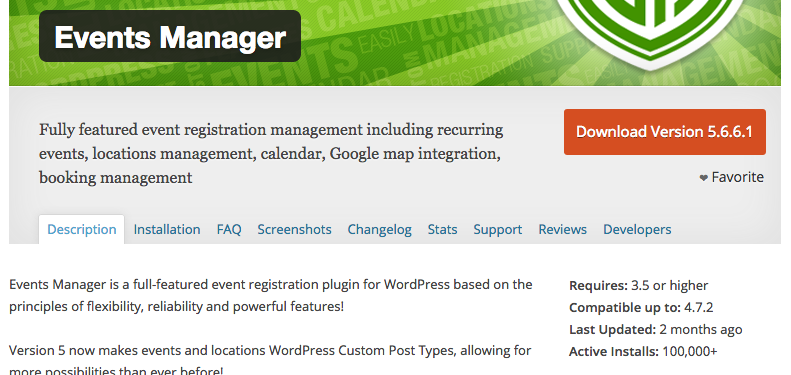
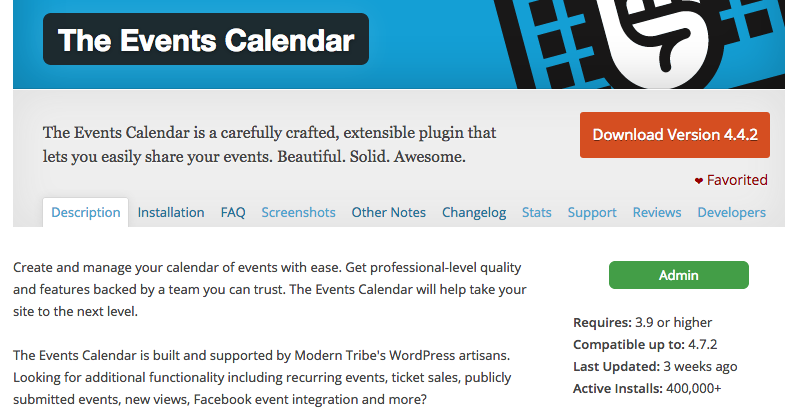
There is also a difference in the “Last updated:” time for both plugins.
It’s true that our plugins are more expensive, but this pricing is directly tied to the amount of development and support we invest into our plugins to make them solid and well-maintained.
I would like to note that we also have a 30-day No-Questions-Asked Refund policy which you can read about here. And so you can totally use this as a sort-of “trial period” to try out our premium plugins firsthand, see how you like them, then get a refund for them and test out the Events Manager premium plugins and compare how you like them.
That is the best way to do this — please note that The Events Calendar itself is free, though, as is Events Manager, and so you could also just test out the free plugins and see which ones you prefer.
Please let me know if there are any other issues or questions I can try to help with!
— George
February 15, 2017 at 9:23 am in reply to: PHP Error – explode() expects parameter 2 to be string, array given #1235673Participant😀
-
AuthorPosts