

Forum Replies Created
-
AuthorPosts
-
George
ParticipantHey George,
Everything you listed in your last reply is indeed support with Event Tickets and Event Tickets Plus 🙂
And if you find that these the products don’t meet your needs, you can get a refund at any time within the first 30 days after your purchase using the steps here: https://theeventscalendar.com/knowledgebase/refund-policy/
Cheers!
GeorgeParticipantHey @Michael,
Thanks for reaching out. There’s unfortunately not much news on our event behavior, and what I wrote to @Jakejules above about the limitations of our events is still true 🙁
We are hoping to roll out better features in this area over time, though I don’t have an ETA for when such features would arrive.
Sorry to disappoint!
— George
February 16, 2016 at 10:44 am in reply to: Events Calendar PRO – Widget Mini Calendar not working correctly. #1073918ParticipantThank you @schimpanz! I’m sorry that our support for customizations is limited but if there are other issues that arise that you are confident are not related to customizations, open a new thread and we’ll take a look 🙂
Cheers,
GeorgeParticipantNice! Glad to help Tony – I’ll close up this thread for now, but open a new thread any time if there’s ever anything else we can help with.
Best of luck with your project,
GeorgeParticipantHi Allee,
I’ve received the email and responded to it. Please let me know if you received my reply! 😀
Thank you for your patience with this!
— George
ParticipantHey Tony,
Thanks for reaching out!
“Events” – whether imported by Facebook or not – are just a post type within WordPress, so no there are no custom tables used for events at all at this time. They are stored in the wp_posts table whether you make them in your wp-admin yourself, import them from Facebook, import them from a CSV or anything, etc.
Does this information help? Let me know!
— George
ParticipantHey Greg,
We unfortunately can not help with customizations. Please see this article for more information → https://theeventscalendar.com/knowledgebase/what-support-is-provided-for-license-holders/
Most of your customizations are achievable with a bit of custom CSS. To write custom CSS on your site, definitely check out a [free!] tool like Firebug if you use FireFox, or the Developer Tools for either Safari or Chrome. They have “Inspector” tools that let you zoom right over the elements you want to remove/hide, and the you can simply add CSS to hide those things in the bottom of your theme’s style.css file.
I’m sorry about these limitations but wish you the best of luck with your customizations. If you are interested in hiring someone to help you implement these customizations, we maintain a list of great developers available for hire here → http://m.tri.be/18k1 (we have no affiliation with any of these folks–they’re simple some well-respected names in the community that we’ve compiled to share in situations like this one).
Thank you,
GeorgeFebruary 15, 2016 at 12:08 pm in reply to: Community Events – What version of The Events Calendar do I need #1073402ParticipantHey Conor,
Thanks for reaching out!
You do NOT need Events Calendar Pro – the “free” version is actually best thought of as the “core” version, and is required for any premium add-on.
But once you have the core version installed, The Events Calendar, yes you can simply add Community Events with no other premium add-ons and it will work 100% effectively 🙂
Cheers!
GeorgeParticipantHey @Aindreas,
The CSV is generated in a function in this file:
src/Tribe/Tickets_Handler.phpThe function specifically is in that file and is called maybe_generate_attendees_csv().
Cheers!
GeorgeFebruary 15, 2016 at 12:02 pm in reply to: Help with Custom Template – Pro Shorcodes – tribe_events_list category #1073395ParticipantHey @Ben,
You may be able to successfully retrieve tickets by using code like this:
$woo_tickets = Tribe__Tickets_Plus__Commerce__WooCommerce__Main::get_instance();

$tickets     = $woo_tickets->get_tickets( get_the_ID() );
if ( ! empty( $tickets ) ) {
foreach ( $tickets as $ticket ) {
// Do things with $ticket.
}
}Your question IS unsupported. All of your questions in this thread are 🙂 I have tried to help despite that fact and hope I have! However, at this point I will now have to close this thread because we cannot keep fielding unsupported questions.
I do genuinely wish you the best of luck with your customizations.
Sincerely,
GeorgeParticipantHey Niné,
Thank you for this information!
I visited your site to see this error in person and it seems like the main blocking error is this one:
Cross-Origin Request Blocked: The Same Origin Policy disallows reading the remote resource at http://www.livelovelovelife.org/wp-admin/admin-ajax.php. (Reason: CORS header 'Access-Control-Allow-Origin' missing).This is an issue happening because of your server/domain name configuration, not The Events Calendar itself or Events Calendar Pro itself.
To fix this issue, I would recommend contacting your webhost. You can fix it in a few different ways, though most require modifying your server’s .htaccess file. This question/answer exchange on StackOverflow has some good insight on this issue if you are curious to know more about it → http://stackoverflow.com/questions/27009425/how-can-i-fix-the-missing-cross-origin-resource-sharing-cors-response-header
I hope this information helps you proceed with resolving this issue!
Thank you,
GeorgeParticipantHey Casey,
Thanks for the update here. When it comes to hacking together a solution with Gravity Forms like you mention, I do not know myself if this would do the job adequately. If you’re confident it would, then while we unfortunately cannot help with custom coding, the thing with getting “date” values is that you can use a number of approaches. If you are referring to the date of the specific event being viewed by the user when they go to buy some tickets, you should be able to get the date of the current event by using code like this:
$start_date = tribe_get_start_date( get_the_ID() );
The variable $start_date should then be holding, well, the start date of the event 🙂
Getting the date of the currently-viewed event is something you can tinker around with without needing Events Calendar Pro, and so I would recommend doing this! In other words, the features like event date–and the functions above I showed that retrieve the event date–are totally available within the core plugin The Events Calendar, which is of course totally free. So you can see if you’re able to write custom code reliant upon getting event start dates first, to test the waters with your customization ideas…this is the approach I would recommend before buying anything.
If you buy things eventually, anyways, and can’t seem to make it work as hoped so would like a refund, you can do so by following the steps here: https://theeventscalendar.com/knowledgebase/refund-policy/
I hope this information helps! Best of luck with your customizing and tinkering.
Sincerely,
GeorgeFebruary 15, 2016 at 11:43 am in reply to: tribe_events_list shortcode with more than one category #1073387ParticipantThanks for this @Johan!
I looked through your information but nothing seems particularly problematic or out-of-place. So, unfortunately, at this point the only thing I could think of as a potential source of these issues would be a theme or plugin code conflict….
To investigate if such a conflict exists, I would recommend running through the complete set of troubleshooting steps outlined on this page → https://theeventscalendar.com/knowledgebase/testing-for-conflicts/
After EACH STEP in that process, check on your shortcode results and see if things improve in terms of the category filter being properly applied.
I’m sorry that this is the best course of action I can recommend at this point, but I hope you’re able to do this testing and that it reveals a conflict.
Let us know what you find!
Thank you,
GeorgeFebruary 15, 2016 at 11:40 am in reply to: Events Calendar PRO – Widget Mini Calendar not working correctly. #1073384ParticipantThanks for all of this information!
To be clear, are you referring to the calendar here shown in this screenshot:
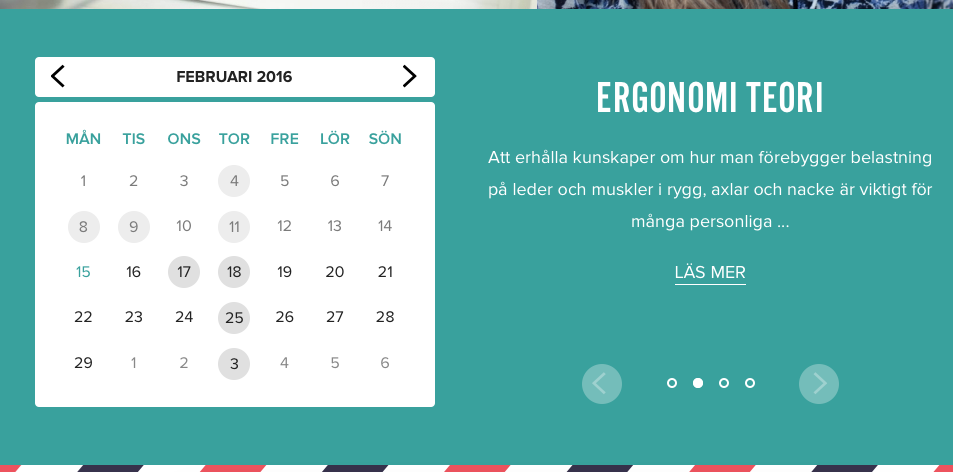
If so, then there are two things worth pointing out:
1. For me the “prev” and “next” month links work fine, and do indeed make the calendar go to the previous or next month when clicked.
2. This calendar view is heavily customized. The HTML and markup of this calendar is entirely custom. So if you are referring to the left and right buttons on the right half in the screenshot above, then these are heavily customized, custom buttons. These are custom buttons and so we unfortunately cannot help much with troubleshooting these. You would need to contact whomever developed those buttons for troubleshooting issues with them.
I’m sorry to disappoint if these buttons are the only problematic things left on your page!
Sincerely,
GeorgeParticipantHey @Edward,
I’m sorry for the inconvenience of this. At this time there are no such plans because the nature of “licenses” and of premium file downloads makes it basically impossible to have “development licenses” or “trial licenses”.
I’m sorry about the state of things, @Edward. Let me know know if there is anything else I can try to help with here!
Sincerely,
George -
AuthorPosts