

Forum Replies Created
-
AuthorPosts
-
George
ParticipantHey Hanna,
Your screenshots show behavior that is not normal—I cannot recreate their behavior on my own site, so I’m suspecting that there’s a plugin or theme code conflict happening here.
To help reveal if that’s the case or not, I would recommend running through the complete set of troubleshooting steps outlined on this page → https://theeventscalendar.com/knowledgebase/testing-for-conflicts/
After EACH STEP in that process, check on the issues you have described above. Do the issues persist? Is the organizer detail on the form still missing? Etc.
You should eventually end up in a state where the only active plugins are The Events Calendar and Community Events, and the active theme is a default one like Twenty Sixteen.
<string>In this state, do all of these issues persist? And can you share a link to your community events page in this state?
Thank you!
GeorgeParticipantHey @Kostas,
I’m sorry to bear this news, but I do not know of any Translations plugin that we fully support 🙁
Our plugins are fully compatible with all default WordPress translation methods. Each “translation plugin” uses different non-standard methods for applying their plugin-specific multiple translations, and so we do not have 100% support for any of them.
In general, it seems like qTranslate has better coverage than WPML, though again this coverage is not 100% and I cannot confirm that it would solve your specific issue here. 🙁
I’m sorry @Kostas!
— George
ParticipantHey Rachel,
I’m really sorry to hear about these conflicts!
It sounds like the geodirectory plugin was problematic on your site beyond with just Events, as you write in your last reply here. I can indeed mark this thread resolved, but as far as Business Directory plugin recommendations, I unfortunately do not have any recommendations off the top of my head or based on personal use.
Can you elaborate a bit on your goals with such a plugin? How should the end result on your site look and function? If you’re trying to build a simple directory of listings, then there might be a more general “listings” plugin that works well even if it’s not specifically built for a business directory; for example, this “job listing” plugin is phenomenal and very well-made → https://wordpress.org/plugins/wp-job-manager/
While not specifically for “businesses”, many of its features might work just as well for your directory-building….
Thank you,
GeorgeParticipantHi @mnussbaum,
Creating custom views like is indeed possible, but only with extensive custom coding.
We cannot help with custom coding at all, unfortunately.
So to implement the features you describe, you would have to write that custom code on your own, or hire a professional developer to write the code for you. We have a list of great developers here → http://m.tri.be/18k1 (and have no affiliation with any of these folks–they’re simple some well-respected names in the community that we’ve compiled to share in situations like this one).
Sorry to disappoint!
Let me know if there’s anything else I can try to help with.
Sincerely,
GeorgeParticipantHey @stephaneperrin,
Our Photo View is fully responsive and works well in all modern browsers. It sounds like your theme or perhaps another plugin on your site is breaking things.
1. Can you share a link to your Events page so that I can investigate the source of the problem?
2. Can you share your “System Information” with us? Here’s how → https://theeventscalendar.com/knowledgebase/sharing-sys-info/
Thanks,
GeorgeParticipantHey Christian,
Thanks for reaching out! I agree that having a one-page checkout would be pretty slick; it is unfortunately not possible at this time with our plugins 🙁
I’m sorry about that!
Please let me know if there’s anything else I can try to help with.
Sincerely,
GeorgeParticipantHi there,
This would actually be very difficult to pull off because everything in our plugins related to the Month View is geared towards showing one month at a time.
We don’t have any existing examples, and cannot help with code customizations—especially ones of this magnitude—but we do have a Themer’s Guide which covers the basics of building custom front-end templates for The Events Calendar. This might be helpful as a starting point, so I wanted to mention it; it can be found here: https://theeventscalendar.com/knowledgebase/themers-guide/
I hope that guide is helpful! Let me know if there’s anything else I can try to help with.
Thanks,
GeorgeParticipantHey @Guillaume,
While you unfortunately cannot make The Events Calendar a real “page”, you can add the “Events” auto-generated URL to your menus without issue.
In your Appearance → Menus menu builder, simply use the “Custom Links” type of menu item, and then enter your events page URL with the title “Events”, then add it to your menu. See this screenshot for an example (click to see full-size):
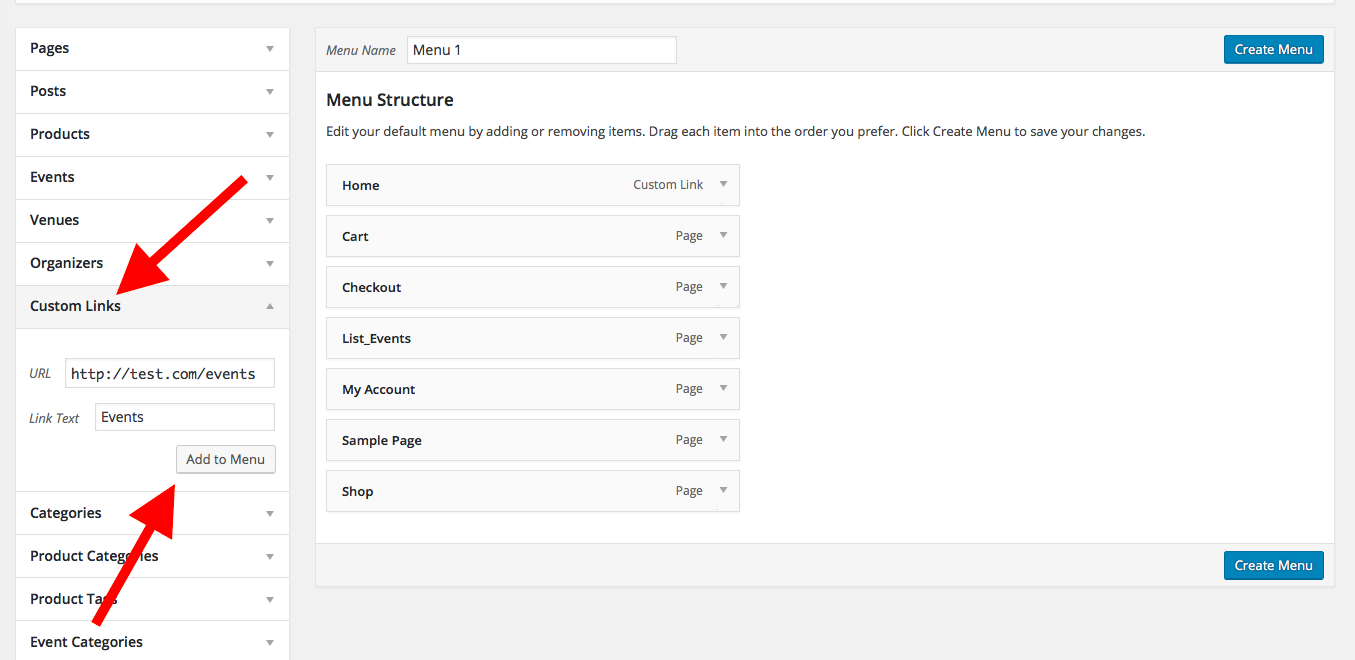
I hope that helps!
— George
ParticipantHey @Gail,
Thanks for reaching out. I’m sorry to bear this news, but at this time the best solution for the sort of discount you are trying to setup here is using the “minimum cart total” parameter in WooCommerce for its coupon codes.
You mention some of the limitations and problems with this:
I can tie to the minimum cart subtotal, but this can include totals from other events in the cart at the same time.
That is definitely true, and I fully admit that this is not a perfect solution. We do not have any better alternatives at this time, though 🙁 I’m sorry about this!
Let me know what you think and if there’s anything else I can try to help with; sorry to bear the bad news here, @Gail.
Sincerely,
GeorgeParticipantHey @Kadi,
Thanks for reaching out.
When you say “look like ours,” can you clarify exactly what discrepancies you are referring to?
You’re obviously using a different theme and such, and so your site’s styles are entirely different than the styles used on the website we took screenshots of for the plugin page. The only way to significantly change appearance, then, is to write custom CSS or to change your theme. Your theme is what is dictating font styles and such.
We cannot help with custom CSS and style tweaks, unfortunately, so I would encourage reaching out to your theme developer for theme-related style tweaks.
However, you ask this which we should be able to help with: “Is there a way to shorten what gets shown in the month view title?”
To be clear, are you asking if the month view title “Events for February 2016” can be shortened? Or are you asking if the titles in each month view event block can be trimmed to a certain number of characters?
Or something else altogether? 🙂
Let me know what you mean about “shortening what gets shown in the month view title” in a bit more detail and I will try to suggest a solution.
Thank you!
GeorgeParticipantHey @Fabrice,
Thanks for reaching out—the behavior you describe actually just seems to be our default styling for events in this way. If you notice, the events that have lower opacity are either in the past, or in the next month.
So in your screenshot, for example, you are viewing the month of February. The events in the bottom that have lower opacity are actually from March, though—the next month over.
Their opacity difference is meant as a way to indicate to users that they are not in the current month, but are instead being pulled in to fill out the calendar grid.
This is a common approach for calendars and you can see it in effect on our official demo site here: http://wpshindig.com/events/.
To override this behavior and keep those events at full-opacity, you can add the following CSS to the bottom of your theme’s style.css file:
.tribe-events-othermonth .tribe-events-month-event-title,

.tribe-events-othermonth div[id*="tribe-events-daynum-"] {

	opacity: 1.0 !important;

}
I hope this information helps!
Thanks,
GeorgeFebruary 18, 2016 at 7:50 am in reply to: Can Eventbrite added events be auto pulled in via the plugin? #1075110ParticipantHey Ian,
At this time there is no default functionality for pulling in the events automatically 🙁
I’m sorry to bear this news!
Please let me know if there’s anything else I can help with.
Sincerely,
GeorgeFebruary 18, 2016 at 7:44 am in reply to: Basic community events user registration question #1075104ParticipantHey @Clarity,
That is bizarre! The function is literally defined right there, so that error should not be displaying and this works very well for me.
Can you copy and paste your ENTIRE, UN-EDITED functions.php file into a Gist at http://gist.github.com and then share a link to this Gist?
I will take a look and see if I can spot what’s wrong.
Thanks,
GeorgeParticipantHey Daryll,
Interesting question! The way “widgets” are created in WordPress makes it something that’s a bit tricky to do in a context of “extending” The Events Calendar.
In other words: for the changes you describe, at some point these would require significant enough code modifications to the existing “This Week” widget code that you would need to make your own Widget, or do as you’ve done thus far and modify the “This Week” widget code directly 🙁
You mention that you eventually end up loading the content with the [tribe_this_week] shortcode anyways, so making a custom widget of your own may be much less of a lift than you think. Articles like this one cover the basics of creating your own widget and I would recommend taking a look at the process → http://www.wpbeginner.com/wp-tutorials/how-to-create-a-custom-wordpress-widget/
I hope this information helps!
— George
ParticipantHey @Nathan,
Thank you for the detailed write-up here of your testing process thus far.
I know how much of a pain it can be to do this, but I would strongly suggest trying a very definitive test here to truly rule out or reveal a code conflict:
- Activate a default theme like Twenty Sixteen, Twenty Fourteen, etc. on your site. No child themes or anything; just a default theme. This will not erase any content or site data (at most, you may have to drag some widgets back into place in your wp-admin “Widgets” page).
- Deactivate every single plugin on your site so that literally the only two plugins running are The Events Calendar and Events Calendar Pro.
- Once your site is in this state, how do things behave?
Are these tests something you’re able to do? If so, what do you find?
I have been unable to pin down the source of the template issues with prev/next navigation, which I’m sorry about—the above tests are the only step I can think of that could potentially reveal useful information about this bug at this point.
Let me know what you think, Nathan. I’m sorry for the trouble here and sincerely appreciate your patience with all of this.
— George
-
AuthorPosts