

Forum Replies Created
-
AuthorPosts
-
February 19, 2016 at 1:13 pm in reply to: Times shift with recurrent and no recurrent events from Google Calendar #1078497
George
ParticipantHey Fabrice,
Sorry to hear about these issues!
This is not default behavior, so I’m wondering if there’s a timezone-related issue on your site. I noticed in the site “System Information” that you shared with your thread here that the “WordPress Timezone” option is empty.
If you head to Settings → General in your site’s wp-admin, what do you find for the following questions:
1. What is the current timezone setting there?
2. If you change this setting to your proper timezone, does anything with these issues improve or change in any way?
Thank you!
GeorgeParticipantHey Michael,
Thanks for reaching out!
This is an interesting use case, but unfortunately not one that is easily possible or something supported by our plugins at this time 🙁
Building something like this is possible with custom coding, or possibly by using some other plugins like Gravity Forms or Ninja Forms to collect user data, but it’s not possible “out of the box” with any of our plugins.
Let me know if this information helps!
Thank you,
GeorgeParticipantThanks for your patience Brian — stay tuned! 🙂
February 19, 2016 at 1:02 pm in reply to: Geolocation / only display events whose venues are within 50km of the user #1078485ParticipantThanks Ashia! I agree that this would be an excellent feature. Stay tuned to plugin updates over the months to come and beyond, and better support for the things you suggest may indeed arrive.
Best of luck with your project,
GeorgeParticipantThanks Rachel!
I took a look and it does seem like my suggestion to use WP Job Manager might be a good one! Like I mentioned above, it’s not built specifically for business directory listings, but it’s a really solid “listing”-based plugin regardless and might work well.
Merging sites is indeed a bit tricky, and I wish you the best of luck with your project!
Sincerely,
GeorgeParticipantHey Nathan,
I’m really sorry to hear about the troubles that have been caused by that theme! It definitely sounds like that is the main source of issues here and I would personally recommend replacing it. These are some recommended places to get high-quality, well-coded themes:
• http://wordpress.org/themes [yes, the free wordpress.org themes!]
• http://arraythemes.com
• http://woothemes.comI would recommend avoiding marketplace sites like ThemeForest or similar ones. They have some great items! But it’s quite hit-or-miss, so I would recommend against it.
There’s not much we can do about theme conflicts, unfortunately, because we don’t know theme code and whatnot, but I hope my recommendations for different themes are helpful.
Please let me know if there’s anything else I can try to help with!
Sincerely,
GeorgeParticipantHey Brian,
Thank you for revealing this—we have no specific compatibility with BuddyPress and so that could be part of the problem here. I will have to take some time to investigate if this is the case, but just wanted to note this.
Thank you for your patience here!
GeorgeParticipantHey Brian,
Thanks for clarifying this! I do not find the exact same behavior, but regardless, since these are submitted by users with user accounts on your site you can change the Author by ensuring the “author” screen options checkbox is visible in the event edit screen.
You can ensure this by clicking the “Screen Options” tab in the top right of the edit-event screen, and checking the “Author” checkbox if it’s not already checked. Here’s a screenshot of this for reference:
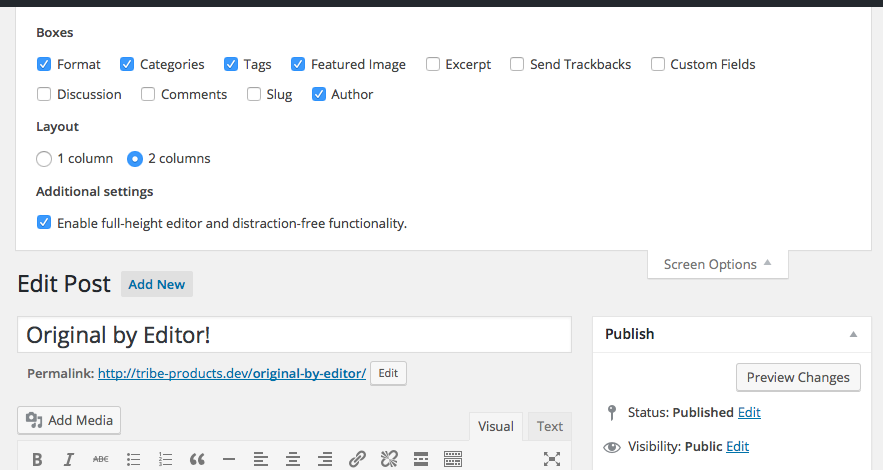
This should reveal an “Author” metabox where you can specify the author.
I hope this helps!
GeorgeParticipantThank you for this information!
In your reply you said, “For the moment I rolled back the month view because the photo view is not showing well.” However, I could not even see the photo view on your site 🙁
1. How did you “roll back the month view” and “hide the photo view,” specifically? This seems to reveal that you are using custom code on your website, which could be a factor in the poor display of your Photo View.
2. Can you temporarily make it so that the Photo View is accessible and visible? I will take a look and try to isolate its specific problems.
Thank you!
GeorgeParticipantHey Christian,
Thanks for the follow-up. What you’re asking to do would require custom code, unfortunately, and we cannot help with custom code 🙁
However, I’m still happy to try and help as much as I am able to—can you explain a bit more about how you want the date and location to appear and such? Can you clarify what this means, for example:
Is it maybe possible to get date and location to a ticket based on a page?
If you can share a screenshot of where you want such information to display, and what specific information you mean, that will help a lot and I will try to recommend some custom code. You can share screenshots by uploading the image to Imgur.com, Flickr.com, CloudUp.com, or any similar image-hosting site; then just share the links to those images here and I’ll take a look.
Thank you!
GeorgeParticipantI appreciate your reaching out and am glad I was able to help here. I’ll be closing up this thread, but if there’s anything else we can help with, open a new thread any time!
Best of luck with your project,
GeorgeParticipantNo worries at all @Fabrice! No problem! 🙂
February 19, 2016 at 10:43 am in reply to: Basic community events user registration question #1078364ParticipantHey Clarity,
Thanks for this, I see what the issue is—when I said “your theme’s functions.php file”, I perhaps wasn’t being as clear as I could’ve been!
I am referring to a file within your theme’s folder that is called functions.php. You might be familiar with this file, but if not, then let’s say for example your theme is Twenty Sixteen (I know it’s not, but just for example). Then the file I am referring to would be at this location:
/wp-content/themes/twenty-sixteen/functions.php
The “functions.php” file you’ve added the code to presently is in another location in your WordPress installation.
Remove the code from that functions.php file and try adding it to the file in your theme’s functions.php file.
Learn more about theme functions files here, if you’re curious → https://codex.wordpress.org/Functions_File_Explained
Thanks,
GeorgeParticipantHey @Jennifer,
Unfortunately “tickets” are registered as normal products or “simple products” in WooCommerce — a “variable product” is another type of product type completely, and so its features are unfortunately not support by our ticketing plugins at this time.
As far as sandbox versions and such, we do not have a demo like this at this time 🙁 It’s another project under active development but will likely not be a reality for at least several more months from now, and this is the best case scenario.
Sorry to bear some of this bad news! Please let me know if there’s anything else I can help with.
Sincerely,
GeorgeParticipantHey @mnussbaum,
Thank you for your understanding of our policies and such. I’m still happy to try and helpful resources, of course, so I will try to do that here.
We don’t have much information that is specifically about additional fields, but one resource that is always worth starting at when making custom code for The Events Calendar or its add-ons is our Themer’s Guide → https://theeventscalendar.com/knowledgebase/themers-guide/
That’s a handy resource for figuring out where and how to add your customizations within context of The Events Calendar specifically.
To learn more about custom fields directly, and learn all of the API functions used for adding them, removing them, updating them, etc., I would recommend checking out this “parent” page on the WordPress Codex and then checking out all of the “sub” pages it links to throughout its content → https://codex.wordpress.org/Custom_Fields
These are the best resources I can think of—I hope they are helpful and I wish you the best of luck with your customizations.
Cheers!
George -
AuthorPosts