

Forum Replies Created
-
AuthorPosts
-
George
ParticipantHey Michael,
Thank you for the update—I’m glad to hear that the widgets work again!
I do not know why the calendar plugin was deactivated; this does not happen automatically.
Regardless of that, I’m wondering if anything improves if you head to Events → Settings → Display in your wp-admin, and then look for an option called “Enable event views.”
There should be checkboxes here.
Make sure the “Photo” checkbox is checked and save changes:
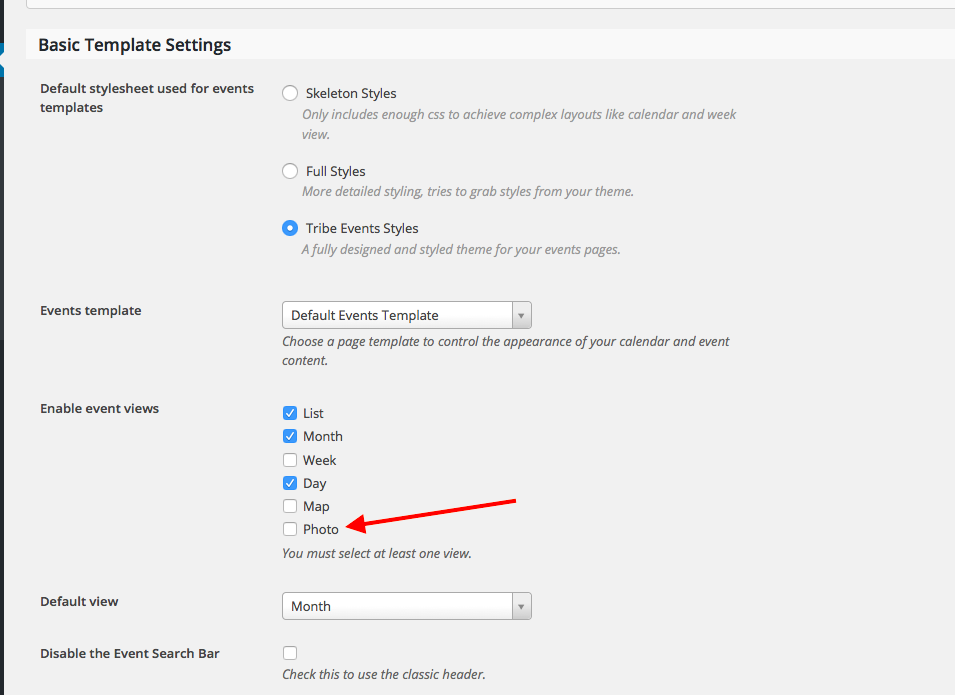
Does this help at all?
If not, then can you share your current System Information? Here is how to do that: https://theeventscalendar.com/knowledgebase/sharing-sys-info/
Thank you!
GeorgeParticipantGlad to hear it! Thank you for sharing your solution, too.
Best of luck with your project,
GeorgeParticipantHey Doug,
Thanks for reaching out—I’m sorry to hear about these issues!
First, the “Pssst! Looking for the filters? They live in a separate plugin now” text is NOT a factor in this issue; you can “dismiss” that text without issue. It won’t affect anything on your site.
As for your actual issue, I do not have this problem on my own site—I, too, am using version 4.1 of all Tribe plugins.
We cannot log into customer sites for any reason, so do not post any login information anywhere on this site, but I’m still curious if you can share a screenshot of the “Edit Event” screen in your wp-admin so that I can see the exact issue?
In your post, you say that the area is too large to share a screenshot, but you might be able to take “Fullpage” screenshot using your browser.
If you use Chrome, Safari, or Firefox for example, simply google “how to take a full-page screenshot in {insert browser that you use}”, and you should find several methods for doing this. If you use Internet Explorer or something else, then try searching too—there might be a method for full-page screenshots in that. But if not, the other browsers I listed are all 100% free—so you could even download one of those and use that to get a fullscreen screenshot…if you want!
It would just be very, very helpful.
For example, here’s my own edit-event screen, which does not have the problems you describe:
Regardless of whether you can share that screenshot, can you also your site’s “System Information” here? That will help me investigate this problem. You can share this by following the steps in this article → https://theeventscalendar.com/knowledgebase/sharing-sys-info/
Thank you!
GeorgeParticipantHey Sofia,
Thank you for reaching out!
Our plugins unfortunately have no integration whatsoever with the plugin you linked to in your post. 🙁
Is it technically possible to integrate our plugins with that plugin? Yes, it is. However, it would require a very large amount of custom-coding and rewriting aspects of our plugin. So you would have to write all of that custom code yourself, or hire a professional developer to make that integration for you.
I’m sorry to disappoint!
Or do you have a feature in The Events Calendar that will allow a Mobile Check-Inn APP?
Our ticketing plugins add QR Codes for check-ins to tickets; these are the QR codes that you can scan with a mobile scanning app, yes. I don’t know if this is quite what you mean, but you can take a look on our official product page for the plugin here to have a look → https://theeventscalendar.com/product/wordpress-event-tickets-plus/
In the “Screenshots” section of that page, the second image from the left is an example of a ticket generated by our plugins—you’ll see the scannable QR Code in the bottom-left corner of that image.
Take a look at that and let me know if it’s what you’re referring to—and let me know if you have any other questions in general! 🙂
Thank you,
GeorgeParticipantSorry to hear about this, Eric!
I took a look at your site and see a JavaScript error in the console when viewing your events page, which explains why the “Previous Events” link won’t work correctly.
The error is coming from one of our own JavaScripts, but I do not have it on my own site…so I’m curious about what’s going here.
To help me investigate this a bit more deeply, can you share your “System Information” with us in this thread? Here’s how to do that → https://theeventscalendar.com/knowledgebase/sharing-sys-info/
Also, can you clarify if this is a brand-new bug on your site, or has this been happening for a while?
Thank you!
Sincerely,
GeorgeParticipantHey Alexander,
Thanks for reaching out!
There are a few different things I’m curious about here so that I can better understand your issue:
1. First, would you be willing to share a screenshot of the exact Additional Field you are trying to create in your wp-admin? I mean, specifically, the actual admin “Additional Fields” tab where you have the options for creating the field and such. This will let me see exactly how you’re creating things and will be very useful.
You can share images by uploading them to Imgur.com, Flickr.com, CloudUp.com, or any similar image-hosting site; then just share the links to those images here and I’ll take a look.
2. Can you share your “System Information” with me here? It will provide a lot of helpful information about your site, which I will use to try and recreate your exact issues. Here’s how to do this → https://theeventscalendar.com/knowledgebase/sharing-sys-info/
Thank you!
GeorgeParticipantHey Mark,
I’m sorry to hear about these issues. When I try searching or paging through the Previous/Next months on my own site, things work fine, so we’ll need to do some digging here to figure out the exact culprit on your site.
1. Can you share your “System Information” with us? Here’s how to do that → https://theeventscalendar.com/knowledgebase/sharing-sys-info/
2. It looks like you might have made some customizations on your site. Can you confirm whether or not there are customizations to the calendar on your site?
3. I see that your Events Calendar Pro license expired in September 2015. This could mean that your current versions of the software are outdated. We cannot support outdated versions of our plugins, and so the first order of business before any further support can be done here would be to update your versions of our plugins to their most recent versions:
• The Events Calendar: 4.1.0.1
• Events Calendar Pro: 4.1Thank you!
GeorgeMarch 19, 2016 at 9:08 am in reply to: Google calendar multi day events are imported as single day events #1091364ParticipantHey Oystein,
Sorry to see this issue!
1. How, specifically, did you import the event from Google into your WP site?
2. Can you post your “system information” here? Here’s how to do that → https://theeventscalendar.com/knowledgebase/sharing-sys-info/
Thank you!
GeorgeParticipantHey Michael,
Thanks for reaching out!
We maintain a list of great developers here → http://m.tri.be/18k1. We have no affiliation with any of these folks—they’re simply some well-respected names in the community, and we maintain this list because we’re often asked for such recommendations.
You can’t go wrong with any of the folks on that list—I hope this helps!
Sincerely,
GeorgeParticipantHey Jan,
Thanks for reaching out. There is currently a bug that is preventing the mini-calendar day names from using their “short” names like expected in some cases.
We’re working hard on a fix for this, and hope to have a release with a fix out in the coming weeks.
I’m sorry about this bug! Please let me know what you think and if there’s anything else I can try to help with.
Sincerely,
GeorgeMarch 19, 2016 at 9:01 am in reply to: Eventbrite Ticket Sync / Image Question + WooCommerce #1091356ParticipantHey Marcos,
Thanks for reaching out, and for your interest in our plugins! I will address your questions in reverse-order as follows. 🙂
Also, are you able to create an event in WP, sync it to WP with Eventbrite Tickets, but have EVENT TICKETS PLUS installed and have customers on your website buy through WooCommerce?
Unfortunately, what you describe is not possible with our plugins at this time. You cannot have an event that sells tickets through Eventbrite and your own self-hosted tickets via WooCommerce. 🙁 Now, you can have both Event Tickets & Event Tickets Plus running on your site, and then also have Eventbrite Tickets on your site, and create separate events that sell tickets with one of these methods—but you cannot merge that functionality on the same event, unfortunately. Sorry to disappoint!
If I formated the event exactly as it is above in WP and then synced it to EB using Eventbrite Tickets would everything transfer exactly?
In theory, yes, the formatting will be wholly preserved. However, in your post you say the word “exactly” several times, so it seems rather important that the whole set formatting is 100% preserved with no issues. This is unfortunately not something that can be guaranteed. 🙁 With enough formatting of image content and such like in the sample event you linked to, it’s possible and likely that, for example, all of the bold and italic text and all of the HTML link tags will import fine; the images should import fine, too, but there would likely be small layout inconsistencies. For example, centered images could end up floated to the left. Elements like this centered list of twitter handles might have their raw HTML imported fine, but lose the centering and carefully-made spacing:

So it’s unfortunately a bit of a mixed bag of results, and any complicated formatting like in your sample event would, in all honestly, likely require some fine-tuning once it’s imported into your wp-admin.
I’m sorry to disappoint on both fronts here, Marcos! Please let me know any further questions you might have here.
Sincerely,
GeorgePS
One thing worth noting is that we have a thirty-day, no-questions-asked refund policy. So if you buy one of our plugins to try it out and see firsthand how things like formatting and all of that work, and you find that it’s not satisfactory for your project needs, you can request a refund any time in that thirty-day period after purchase and we’ll issue a refund in full immediately. Learn more here → https://theeventscalendar.com/knowledgebase/refund-policy/Just wanted to mention this—many users use this policy to facilitate, essentially, a “trial period” for thirty days.
Cheers!
ParticipantHey @wranne,
Thank you for reaching out. Our event recurrence system has gotten much more sophisticated and complex than the sort of array of options that you demonstrate in your example snippet.
Creating recurring events programmatically is technically possible, but is a complex custom-coding project that you will have to take the reins on yourself (or hire a professional developer to help). I’m sorry about this! Custom coding projects are just not something within the scope of support we can provide—see the “Product Support” section of this page for more information: http://theeventscalendar.com/terms
For some insight into how the plugin itself creates recurring events, you can check out the class
Tribe__Events__Pro__Recurrence__Events_Saverinside Events Calendar Pro—by exploring this class and its methods, and all of the other objects and methods it calls upon, you might be able to put together some code that creates recurring-event series accurately.I wish you the best of luck with your custom project—let me know if there’s anything else I can try to help with here!
Sincerely,
GeorgeMarch 19, 2016 at 8:41 am in reply to: ECP causes URL issues / Invalid post type error when using tag filter view #1091351ParticipantHey Steve,
Thanks for reaching out—sorry to see that this issue has re-emerged! As you can tell from that older thread you linked to, this is a tricky issue, and even that thread didn’t come to a conclusive end.
Editing, searching, and all other activities with tags works fine for me without error. However, when I initially click to the list of posts filtered by tag (which you get to by clicking the “post count” link on the main Tags list like you describe), I get this PHP notice at the top of the page:
Notice: Array to string conversion in /Users/ggwicz/Sites/wp/wp-admin/edit.php on line 2571. Do you get this same PHP notice?
2. Can you share your system information with me to help investigate further? Here’s how → https://theeventscalendar.com/knowledgebase/sharing-sys-info/
3. Have the issues you describe here been happening since you first installed The Events Calendar and its related add-ons? Or have these issues only recently appeared?
Thank you in advance for this information. The fact that I can produce a PHP notice alone is already some progress on this issue, and I will create a bug ticket for this. With your information and some testing on my end, hopefully we can flesh out the full scope of this problem!
Thank you,
GeorgeMarch 19, 2016 at 8:01 am in reply to: Facebook event can´t reach API when I try to import. #1091340ParticipantHey @Mikael,
I’m sorry to hear about these issues! I have a few specific questions here that should help reveal the nature of these issues:
1. Do you have this problem with several other events? Or is the event you shared the only event with this problem?
2. Is the event you shared limited by age, at all? Is it an “adult” event on Facebook, so that perhaps you have to be 18 or older to fully view and explore the event and confirm attendance to it and such?
3. Can you share your “System Information” with us? Here’s how to do that → https://theeventscalendar.com/knowledgebase/sharing-sys-info/
Thank you!
GeorgeParticipantHey Juan,
Thanks for reaching out! I’m sorry to hear about these issues and will investigate the bugs you report—if I find the same behavior that you do, I’ll create a bug ticket for our developers so that we can work on a fix.
In the meantime, can you share your “System Information” here? Here’s how to share that → https://theeventscalendar.com/knowledgebase/sharing-sys-info/
Thank you!
George -
AuthorPosts