Forum Replies Created
-
AuthorPosts
-
George
ParticipantThanks for reaching out, @Carly! This is indeed a feature that others have requested, and it may end up in our plugins at some point.
There aren’t specific plans to implement it for now, unfortunately; but to voice opinions on this and other feature ideas, head over to our “UserVoice” page and post ideas any time! ? http://tribe.uservoice.com
Cheers,
GeorgeParticipantHey Chris,
Sorry to hear this!
1. Can you share a link to a specific event on your site that demonstrates this issue?
2. Can you post your site’s “System Information”? Here’s how ? https://theeventscalendar.com/knowledgebase/sharing-sys-info/
Thank you!
GeorgeJune 12, 2016 at 9:26 am in reply to: error 500 for all event links after updating events calendar pro and events tick #1125830ParticipantHi @james,
I’m sorry to hear this! I do not have any similar problems on my own testing site.
1. Are you able to access your site’s /wp-admin admin area? If so, please post your site’s “System Information.” Here’s how to do that ? https://theeventscalendar.com/knowledgebase/sharing-sys-info/
2. Next, do you remember any error messages when you tried performing the updates?
3. If possible, see if any errors pop up on your site if you head to your site’s wp-config.php file and change this line of code:
define('WP_DEBUG', false);to this:
define('WP_DEBUG', true);That will display PHP errors if any exist, which might be quite useful here.
Thank you!
GeorgeJune 12, 2016 at 9:09 am in reply to: The server responded with a malformed response. Please see the JS console #1125825ParticipantSorry to hear this @Neil!
I tested this out and was not able to reproduce the “malformed response” error you describe. I did, however, only get 8 events listed as “importable”, though it seems the file has closer to 33 events:
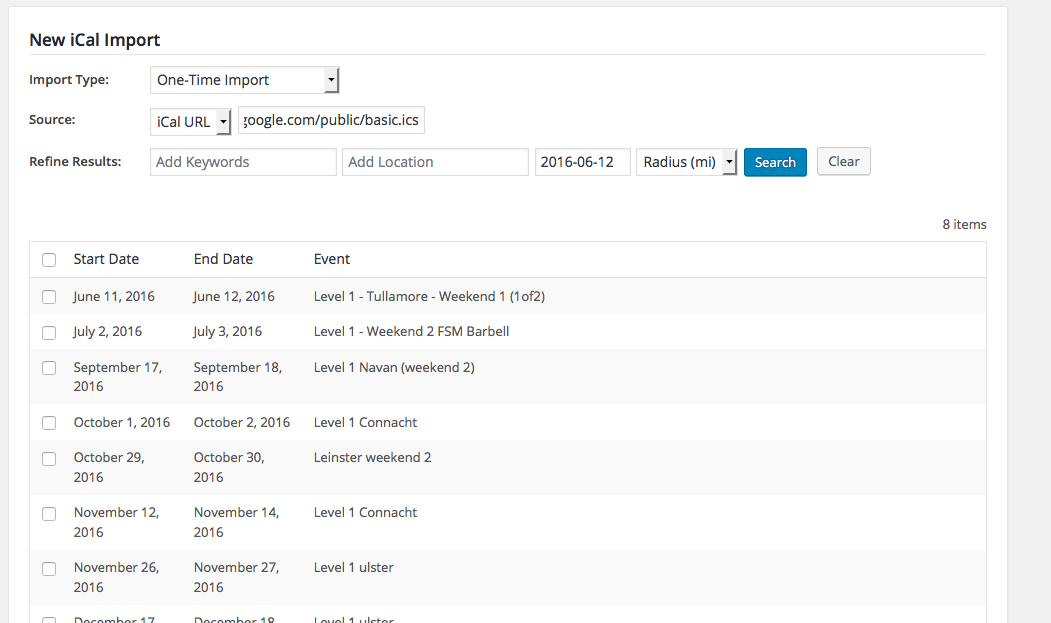
1. To help investigate this issue, first can you post your site’s System Information? Here’s how ? https://theeventscalendar.com/knowledgebase/sharing-sys-info/
Next, here is test .ics file that you can download, and should :point_right: https://cloudup.com/cmTsEEjlZIK
☝️ Once you download that file, try using it in an iCal import. It should say that there are 123 events to import, as shown in this screenshot:
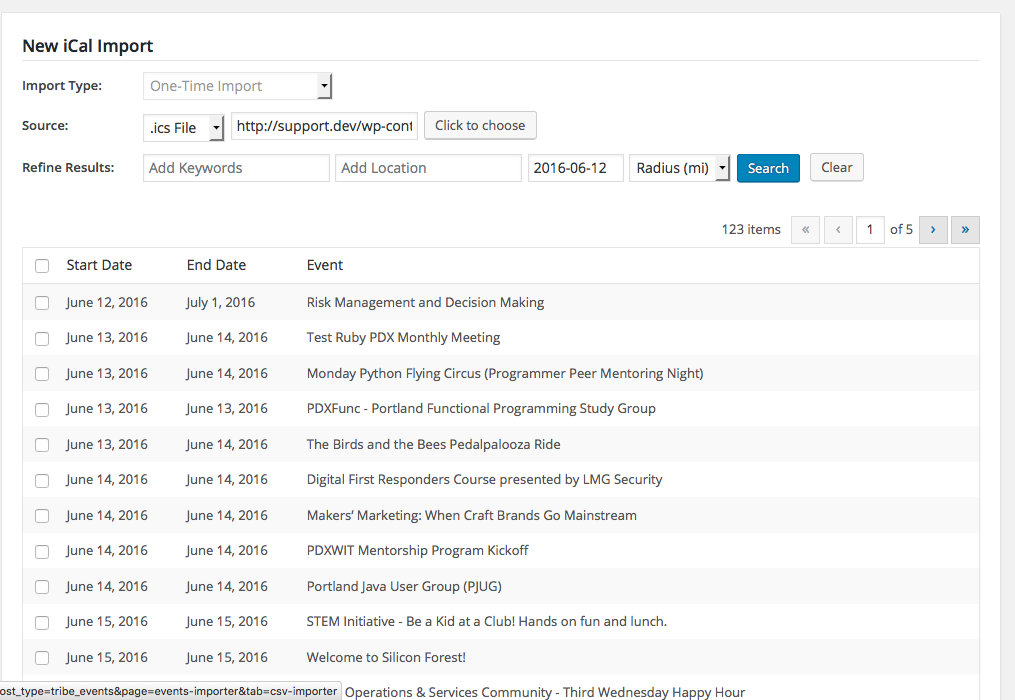
2. What do you find when you do a test import of the above test ics file? (Note: you don’t have to actually import the events once they’re listed there. Just load the file until the events are listed there, and let me know how many events are reported.)
Thank you!
GeorgeJune 11, 2016 at 6:03 pm in reply to: Add add_filter to organizer and venues for importing custom data. #1125756ParticipantHey @Geir,
Thanks for your patience with the addition of this new filter!
I wanted to let you know that we just published our 4.2 release earlier this week; included in those is a new filter in this file inside The Events Calendar:
src/Tribe/Importer/File_Importer_Organizers.php
☝️ In that file you’ll find a new filter, tribe_events_csv_import_organizer_fields. This lets you accomplish the goals you describe in this thread.
I hope this helps and is good news—cheers!
George
June 10, 2016 at 2:49 pm in reply to: Internal Server Error when checking out using Ticket+ #1125415ParticipantHey @Freddy,
Thanks for reaching out!
You mention “Ticket+”, but in your site’s “System Information”, I do not see “event tickets” or “event tickets plus” listed as active plugins.
Are you using these plugins to provide the ticketing functionality? If not, then how are you providing ticketing functionality on your site?
Thank you,
GeorgeParticipantHey @Tom,
Sorry to hear this!
First, ensure that these plugins are not only installed, but activated:
• WooCommerce
• The Events Calendar
• Event Tickets
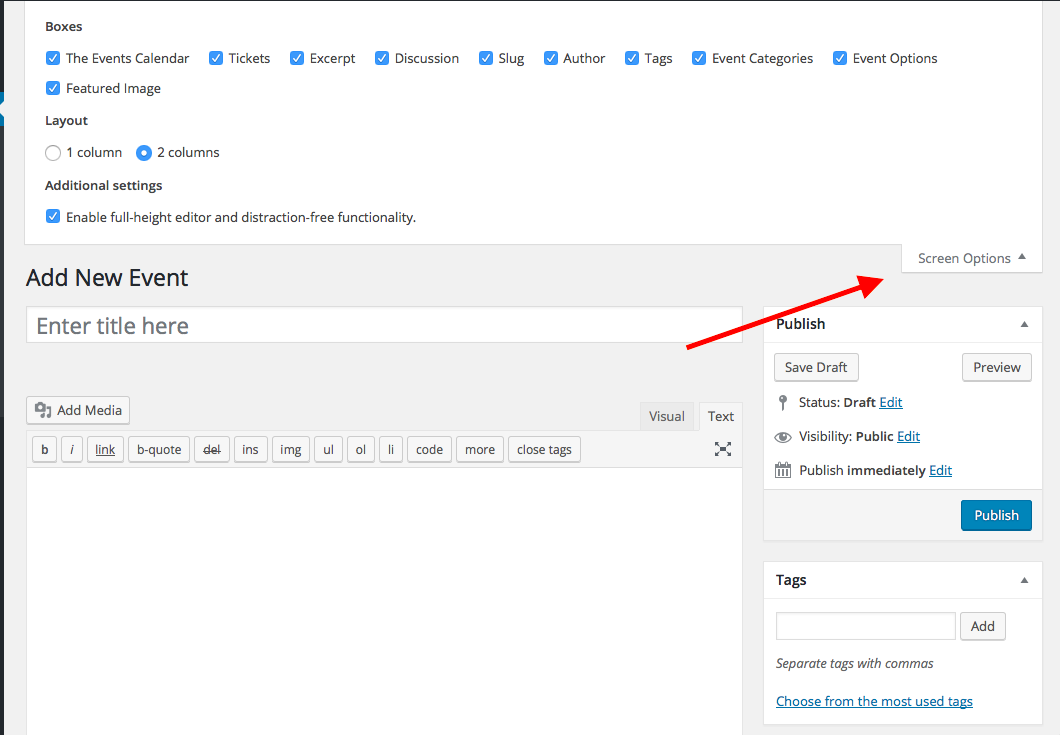
• Event Tickets PlusNext, make a new test event in your site’s wp-admin. While in the admin screen, look for the “Screen Options” tab in the top-right corner of the screen. Click this tab.
This should open a “drawer” of checkboxes:
1. Do you see a checkbox called “Tickets”?2. Here is a screenshot of my drawer: https://cldup.com/9YMnv1jytj.png. Please take a screenshot of your open drawer and post that here, too (you can share a screenshot right on the thread uploader, or if that doesn’t work, you can do so by uploading the screenshot to Imgur.com, Flickr.com, CloudUp.com, or any similar image-hosting site; then just share the links to those images here and I’ll take a look.)
If you see the Tickets checkbox, make sure it is checked. Does this help at all?
Let me know what you find!
GeorgeJune 10, 2016 at 2:43 pm in reply to: New update comes with needless title that actually covers a navigation feature. #1125411ParticipantHey @Ruud,
That text is “screen reader text,” so while I’m not sure why it is showing now when it wasn’t before, I would recommend adding this CSS to the bottom of your theme’s style.css file to hide that text:
.screen-reader-text {

    clip: rect(1px, 1px, 1px, 1px) !important;

    position: absolute !important;

    height: 1px !important;

    width: 1px !important;

    overflow: hidden !important;

}
I hope this helps!
GeorgeParticipantHey Rhonda,
Our plugins do not offer a CSV export tool—only import tools.
For your purposes, I would personally recommend using the built-in WordPress XML export and import tools.
You can learn more about how to use these for migrating events in this knowledgebase article ? https://theeventscalendar.com/knowledgebase/using-wordpress-export-tools-to-migrate-events-content/
Cheers!
GeorgeParticipantSorry to hear this, David!
Just to be clear, you mean that this happens when you try downloading the Attendees List for a ticketed event, right?
1. How many attendees, roughly, are on the list?
2. Does this happen only on some attendees lists? Or does it happen on every attendees list you try?
3. Can you post your site’s system information to this thread? Here’s how ? https://theeventscalendar.com/knowledgebase/sharing-sys-info/
Thank you!
GeorgeParticipantHey Emil,
Thanks for reaching out.
When you say “booking”, can you clarify what you mean? Do you mean just the purchasing of event tickets, for example? Or RSVPs only? Or both?
Next, we unfortunately do not have any duplication-prevention controls at this time.
However, as of version 4.2 you can head to Events > Settings > Tickets in your wp-admin, and choose options to limit the ability to buy tickets or make RSVPs to ONLY logged-in users on your site.
This means that users must have an account on your website that they have to log into before buying tickets, or making RSVPs. While this does not prevent duplication, it does create a bit of a “profile” and “ticket purchase history” for users.
☝️ Not quite what you’re looking for, but I figured it might be helpful!
You can learn more about login requirements here ? https://theeventscalendar.com/knowledgebase/configuring-event-tickets/#login
Cheers,
GeorgeParticipantHey @danfeeley,
I tested this and was also not able to edit fields; this worked while writing tutorials about the features, but now does not, so perhaps we’ve let a major bug slip through in packaging or something!
So sorry for the trouble—it’s late on a Friday, but I am pinging our developers and have made a priority-1 bug ticket for this so we can figure out what’s going on.
Sincerely,
GeorgeJune 10, 2016 at 2:07 pm in reply to: text doesn't wrap around photos in the Events Calendar #1125390ParticipantHey Richard!
Can you share a link to some events on your site where the text isn’t wrapping around the photos? This may be happening due to theme CSS; with some links to actual events on your site where this is happening, I will take a closer look and recommend a solution.
Cheers,
GeorgeParticipantHey Mike,
Thanks for reaching out.
When you say, “the iCal URL,” can you specify which iCal URL? What site are you trying to import events from?
Thanks!
GeorgeJune 10, 2016 at 2:01 pm in reply to: https://tiga.org/events/the-tiga-games-industry-awards-2016 #1125386ParticipantHey Richard,
We unfortunately cannot log into customer sites for any reason. 🙁
Please don’t post any login credentials to this site (or anywhere online, really).
Are the steps Geoff posted the same steps you’ve been following when testing? We just want to confirm we’re both looking at the same thing since we’ve been unable to recreate the issue ourselves.
Thank you!
George -
AuthorPosts