

Forum Replies Created
-
AuthorPosts
-
George
ParticipantI’m sorry to hear this, @John!
The link works fine for me, so to help investigate what might be happening, can you share a link to your site’s event page and then also share your site’s “System Information”? Here’s how to do that ? https://theeventscalendar.com/knowledgebase/sharing-sys-info/
Thank you!
GeorgeParticipantHey Russell,
Thanks for reaching out!
Something like this should indeed be possible, especially because as of version 4.2 of Event Tickets Plus you can require users to be logged-in to be able to buy tickets or make RSVPs (which you can learn more about by reading the “Login Requirements” section of this knowledgebase article → https://theeventscalendar.com/knowledgebase/configuring-event-tickets/#login).
A full run-down of the required plugins would look something like this:
• WooCommerce [free]
• The Events Calendar [free]
• Event Tickets [free]
• Event Tickets Plus [premium]
• A membership plugin like Memberpress or Restrict Content Pro, etc. [free–premium]I hope this information helps!
George
ParticipantThere is a lot of information here, Mathias! If you have specific follow-up replies to make, please be sure to refer to the question you are referring to by its number. So, for example, if you have something related to Question 2, please make it clear that you are referring to Question 2 just to make it easier to keep track of things.
Thanks!
GeorgeParticipant3.) Is it possible to have the “event” of the specific day in a pop-up or such? (Either by custom coding or anything else) ?
☝️ I am not quite sure what you mean here; if you mean a pop-up window in any sort of way that is not currently present on the site, then unfortunately yes it would require custom coding. We are not able to help with custom coding, but we have a list of great developers here → http://m.tri.be/18k1 (and we have no affiliation with any of these folks–they’re simply some well-respected names in the community that we’ve compiled).
4.) On the event page itself i want to add a full-size banner, which goes outside the normal tribe-event wrapper. I then added it to the default template, but it shows both on the event + events pages. Any idea how to solve that one?
☝️ Can you add the banner back onto your site, and then share links to BOTH “the event + events pages”? I will take a look at both and recommend a solution to hide the CSS.
5.) Possible to be using multiple calendars around the site, and thereby also another styling, and then exclude/include several categories?
☝️ This is unfortunately not possible. 🙁 I’m sorry to disappoint!
6.) It seems like i need to use the “Previous/Next” events on the list-view. Maximum events on a page + maybe a pagination solution or even better infinity scroll?
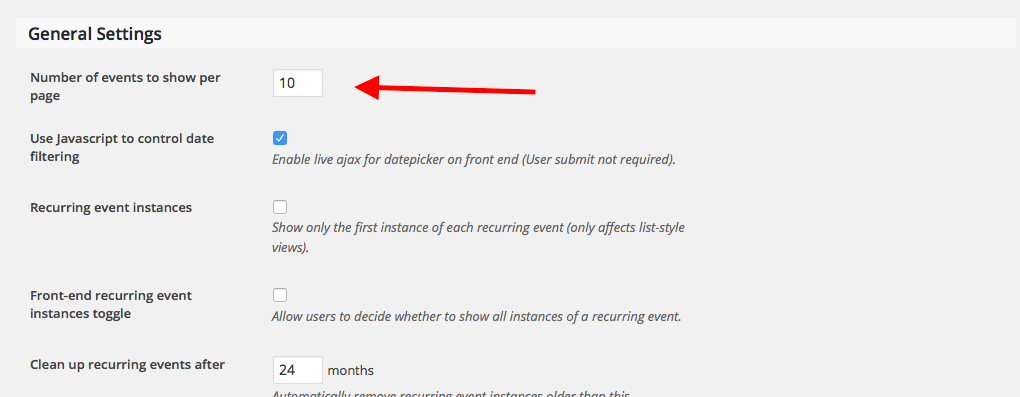
☝️ If you want to increase the number of events per-page, then head to Events → Settings in your wp-admin. In the “general” tab, adjust the option called “Number of events to show per page”, as shown in this screenshot:
 Participant
2.) On the frontpage of http://sidefabrikken.dk/ledelsesredskaber/ ,you’ll see the calendar and a pretty nice design. The problem is, i want to figure, why it’s not showing the 3 next events all the time. Try skipping the months, it should still tell you the 3 next events, until you click a certain date?
:point_up: I took a look at your site and found that this calendar widget works as expected.
First, please look at these three screenshots of the widget calendar:
• June 2016: https://cloudup.com/c9ou2-n77FM
• July 2016: https://cloudup.com/coGIo2Bt4wd
• August 2016: https://cloudup.com/cPFTzyBdaygNow, let’s look at your actual calendar here: http://sidefabrikken.dk/ledelsesredskaber/begivenheder/
Please look at this screenshot of your calendar:
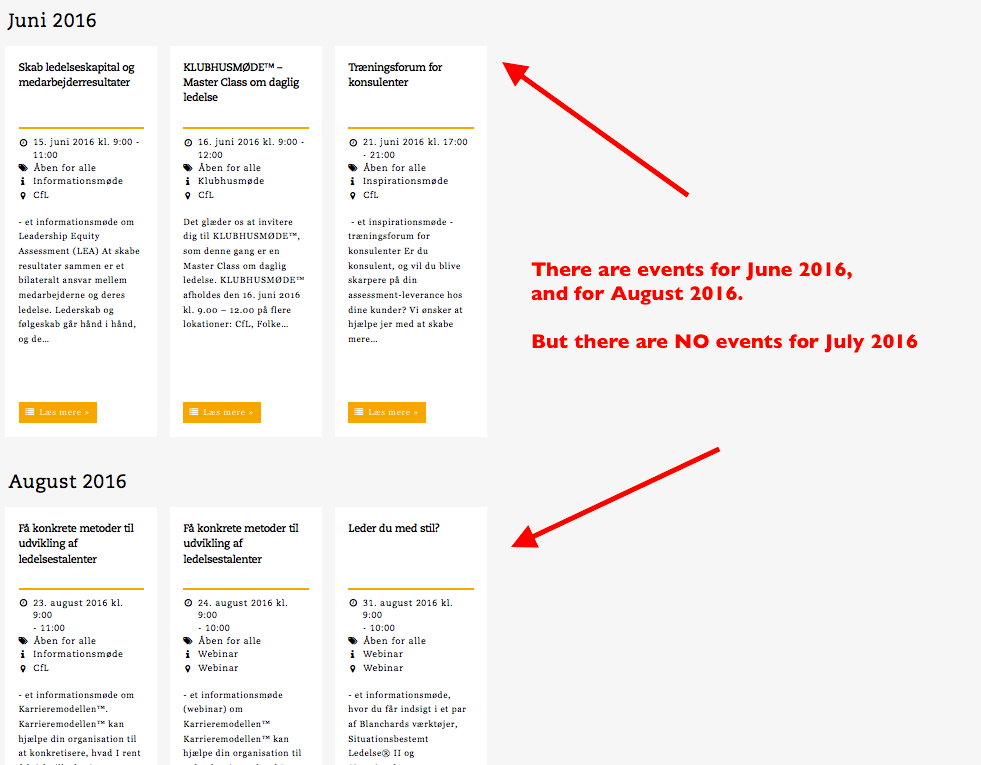
As seen in that screenshots, there are no events for July 2016.
So lets look at the widget for July 2016:
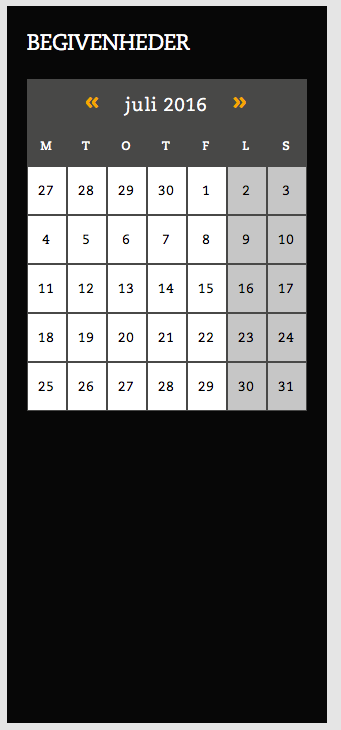
☝️ There are no events for July 2016, so no event show in the widget calendar when you move to July 2016. This is the default and correct behavior of the plugin, and unfortunately cannot be changed without extensive code customization. 🙁
Participant1.) In the venue meta field, you will see date and time seperated by itself. Is it possible to have the same structure all over the site? I mean, date and time in 2 seperate divs etc.?
Can you please share a screenshot of the “venue meta field”? I am sorry for my misunderstanding; I just do not quite understand what you mean here.
ParticipantHey Mathias,
Thanks for reaching out. There are number of questions here, so I will address them one by one.
For starters, though, can you please read this page and confirm that you’ve done so? ? https://theeventscalendar.com/knowledgebase/what-support-is-provided-for-license-holders/
☝️ I only mention this page because it covers our support policy. We unfortunately cannot help with any code customizations, which may be necessary to achieve some of the things you ask about here.
I am happy to help regardless, and will do so! But I just wanted to set your expectations early.
Sincerely,
GeorgeParticipantHey @Seth,
Sorry to hear about this! To help investigate, can you share two more pieces of information?
1. Can you link to your site’s event page?
2. Can you post your site’s “System Information”? Here’s how to do that ? https://theeventscalendar.com/knowledgebase/sharing-sys-info/
With this information I’ll see if I can determine the exact cause of the failure of that CSS to load/take effect.
Thank you!
GeorgeParticipantHey Chris!
Renewals are 30% less than the first-time purchase. So an $89 license is $62 to renew, for example.
Let me know if there’s anything else I can try to help with!
Cheers,
GeorgeParticipantHey @Chris,
I was not able to recreate your exact issue, but did find several bugs with WooCommerce Tickets and the pricing system within it.
I have ticketed all of these bugs so that our developers can get to work on fixing those!
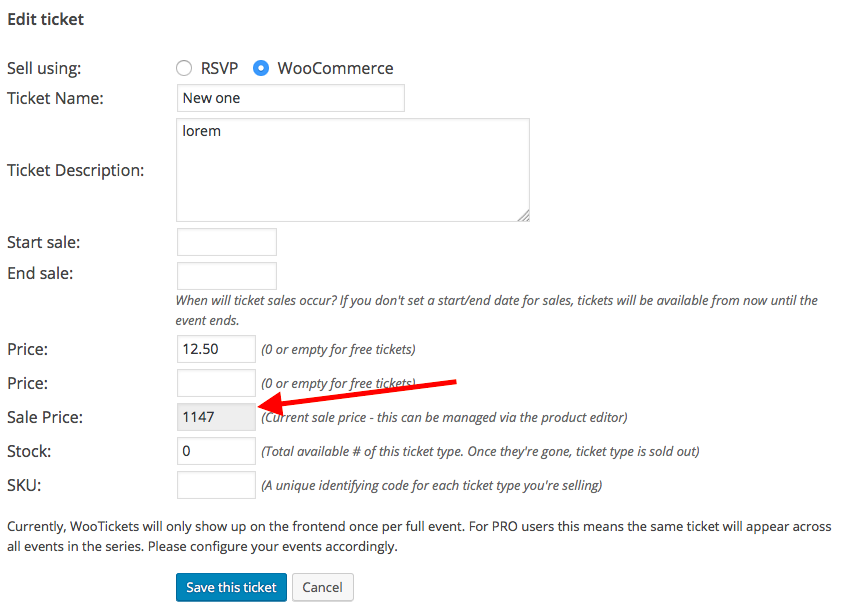
As for your specific issues, I’m wondering—on the event you linked me to, can you head into the “edit event” screen for that event; scroll down to the metabox where you can create and edit tickets; and then click “edit” for the ticket whose price £6.50?
When you do this, do you see a “Sale Price” value populated? If so, what is the value of this field? Here’s a screenshot of the specific field I am referring to:
Let me know what you find!
George
ParticipantYikes! Not sure why that happened; sorry for the trouble.
No worries, though. I will close this thread and move our conversation to that one.
Thank you!
GeorgeParticipantHi @Chris,
Are you referring to this thread? ? https://theeventscalendar.com/support/forums/topic/price-displaying-incorrectly/
Might I ask why you posted a new thread instead of just posting replies in that already-existing thread? No worries—I just want to say that you should only post replies on existing threads, as it enables faster support and makes it easier to keep track of things.
I will close that other thread of ours so that we can keep our conversation in this thread.
As for these issues, I notice you are using WooCommerce Tickets. This plugin is no longer active, and should be replaced with the combination of Event Tickets and Event Tickets Plus. (You can read more on doing this here ? https://theeventscalendar.com/knowledgebase/moving-to-event-tickets-plus/)
We do try to patch bugs and such with this plugin until the last valid license key for it expires—but if there is a bug here and we set out to patch it, it could take several weeks for the fix to arrive. So I highly recommend updating to Event Tickets and Event Tickets Plus (which is free; you should have a license and download files for Event Tickets Plus already in your account here on http://theeventscalendar.com) and then seeing if the issue persists.
I will investigate this issue with WooCommerce Tickets to see if I can recreate the bug. Stay tuned!
— George
ParticipantHey @John,
We have a slightly different version of that snippet available, along with some clearer instructions, on this knowledgebase article ? https://theeventscalendar.com/knowledgebase/change-the-wording-of-any-bit-of-text-or-string/
I would recommend replacing the code you’ve tried thus far with the similar-looking, but different code in that knowledgebase article.
Let me know if it works any more effectively!
— George
June 12, 2016 at 9:50 am in reply to: Error message: The following plugins are out of date: Events Calendar PRO 4.1.3. #1125850ParticipantHey @Samuel,
Thanks for reaching out. The current versions of Events Calendar Pro and The Events Calendar are version 4.2, so version 4.1.3 (or any 4.1.x version) is out of date at this time.
If you update to version 4.2 of The Events Calendar and Events Calendar Pro, does that make the notice go away?
You can get the files for the latest version of your plugins any time at http://theeventscalendar.com/my-account/downloads
I hope this information helps!
GeorgeParticipantHey @Jonathan,
Thanks for reaching out. In regards to the issue with the HTML being stripped out of events:
1. Can you share a link to your main events page?
2. Can you post your site’s “System Information”? Here’s how ? https://theeventscalendar.com/knowledgebase/sharing-sys-info/
Next, in regards to your Maps-related question, can you clarify what your goal is? Are you using the Map View as your main Events view, and are trying to be able to recreate this Map View in other locations on your site?
In the meantime, please do not that we cannot help with any custom coding or development assistance. Please read this page here ? https://theeventscalendar.com/knowledgebase/what-support-is-provided-for-license-holders/
I’m still happy to help! 😀 Just wanted to set your expectations early about that stuff. Let me know more details and we can go from there.
Cheers,
George -
AuthorPosts